A New Chapter for MagicMirror: The Community Takes the Lead
Read the statement by Michael Teeuw here.
  • MMM-DumpsterDay

    83
    2 Votes
    83 Posts
    56k Views
    D
    @BD0G awesome mate! So glad the module is used :)
  • Capital letter of weekdays and symbol in front of specific calendar

    1
    0 Votes
    1 Posts
    1k Views
    L
    Re: MMM-CalendarExt3 Can anyone help me with theese issues. This is probably easy coding, but for a newbie as me, I need som help. I want the first letter in the weekdays to be capital. How to do that? I want to display a symbol in front of a specific calendar events. I have one calendar for all the birthdays during a year, and I want for example a cake as a symbol in front of all the events from this specific calendar. All the other calendars should be without a symbol.
  • MMM-Domoticz-ext: interact with Domoticz

    121
    6
    1 Votes
    121 Posts
    98k Views
    G
    @ArturB I’m the developer of the module. This is not possible at the moment. Since I don’t own a magic mirror anymore I kind of stopped the development of this module. Feel free to clone it and make your own modifications to the code.
  • Replacement for MMM button due to Node-Abi error.

    5
    0 Votes
    5 Posts
    733 Views
    R
    @sdetweil Ups, sorry for the mistake! sdetweil instead of jopyth :-) And … Great work. Thank you. pi@InfoTerminal:~/MagicMirror/modules $ git clone https://github.com/sdetweil/MMM-Buttons.git Klone nach ‘MMM-Buttons’ … remote: Enumerating objects: 56, done. remote: Counting objects: 100% (4/4), done. remote: Compressing objects: 100% (4/4), done. remote: Total 56 (delta 0), reused 2 (delta 0), pack-reused 52 Entpacke Objekte: 100% (56/56), Fertig. pi@InfoTerminal:~/MagicMirror/modules $ cd MMM-Buttons/ pi@InfoTerminal:~/MagicMirror/modules/MMM-Buttons $ npm install Magic-Mirror-Module-Buttons@1.0.0 postinstall ./postinstall /home/pi/MagicMirror/modules/MMM-Buttons ⠴ Building module: epoll, Completed: 0make: Verzeichnis „/home/pi/MagicMirror/modules/MMM-Buttons/node_modules/epoll/build“ wird betreten CXX(target) Release/obj.target/epoll/src/epoll.o ⠋ Building module: epoll, Completed: 0 SOLINK_MODULE(target) Release/obj.target/epoll.node ⠼ Building module: epoll, Completed: 0 COPY Release/epoll.node make: Verzeichnis „/home/pi/MagicMirror/modules/MMM-Buttons/node_modules/epoll/build“ wird verlassen ✔ Rebuild Complete added 6 packages, and audited 7 packages in 5m found 0 vulnerabilities pi@InfoTerminal:~/MagicMirror/modules/MMM-Buttons $
  • Grafana chart will not appear in MM

    8
    0 Votes
    8 Posts
    2k Views
    F
    Hey guys, I’m running into the same issue. But I have an error code: electron failed to load URL, and it is error ERR_BLOCKED_BY_RESPONSE. I get the same issue with an iframe module in MM2. I read, that electron would block unsafe sides and as the grafana I want to show is running on an external device I do not own and can’t configure, cause it is part of my solar panel, I can’t change anything about it. The side is registered as insecure in the browser. Any idea? I already tried to modify the electron.js with a phrase to allow unsafe URLs, but it didn’t work. Greetz
  • Calendar text alignment other than module alignment?

    1
    1 Votes
    1 Posts
    310 Views
    I
    Re: Calendar text alignment other than module alignment? This worked perfectly. Easiest of all the solutions!!!
  • 2 Votes
    1 Posts
    2k Views
    wishmaster270W
    Description: Ever wanted to run scripts periodically and provide their output as notifications? Want to run the scripts within different time periods? Then MMM-CommandToNotification is your module! You can define a base rhythm the module iterates all scripts. You can specify skips per script to run scripts only each (skips+1) iterations. You can send the output as payload of one or multiple notifications. You may want to use my MMM-ValuesByNotification to display the payload. Download: Download [card: Tom-Hirschberger/MMM-CommandToNotification] Version 0.0.8 added a script called venvWrapper.py which can be used to create a virtual Python environment, install the dependencies of Python scripts to it and call the scripts with the wrapper in the virtual environment the htu21 script now uses the CircuitPython libraries of Adafruit now Version 0.0.7 scripts in the scripts directory now can be called without adding a additional ./ as prefix, now the module first checks if scripts do exist and if they are executable before trying to call them. If the file is missing or permissions are not set correctly the module prints a log message and skips the command now reduced the console output drastically. Use debug: true config option to re-enable the console output. Errors are printed to console without the debug flag as before Version 0.0.6 add a debug flag to configuration which enables/disables some console messages added a new dummy example script which simply outputs the content of a text file fixed all issues reported by the new automatic module scanning script developed by @KristjanESPERANTO Version 0.0.5 Fixed a bug which caused the module to not return output for any command if one of the scripts closes with no output Version 0.0.4 added sync option to make it possible to configure if the commands should be run one after another or if they should be started as fast as possible added delayNext option which makes it possible to wait a configurable amount of milliseconds before the next command is processed (i.e. if you want to make 10 API calls but the API only supports one connection each second) Version 0.0.3 fixed the additional parameters like “timeout” being ignored the scripts now will be called with working directory set to “scripts” directory added a new option to send the notifications with custom payloads instead of the output of the script Version 0.0.2 Added new “conditions” option which causes notifications only be send if the scripts exits with a specified return code and/or the output contains a specified string The flowercare-mm.bash script now returns a JSON instead of JSON5 object Added a script to watch files for changes Added more documentation of the scripts Version 0.0.1 Specify a period in which the module calls all scripts Configure scripts (with their arguments) to be called and the notifications which the outputs of the scripts should be send to Configure a skip count per script if you do not want the script to be called each iteration Configure a timeout to stop the call of a script if it does not respond within a given time Scripts to query the temperature and humidity information of BME280, DHT11, DHT22, DS18B20 and HTU21 are included A script to query the temperature, moisture, light, conductivity and battery level of Miflora flowercare sensors is included Two scripts to generate either a single random integer or a JSON object which contains a integer and float value are included (for debugging purpose)
  • BME280 sensor with esp 8266

    6
    0 Votes
    6 Posts
    888 Views
    wishmaster270W
    Hi, i integrated some examples into my MMM-Temperature module (GitHub). There are serveral ones using an BME280 sensor connected to an ESP8266 or ESP32 sending the data either via plain TCP or MQTT.
  • MMM-xiaomi - Temperature and Humidity from your smarthome

    141
    2 Votes
    141 Posts
    214k Views
    E
    Hi guys, can anyone tell me if this module still works? If yes, which gateway should I purchase to make sure I can view sensor data with the MM? thanks
  • MMM-WeasleyClock - A Clock The Shows Location Not Time

    6
    3
    1 Votes
    6 Posts
    2k Views
    J
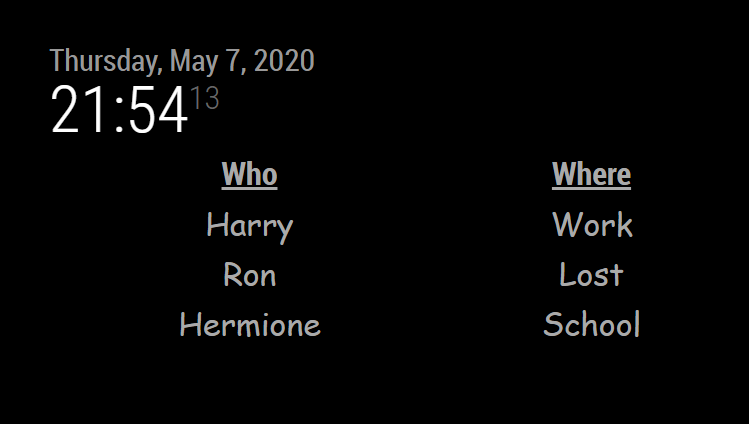
    Hey Brian - just to say, absolutely love this and have this running. Fantastic work. Can’t wait for the update on the hands and clock face.
  • Missing days when in portrait orientation CalendarExt3

    6
    0 Votes
    6 Posts
    3k Views
    M
    @fguido And I need more detail info about ‘rotating’ with custom css meaning. Because this module would use ‘vw’ things, so with ‘transform 2D’ to rotate, this will make an issue. Simply you can assign physical real metrics (00px) instead of relative/dynamic metrics(vw, % ) by your manual calculations. Or considering transformed result, adjust values to fit with it.
  • Does not work

    5
    0 Votes
    5 Posts
    840 Views
    V
    @sdetweil I did the same procedure again, now it works!! Thanks a lot!!!
  • Change color and font

    2
    0 Votes
    2 Posts
    585 Views
    BKeyportB
    @bill63 @FlatPepsi is the person to talk to on that… however, look into MMM-WeatherGraph.css for what can be changed easily (DO NOT EDIT THIS FILE) - then make the changes in custom.css If the two files should be: MagicMirror/modules/MMM-WeatherGraph/MMM-WeatherGraph.css and MagicMirror/css/custom.css In a default pi install, that would be a directory located in your home folder.
  • Changing the colour of the temperature bars

    2
    0 Votes
    2 Posts
    455 Views
    FlatPepsiF
    @Bobrae Not currently - I’ll have to look into that.
  • MMM-Loxone

    loxone smart home
    94
    0 Votes
    94 Posts
    92k Views
    B
    @sdetweil thanks, i will do so!
  • MMM-PlaceInfo: display information about the world

    weather currency time
    8
    3 Votes
    8 Posts
    4k Views
    R
    @sdetweil I will, thank you!
  • 1 Votes
    4 Posts
    1k Views
    S
    @droomoo I would submit an issue on the module GitHub page, to engage the author
  • Electricity Bill Module Development

    19
    3
    0 Votes
    19 Posts
    5k Views
    mumblebajM
    @sdetweil Ah, hopefully he caught that and changes it.
  • Stoped working

    2
    0 Votes
    2 Posts
    548 Views
    D
    check this: https://forum.magicmirror.builders/topic/12507/mmm-jast-just-another-stock-ticker-new-version-2-x/119
  • MMM-Remote-Control

    7
    0 Votes
    7 Posts
    1k Views
    N6NGN
    @sdetweil Arrrgh… that was it… thanks again Sam… One more time… Dennis