A New Chapter for MagicMirror: The Community Takes the Lead
Read the statement by Michael Teeuw here.
  • MMM-MyCommute not updating transit times

    Unsolved transport troubleshoot mycommute
    1
    0 Votes
    1 Posts
    733 Views
    thedoorsfanaticT
    Hi community, I am a total newbie and really like the idea and look oft the MMM-MyCommute module. Unfortunately my transit time does not change (or at least only every hour or so) although my poll frequency is 2 minutes. There is some kind of delay. Is there a solution or a different module I could use? Thanks! { module: "MMM-MyCommute", position: "top_right", header: "Google Maps Routen", config: { apikey: "xxxxx", classes: "default everyone", origin: "xxx 12, 80637 Munich", startTime: "06:30", endTime: "22:30", //hideDays: [], pollFrequency: 120000, nextTransitVehicleDepartureFormat: "[Abfahrt um] HH:MM [Uhr]", destinations: [ { destination: "xxxx-Strasse 26,80807 Munich", label: "xxx", startTime: "06:30", endTime: "08:00", hideDays: [0,6], }, { destination: "xxxx-Strasse 26,80807 Munich", label: "xxx", mode: "transit", startTime: "06:30", endTime: "08:00", hideDays: [0,6], showNextVehicleDeparture: "true", }, { destination: "xxxstrasse 38,80636 Munich", label: "xxx", mode: "transit", startTime: "17:30", endTime: "18:30", hideDays: [0,1,2,4,5,6], showNextVehicleDeparture: "true", }, ] } },

  • MMM-Assistant // MMM-Hotword

    Unsolved
    3
    0 Votes
    3 Posts
    1k Views
    G
    @Sean Im not getting a device registration on google actions? how do i make MMM-Hotword call MMM-GAction? or do i just let it call MMM-Assistant stil
  • MagicMirror Module not opening

    Unsolved
    1
    1
    0 Votes
    1 Posts
    406 Views
    Y
    [image: 1552377987279-rp.jpg]
  • 0 Votes
    15 Posts
    7k Views
    REBR
    @sdetweil I’ll send the url over. Thank you for your assistance with this.
  • Email module Error

    Unsolved
    1
    0 Votes
    1 Posts
    521 Views
    S
    hi, i successfully installed and configure the email module both in config.js & email.js but still not showing new mails in magicmirror screen plz help me out
  • MMM-Wunderlist

    2
    0 Votes
    2 Posts
    2k Views
    O
    Two things from your config: You’ve written “accessTOKEN:” instead of “accessToken:” And you have a comma after “clientID:‘2cxxxxxxxxxxxx49’,” This is the last line in this bracket and therefore shouldn’t have a comma.
  • MMM-PIR-Sensor black screen

    Solved
    6
    0 Votes
    6 Posts
    3k Views
    wishmaster270W
    @Stef Hi, yesterday i added two Modules to the Showcase Area. On that monitors GPIO Pins and one which controls the Monitor. My usecase is exactly like yours. I use an PIR sensor to detect user presence and want the screen to be turned off after a configurable timeout. If you want to try them: MMM-Screen-Powersave-Notification and MMM-GPIO-Notifications
  • Help with google assistant features using mmm-assistantmk2

    Unsolved
    2
    0 Votes
    2 Posts
    1k Views
    S
    I’m trying to get this working as well, not with Scenes but just with Routines in general. I have a couple of Routines setup in the Google Assistant app on my iPhone, but the MMM-AssistantMk2 module doesn’t recognize them. I realize it isn’t a full-featured Google Assistant but I was hoping Routines would be accessible. Anyone done it?
  • MMM-AssistantMk2 and auth_and_test.js

    Unsolved
    7
    0 Votes
    7 Posts
    3k Views
    S
    SUCCESS!!
  • MMM-EOL

    Unsolved
    15
    0 Votes
    15 Posts
    7k Views
    M
    @Mykle1 said in MMM-EOL: :thumbs_up_medium_skin_tone:
  • Noob needs advice - DarkSkyForecast

    Unsolved
    1
    2
    0 Votes
    1 Posts
    433 Views
    C
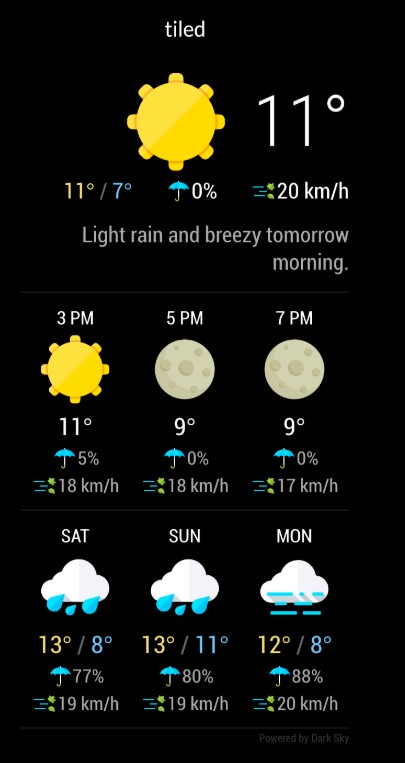
    Noob need some advise with size of the “tiled” view. Would like to have it in a compact way “top right”. I do not find any possibility to adjust the size. In the moment it looks like this: [image: 1551904887331-screenshot1.jpg] I would like to have smaller to get my worldclock below… like this: [image: 1551904923697-bild1.jpg] Any ideas? Thanks, Chris
  • MMM-GoogleBirthdaysProvider

    Unsolved calendar birthdays
    6
    0 Votes
    6 Posts
    2k Views
    M
    Hi Sam, So yea I can paste the URL into the browser and view my birthday calendar, however none of my birthdays are there even though I have contacts that have birthdays along with the test ones I added. So I’m thinking its nothing to do with MagicMirror and has to do with my google account. Suggestions on how to trouble shoot that? I checked in the google forums and have tried what other users suggested. Thanks MW
  • 0 Votes
    4 Posts
    2k Views
    M
    @kfyfeg Hi! I just fixed my problem as well! Thank you for your advice!
  • MMM-FUEL Icon Issue when Default Calendar is activated

    Unsolved
    3
    2
    0 Votes
    3 Posts
    1k Views
    I
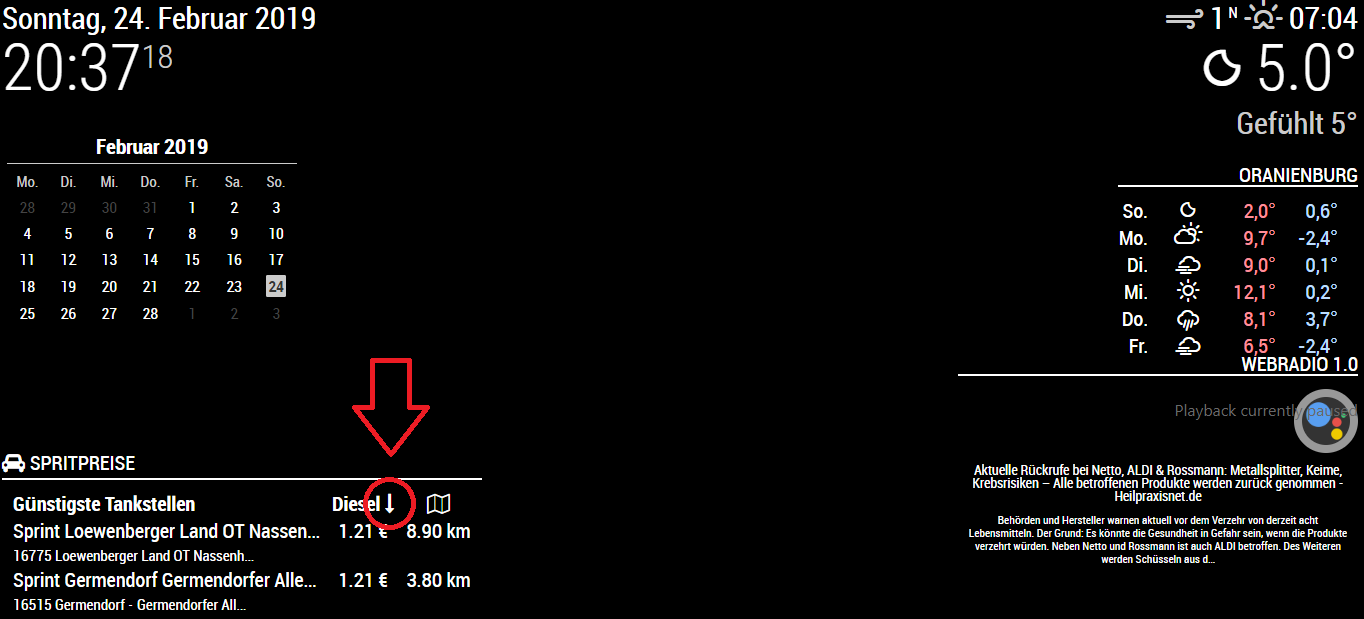
    Thanks Jeff i changed the Icon in the MMM-fuel.js [image: 1551822973128-mmmfuel.png]
  • MK2 Assistant with MMM-Hotword

    Unsolved
    4
    0 Votes
    4 Posts
    1k Views
    ?
    @braunprinz You can change it in google assistant app on your phone.
  • issue with installing MMM-awesome-alexa

    Unsolved
    15
    0 Votes
    15 Posts
    6k Views
    J
    @sdetweil that’s alright, I decided to go with Google Assistant, thanks for your help! I do still need some help with getting that to work though, as I stated in my other post! Thanks!
  • Missing Config.js entry and options

    Unsolved
    3
    0 Votes
    3 Posts
    1k Views
    L
    Works fine now. thanks, really appreciate it. If it’s not an exact copy and paste, it’s a challenge for me. But getting there. Now it a question of playing around trying to get mmm-recipe to show correctly on the bottom_right tks again
  • V2.5.0 problem.

    Unsolved
    7
    0 Votes
    7 Posts
    2k Views
    S
    @3zq3mh after you did the git pull, did u npm install again?
  • Can't get OAuth code from Google for MMM-Assistantmk2

    Unsolved
    1
    0 Votes
    1 Posts
    510 Views
    J
    Everything has gone fine up until I’ve tried to get the code from the OAuth redirect from putting node auth-and-test.js In the AssistantMk2 folder in terminal, and when I go to log in to my Google account, the little blue bar at the top of the little sign in window goes and nothing happens. I’ve tried rebooting, I’ve tried getting new credentials, I’ve tried clearing the cache of the browser (which isn’t chromium for some reason, just a random browser with a picture of a globe as the icon), and nothing works, just the same thing over and over again. Can’t seem to find another way to get the code either, so im stuck. All help is appreciated, just want to get this fixed. Thanks!
  • Error on Updating to v2.6.0

    4
    1 Votes
    4 Posts
    2k Views
    D
    thanks a lot :) working for me