A New Chapter for MagicMirror: The Community Takes the Lead
Read the statement by Michael Teeuw here.
  • MMM-CalendarEXT: Not Showing Latest Private Google Calendar Feed

    Unsolved
    12
    0 Votes
    12 Posts
    5k Views
    S
    u have to stop the MM instance before starting the debug instance… can’t run two at the same time
  • Config error

    Solved
    13
    0 Votes
    13 Posts
    4k Views
    S
    This site was helpful for me. As with everything MagicMirror everyone contributes to help everyone. Just erase the code on this page and copy and paste your code to see where your errors are. Works great for me. https://jshint.com/
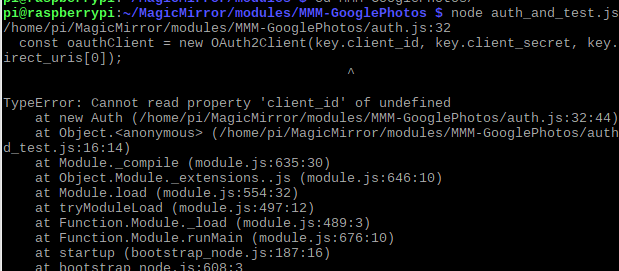
  • Problems with certificate with MMM- Google Photos

    15
    1
    0 Votes
    15 Posts
    6k Views
    W
    Thanks, That did the trick, I used laukit on the RPI3.
  • Uncaught TypeError: this.sendNotification is not a function at HTMLParagraphElement.

    Unsolved
    4
    0 Votes
    4 Posts
    2k Views
    ?
    Try this; notificationReceived: function(notification, payload, sender) { switch(notification) { case "DOM_OBJECTS_CREATED": var elem = document.getElementById("TEST") elem.addEventListener("click", () => { this.sendNotification('CHANGE_POSITIONS', ... ... }, Or, notificationReceived: function(notification, payload, sender) { switch(notification) { case "DOM_OBJECTS_CREATED": var elem = document.getElementById("TEST") var that = this elem.addEventListener("click", function() { that.sendNotification('CHANGE_POSITIONS', ... ... },

  • a question about MMM-Remote-Control

    Unsolved
    4
    0 Votes
    4 Posts
    2k Views
    S
    @robiv8 said in a question about MMM-Remote-Control: How I initialized? Short answer: If you restart the Mirror (from command line, computer, or remote), make sure you refresh the remote page after the Mirror loads, if you have the remote open on a different device. Long answer: For some functions to work properly, an instance of the MagicMirror page must be loaded first because the remote queries it for information and uses it to perform actions on other modules. The main page must be loaded before the remote page; or the remote page refreshed if the Mirror is restarted. This should usually be the case if you use the Mirror on a screen directly attached to the server (RPi). If you use a web browser on a different computer, open/refresh http://magicmirror:8080 first in another tab, before reloading http://magicmirror:8080/remote.html.
  • Default calendar and weather app not working on fresh install?

    Unsolved
    1
    0 Votes
    1 Posts
    540 Views
    A
    Hi, About 2 weeks ago I had to re-install with a fresh copy of Raspbian Stretch and noticed both the Calendar and weather wasn’t working. The default weather module displays nothing at all although its enabled and APIs are set and the calendar shows “No upcoming events…” no matter what URL or ical file I use. My calendars display fine on other apps/devices so it just seems like its not pulling the data or something although its there. @sdetweil and @Sean I’m not sure if you guys are the developers but I see you were in another post troubleshooting so if not, please forgive me!
  • Default Calendar not Displaying Holidays

    11
    0 Votes
    11 Posts
    6k Views
    swvalentiS
    @lavolp3 said in Default Calendar not Displaying Holidays: @swvalenti Sorry Iw as too fast and too occupied. It was in the github repository in the issues (and the ones already solved Using the default URL (“webcal://www.calendarlabs.com/templates/ical/US-Holidays.ics”) only gets you an ics for >2017-2018 holidays, so nothing shows now. You can verify this by downloading it and opening it in a calendar app. Trying using the new URL “https://www.calendarlabs.com/ical-calendar/ics/76/US_Holidays.ics” in your config file and >that should get your MagicMirror to show the holidays in 2019. @lavolp3 that worked…thank you for being patient and revisiting for me, that’s why I love this place!
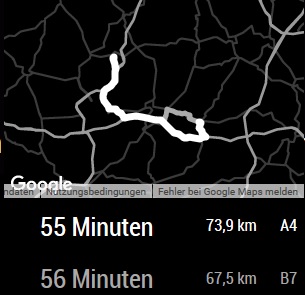
  • Google-route Citys disappear changing height/width

    Unsolved
    10
    1
    0 Votes
    10 Posts
    3k Views
    T
    Also with max-width and max-height the map doesnt get smaller, it just moves out of the Display.
  • MM Error - .AppleDouble and UnhandledPromiseRejectionWarning

    Unsolved
    34
    0 Votes
    34 Posts
    16k Views
    B
    @lavolp3 :-) Let’s see what will happen to mine then!! But to be honest, I’m also afraid that this is the kind of things which is never really “finished”… Who cares…As soon as we enjoy?? (the issue then becomes the quantity of unfinished things…)
  • MMM-voice + MMM-Podcast

    Unsolved
    4
    0 Votes
    4 Posts
    1k Views
    ArzegA
    @AxLed Thats good to know. I am gonna try it in the next days @sdetweil The problem is im not a JS Developer the only and first time with JS was the mirror. But im gonna try it in the next days with the new module from @AxLed Thanks for the fast answer ;) Hendrik
  • node serveronly

    Unsolved
    3
    0 Votes
    3 Posts
    2k Views
    R
    The config.js seems to be OK My MM works fine with pm2 start mm, I just wanted to test it in server mode. And that’s just what it looks like!
  • Need help with setting up Alexa

    Unsolved
    3
    0 Votes
    3 Posts
    975 Views
    cowboysdudeC
    Go to whoever the author of the module is and ask for help…it’s the quickest way ;)
  • MMM-Uber and MMM-Lyft

    Unsolved
    3
    0 Votes
    3 Posts
    1k Views
    A
    Ah I will do that! I appreciate the help!
  • MMM-NewsFeedTicker Make Banner and Scrolling Text Smaller

    Solved
    25
    1 Votes
    25 Posts
    12k Views
    D
    @justjim1220 @cowboysdude Thanks for the info. This has been an awesome project. You guys have been more then helpful.
  • MMM-PIR-Sensor brightness

    Solved
    4
    0 Votes
    4 Posts
    2k Views
    QuesadaQ
    if I don’t have the sensor activated, the brightness goes perfectly. But if it is activated and I leave a few minutes without passing in front of it, when passing has a fairly low brightness, it takes a few long seconds to regain the brightness. In a beginning I opened this thread to know if the module towards something with the brightness etc. But it looks like it belongs to my (old) screen, I’ll try it on a newer screen. Thanks you
  • MMM-MQTT module multiple Sensors 433Mhz

    Unsolved
    2
    0 Votes
    2 Posts
    1k Views
    S
    Ok i think now that i need to filter the MQTT stream with node-red and generate separate topics for MM. Can i run MM and node_red together on Pi 3B+ . Has anyone done this already?
  • How to start MM with a module as default hidden

    Solved
    17
    0 Votes
    17 Posts
    9k Views
    Mykle1M
    @justjim1220 Thanks, I do appreciate your kind words. However, as @THeStigh mentioned, @Sean uses a cleaner (re: better) way of doing things. This better way of doing things just might inspire me to redo Lucy. :-)
  • Calender only Loading!

    Moved
    21
    0 Votes
    21 Posts
    13k Views
    F
    @sdetweil Yes!
  • MMM-AssistantMk2 stop responding after a few hours

    Solved
    2
    0 Votes
    2 Posts
    889 Views
    L
    I changed the Powersave settings from the Wlan module to OFF and the Assistant still works after 8h Solved
  • MMM-FRITZ-Box-Callmonitor throws an error after enabling phonebook sync

    Unsolved
    4
    1
    0 Votes
    4 Posts
    3k Views
    S
    @sandy2503 said in MMM-FRITZ-Box-Callmonitor throws an error after enabling phonebook sync: ted I carefully made this corrections you suggested but now got more errors. Whoops! There was an uncaught exception... SyntaxError: Unexpected token F in JSON at position 2 at JSON.parse (<anonymous>) at PythonShell.asJson (/home/pi/MagicMirror/modules/MMM-FRITZ-Box-Callmonitor/node_modules/python-shell/index.js:358:21) at /home/pi/MagicMirror/modules/MMM-FRITZ-Box-Callmonitor/node_modules/python-shell/index.js:310:42 at Array.forEach (<anonymous>) at PythonShell.recieveInternal (/home/pi/MagicMirror/modules/MMM-FRITZ-Box-Callmonitor/node_modules/python-shell/index.js:306:15) at PythonShell.receiveStderr (/home/pi/MagicMirror/modules/MMM-FRITZ-Box-Callmonitor/node_modules/python-shell/index.js:290:21) at Socket.<anonymous> (/home/pi/MagicMirror/modules/MMM-FRITZ-Box-Callmonitor/node_modules/python-shell/index.js:108:18) at emitOne (events.js:116:13) at Socket.emit (events.js:211:7) at addChunk (_stream_readable.js:263:12) MagicMirror will not quit, but it might be a good idea to check why this happened. Maybe no internet connection? If you think this really is an issue, please open an issue on GitHub: https://github.com/MichMich/MagicMirror/issues Whoops! There was an uncaught exception... TypeError: Cannot read property 'indexOf' of undefined at PythonShell._endCallback (/home/pi/MagicMirror/modules/MMM-FRITZ-Box-Callmonitor/node_helper.js:233:25) at terminateIfNeeded (/home/pi/MagicMirror/modules/MMM-FRITZ-Box-Callmonitor/node_modules/python-shell/index.js:148:39) at ChildProcess.<anonymous> (/home/pi/MagicMirror/modules/MMM-FRITZ-Box-Callmonitor/node_modules/python-shell/index.js:121:13) at emitTwo (events.js:126:13) at ChildProcess.emit (events.js:214:7) at Process.ChildProcess._handle.onexit (internal/child_process.js:198:12) MagicMirror will not quit, but it might be a good idea to check why this happened. Maybe no internet connection? If you think this really is an issue, please open an issue on GitHub: https://github.com/MichMich/MagicMirror/issues git show Joseph Bethge 30.oct.2016