@kool said
Bumping this back up. Pleeeease help
Dear @kool ,
if you are using url as suggested by Sam ( @sdetweil ), you are nearly done.
As far as I can see from my rookie perspective you do have some redundancies in your config.js (e.g. the unit section: units, tempUnits, windUnits) ) but this shouldn’t disturb.
As far as I understood you can delete these icontables because you do not use the icon-font but try to use some images from sigle file-URLs instead - so you can delete the whole section iconTable {} with all entries.
In addition you have to adapt (see above, Sam’s tip) the URL of all you images in your custom.css file.
(pls. double check, if the files are really in these locations)
You wrote in your current css
.weatherforecast .wi-day-sunny {
content: url("/home/kool/MagicMirror/css/icons/6fas/day.svg") !important;
}
IF your weather-icon files are really in this directory (/home/kool/MagicMirror/css/icons/6fas/) than your css should be as follows:
.weatherforecast .wi-day-sunny {
content: url("/css/icons/6fas/day.svg");
You do not need the !important flag (in my case)
second wrong thing besides the URL is your qualifier.
you are using
.weatherforecast .wi-something ....
This cannot be recognized because .weatherforecast is not defined.
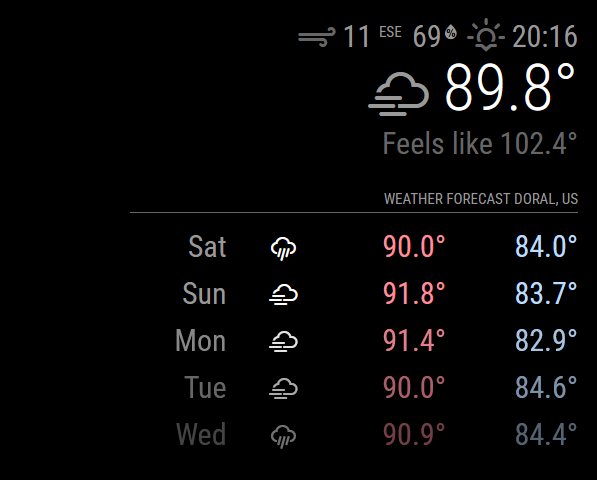
At first you have to decide if you want to have different icons for the current weather and for the weather forecast.
(In my case this is true).
IF you would like to have this you have to differentiate the two instances of the weather-module by a “classes” definition.
For example your first instance of the weather module (current weather) than should be
module: "weather",
position: "top_right", // Adjust position as needed
classes: "weather_current",
config: {
weatherProvider: "openmeteo", // Specify the Open-Meteo provider
apiBase: "https://api.open-meteo.com/v1", // REQUIRED: Base URL for Open-Meteo
lat: xxxx, // REQUIRED: Latitude of the location
lon: xxxx, // REQUIRED: Longitude of the location
maxNumberOfDays: 8, // OPTIONAL: Number of forecast days (default is 5)
pastDays: 0, // OPTIONAL: Number of past days of data to include (default is 0)
units: "imperial", // Set this to 'imperial' for Fahrenheit and miles per hour
tempUnits: "imperial", // Make sure to match with 'imperial'
windUnits: "imperial",
type: "current", // OPTIONAL: Change to "current" if only current weather data is desired
}
},
(pay attention for the third line: classes: “weather_current”, )
THIS is your qualifier if you are about to diffrentiate between current weather and weather forecast image-wise.
(“weather_current” is just an example! you can name it like you want every name is suitable and OK, only pay attention that all of these namings are strictly case sensitive, so Weather is NOT the same as weather"
Your correct line for custom.css than is:
.weather_current .wi-day-sunny {
content: url("/css/icons/6fas/day.svg");
and the same dance than for your second instance with DIFFERENT classes-clause in config.js
(e.g. a " classes: “weather_forecast”, " in the definition of the second weather instance ) results in a custom.css entry like this:
.weather_forecast .wi-day-sunny {
content: url("/css/icons/some_other_directory_with_smaller_icons/day.svg");
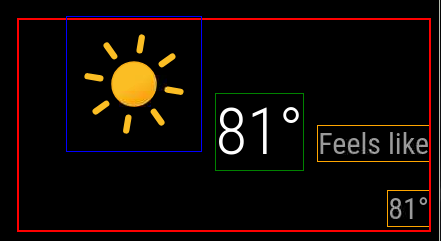
Because the “forecast instance” of the weather module is (in my case) organized as table I found it really useful to differentite these logos - big ones for current, smaller ones for the forecast:
[image: 1744630855324-screenfloat-bildschirmfoto-von-sublime-text-am-14_04_2025-13_38_51-14_04_2025-13-38-51.jpg]
If You do NOT like to differentiate the current and forecast instance you do NOT need the classes-phrase in config.js and your correct qualifier is the name of the module (so “weather” ) and your custom.css entry is like this:
.weather .wi-day-sunny {
content: url("/css/icons/6fas/day.svg");
And this than is valid for both instances.
Keep in mind that there are a LOT more weather conditions than the two times 5 conditions you have defined in your current custom.css!
my own definition for the current weather for your reference:
.weather_current .wi-fog {
content: url("/css/icons/current/wsymbol_0007_fog.png");
}
.weather_current .wi-cloudy {
content: url("/css/icons/current/wsymbol_0002_sunny_intervals.png");
}
.weather_current .wi-cloudy-windy {
content: url("/css/icons/current/wsymbol_0004_black_low_cloud.png");
}
.weather_current .wi-rain {
content: url("/css/icons/current/wsymbol_0018_cloudy_with_heavy_rain.png");
}
.weather_current .wi-showers {
content: url("/css/icons/current/wsymbol_0017_cloudy_with_light_rain.png");
}
.weather_current .wi-thunderstorm {
content: url("/css/icons/current/wsymbol_0024_thunderstorms.png");
}
.weather_current .wi-snow {
content: url("/css/icons/current/wsymbol_0019_cloudy_with_light_snow.png");
}
.weather_current .wi-snowflake-cold {
content: url("/css/icons/current/wsymbol_0020_cloudy_with_heavy_snow.png");
}
.weather_current .wi-na {
content: url("/css/icons/current/wsymbol_0999_unknown.png");
}
.weather_current .wi-day-sunny {
content: url("/css/icons/current/wsymbol_0001_sunny.png");
}
.weather_current .wi-day-cloudy {
content: url("/css/icons/current/wsymbol_0043_mostly_cloudy.png");
}
.weather_current .wi-day-cloudy-gusts {
content: url("/css/icons/current/wsymbol_0004_black_low_cloud.png");
}
.weather_current .wi-day-cloudy-windy {
content: url("/css/icons/current/wsymbol_0004_black_low_cloud.png");
}
.weather_current .wi-cloudy-windy {
content: url("/css/icons/current/wsymbol_0004_black_low_cloud.png");
}
.weather_current .wi-day-fog {
content: url("/css/icons/current/wsymbol_0007_fog.png");
}
.weather_current .wi-day-hail {
content: url("/css/icons/current/wsymbol_0015_heavy_hail_showers.png");
}
.weather_current .wi-day-haze {
content: url("/css/icons/current/wsymbol_0005_hazy_sun.png");
}
.weather_current .wi-day-lightning {
content: url("/css/icons/current/wsymbol_0016_thundery_showers.png");
}
.weather_current .wi-day-rain {
content: url("/css/icons/current/wsymbol_0085_extreme_rain_showers.png");
}
.weather_current .wi-day-rain-mix {
content: url("/css/icons/current/wsymbol_0009_light_rain_showers.png");
}
.weather_current .wi-day-rain-wind {
content: url("/css/icons/current/wsymbol_0010_heavy_rain_showers.png");
}
.weather_current .wi-day-showers {
content: url("/css/icons/current/wsymbol_0018_cloudy_with_heavy_rain.png");
}
.weather_current .wi-day-sleet {
content: url("/css/icons/current/wsymbol_0087_heavy_sleet_showers.png");
}
.weather_current .wi-day-sleet-storm {
content: url("/css/icons/current/wsymbol_0089_heavy_sleet.png");
}
.weather_current .wi-day-snow {
content: url("/css/icons/current/wsymbol_0011_light_snow_showers.png");
}
.weather_current .wi-day-snow-thunderstorm {
content: url("/css/icons/current/wsymbol_0057_thundery_snow_showers.png");
}
.weather_current .wi-day-snow-wind {
content: url("/css/icons/current/wsymbol_0053_blowing_snow.png");
}
.weather_current .wi-day-sprinkle {
content: url("/css/icons/current/wsymbol_0009_light_rain_showers.png");
}
.weather_current .wi-day-storm-showers {
content: url("/css/icons/current/wsymbol_0018_cloudy_with_heavy_rain.png");
}
.weather_current .wi-day-sunny-overcast {
content: url("/css/icons/current/wsymbol_0002_sunny_intervals.png");
}
.weather_current .wi-day-thunderstorm {
content: url("/css/icons/current/wsymbol_0024_thunderstorms.png");
}
.weather_current .wi-day-windy {
content: url("/css/icons/current/wsymbol_0060_windy.png");
}
.weather_current .wi-solar-eclipse {
content: url("/css/icons/current/wsymbol_0005_hazy_sun.png");
}
.weather_current .wi-hot {
content: url("/css/icons/current/wsymbol_0045_hot.png");
}
.weather_current .wi-day-cloudy-high {
content: url("/css/icons/current/wsymbol_0006_mist.png");
}
.weather_current .wi-day-light-wind {
content: url("/css/icons/current/wsymbol_0060_windy.png");
}
.weather_current .wi-night-clear {
content: url("/css/icons/current/wsymbol_0008_clear_sky_night.png");
}
.weather_current .wi-night-alt-cloudy {
content: url("/css/icons/current/wsymbol_0041_partly_cloudy_night.png");
}
.weather_current .wi-night-alt-partly-cloudy {
content: url("/css/icons/current/wsymbol_0041_partly_cloudy_night.png");
}
.weather_current .wi-night-alt-cloudy-gusts {
content: url("/css/icons/current/wsymbol_0041_partly_cloudy_night.png");
}
.weather_current .wi-night-alt-cloudy-windy {
content: url("/css/icons/current/wsymbol_0041_partly_cloudy_night.png");
}
.weather_current .wi-night-alt-hail {
content: url("/css/icons/current/wsymbol_0031_heavy_hail_showers_night.png");
}
.weather_current .wi-night-alt-lightning {
content: url("/css/icons/current/wsymbol_0032_thundery_showers_night.png");
}
.weather_current .wi-night-alt-rain {
content: url("/css/icons/current/wsymbol_0025_light_rain_showers_night.png");
}
.weather_current .wi-night-alt-rain-mix {
content: url("/css/icons/current/wsymbol_0026_heavy_rain_showers_night.png");
}
.weather_current .wi-night-alt-rain-wind {
content: url("/css/icons/current/wsymbol_0026_heavy_rain_showers_night.png");
}
.weather_current .wi-night-alt-showers {
content: url("/css/icons/current/wsymbol_0025_light_rain_showers_night.png");
}
.weather_current .wi-night-alt-sleet {
content: url("/css/icons/current/wsymbol_0029_sleet_showers_night.png");
}
.weather_current .wi-night-alt-sleet-storm {
content: url("/css/icons/current/wsymbol_0029_sleet_showers_night.png");
}
.weather_current .wi-night-alt-snow {
content: url("/css/icons/current/wsymbol_0028_heavy_snow_showers_night.png");
}
.weather_current .wi-night-alt-snow-thunderstorm {
content: url("/css/icons/current/wsymbol_0075_thundery_snow_showers_night.png");
}
.weather_current .wi-night-alt-snow-wind {
content: url("/css/icons/current/wsymbol_0071_blowing_snow_night.png");
}
.weather_current .wi-night-alt-sprinkle {
content: url("/css/icons/current/wsymbol_0025_light_rain_showers_night.png");
}
.weather_current .wi-night-alt-storm-showers {
content: url("/css/icons/current/wsymbol_0026_heavy_rain_showers_night.png");
}
.weather_current .wi-night-alt-thunderstorm {
content: url("/css/icons/current/wsymbol_0032_thundery_showers_night.png");
}
.weather_current .wi-night-cloudy {
content: url("/css/icons/current/wsymbol_0041_partly_cloudy_night.png");
}
.weather_current .wi-night-cloudy-gusts {
content: url("/css/icons/current/wsymbol_0044_mostly_cloudy_night.png");
}
.weather_current .wi-night-cloudy-windy {
content: url("/css/icons/current/wsymbol_0044_mostly_cloudy_night.png");
}
.weather_current .wi-night-fog {
content: url("/css/icons/current/wsymbol_0064_fog_night.png");
}
.weather_current .wi-night-hail {
content: url("/css/icons/current/wsymbol_0039_cloudy_with_heavy_hail_night.png");
}
.weather_current .wi-night-lightning {
content: url("/css/icons/current/wsymbol_0032_thundery_showers_night.png");
}
.weather_current .wi-night-partly-cloudy {
content: url("/css/icons/current/wsymbol_0041_partly_cloudy_night.png");
}
.weather_current .wi-night-rain {
content: url("/css/icons/current/wsymbol_0025_light_rain_showers_night.png");
}
.weather_current .wi-night-rain-mix {
content: url("/css/icons/current/wsymbol_0026_heavy_rain_showers_night.png");
}
.weather_current .wi-night-rain-wind {
content: url("/css/icons/current/wsymbol_0025_light_rain_showers_night.png");
}
.weather_current .wi-night-showers {
content: url("/css/icons/current/wsymbol_0026_heavy_rain_showers_night.png");
}
.weather_current .wi-night-sleet {
content: url("/css/icons/current/wsymbol_0029_sleet_showers_night.png");
}
.weather_current .wi-night-sleet-storm {
content: url("/css/icons/current/wsymbol_0029_sleet_showers_night.png");
}
.weather_current .wi-night-snow {
content: url("/css/icons/current/wsymbol_0027_light_snow_showers_night.png");
}
.weather_current .wi-night-snow-thunderstorm {
content: url("/css/icons/current/wsymbol_0075_thundery_snow_showers_night.png");
}
.weather_current .wi-night-snow-wind {
content: url("/css/icons/current/wsymbol_0028_heavy_snow_showers_night.png");
}
.weather_current .wi-night-sprinkle {
content: url("/css/icons/current/wsymbol_0025_light_rain_showers_night.png");
}
.weather_current .wi-night-storm-showers {
content: url("/css/icons/current/wsymbol_0026_heavy_rain_showers_night.png");
}
.weather_current .wi-night-thunderstorm {
content: url("/css/icons/current/wsymbol_0032_thundery_showers_night.png");
}
HTH & good luck!
Ralf