MagicMirror Forum
    • Recent
    • Tags
    • Unsolved
    • Solved
    • MagicMirror² Repository
    • Documentation
    • 3rd-Party-Modules
    • Donate
    • Discord
    • Register
    • Login
    A New Chapter for MagicMirror: The Community Takes the Lead
    Read the statement by Michael Teeuw here.

    MagicMirror does not work at startup

    Scheduled Pinned Locked Moved Troubleshooting
    19 Posts 6 Posters 18.8k Views 5 Watching
    Loading More Posts
    • Oldest to Newest
    • Newest to Oldest
    • Most Votes
    Reply
    • Reply as topic
    Log in to reply
    This topic has been deleted. Only users with topic management privileges can see it.
    • M Offline
      martirius
      last edited by

      Hi guys,
      i followed the guide on GitHub to make it starts at startup but it does not work…
      When RaspBerry startup, appear on the screen The MagicMirror logo and it says booting up, but after that the screen disappear and the normal Debian jessie Desktop appears… how to make it work?

      1 Reply Last reply Reply Quote 0
      • C Offline
        cassidycaid
        last edited by

        I also am having issues with auto start of the script.

        New install on raspberry pi 3 B.

        The manual start, stop and restart commands all work and when I run the pm2 save command, it does not error.

        After a reboot the mm.sh does not autostart.

        1 Reply Last reply Reply Quote 0
        • A Offline
          amomat
          last edited by

          Also having this issue. pm2 start mm.sh works. MM2 boot up screen appears on start up. But loads to desktop.

          1 Reply Last reply Reply Quote 0
          • lucallmonL Offline
            lucallmon
            last edited by

            I am having this problem too. This is the 4th time I’ve installed MM on a RPI 3 and I don’t know what’s changed recently, but it’s not loading at boot. I followed the AutoStart wiki to the T but it won’t autostart.

            @MichMich @KirAsh4 @cowboysdude @ianperrin @yawns @Jopyth @morozgrafix - can any of you guys weigh in on this? This is kind of a big issue that it seems many folks are having.

            1 Reply Last reply Reply Quote 0
            • mpiresM Offline
              mpires
              last edited by

              I have the same issue, i did put java scrip on startup, i did look on the forum and #sebzx10r, suggest the same solution.

              https://forum.magicmirror.builders/topic/1094/pm2-mm2-not-starting-on-start-up/15

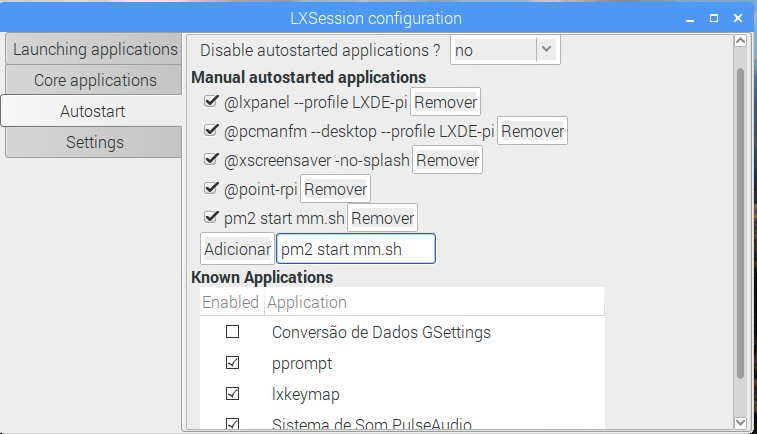
              In Raspian click Menu,Preferences,Main Menu Editor
              Click Preferences and check Default applications for LXSession
              Click OK and close main menu editor
              Now click Menu and Under Preferences click on Default applications for LXSession
              LXSession configuration opens
              Click Autostart
              Under Manual autostarted applications paste in your java command line
              click add
              close the LXSession configuration application and reboot your pi
              your java app should run after reboot
              

              Hope this help.
              Cheers,

              lucallmonL 1 Reply Last reply Reply Quote 0
              • lucallmonL Offline
                lucallmon @mpires
                last edited by

                @mpires did you get it working with this script?

                1 Reply Last reply Reply Quote 0
                • mpiresM Offline
                  mpires
                  last edited by

                  I have the script working, but the only way to start mm on boot, was set

                  pm2 start mm
                  

                  on LXSession, but yes now once i boot my Pi, mm start without any problem.

                  lucallmonL 2 Replies Last reply Reply Quote 0
                  • lucallmonL Offline
                    lucallmon @mpires
                    last edited by

                    @mpires so in the LXSession configuration menu under ‘autostart’, simply add the line ‘pm2 start mm’ and it’ll run at boot?

                    1 Reply Last reply Reply Quote 0
                    • lucallmonL Offline
                      lucallmon @mpires
                      last edited by

                      @mpires do I need an @ in front of it?

                      1 Reply Last reply Reply Quote 0
                      • mpiresM Offline
                        mpires
                        last edited by

                        You have Pm2 install?

                        lucallmonL 2 Replies Last reply Reply Quote 0
                        • lucallmonL Offline
                          lucallmon @mpires
                          last edited by

                          @mpires Yes.

                          1 Reply Last reply Reply Quote 0
                          • lucallmonL Offline
                            lucallmon @mpires
                            last edited by

                            @mpires That got it working. I had to add in the directory. Thanks for all your help.

                            1 Reply Last reply Reply Quote 0
                            • mpiresM Offline
                              mpires
                              last edited by

                              no just put " pm2 start.sh "

                              0_1488758016035_upload-7c9f1bfc-ddec-48c9-9879-941288a3005a

                              1 Reply Last reply Reply Quote 2
                              • mpiresM Offline
                                mpires
                                last edited by

                                Another happy person :D

                                1 Reply Last reply Reply Quote 0
                                • C Offline
                                  cassidycaid
                                  last edited by cassidycaid

                                  Thanks for the information. Using it I was able to figure out the steps for the command line.

                                  cd ~/.config/lxsession/LXDE-pi
                                  sudo nano autostart

                                  add to the end

                                  pm2 start mm.sh

                                  Thanks again for helping.

                                  mpiresM A 2 Replies Last reply Reply Quote 0
                                  • mpiresM Offline
                                    mpires @cassidycaid
                                    last edited by

                                    @cassidycaid yup is the same, i just show visual way, because is more simple for some ppl to understand.

                                    1 Reply Last reply Reply Quote 1
                                    • A Offline
                                      amomat @cassidycaid
                                      last edited by

                                      @cassidycaid Worked like a charm. Thanks a bunch.

                                      1 Reply Last reply Reply Quote 0
                                      • T Offline
                                        TheSt33v
                                        last edited by

                                        When I boot the pi, I see the MagicMirror boot screen, the desktop, and then MagicMirror boots. Following the steps above did not solve the problem. Is the desktop supposed to show up before MagicMirror boots, or is it supposed to go straight into MagicMirror? After I see the boot screen and right before I see the desktop, it briefly becomes a black screen with an X in the upper left corner of the screen. Any ideas on what might be wrong? I have pm2 installed and it is functioning perfectly.

                                        1 Reply Last reply Reply Quote 0
                                        • mpiresM Offline
                                          mpires
                                          last edited by

                                          Yes that is correct, you will always see the desktop for few seconds, then should open MM.
                                          I think will happen the same with any other option you find to auto boot MM.

                                          1 Reply Last reply Reply Quote 0

                                          Hello! It looks like you're interested in this conversation, but you don't have an account yet.

                                          Getting fed up of having to scroll through the same posts each visit? When you register for an account, you'll always come back to exactly where you were before, and choose to be notified of new replies (either via email, or push notification). You'll also be able to save bookmarks and upvote posts to show your appreciation to other community members.

                                          With your input, this post could be even better 💗

                                          Register Login

                                          • 1 / 1
                                          • First post
                                            Last post
                                          Enjoying MagicMirror? Please consider a donation!
                                          MagicMirror created by Michael Teeuw.
                                          Forum managed by Sam, technical setup by Karsten.
                                          This forum is using NodeBB as its core | Contributors
                                          Contact | Privacy Policy