Read the statement by Michael Teeuw here.
MMM-3Day-Forecast
-
Even just running nothing but the MMM-Weather-Now and MMM-3Day-Forecast all I get is
Loading… on both…git cloned it
switched to that dir and ran ‘npm install’
put the proper config in the mirror
ran it in DEV mode getting no errors and it’s loadingNothing.
-
@cowboysdude thanks for all of the info, it points to a need for to set up the same environment you have and to recreate the issue you have. I have a spare Pi so I’ll set up the full environment on it. When I’ve got there (probably Wed) I’ll see if I can debug the set up.
The system I’m running is on a Pi Zero running as
node serveronlyso I suspect there could be an issue with these modules firing up under electron. I’ll check this out and let you know what I find out. -
Ahhhhhhhhhh yes that could do it… at first I thought perhaps the ‘classes’ where my issue but I think you’re correct! Thanks a bunch!
-
@cowboysdude I’ve spotted an error in my ReadMe that I think has caused the problem here. In my example config I only put
keywhere I entered the API key instead ofapi_key. Try changing the name of that config variable and things should sort themselves out, I hope that works. Let me know if there are any other problems and I’ll update the Read Me files. -
@nigel-daniels said in MMM-3Day-Forecast:
api_key
That sir solved the issue!! Many Thanks… it’s running great now! :)
-
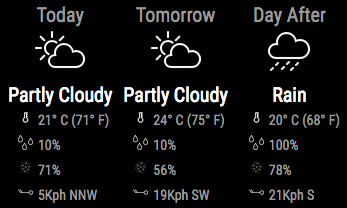
This module has been updated to include humidity. More details on the module read me page here. -
It might be a good idea to make use of the available translations. The words “Today”, “Tomorrow” and “Day After” are all part of the system translations. Check the documentation on how to use it. :)
-
@MichMich great idea… done! If anyone can translate the text I have? I’d appreciate and will add the appropriate files.
BTW. I assume this does not work in the node helper?
-
No, the translations are frontend only.
About the translations: just make a modular specific english translations file. When that is done, others can send you a pull request with other languages.
-
I recommend re-cloning to anyone using the module, there were a couple of missing icons. They are now in place.
-
@nigel-daniels as soon as I get back home… am on vacation [holiday] in Galveston, Texas :) Nice and sunny and very warm here! …
-
@cowboysdude enjoy… you won’t have missed the ‘chance of rain’ icon there :)
-
@nigel-daniels said in MMM-3Day-Forecast:
@cowboysdude enjoy… you won’t have missed the ‘chance of rain’ icon there :)
Why Thank you sir :)
-
FYI there is a minor fix to the chance of storm icons, there was a typo in the gif files name which prevented it from displaying. This also impacted MMM-Weather-Now.
-
Don’t suppose there’s any support on this module these days?
I just get stuck on Loading… after I’ve installed this, my API key is correct and tested in browser, the only error I can see that I think relates to it is "[TypeError: Cannot read property ‘simpleforecast’ of undefined] :/
Any help would be appreciated but after 2 years I’m not expecting anything! :p
-
@MattSharp Hi, from what you describe the error is happening because the node_helper is not getting a response to the call to get the weather status in the first place. That’s where it expect the simpleforcast to be a part of the response. Can you post a version of your config to verify the call is happening ok?
-
I had nothing to do tonight so I took a look at this for you. I’m certain your problem lies with your config entry. Why? Because I tried a few things in the config and received the “[TypeError: Cannot read property ‘simpleforecast’ of undefined]”. This occurs when the state and/or city value is incorrect. I tried 3 cities in 2 different states and the module works fine. If you have further trouble I will try to help you. Here is my WORKING config entry.
{ disabled: false, module: 'MMM-3Day-Forecast', position: 'top_right', config: { api_key: '123456789abcde', // Wunderground api key state: 'NY', // US states or other country codes city: 'Elmira' // City, eg. New_York (with underscore - no spaces) } }, -
I have just migrated this to the WeatherBit API as Wunderground are cancelling the free service :( This forces an update of the module and a new config! I’ve updated the read me in GitHub, so please take a look.
-
@nigel-daniels hello! Not sure if you are still around but I was wondering if you could help.
I have installed the module correctly, and using imperial, but would like to remove the metric notation that is listed in () . What do I need to edit to accomplish this?
Thank you
-
Hi, I have not been able to work on these modules as a full time role has limited my time considerably. To make tweaks I recommend forking the repo in git hub.



Hello! It looks like you're interested in this conversation, but you don't have an account yet.
Getting fed up of having to scroll through the same posts each visit? When you register for an account, you'll always come back to exactly where you were before, and choose to be notified of new replies (either via email, or push notification). You'll also be able to save bookmarks and upvote posts to show your appreciation to other community members.
With your input, this post could be even better 💗
Register Login