Read the statement by Michael Teeuw here.
mmm-wu-moon-phases - Moonphases from Weather Underground
-
@kurt yeah, you are right! all module specific changes and settings are in the main config
~/MagicMirror/config/ -
@schlachtkreuzer6
Danke ! I can see the New Moon, at least some shades of him or her :)
Thanks a lot ! works fine, only when I tell himmiddle_ rightthe screen stays black. But withtop_righteverythings works out fine.
kurt -
Hello Kurt
As first, thanks to @schlachtkreuzer6 for quickly answering the questions of Kurt.
Kurt, I hope it worked and yes, at the moment we have new moon and you see only a weak shadow.
If you need help, please contact me. I can also support you in your native language. :-)
Greetings from switzerland
-
@Raffaello
Hi
Thank you and Dankeschön for the offer to help me in my native language.
Der Tag wird kommen :)
Oisdan bisdan
Kurt -
@Raffaello
Hallo Raffaello
The day has come…your moonphase doesn’t load anymore, and I don’t no why, because I havn’t changed a thing.
I updated the rpi some days ago, but the fault was also bevor the update.
I hope you can help, cause by now I miss the moon already.
And by the way Gratulation to the Swiss Tennis Finale. Love to watch both of them !
Liebe Grüße aus WienStarting MagicMirror: v2.1.0 Loading config ... Loading module helpers ... Initializing new module helper ... No helper found for module: mmm-wu-moonphase. Initializing new module helper ... Initializing new module helper ... No helper found for module: alert. Initializing new module helper ... No helper found for module: clock. No helper found for module: compliments. No helper found for module: currentweather. No helper found for module: weatherforecast. Initializing new module helper ... All module helpers loaded. Starting server op port 8080 ... Server started ... Connecting socket for: internet-monitor internet-monitor helper started ... Connecting socket for: mmm-systemtemperature Starting node helper: mmm-systemtemperature Connecting socket for: MMM-WienerLinien Starting module: MMM-WienerLinien Connecting socket for: updatenotification Connecting socket for: newsfeed Starting module: newsfeed Sockets connected & modules started ... (node:6133) DeprecationWarning: sys is deprecated. Use util instead. Launching application. starting internet monitor node helper Create new news fetcher for url: http://derStandard.at/?page=rss&ressort=Seite1 - Interval: 300000 -
Hello Kurt, have checked on two raspi the module and it works with both. Can you upload your config.js?
-
@Raffaello
Hallo Raffaello
this is my config.js
Thank you/* Magic Mirror Config Sample * * By Michael Teeuw http://michaelteeuw.nl * MIT Licensed. */ var config = { port: 8080, ipWhitelist: ["::fff:0.0.0.0/1", "::fff:128.0.0.0/2", "::fff:192.0.0.0/3", "::fff:224.0.0.0/4", "127.0.0.1", "::ffff:127.0.0.1", "::1"], language: 'de', timeFormat: 24, units: 'metric', modules: [ { module: 'internet-monitor', position: 'top_center', header: '', config:{ type: '', maxTime: 20000, updateInterval: 0, verbose: false, displayStrength: true, displaySpeed: false, strengthIconSize: 80, maxGaugeScale: 100, } }, { module: 'mmm-wu-moonphase', header: 'Aktuelle Mondphase', // optionally you can add a header to this block position: 'bottom_right', // this can be any of the regions. config: { // See 'Configuration options' for more information. apikey: ' xxxxxx ', country: 'Austria', city: 'Vienna', apiLang: 'DL', } }, { module: 'mmm-systemtemperature', position: 'top_center', // This can be any of the regions. classes: 'small dimmed', // Add your own styling. Optional. config: { // See 'Configuration options' for more information. } }, { module: "MMM-WienerLinien", position: "bottom_left", config: { api_key: "xxxxxxx", stations: ["141"], } }, { module: 'alert', }, { module: "updatenotification", position: "top_bar" }, { module: 'clock', position: 'top_left' }, { module: 'compliments', position: 'lower_third' }, { module: 'currentweather', position: 'top_right', config: { location: 'Vienna', locationID: '2761369', //ID from http://www.openweathermap.org appid: 'xxxxxxxx' } }, { module: 'weatherforecast', position: 'top_right', header: 'Weather Forecast', config: { location: 'Vienna', locationID: '2761369', //ID from http://www.openweathermap.org appid: 'xxxxxxx' } }, { module: 'newsfeed', position: 'bottom_bar', config: { feeds: [ { title: "Der Standard", url: "http://derStandard.at/?page=rss&ressort=Seite1" } ], showSourceTitle: true, showPublishDate: true } }, ] }; /*************** DO NOT EDIT THE LINE BELOW ***************/ if (typeof module !== 'undefined') {module.exports = config;} -
@kurt
what do you mean by “doesn’t load any more” ? Do you see any error message? Did the whole mirror stop working? Or is it simply “gone” ? -
@yawns
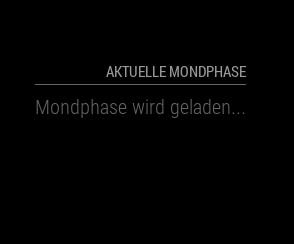
I just see:Aktuelle Mondphase wird geladen...is loading -
@yawns
to completely answer your questions… sorry got a phone call…
The whole mirror is working, the module isn’t gone, I do not see any error messages,
Thank you
-
Hi,
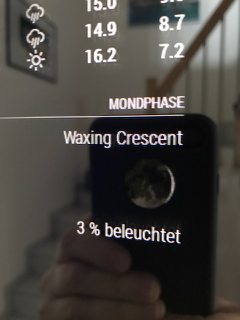
In my display the state of the moon appears in english and the lighting down in German. Why is not this completely in German?
Someone an idea?Jörg
-
can i use the same api key what i use for my weather underground ? or should i edit something?
because i have the same error like kurt. it always shows me “moonphase wird geladen”is the comma after the apiLang: correct ?
apiLang: ‘DL’, <-------------------------------
}
}, -
Yes, you can use the same api key and yes, the comma to apiLang is correct.
What happens if you enter the link directly in the browser?
http://api.wunderground.com/api/“apikey”/astronomy/lang:“language”/q/“country”/“city”.jsonReplace the " "-placeholders accordingly.
-
@Raffaello
Hi, I don’t know why, but your module is working fine by now, i put it on an other place and that’s it. I havn’t changed a bit on the modul or the config, just the moon didn’t liked the old place.:last_quarter_moon_with_face:
So I just want to inform you about that. Sometimes it’s hard to find the reason, when there is none. -
Hello, first of all, thanks for the module, I find it quite interesting. I tried to install it, but I found a problem trying to get the api key from Weather Underground. By accessing the following link: https://www.wunderground.com/weather/api says that “we will no longer provide free weather API keys”.
Do you know if it is possible to use an api key from openweathermap.org? If it is not possible, I think that the module can not be used.
Thanks in advance for the answer
-
You cannot use an API key from another API provider. However, until the issue with WU is corrected, you can use another module that requires no API key.
-
@mykle1 Thanks. Cool module! I will try it.
-
@qu1que said in mmm-wu-moon-phases - Moonphases from Weather Underground:
Thanks. Cool module! I will try it.
You’re welcome. I hope you like it


Hello! It looks like you're interested in this conversation, but you don't have an account yet.
Getting fed up of having to scroll through the same posts each visit? When you register for an account, you'll always come back to exactly where you were before, and choose to be notified of new replies (either via email, or push notification). You'll also be able to save bookmarks and upvote posts to show your appreciation to other community members.
With your input, this post could be even better 💗
Register Login