MagicMirror Forum
    • Recent
    • Tags
    • Unsolved
    • Solved
    • MagicMirror² Repository
    • Documentation
    • 3rd-Party-Modules
    • Donate
    • Discord
    • Register
    • Login
    A New Chapter for MagicMirror: The Community Takes the Lead
    Read the statement by Michael Teeuw here.

    MMM-OpenWeatherForecast - Replacement for MMM-DarkSkyForecast

    Scheduled Pinned Locked Moved Utilities
    256 Posts 55 Posters 631.3k Views 57 Watching
    Loading More Posts
    • Oldest to Newest
    • Newest to Oldest
    • Most Votes
    Reply
    • Reply as topic
    Log in to reply
    This topic has been deleted. Only users with topic management privileges can see it.
    • B Offline
      Biebermann @lavolp3
      last edited by

      @lavolp3

      Thank you, it can be so simple when you come to it.

      O 1 Reply Last reply Reply Quote 0
      • O Offline
        OberfragGER @Biebermann
        last edited by OberfragGER

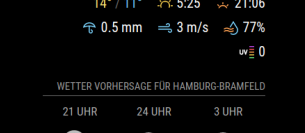
        After updating to the newest version and MagicMirror 2.15 too, the UV-index produces an extra line.

        How is that possible to have every icon in the same line?
        4f5a7d2b-cc83-408e-8122-720c31a1f1fc-image.png

        1 Reply Last reply Reply Quote 0
        • ? Offline
          A Former User @blackeaglece
          last edited by A Former User

          This post is deleted!
          1 Reply Last reply Reply Quote 0
          • P Offline
            PH1TCH @karsten13
            last edited by PH1TCH

            @karsten13 & @Biebermann

            Probably not the most elegant solution ever, but I added the following jquery code to the index.html located in the MagicMirror folder which will check every 30 seconds for the text “There” in elements of the class "weather-alert-description " and will hide the parent element (so the whole thing) if found.

            Since the English alerts usually start with “There” I can hide them this way and only leave the German ones

            <script src="https://ajax.googleapis.com/ajax/libs/jquery/2.1.3/jquery.min.js"></script>
            
            <script>
            	setInterval(function(){ 
            		$('.weather-alert-description').each(function () {
            			  if ($(this).text().includes('There')) {
            				$(this).parent().hide();
            			  }
            		})
            	}, 30000);
            </script>
            
            1 Reply Last reply Reply Quote 0
            • F Offline
              fillilutten
              last edited by

              I’m sorry if this is stupid - but I’m currently showing extraCurrentConditions - high/low + precipitation. And precipitation shows in “mm” and I’d prefer if it could show in % how likely it is to rain/snow that day. So I know if I should bring an umbrella or not.

              Is this possible? I tried using hourly forecast + extras and set that to 12 hours interval and only show one daily. But it didn’t work.

              Thanks!

              1 Reply Last reply Reply Quote 0
              • R Offline
                rcberg3
                last edited by

                @j-e-f-f any way to hide the wind units in the hourly and daily forecasts? I’m finding that they’re pushing onto a second line when the wind speed is greater than 2 digits. I’d be happy just to show the number and not the units.

                J 1 Reply Last reply Reply Quote 0
                • J Offline
                  j.e.f.f Project Sponsor Module Developer @rcberg3
                  last edited by

                  @rcberg3 sorry, the code doesn’t currently allow for this, nor do the units have their own CSS class that you can use to hide them.

                  You could instead increase the width of the module in order to give the forecast a bit more space to stop the wind units from wrapping to a second line. Instructions to do so are included in the readme.

                  R 1 Reply Last reply Reply Quote 0
                  • R Offline
                    rcberg3 @j.e.f.f
                    last edited by

                    @j-e-f-f Appreciate it! I added the nowrap to the css for now and it’s better.

                    1 Reply Last reply Reply Quote 1
                    • M Offline
                      MMuser
                      last edited by

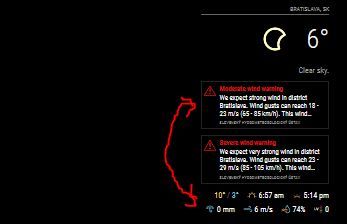
                      Hi is it possible to swap warnings and extra weather info, like shown below ?
                      Capture.JPG

                      1 Reply Last reply Reply Quote 0
                      • C Offline
                        cwong79
                        last edited by sdetweil

                        I am a complete newbie. I followed the instructions exactly, I even did it multiple times to ensure it was done correctly. As during installation process, some warnings around vulnerability kicked up and I attempted to resolve. I removed the copy and reinstalled MMM-OpenWeatherForecast. I have the default weather module commented out and just running this module. I cannot get it working, not sure why. I copied the sample configuration and inserted the appropriate API key and Long/Lat. What am I doing wrong?

                        
                        {
                        			module: "MMM-OpenWeatherForecast",
                        			position: "top_right",
                        			header: "Forecast",
                        			config: {
                        						apikey: "??????????", //SUPER SECRET
                        						latitude: 26.124161,
                        						longitude: -80.143593,
                        						units: "imperial",
                        						iconset: "3c",
                        						colored: true,
                        						concise: true,
                        						requestDelay: "2000",
                        						showFeelsLikeTemp: true,
                        						showCurrentConditions: true,
                        						showSummary: true,
                        						showExtraCurrentConditions: true,
                        						extraCurrentConditions: {
                        													highLowTemp: true,
                        													precipitation: true,
                        													sunrise: true,
                        													sunset: true,
                        													wind: true,
                        													barometricPressure: false,
                        													humidity: true,
                        													dewPoint: false,
                        													uvIndex: true,
                        													visibility: false
                        						},
                        						forecastLayout: "table",
                        						forecastHeaderText: "",
                        						hourlyForecastTableHeaderText: "By the hour",
                        						showHourlyForecast: true,
                        						showHourlyTableHeaderRow: true,
                        						hourlyForecastInterval: 1,
                        						maxHourliesToShow: 10,
                        						hourlyExtras: {
                        											precipitation: true,
                        											wind: true,
                        											barometricPressure: false,
                        											humidity: false,
                        											dewPoint: false,
                        											uvIndex: false,
                        											visibility: false
                        						    		  },
                        						dailyForecastTableHeaderText: "Throughout the week",
                        						showDailyForecast: true,
                        						showDailyTableHeaderRow: true,
                        						maxDailiesToShow: 5,
                        						dailyExtras: {
                        										precipitation: true,
                        										sunrise: false,
                        										sunset: false,
                        										wind: true,
                        										barometricPressure: false,
                        										humidity: false,
                        										dewPoint: false,
                        										uvIndex: false
                        									 },
                        
                        					}
                        			}
                        
                        S 1 Reply Last reply Reply Quote 0
                        • S Offline
                          sdetweil @cwong79
                          last edited by

                          @cwong79 I added the code wrapper around your config info

                          to do this

                          paste your text.
                          select it
                          then push the button </>
                          above the editor window

                          Sam

                          How to add modules

                          learning how to use browser developers window for css changes

                          C 1 Reply Last reply Reply Quote 0
                          • C Offline
                            cwong79 @sdetweil
                            last edited by

                            @sdetweil thank you. Sorry, its my first post.

                            1 Reply Last reply Reply Quote 0
                            • N6NGN Offline
                              N6NG
                              last edited by

                              Darksky is no longer accepting new signups. Just an FYI
                              Dennis

                              1 Reply Last reply Reply Quote 0
                              • goldyfruitG Offline
                                goldyfruit Project Sponsor
                                last edited by

                                Re: MMM-OpenWeatherForecast - Replacement for MMM-DarkSkyForecast

                                I opened an issue on GitHub about the CPU consumption, anyone else with the same symptom?

                                https://github.com/jclarke0000/MMM-OpenWeatherForecast/issues/14

                                Build smart things with magic and love! | https://smartgic.io

                                1 Reply Last reply Reply Quote 0
                                • A Offline
                                  airclown
                                  last edited by

                                  Love the module, Is there a way to have the module show - Horizontally?

                                  Like moving the Hourly and 5/3 day to the right side of the current? so 1 row with 3 columns.

                                  Thank You

                                  J 1 Reply Last reply Reply Quote 0
                                  • J Offline
                                    j.e.f.f Project Sponsor Module Developer @airclown
                                    last edited by

                                    @airclown if you know what you’re doing with CSS this is certainly doable in your custom.css file. The module’s HTML is structured in such a way as to not restrict reordering through CSS

                                    G 1 Reply Last reply Reply Quote 0
                                    • G Offline
                                      gekberlin @j.e.f.f
                                      last edited by

                                      Hi all,
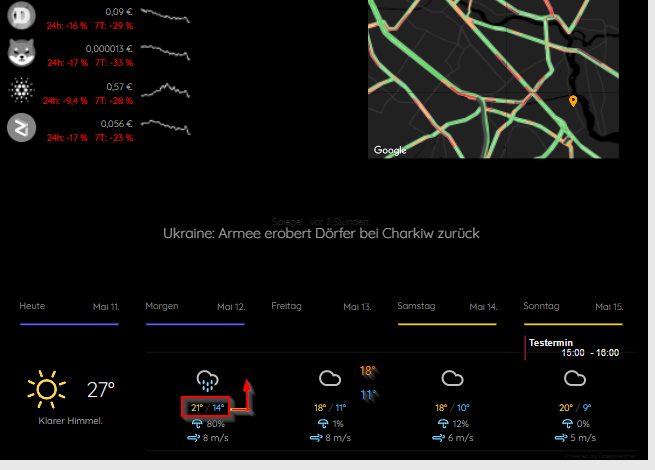
                                      has anyone a suggestion how to move the temprature in tiled mode next to the icon in one row?
                                      I mean just like in the picture given ?
                                      18491c61-46b8-4b8a-a2e6-7422c6d82e78-image.png

                                      I really don’t understand the syntax of the nunjucks part.

                                      1 Reply Last reply Reply Quote 0
                                      • R Offline
                                        Ray
                                        last edited by

                                        MMM-OpenWeatherForecast

                                        Hey guys in the alert status. I show the following 3 items

                                        Excessive heat watch

                                        heat advisory

                                        small craft advisory

                                        Is there a way I can eliminate small craft advisory
                                        or just use heat advisory

                                        1 Reply Last reply Reply Quote 0
                                        • plainbrokeP Offline
                                          plainbroke
                                          last edited by

                                          When will Darksky fail to work anymore.
                                          I have it running now and it works fine.
                                          What am I missing?

                                          Slow learner. But trying anyways.
                                          MM is on Raspberry Pi 4B w/8gb ram loaded on a 128gb nvme drive.
                                          Running Trixie and the latest MM version.

                                          BKeyportB J 2 Replies Last reply Reply Quote 0
                                          • BKeyportB Offline
                                            BKeyport Module Developer @plainbroke
                                            last edited by

                                            @plainbroke If you have an API key from before Apple bought it up, Darksky still will work. They’re just not issuing new API keys any longer, and Apple seems to be wanting to put all of Darksky’s features into their own app, and use the API for themselves, so I doubt old keys are gonna go away any time soon.


                                            The "E" in "Javascript" stands for "Easy"

                                            karsten13K 1 Reply Last reply Reply Quote 0

                                            Hello! It looks like you're interested in this conversation, but you don't have an account yet.

                                            Getting fed up of having to scroll through the same posts each visit? When you register for an account, you'll always come back to exactly where you were before, and choose to be notified of new replies (either via email, or push notification). You'll also be able to save bookmarks and upvote posts to show your appreciation to other community members.

                                            With your input, this post could be even better 💗

                                            Register Login

                                            • 1
                                            • 2
                                            • 3
                                            • 4
                                            • 5
                                            • 6
                                            • 7
                                            • 8
                                            • 12
                                            • 13
                                            • 6 / 13
                                            • First post
                                              Last post
                                            Enjoying MagicMirror? Please consider a donation!
                                            MagicMirror created by Michael Teeuw.
                                            Forum managed by Sam, technical setup by Karsten.
                                            This forum is using NodeBB as its core | Contributors
                                            Contact | Privacy Policy


