MagicMirror Forum
    • Recent
    • Tags
    • Unsolved
    • Solved
    • MagicMirror² Repository
    • Documentation
    • 3rd-Party-Modules
    • Donate
    • Discord
    • Register
    • Login
    A New Chapter for MagicMirror: The Community Takes the Lead
    Read the statement by Michael Teeuw here.

    Regions

    Scheduled Pinned Locked Moved Core System
    34 Posts 19 Posters 126.2k Views 24 Watching
    Loading More Posts
    • Oldest to Newest
    • Newest to Oldest
    • Most Votes
    Reply
    • Reply as topic
    Log in to reply
    This topic has been deleted. Only users with topic management privileges can see it.
    • D
      doubleT Module Developer
      last edited by

      You’re welcome.
      Btw. depending on how you control your Pi and Mirror, you don’t need to restart your whole Pi. In this case, just refreshing the browser should work, or restarting the Mirror process, if it doesn’t.

      1 Reply Last reply
      Reply Quote 0
      • WayneRigleyW
        WayneRigley
        last edited by WayneRigley

        Hi all, well after countless trying ive given up and now asking for help. my MM is working perfect and the only troubling issue in my top_right section, i have a few things in there under the config but i would like to extend the left border of my top_right a little more left if thats possible. i have too much open space from the center to the right side. i will not be resizing fonts using the shift+ +/- any longer so that wont be an issue is manually adjusted. thanks all in advance and have a look here what im refering to
        https://photos.app.goo.gl/EUWdJRQwAjKJksx46

        Wayne R

        1 Reply Last reply
        Reply Quote 0
        • F
          Fifin404
          last edited by Fifin404

          Hi all, is there any way to change outer border around modules? Make it smaller?
          0_1575129077002_IMG_20191130_153745.png

          1 Reply Last reply
          Reply Quote 0
          • FoziF
            Fozi Project Sponsor
            last edited by

            Im main.css you can change the margin, heightand width under ‚body’ as you need. Here are my values I adjusted. The default values are commented.

            body {
              /* margin: 60px; */
              margin: 5px; 
              position: absolute;
              /*height: calc(100% - 120px);
              width: calc(100% - 120px);*/
              height: calc(100% - 10px);
              width: calc(100% - 10px);
            

            HowTo: Replace PIR Sensor with a RCWL-0516 Microwave Sensor

            Mykle1M 1 Reply Last reply
            Reply Quote 0
            • F
              Fifin404
              last edited by

              Thank you, that is what I looking for.

              1 Reply Last reply
              Reply Quote 0
              • Mykle1M
                Mykle1 Project Sponsor Module Developer @Fozi
                last edited by

                @Fozi said in Regions:

                Im main.css you can change

                Encouraging people to modify their main.css is really not a good idea, especially for those that are new to MM and/or linux.

                Please direct your help towards the custom.css file which is intended for just such modifications.

                Peace

                -A concerned citizen-

                Create a working config
                How to add modules

                D FoziF 2 Replies Last reply
                Reply Quote 1
                • D
                  drwatson @Mykle1
                  last edited by

                  Good point, @Mykle1

                  Can you then suggest the equivalent change to make the proper way without modifying the main.css?

                  C Mykle1M 2 Replies Last reply
                  Reply Quote 0
                  • C
                    cskenney @drwatson
                    last edited by

                    @drwatson Copy the exact same code that @Fozi noted above and put it in the custom.css file.

                    Below is what I put in my custom.css file.

                    body {
                      margin: 5px;
                      position: absolute;
                      height: calc(100% - 10px);
                      width: calc(100% - 10px);
                    }
                    
                    1 Reply Last reply
                    Reply Quote 3
                    • BKeyportB
                      BKeyport Module Developer
                      last edited by BKeyport

                      This post is deleted!
                      1 Reply Last reply
                      Reply Quote 0
                      • FoziF
                        Fozi Project Sponsor @Mykle1
                        last edited by

                        @Mykle1 ouh damned…your concerns are absolutely justified. Haven’t hought of that. Thanks for pointing me to that.:thumbs_up_light_skin_tone:

                        HowTo: Replace PIR Sensor with a RCWL-0516 Microwave Sensor

                        1 Reply Last reply
                        Reply Quote 2
                        • F
                          Fifin404
                          last edited by

                          Yes I added code to custom.css not main.css. Thanks for all

                          1 Reply Last reply
                          Reply Quote 1
                          • Mykle1M
                            Mykle1 Project Sponsor Module Developer @drwatson
                            last edited by Mykle1

                            @drwatson @Fozi

                            Can you then suggest the equivalent change to make the proper way without modifying the main.css?

                            Well, any changes that you consider making in the main.css can be made in the custom.css file without changing the main.css file. The custom.css file will override what is in the main.css file. This way you’re not altering any core files and your modifications will be accepted. When it’s time to upgrade to a newer version of MM the upgrade won’t abort because of changes you’ve made to the core files and your custom.css changes will survive the upgrade. :-)

                            I’m still learning things every day and I enjoy the process. That’s the whole point for me.

                            Peace!

                            Create a working config
                            How to add modules

                            1 Reply Last reply
                            Reply Quote 0
                            • cowboysdudeC
                              cowboysdude Module Developer
                              last edited by

                              Yes I would HIGHLY suggest you do not change the main.css file… that could send other modules or positions in to chaos. Use the custom css as Mykle1 suggested :)

                              1 Reply Last reply
                              Reply Quote 1
                              • T
                                toots
                                last edited by

                                Sorry if this has been asked. Is there a way to do left_side and right_side? I’m displaying my mirror on a chromecast so it’s locked into landscape mode at 720p and there isn’t a whole lot of room for each of the regions. I’d rather replace top_left and bottom_left with left_side, and just use the entire edge.

                                S 1 Reply Last reply
                                Reply Quote 0
                                • S
                                  sdetweil @toots
                                  last edited by

                                  @toots u could edit the index.html to add your left/right locations, and add entries to custom.css for them

                                  Sam

                                  How to add modules

                                  learning how to use browser developers window for css changes

                                  1 Reply Last reply
                                  Reply Quote 0
                                  • M
                                    megagprime
                                    last edited by

                                    hi all, how could i center this kodi-websocket module between these two?

                                    0c7f3eab-0372-47e1-bc6a-e11ae8bd7409-image.png

                                    using bottom left for map, bottom center for kodi websocket and bottom right for wind

                                    i tried custom.css module placement but did not work

                                    .module.MMM-Kodi-WebSocket{
                                    left : 600 px,
                                    }

                                    1 Reply Last reply
                                    Reply Quote 0
                                    • P
                                      pastormingle
                                      last edited by

                                      can you position left middle?

                                      S 1 Reply Last reply
                                      Reply Quote 0
                                      • S
                                        sdetweil @pastormingle
                                        last edited by

                                        @pastormingle no, not a valid position

                                        here is the list from the MM doc

                                        https://docs.magicmirror.builders/modules/configuration.html#module-configuration

                                        Sam

                                        How to add modules

                                        learning how to use browser developers window for css changes

                                        1 Reply Last reply
                                        Reply Quote 0
                                        • S sdetweil referenced this topic on
                                        • S sdetweil referenced this topic on
                                        • S sdetweil referenced this topic on
                                        • S sdetweil referenced this topic on
                                        • R
                                          roth_nj
                                          last edited by

                                          im just diving into this project (mech eng with very limited programming experience)

                                          i have the MM installed and running on my mac using terminal/electron. ive been in the config editing it and taking out stuff i dont want and added CalendarExt3 and have that working. im doing it on my mac for now waiting on my PI to come in the mail. from what ive read it will also speed up the editing phase vs pop it into the pi over and over.

                                          im about to start digging into size/area/color/font/etc and have a combo of questions:

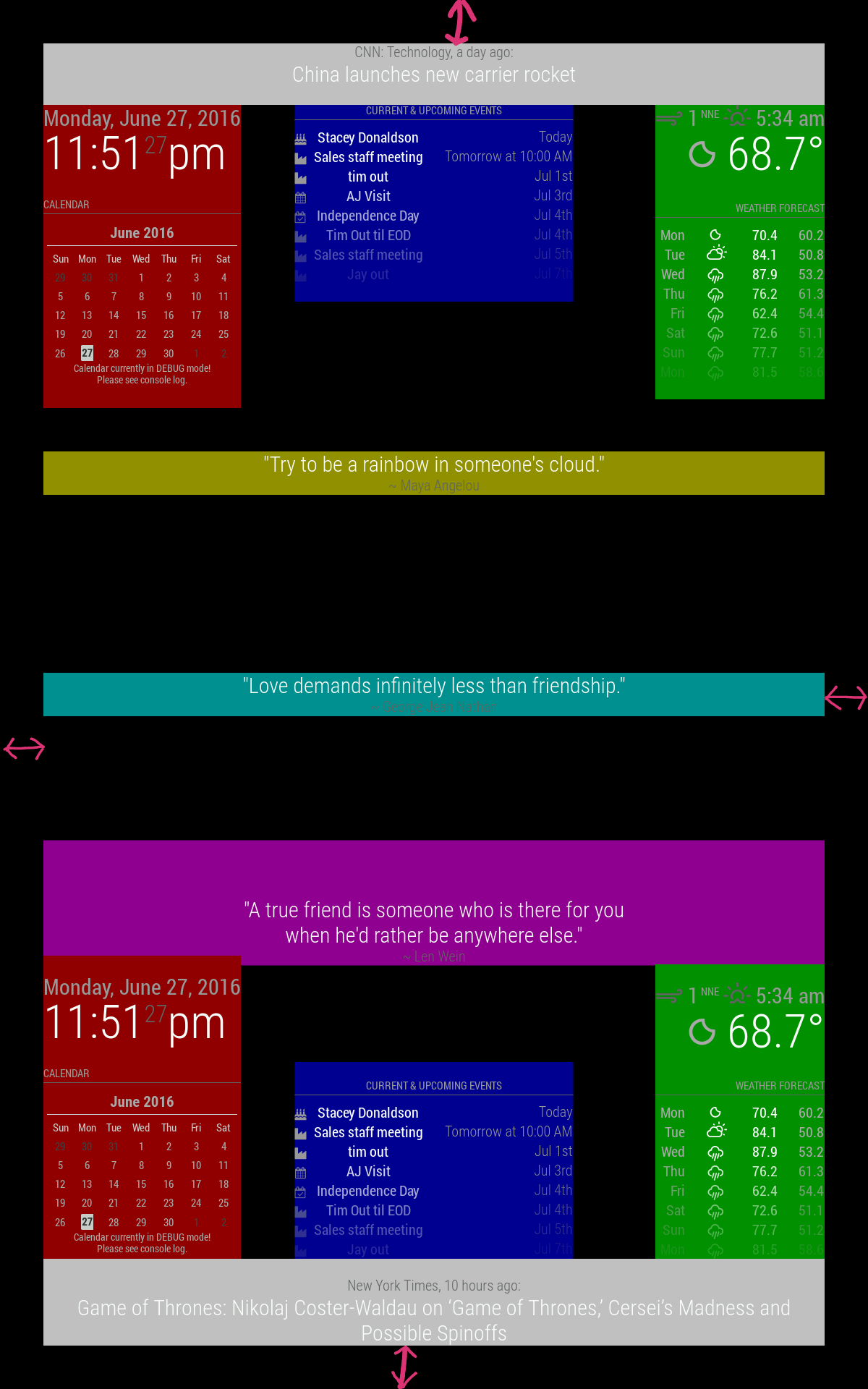
                                          the picture posted in the start of this thread is very helpful for the zones. i want to run mine in landscape view. will those zones be the same in landscape vs portrait? i can’t tell if it is because i haven’t configured it properly for my monitors or if it needs to be adjusted (portrait to landscape). if so, is there another version of the same picture but in the other orientation?

                                          sorry if these are self explanatory questions once i dive into it more just wanted to ask to help the process

                                          S 1 Reply Last reply
                                          Reply Quote 0
                                          • S
                                            sdetweil @roth_nj
                                            last edited by sdetweil

                                            @roth_nj The regions will be the same but obviously the sizes will be different

                                            You can do the same color view by adding a background color to each one of the regions in custom CSS and then you can see where they are

                                            Sam

                                            How to add modules

                                            learning how to use browser developers window for css changes

                                            R 1 Reply Last reply
                                            Reply Quote 0

                                            Hello! It looks like you're interested in this conversation, but you don't have an account yet.

                                            Getting fed up of having to scroll through the same posts each visit? When you register for an account, you'll always come back to exactly where you were before, and choose to be notified of new replies (either via email, or push notification). You'll also be able to save bookmarks and upvote posts to show your appreciation to other community members.

                                            With your input, this post could be even better 💗

                                            Register Login

                                            • 1
                                            • 2
                                            • 1 / 2
                                            • First post
                                              Last post
                                            Enjoying MagicMirror? Please consider a donation!
                                            MagicMirror created by Michael Teeuw.
                                            Forum managed by Sam, technical setup by Karsten.
                                            This forum is using NodeBB as its core | Contributors
                                            Contact | Privacy Policy