MagicMirror Forum
    • Recent
    • Tags
    • Unsolved
    • Solved
    • MagicMirror² Repository
    • Documentation
    • 3rd-Party-Modules
    • Donate
    • Discord
    • Register
    • Login
    A New Chapter for MagicMirror: The Community Takes the Lead
    Read the statement by Michael Teeuw here.

    MMM-forecast-io -- Localized up to the minute weather

    Scheduled Pinned Locked Moved Utilities
    127 Posts 36 Posters 221.9k Views 38 Watching
    Loading More Posts
    • Oldest to Newest
    • Newest to Oldest
    • Most Votes
    Reply
    • Reply as topic
    Log in to reply
    This topic has been deleted. Only users with topic management privileges can see it.
    • FlatPepsiF Offline
      FlatPepsi @jinjirosan
      last edited by

      @jinjirosan - The temperature bars auto scale based upon the width of the rest of the module. I suspect some other changes you’ve made have caused the module to get wider, so you’re looking at a side effect and not a cause.

      It might also be a screen resolution – the crypto currency module underneath in your screenshot is wide as well. I’m using a crummy small monitor, and have very narrow margins.

      I love that someone else is picking this up and running with this module. Looks good!

      1 Reply Last reply Reply Quote 0
      • jinjirosanJ Offline
        jinjirosan
        last edited by jinjirosan

        Thx for the quick reply! Yes, the crypto currency module also scales based on the width of the “top right” column of the mirror. Still have to fix that but up until now the other modules above and below were of narrower width.

        Screen resolution could be it, I’m using a 24" monitor at native 1080p. I do remember that the sunrise/sunset, hourly forcast line above the graph and the days forcast below the graph were shifted to the left before I made changes but I’ll check to make sure.

        Is there a way to “fix” the sunset/sunrise/hourly and the forecast days/bars in place instead of having it auto-scale?

        -edit- : I freshly pulled @FlatPepsi and the days/bars and the sunrise/sunset/hourly forecast are shifted to the left as shown in my original picture.
        Also pulled @dmcinnes repo and that seems to outline the way I like to see it. Looking at a diff between the files the table generate section seems the same.

        The mirror project for me is to work on my coding skills as well (which do need a lottttttt of work :-) ) so pls bear with me when I ask something that might be obvious :-)

        1 Reply Last reply Reply Quote 0
        • jinjirosanJ Offline
          jinjirosan
          last edited by

          Got it :-)

          Playing around with the Chrome inspector and fiddling with additional CSS classes, have it lined up nicely now.

          Now the hard(er) part, the visualization changes.

          1 Reply Last reply Reply Quote 0
          • L Offline
            Littlejohn21
            last edited by

            I cannot for the life of me get this to work it keeps saying that there is an error in the config file. I will have it Exactly as others have it with only my darkskyspi key being diffrent and still get the error .

            magicmirror@2.1.2 start /home/pi/MagicMirror
            sh run-start.sh

            Starting MagicMirror: v2.1.2
            Loading config …
            WARNING! Could not validate config file. Please correct syntax errors. Starting with default configuration.
            Loading module helpers …
            Initializing new module helper …
            Module helper loaded: updatenotification
            No helper found for module: helloworld.
            All module helpers loaded.
            Starting server on port 8080 …
            Server started …
            Connecting socket for: updatenotification
            Sockets connected & modules started …
            Launching application.

            Mykle1M 1 Reply Last reply Reply Quote 0
            • Mykle1M Offline
              Mykle1 Project Sponsor Module Developer @Littlejohn21
              last edited by Mykle1

              @Littlejohn21 said in MMM-forecast-io -- Localized up to the minute weather:

              Please correct syntax errors.

              It could be something as simple as a comma, or quote being out of place, or missing.

              Post your config here for help, but please follow this guide on how to post code on the forum correctly.

              https://forum.magicmirror.builders/topic/4247/how-to-post-code-on-the-forum-for-absolute-beginners

              Create a working config
              How to add modules

              L 2 Replies Last reply Reply Quote 0
              • L Offline
                Littlejohn21 @Mykle1
                last edited by

                @Mykle1

                modules: [
                		{
                			module: "alert",
                		},
                		{
                			module: "updatenotification",
                			position: "top_bar"
                		},
                		{
                			module: "clock",
                			position: "top_left"
                		},
                		{
                			module: "calendar",
                			header: "US Holidays",
                			position: "top_left",
                			config: {
                				calendars: [
                					{
                						symbol: "calendar-check-o ",
                						url: "webcal://www.calendarlabs.com/templates/ical/US-Holidays.ics"
                					}
                				]
                			}
                		},
                		{
                			module: "compliments",
                			position: "lower_third"
                		},
                		{
                			module: 'MMM-forecast-io',
                    			position: 'top_right',  // This can be any of the regions.
                  		        config: {
                    			// See 'Configuration options' for more information.
                     		        apiKey: '6xxxxxxxxxxxxxxxxxxxxxxxxxxxx3', // Dark Sky API key.
                      			// Only required if geolocation doesn't work:
                       			latitude:   29.853357,
                      			longitude: -81.389680
                			}
                		},
                		{
                			module: "newsfeed",
                			position: "bottom_bar",
                			config: {
                				feeds: [
                					{
                						title: "New York Times",
                						url: "http://www.nytimes.com/services/xml/rss/nyt/HomePage.xml"
                					}
                				],
                				showSourceTitle: true,
                				showPublishDate: true
                			}
                		},
                	]
                
                };
                

                I have tried several ways and have even ran the npm run config:check it says thet expected to see { but sees something else.

                1 Reply Last reply Reply Quote 0
                • L Offline
                  Littlejohn21 @Mykle1
                  last edited by

                  @Mykle1

                  modules: [
                  		{
                  			module: "alert",
                  		},
                  		{
                  			module: "updatenotification",
                  			position: "top_bar"
                  		},
                  		{
                  			module: "clock",
                  			position: "top_left"
                  		},
                                  {
                  			module: "MMM-Todoist",
                  			header: "Todoist",
                  			position: "top_left",
                  			config: {
                  				accessToken: '33xxxxxxxxxxxxxxxxxxxxxxxxxxxxxxxxxxxxxx' ,
                  				maximumentries: 10,
                  				interval: 60,
                  				lists: [21xxxxxxxx7],
                  				fade: false,
                  			}
                  		},
                  		{
                  			module: "calendar",
                  			position: "top_left",	// This can be any of the regions. Best results in left or right regions.			
                  		},
                  		{
                  			module: "compliments",
                  			position: "lower_third"
                  		},
                  		{
                  			module: "currentweather",
                  			position: "top_right",
                  			config: {
                  				location: "",
                  				locationID: "4170894",  //ID from http://www.openweathermap.org/help/city_list.txt
                  				appid: "axxxxxxxxxxxxxxxxxxxxxxxxxxxxxxxxxxd4"
                  			}
                  		},
                  		{
                  			module: 'MMM-forecast-io',
                      			position: 'top_right',  // This can be any of the regions.
                    		        config: {
                      			// See 'Configuration options' for more information.
                       		        apiKey: '2xxxxxxxxxxxxxxxxxxxxxxxxxxxxxxxxx5', // Dark Sky API key.
                        			// Only required if geolocation doesn't work:
                         			latitude:   29.853357,
                        			longitude: -81.389680
                  			}
                  		},
                  		{
                  			module: "newsfeed",
                  			position: "bottom_bar",
                  			config: {
                  				feeds: [
                  					{
                  						title: "News4JAX",
                  						url: "https://www.news4jax.com/feeds/rssFeed/feedServlet?obfType=GMG_RSS_DETAIL&siteId=800004&categoryId=80041&nbRows=20&FeedFetchDays=10&includeFeeds=True"
                  					}
                  				],
                  				showSourceTitle: true,
                  				showPublishDate: true
                  			}
                  		},
                  	]
                  
                  };
                  

                  I got this one to work, atleast load with no syntax error but the weather module doesnt show up? is there anything i need to do in the actual files?

                  1 Reply Last reply Reply Quote 1
                  • L Offline
                    Littlejohn21
                    last edited by

                    Please disregard i’m “special” I never "git clone “hhtp://module” " to have the module in order for it to read i’m new but have it working now thanks!!!

                    Mykle1M 1 Reply Last reply Reply Quote 1
                    • Mykle1M Offline
                      Mykle1 Project Sponsor Module Developer @Littlejohn21
                      last edited by

                      @Littlejohn21 said in MMM-forecast-io -- Localized up to the minute weather:

                      Please disregard i’m “special” I never "git clone “hhtp://module” " to have the module in order for it to read i’m new but have it working now thanks!!!

                      You won’t make that mistake again. I’m glad you’re up and running.

                      Create a working config
                      How to add modules

                      L 1 Reply Last reply Reply Quote 1
                      • L Offline
                        Littlejohn21 @Mykle1
                        last edited by

                        @Mykle1

                        Thanks! i will try not to haha trying to figure out why I’m having issue with vlc java when trying to launch the alexa avs sample :(

                        Mykle1M 1 Reply Last reply Reply Quote 1
                        • Mykle1M Offline
                          Mykle1 Project Sponsor Module Developer @Littlejohn21
                          last edited by

                          @Littlejohn21 said in MMM-forecast-io -- Localized up to the minute weather:

                          trying to figure out why I’m having issue with vlc java when trying to launch the alexa avs sample :(

                          I’m not familiar with those at all. Create a new topic and hopefully you will get some assistance with that.

                          Good luck! :^)

                          Create a working config
                          How to add modules

                          L 1 Reply Last reply Reply Quote 0
                          • L Offline
                            Littlejohn21 @Mykle1
                            last edited by

                            @Mykle1 is there a way to scale the entire Module? I’ve tried doing the graph but the forecast is still huge on my screen.

                            strawberry 3.141S Mykle1M 2 Replies Last reply Reply Quote 0
                            • strawberry 3.141S Offline
                              strawberry 3.141 Project Sponsor Module Developer @Littlejohn21
                              last edited by

                              @Littlejohn21 you can try

                              .MODULENAME {
                                transform: scale(0.5, 0.5);
                              }
                              

                              if you replace modulename with your actual module name, this should give you a height and with of 50% of the actual size

                              Please create a github issue if you need help, so I can keep track

                              1 Reply Last reply Reply Quote 0
                              • Mykle1M Offline
                                Mykle1 Project Sponsor Module Developer @Littlejohn21
                                last edited by

                                @Littlejohn21 said in MMM-forecast-io -- Localized up to the minute weather:

                                is there a way to scale the entire Module? I’ve tried doing the graph but the forecast is still huge on my screen.

                                Follow @strawberry-3-141 instructions. I can’t imagine why your forecast would be huge. I do have a question for you. What position have you assigned to the weatherforecast module in the config?

                                Create a working config
                                How to add modules

                                1 Reply Last reply Reply Quote 0
                                • L Offline
                                  Littlejohn21
                                  last edited by

                                  @strawberry-3-141 @Mykle1

                                  im having trouble getting it to accept the line you provided it gives me the syntax error code when starting the program. am i supposed to have it inside the MMM-forecast-io module or in its own spot? ive tried both, tried without the . infront of the module name tried with a space after scale ect.

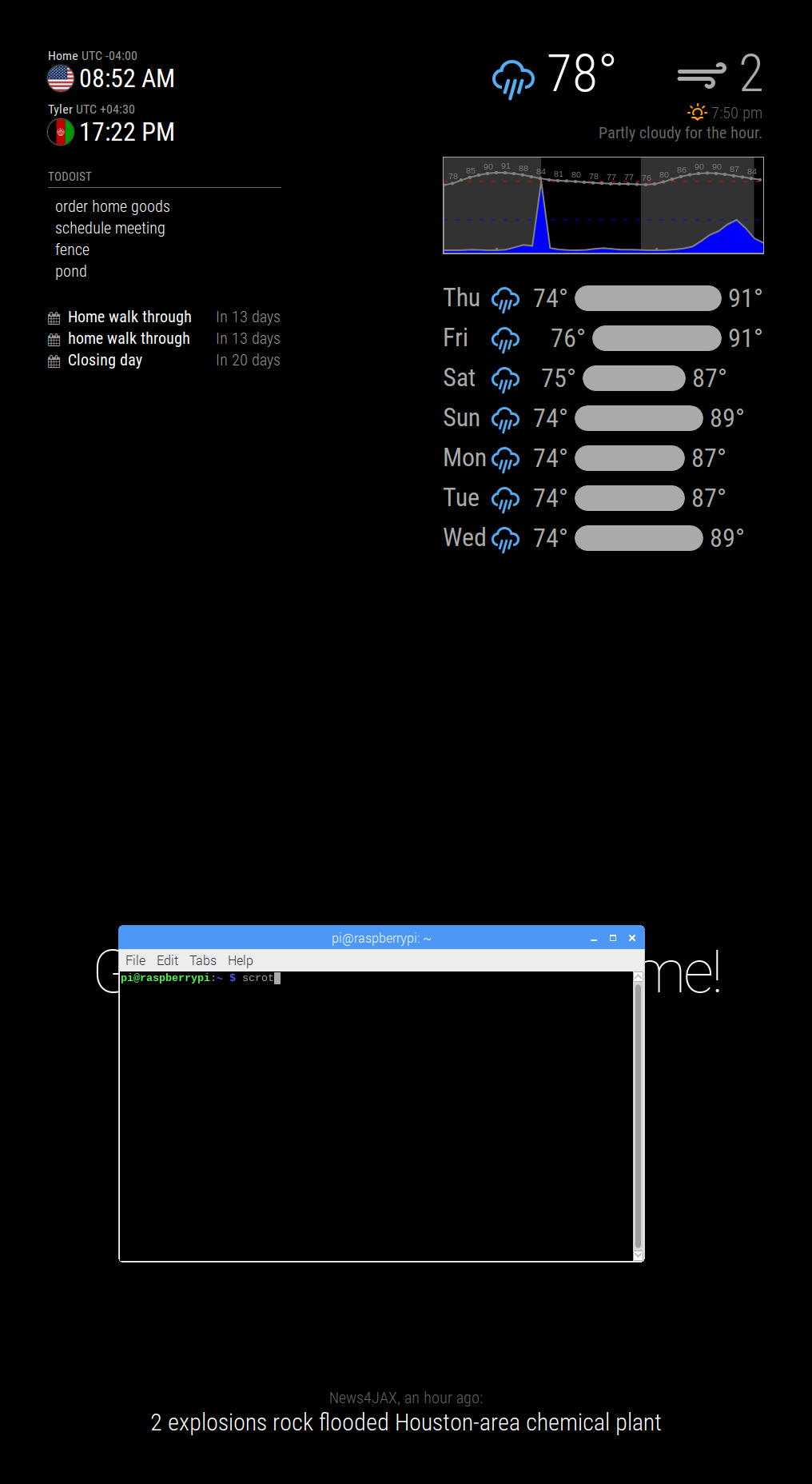
                                  the position is top left and it takes up alsost 1/2 the top of the screen.

                                  1 Reply Last reply Reply Quote 0
                                  • L Offline
                                    Littlejohn21
                                    last edited by

                                    @Mykle1 @strawberry-3-141

                                    here is a screen shot for reference. 0_1504184130418_2017-08-31-085210_1016x1856_scrot.png
                                    yawnsY 1 Reply Last reply Reply Quote 0
                                    • yawnsY Offline
                                      yawns Moderator @Littlejohn21
                                      last edited by

                                      @Littlejohn21
                                      The lines provided by Mykle and Strawberry need to go into custom.css in your css folder, not into the module file.

                                      L 1 Reply Last reply Reply Quote 0
                                      • L Offline
                                        Littlejohn21 @yawns
                                        last edited by

                                        @yawns
                                        Literally just found that out and tried it! haha it worked thanks guys!!

                                        1 Reply Last reply Reply Quote 0
                                        • L Offline
                                          Littlejohn21
                                          last edited by

                                          @Mykle1 @strawberry-3-141 @yawns

                                          now im having an issue where it wont sit in the corner if that makes sense?it keeps a buffer only on the MMM-forecast-io all others are right agains the edge i installed

                                          body {
                                            margin: 0px;
                                            height: 100%;
                                            width: 100%;
                                          

                                          and that moved everything else to the edge but forcast-io stayed it even keeps a buffer when i relocate it to the other side of the screen…
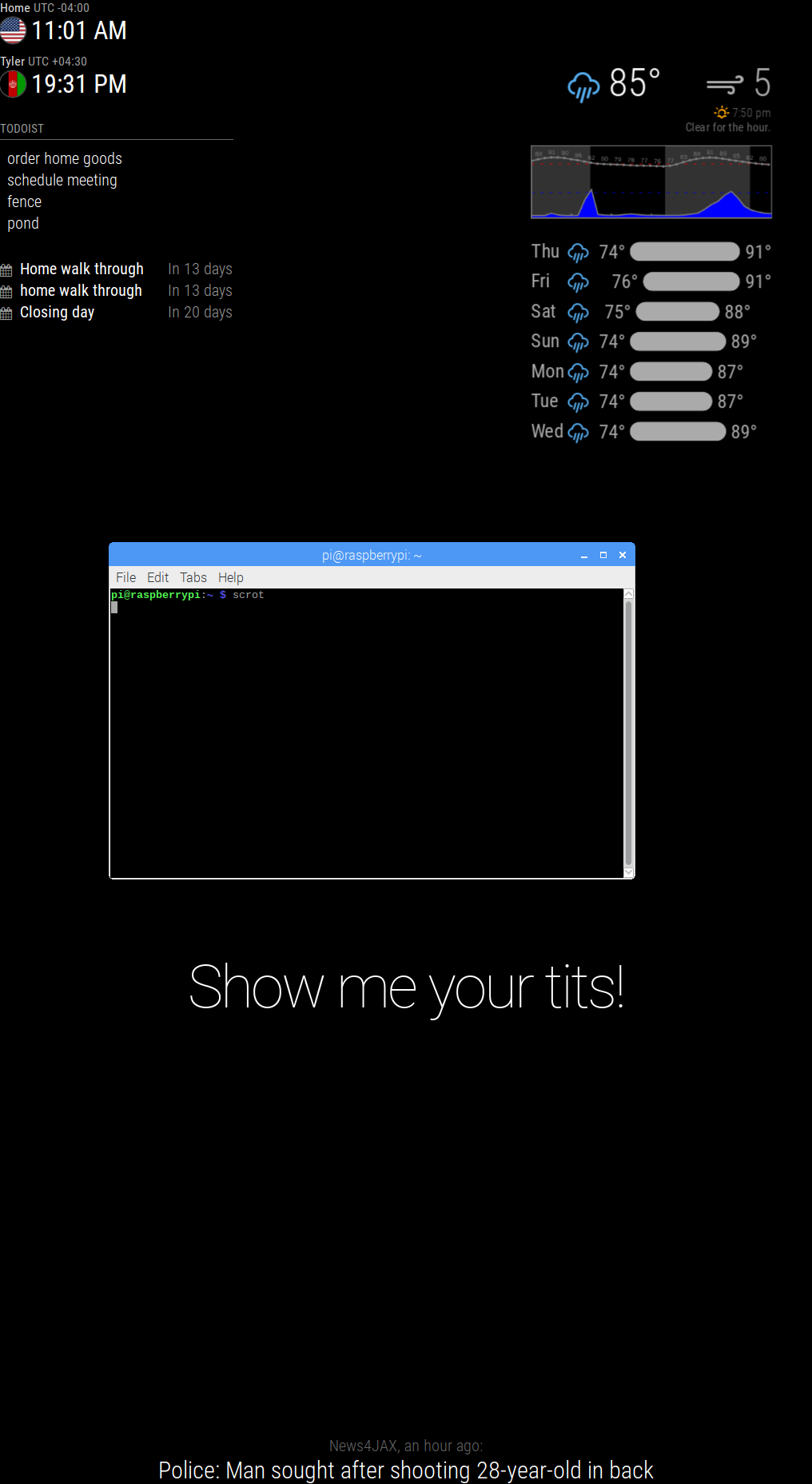
                                          0_1504191718436_2017-08-31-110120_1016x1856_scrot.png

                                          sorry bout the phrase it was the first thing i figured out how to edit and since i’m making this for the wife well… figured i’d have fun with it :)

                                          Mykle1M 1 Reply Last reply Reply Quote 0
                                          • Mykle1M Offline
                                            Mykle1 Project Sponsor Module Developer @Littlejohn21
                                            last edited by

                                            @Littlejohn21 said in MMM-forecast-io -- Localized up to the minute weather:

                                            sorry bout the phrase

                                            LMFAO! That is PERFECT!

                                            Ok, so, in honor of your wife’s #@#'s, you can try this entry in your custom.css file. I assume you want to move the module to the right and up, so you only need margin-right: -40px; and margin-top: -40px;. Adjust those numbers accordingly until you get the result you want.

                                            .MMM-MODULENAME {
                                              margin-left: 0px;
                                              margin-right: -40px; 
                                              margin-top: -40px;
                                              margin-bottom: 0px;
                                            }

                                            Create a working config
                                            How to add modules

                                            1 Reply Last reply Reply Quote 0

                                            Hello! It looks like you're interested in this conversation, but you don't have an account yet.

                                            Getting fed up of having to scroll through the same posts each visit? When you register for an account, you'll always come back to exactly where you were before, and choose to be notified of new replies (either via email, or push notification). You'll also be able to save bookmarks and upvote posts to show your appreciation to other community members.

                                            With your input, this post could be even better 💗

                                            Register Login

                                            • 1
                                            • 2
                                            • 3
                                            • 4
                                            • 5
                                            • 6
                                            • 7
                                            • 5 / 7
                                            • First post
                                              Last post
                                            Enjoying MagicMirror? Please consider a donation!
                                            MagicMirror created by Michael Teeuw.
                                            Forum managed by Sam, technical setup by Karsten.
                                            This forum is using NodeBB as its core | Contributors
                                            Contact | Privacy Policy