MagicMirror Forum
    • Recent
    • Tags
    • Unsolved
    • Solved
    • MagicMirror² Repository
    • Documentation
    • 3rd-Party-Modules
    • Donate
    • Discord
    • Register
    • Login
    A New Chapter for MagicMirror: The Community Takes the Lead
    Read the statement by Michael Teeuw here.

    My First Mirror... until now ^^

    Scheduled Pinned Locked Moved Show your Mirror
    37 Posts 17 Posters 49.0k Views 18 Watching
    Loading More Posts
    • Oldest to Newest
    • Newest to Oldest
    • Most Votes
    Reply
    • Reply as topic
    Log in to reply
    This topic has been deleted. Only users with topic management privileges can see it.
    • N Offline
      nikobelohlav
      last edited by

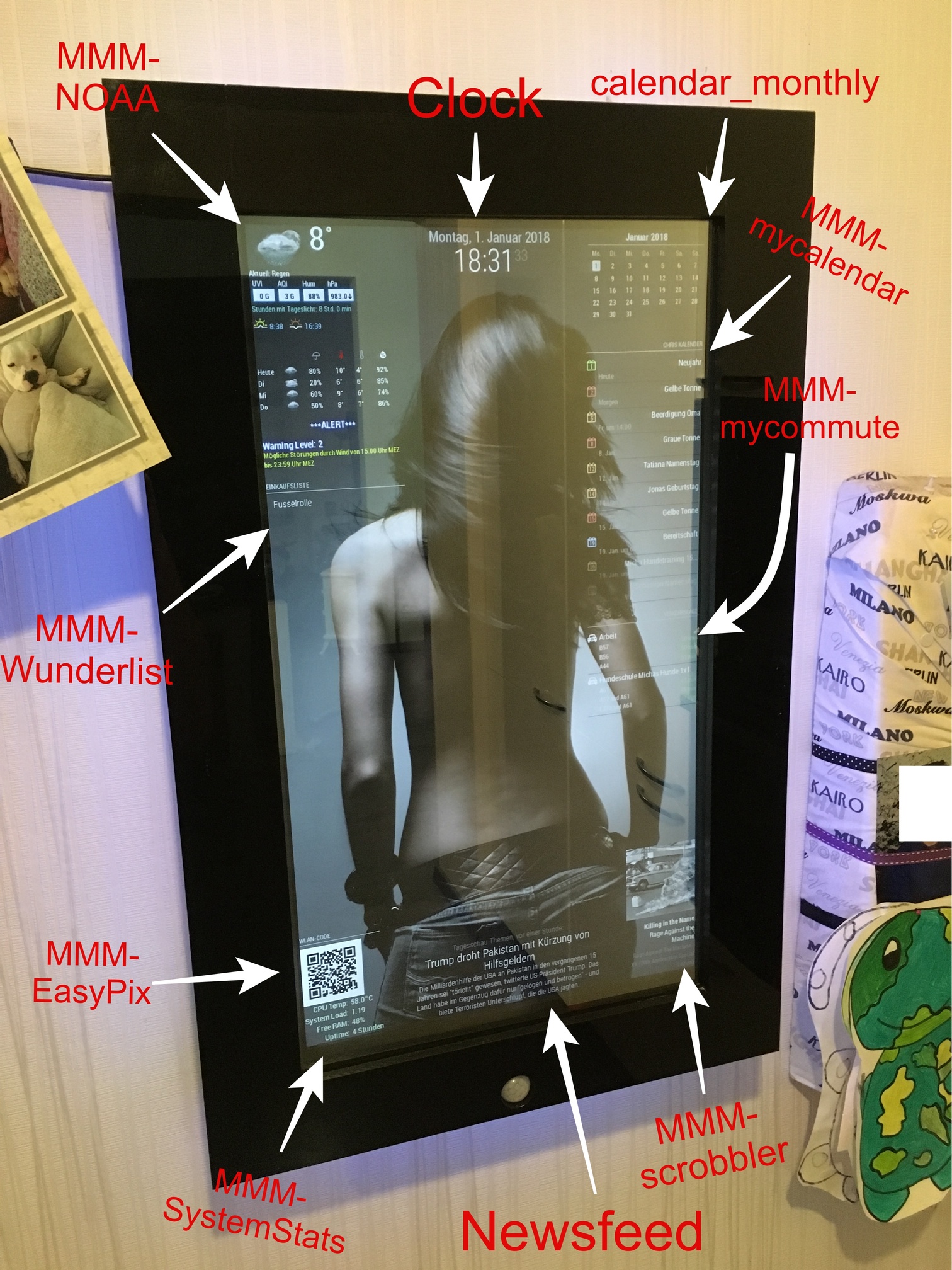
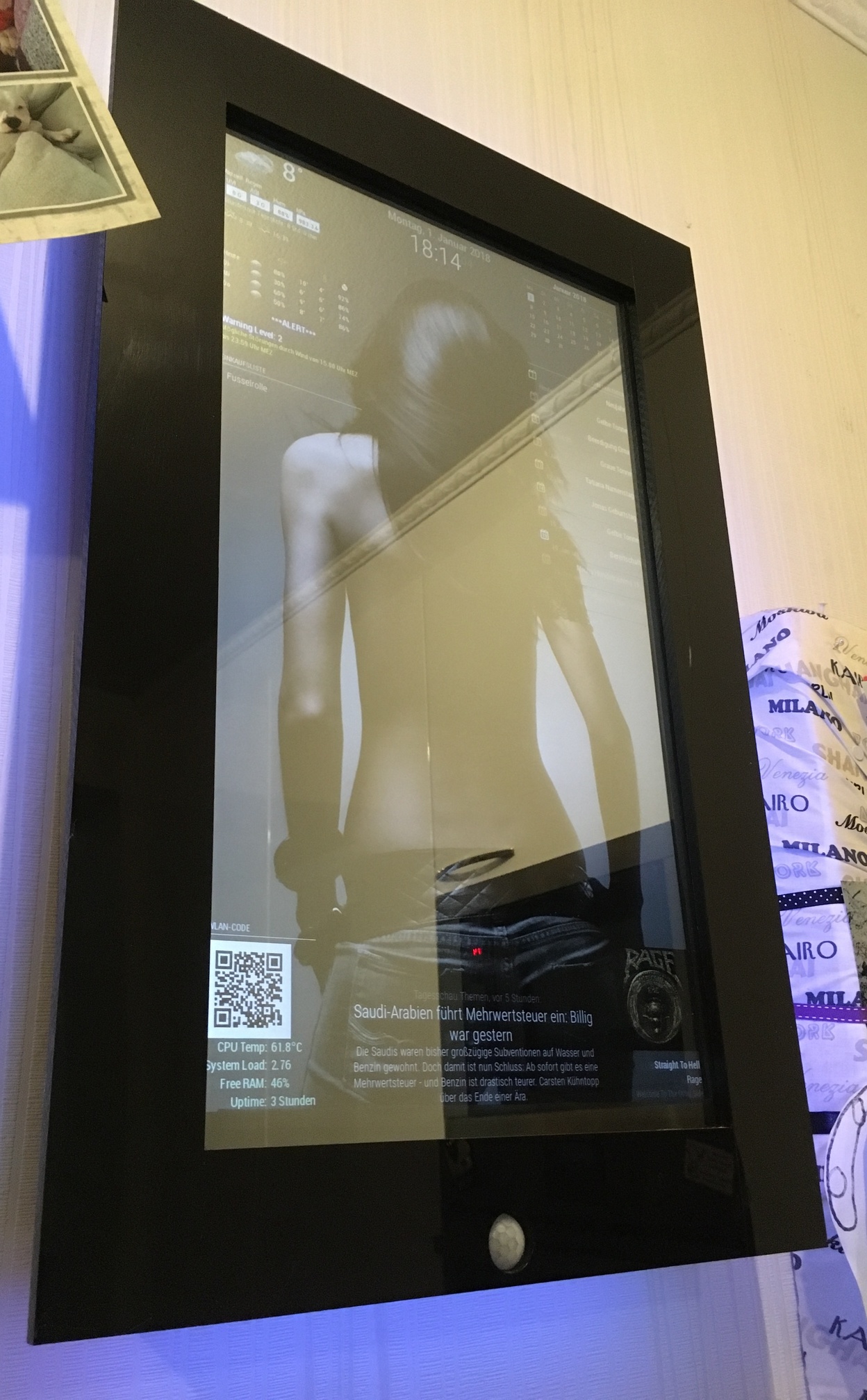
      Looks Fantastic! i have a couple questions though, how did you add the backround (THE GIRL)?, how is your PIR setup, i want to add one for mine but have been trying to figure out how to make the screen just turn black instead of shutting off completely , and last one is how did you get scrobbler to work? I installed scrobbler on my mirror but it only worked if i had last.fm running on a computer within my network and half the time it was’nt “seeing” what i was playing. any insight to those questions would be great, feel free to message me directly so you thread doesnt get packed with a bunch of non-essential post. thanks

      yawnsY 1 Reply Last reply Reply Quote 0
      • yawnsY Offline
        yawns Moderator @nikobelohlav
        last edited by

        @nikobelohlav said in My First Mirror... until now ^^:

        how did you add the backround (THE GIRL)?

        Like this: https://forum.magicmirror.builders/topic/351/add-a-background-image

        1 Reply Last reply Reply Quote 0
        • B Offline
          barnosch
          last edited by

          Sieht super aus!
          Vergess bloß nicht die Fusselrolle zu kaufen ;)

          1 Reply Last reply Reply Quote 0
          • cruunnerrC Offline
            cruunnerr
            last edited by

            Thanks for the compliments.

            You can add a background with your custom.css like the link u posted, yawns.

            My custom.css looks like this:

            /*****************************************************
             * Magic Mirror                                      *
             * Custom CSS                                        *
             *                                                   *
             * By Michael Teeuw http://michaelteeuw.nl           *
             * MIT Licensed.                                     *
             *                                                   *
             * Add any custom CSS below.                         *
             * Changes to this files will be ignored by GIT. *
             *****************************************************/
            
             body {
            	background-image: url("background9.jpg");
            	background-size: cover;
            	margin-left: 0px;
            	margin-right: 30px;
            	margin-top: 15px;
            	margin-bottom: 15px;
              	position: absolute;
              	height: calc(100% - 28px);
              	width: calc(100% - 22px);
            }
            .MMM-SystemStats  {
                    color: #CEF6CE;
                    } 
            .MMM-MyCalendar {
              max-width: 300px;
            }
            

            The image is called “background9.jpg” and has been placed in the “home/pi/MagicMirror/css” folder.

            I needed to play a little bit with the margin’s, until it fits perfect. Keep in mind that your picture should fit the screen resolution. It shouldn’t be smaller. if it is, you should take a look at the MMM-ProfilePicture module.

            @nikobelohlav
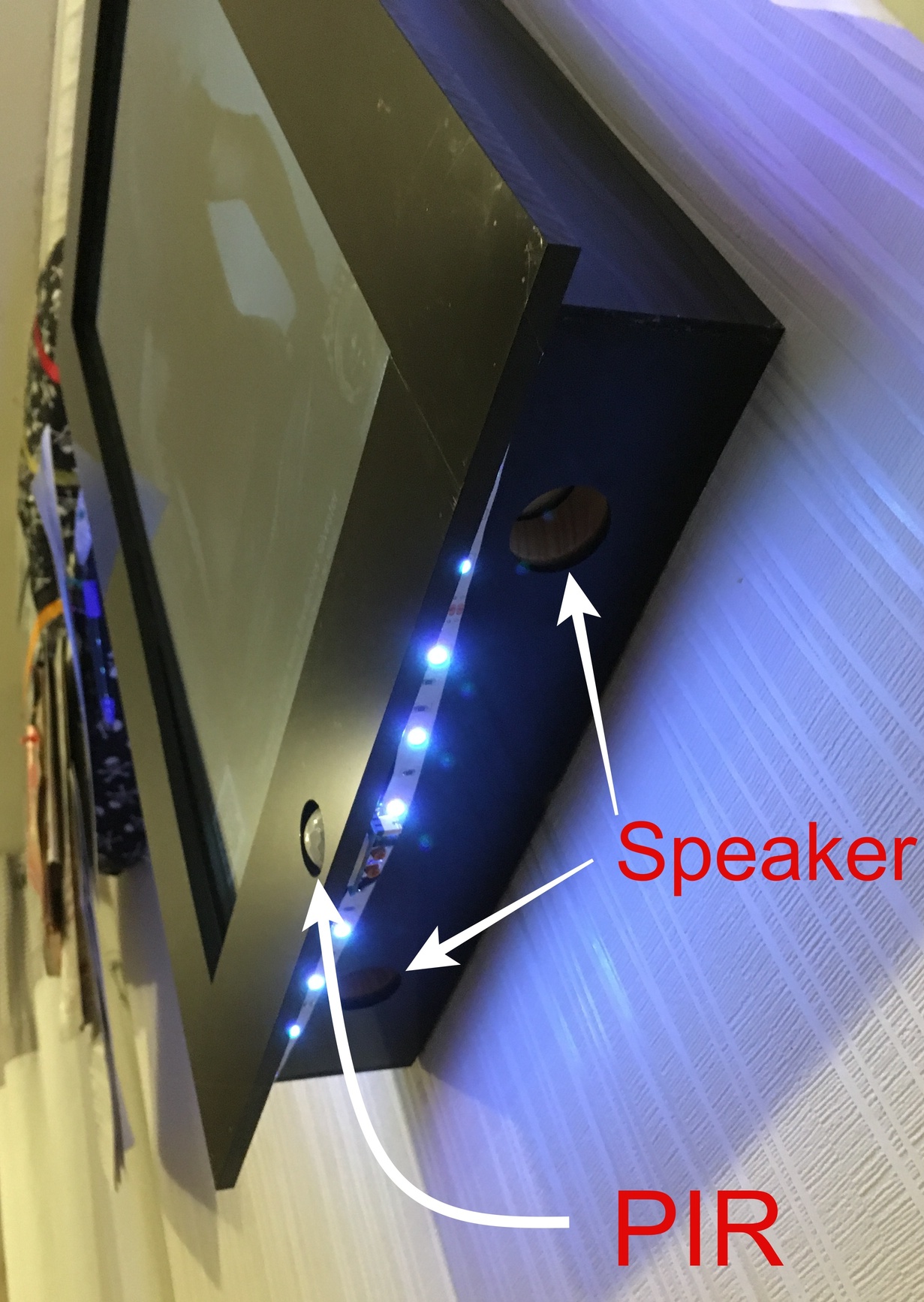
            I just used the MMM-PIR module for it. It turns the HDMI signal off, and my monitor recognized that via HDMI-CEC/ARC and turns off. When the signal comes back the motor turns on within 2 seconds. thats quick enough i think.
            I don’t know if it is possible to change the MMM-Pir-Sensor.js so that not the command “tvservice …” is executed, but a notification will be sent to other modules like the profile-switcher. Maybe you should open a new thread, even if I don’t quite understand why you don’t want to turn off your monitor.

            The scrobbler module was a little bit tricky. First you need to register your apps, to share the current playing music with last.fm.
            I actually just use Spotify, so in the Spotify-settings of my phone, tablet and macbook i needed to login to last.fm via the Spotify app.
            Sometimes i got the same problem as you, but its not a failure of the module. I played music and checked on last.fm if there is actually scribbling something, but there wasn’t. Then i turn back to my Spotify app and just log out and log in again (to last.fm in the Spotify settings) and that brings the scrobbling back.
            So its more a bug, that happens sometimes, cause Spotify didn’t correctly streams to last.fm i think.
            When u don’t pause the music it should scrobble continuous.

            Also keep in mind:

            When is a scrobble a scrobble?
            A track should only be scrobbled when the following conditions have been met:

            The track must be longer than 30 seconds.
            And the track has been played for at least half its duration, or for 4 minutes (whichever occurs earlier.)
            As soon as these conditions have been met, the scrobble request may be sent at any time. It is often most convenient to send a scrobble request when a track has finished playing.

            @barnosch
            Ja im Winter ist es manchmal schlimm mit den Hundis ^^

            1 Reply Last reply Reply Quote 0
            • D Offline
              doubleT Module Developer
              last edited by

              I really like how you integrated the motion sensor! The rest is a little bit too much “screen” (as opposed to mirror) for me, but I can see the appeal. I like it.

              1 Reply Last reply Reply Quote 0
              • cruunnerrC Offline
                cruunnerr
                last edited by

                @doubleT said in My First Mirror... until now ^^:

                The rest is a little bit too much “screen” (as opposed to mirror) for me, but I can see the appeal.

                i know what you mean ^^
                But since i found out how many things can be shown with the MM, i couldn’t let it be :D
                Maybe the background is “too much”, but i like it anyhow XD
                but if i turn on the room lights, its bright enough to use it as a mirror :P

                Mykle1M 1 Reply Last reply Reply Quote 1
                • Mykle1M Offline
                  Mykle1 Project Sponsor Module Developer @cruunnerr
                  last edited by

                  @cruunnerr said in My First Mirror... until now ^^:

                  Maybe the background is “too much”, but i like it anyhow XD

                  Whatever you like is how your mirror should be.

                  Again, well done, mate. :-)

                  Peace

                  Create a working config
                  How to add modules

                  1 Reply Last reply Reply Quote 0
                  • cruunnerrC Offline
                    cruunnerr
                    last edited by cruunnerr

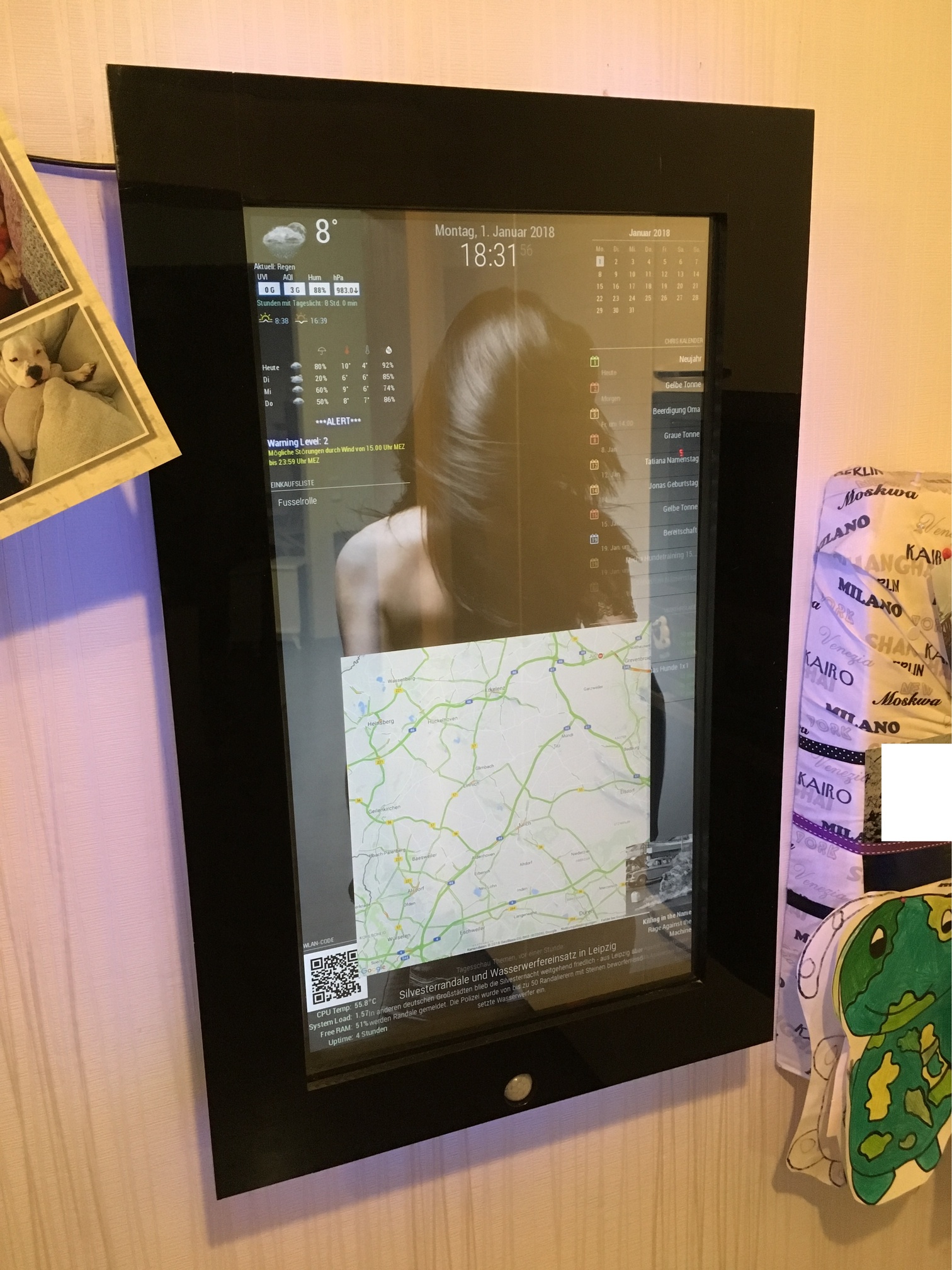
                    0_1514954682191_IMG_2076_low_quality.jpg

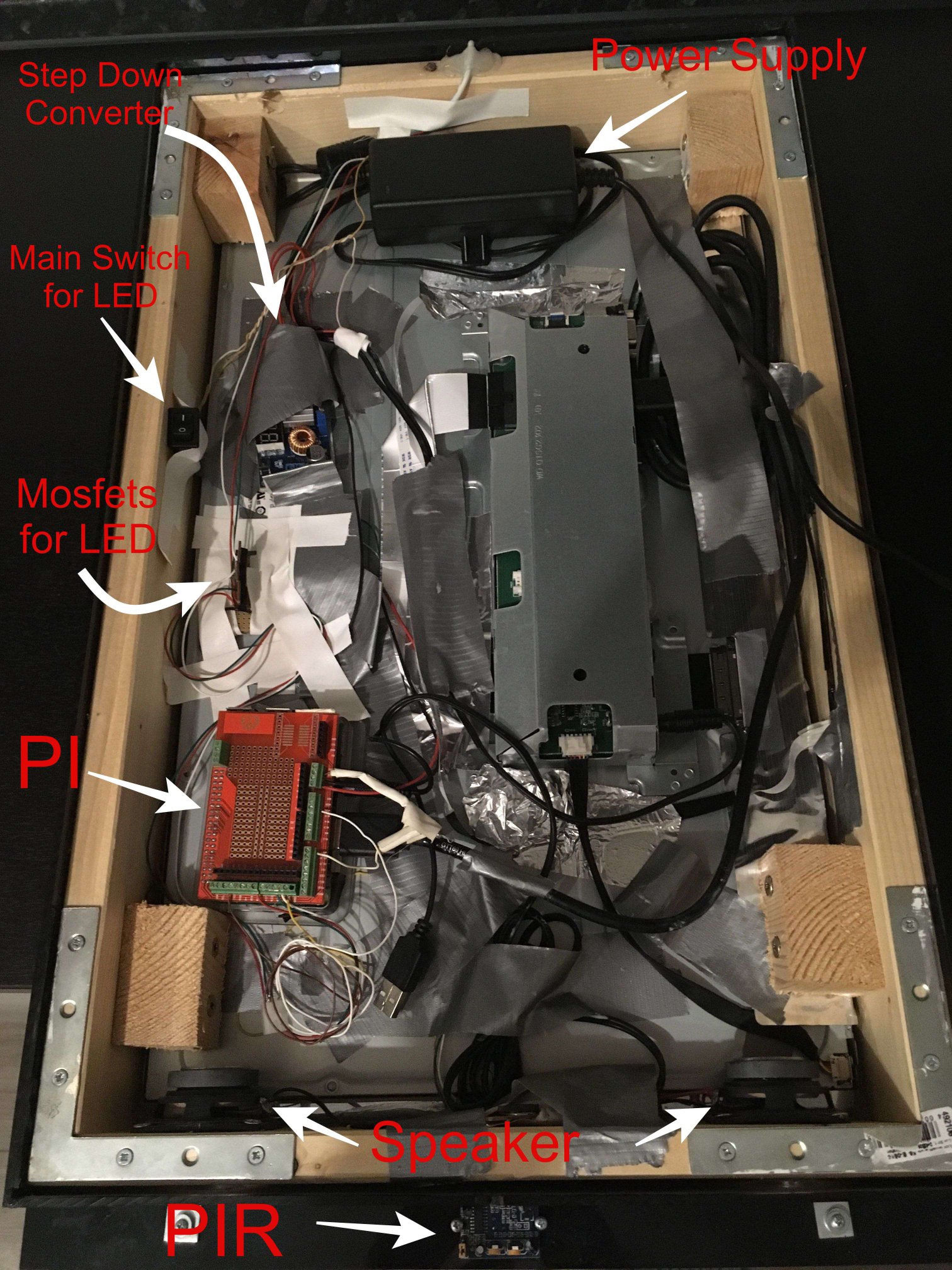
                    Very tinkered cause i am experimenting a lot ^^

                    1 Reply Last reply Reply Quote 0
                    • F Offline
                      fischi87
                      last edited by

                      Hello, is a really awesome mirror really!!!

                      one question, how can i get the header over the qr code picture?

                      thanks

                      cruunnerrC 1 Reply Last reply Reply Quote 0
                      • cruunnerrC Offline
                        cruunnerr @fischi87
                        last edited by

                        @fischi87

                        Just type a header in the config:

                        {
                            			module: "MMM-EasyPix",
                        			header: "WLAN-Code",
                        			position: "bottom_left",
                        			config: {
                        				picName: "guest_wifi_config.png", // Enter the picture file name.
                        				maxWidth: "150px",      // Size picture precisely. Retains aspect ratio.
                        			}
                        		},
                        
                        F 1 Reply Last reply Reply Quote 1
                        • F Offline
                          fischi87 @cruunnerr
                          last edited by

                          @cruunnerr

                          ah yes alright, thanks

                          1 Reply Last reply Reply Quote 0
                          • metalldetectorM Offline
                            metalldetector
                            last edited by

                            hi… i have motion detector pir. and a led5050 strip.
                            can you please provide the software part between pir and led… for dimming and on off feature … pleeeese
                            thx

                            1 Reply Last reply Reply Quote 0
                            • cruunnerrC Offline
                              cruunnerr
                              last edited by cruunnerr

                              Hey @metalldetector

                              I already did somewhere in the forum ^^

                              You need to install PIGPIOD.

                              sudo apt-get install build-essential python-dev unzip wget

                              wget http://abyz.me.uk/rpi/pigpio/pigpio.zip && unzip pigpio.zip && cd PIGPIO && sudo make install

                              Connect the PIR like shown at Part 2.2 and follow the guide:
                              https://forum.magicmirror.builders/topic/6291/howto-turn-on-off-your-monitor-time-based-pir-button-app?page=1

                              When creating the pir.py and fill ist with this code:

                              #!/usr/bin/env python
                              
                              import sys
                              import time
                              import RPi.GPIO as io
                              import subprocess
                              import pigpio
                              
                              io.setmode(io.BCM)
                              SHUTOFF_DELAY = 119 # seconds
                              PIR_PIN = 25       # 22 on the board
                              LED_PIN = 16
                              
                              def main():
                                  io.setup(PIR_PIN, io.IN)
                                  io.setup(LED_PIN, io.OUT)
                                  turned_off = False
                                  last_motion_time = time.time()
                              
                                  while True:
                                      if io.input(PIR_PIN):
                                          last_motion_time = time.time()
                                          io.output(LED_PIN, io.LOW)
                                          print ".",
                                          sys.stdout.flush()
                                          if turned_off:
                                              turned_off = False
                                              turn_on()
                                      else:
                                          if not turned_off and time.time() > (last_motion_time + 
                                                                               SHUTOFF_DELAY):
                                              turned_off = True
                                              turn_off()
                                          if not turned_off and time.time() > (last_motion_time + 1):
                                              io.output(LED_PIN, io.HIGH)
                                      time.sleep(.1)
                              
                              def turn_on():
                              	subprocess.call("sh /home/pi/monitor_on.sh", shell=True)
                              
                              def turn_off():
                              	subprocess.call("sh /home/pi/monitor_off.sh", shell=True)
                              
                              if __name__ == '__main__':
                                  try:
                                      main()
                                  except KeyboardInterrupt:
                                      io.cleanup()


                              For the monitor_on.sh use this:

                              vcgencmd display_power 1
                              
                              pigs p 17 1
                              pigs p 22 1
                              pigs p 24 1
                              
                              sleep 0.06s
                              
                              pigs p 17 2
                              pigs p 22 2
                              pigs p 24 2
                              
                              sleep 0.06s
                              
                              pigs p 17 3
                              pigs p 22 3
                              pigs p 24 3
                              
                              sleep 0.06s
                              
                              pigs p 17 4
                              pigs p 22 4
                              pigs p 24 4
                              
                              sleep 0.06s
                              
                              pigs p 17 5
                              pigs p 22 5
                              pigs p 24 5
                              
                              sleep 0.06s
                              
                              pigs p 17 6
                              pigs p 22 6
                              pigs p 24 5
                              
                              sleep 0.06s
                              
                              pigs p 17 7
                              pigs p 22 7
                              pigs p 24 6
                              
                              sleep 0.06s
                              
                              pigs p 17 8
                              pigs p 22 8
                              pigs p 24 7
                              
                              sleep 0.06s
                              
                              pigs p 17 9
                              pigs p 22 9
                              pigs p 24 8
                              
                              sleep 0.06s
                              
                              pigs p 17 10
                              pigs p 22 10
                              pigs p 24 9
                              
                              sleep 0.06s
                              
                              pigs p 17 11
                              pigs p 22 11
                              pigs p 24 10
                              
                              sleep 0.06s
                              
                              pigs p 17 12
                              pigs p 22 12
                              pigs p 24 11


                              For monitor_off.sh use this:

                              pigs p 17 12
                              pigs p 22 12
                              pigs p 24 11
                              
                              sleep 0.06s
                              
                              pigs p 17 11
                              pigs p 22 11
                              pigs p 24 10
                              
                              sleep 0.06s
                              
                              pigs p 17 10
                              pigs p 22 10
                              pigs p 24 9
                              
                              sleep 0.06s
                              
                              pigs p 17 9
                              pigs p 22 9
                              pigs p 24 8
                              
                              sleep 0.06s
                              
                              pigs p 17 8
                              pigs p 22 8
                              pigs p 24 7
                              
                              sleep 0.06s
                              
                              pigs p 17 7
                              pigs p 22 7
                              pigs p 24 6
                              
                              sleep 0.06s
                              
                              pigs p 17 6
                              pigs p 22 6
                              pigs p 24 5
                              
                              sleep 0.06s
                              
                              pigs p 17 5
                              pigs p 22 5
                              pigs p 24 5
                              
                              sleep 0.06s
                              
                              pigs p 17 4
                              pigs p 22 4
                              pigs p 24 4
                              
                              sleep 0.06s
                              
                              pigs p 17 4
                              pigs p 22 4
                              pigs p 24 4
                              
                              sleep 0.06s
                              
                              pigs p 17 3
                              pigs p 22 3
                              pigs p 24 3
                              
                              sleep 0.06s
                              
                              pigs p 17 2
                              pigs p 22 2
                              pigs p 24 2
                              
                              vcgencmd display_power 0
                              
                              sleep 0.06s
                              
                              pigs p 17 1
                              pigs p 22 1
                              pigs p 24 1
                              
                              sleep 0.06s
                              
                              pigs p 17 0
                              pigs p 22 0
                              pigs p 24 0


                              Hope that helps. Try to find your best way and ask, if u need more help :)

                              Edit:
                              Oh and u need to start Pigpio on reboot with rc.local. ;)

                              metalldetectorM N 2 Replies Last reply Reply Quote 3
                              • swvalentiS Offline
                                swvalenti Project Sponsor
                                last edited by

                                If you told me that your background wasn’t a stock photo I would upvote this! Nice work!

                                1 Reply Last reply Reply Quote 0
                                • cruunnerrC Offline
                                  cruunnerr
                                  last edited by

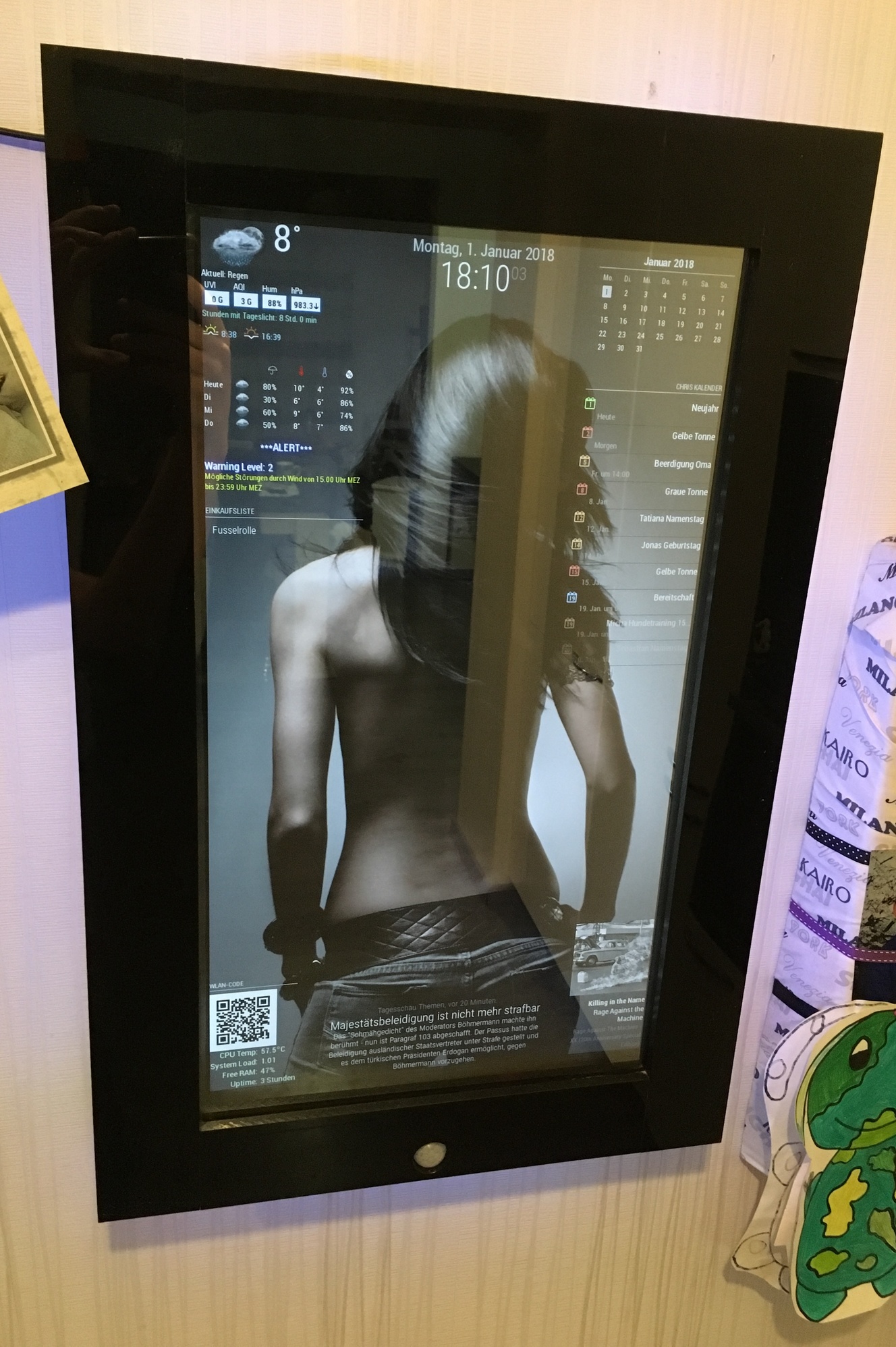
                                  Well, meanwhile i changed my background, but still love it :P
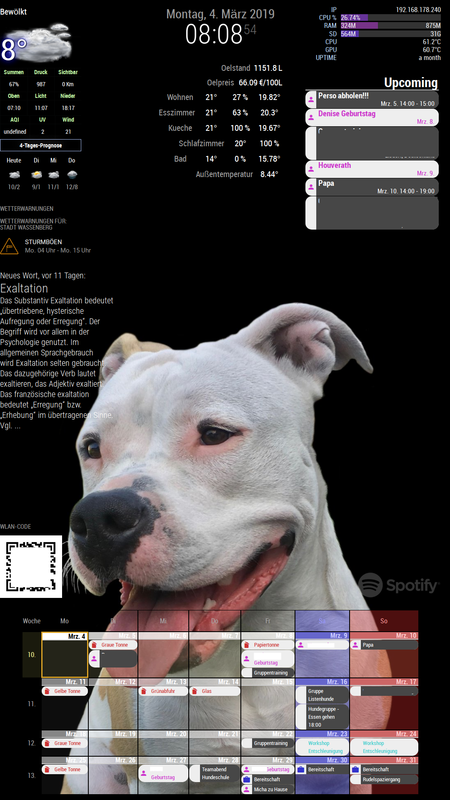
                                  Bild Text

                                  1 Reply Last reply Reply Quote 0
                                  • metalldetectorM Offline
                                    metalldetector @cruunnerr
                                    last edited by

                                    @c:face_with_steam_from_nose: ruunnerr ok that works…
                                    -What ist the Funktion of LED_PIN = 16 .
                                    Only one pin …
                                    Do I need RGB pins in the script?

                                    -And then the led stripe start it’s flickering…
                                    Thx4yourhelp

                                    1 Reply Last reply Reply Quote 0
                                    • cruunnerrC Offline
                                      cruunnerr
                                      last edited by cruunnerr

                                      LED-Pin just shows, if the PIR detects motion. You don’t need to use it.

                                      The pir.py script starts the other shell scripts when motion is detected.

                                      So all commands for the RGB-Stripe are within the shell scripts (monitor_on / off.sh).
                                      And as u can see, i used GPIO 17,22 and 24.
                                      17 = red
                                      22 = green
                                      24 = blue

                                      To control the LEDs i used PIGPIOD and it’s commands, as i wrote.

                                      So after installing PIGIOD u can start it with:
                                      sudo pigpiod

                                      Commands like pigs p 22 128 will set green to 50%.
                                      pigs p 24 255 will set blue to 100%

                                      in the shell script i fade all colors from 1 to 12% with sleeps.

                                      Edit:

                                      As i wrote before u need to Autostart pigpiod via rc.local.

                                      sudo nano /etc/rc.local

                                      Mine looks like this:

                                      #!/bin/sh -e
                                      #
                                      # rc.local
                                      #
                                      # This script is executed at the end of each multiuser runlevel.
                                      # Make sure that the script will "exit 0" on success or any other
                                      # value on error.
                                      #
                                      # In order to enable or disable this script just change the execution
                                      # bits.
                                      #
                                      # By default this script does nothing.
                                      
                                      # Print the IP address
                                      _IP=$(hostname -I) || true
                                      if [ "$_IP" ]; then
                                        printf "My IP address is %s\n" "$_IP"
                                      fi
                                      
                                      iwconfig wlan0 power off &
                                      
                                      sleep 5 &
                                      
                                      /usr/local/bin/pigpiod
                                      
                                      sleep 10 &
                                      
                                      /usr/bin/python /home/pi/pir.py &
                                      
                                      exit 0

                                      
                                      metalldetectorM 1 Reply Last reply Reply Quote 0
                                      • metalldetectorM Offline
                                        metalldetector @cruunnerr
                                        last edited by

                                        @cruunnerr ok I think this is the right way and I understand it with the led pin on Pin16
                                        … Just the flickering looks not good… I try a other power consumption…

                                        …can I only fade the LEDs or can I make a light like a animation around my mirror?

                                        Thanks for your help … And so fast.

                                        This is a good forum for me…

                                        Thx to all guys

                                        1 Reply Last reply Reply Quote 0
                                        • cruunnerrC Offline
                                          cruunnerr
                                          last edited by cruunnerr

                                          Well, if i had to do that project gain, i would not choose the RGB-5050 stripes again…

                                          I would directly get WS2812, because u just need one PWM Pin and with that you were able to do things like animations…

                                          In another project (infinity table) i choosed this one and was pretty amused :)

                                          https://youtu.be/IcDjzh03W-4

                                          1 Reply Last reply Reply Quote 0
                                          • metalldetectorM Offline
                                            metalldetector
                                            last edited by

                                            Yes. But what is the difference between WS2812, WS2812, neopixel…
                                            What is the best stripe with a good price…
                                            I think a meter for 60 euro is to much…

                                            Greetings from Saxony, Germany

                                            1 Reply Last reply Reply Quote 0

                                            Hello! It looks like you're interested in this conversation, but you don't have an account yet.

                                            Getting fed up of having to scroll through the same posts each visit? When you register for an account, you'll always come back to exactly where you were before, and choose to be notified of new replies (either via email, or push notification). You'll also be able to save bookmarks and upvote posts to show your appreciation to other community members.

                                            With your input, this post could be even better 💗

                                            Register Login

                                            • 1
                                            • 2
                                            • 1 / 2
                                            • First post
                                              Last post
                                            Enjoying MagicMirror? Please consider a donation!
                                            MagicMirror created by Michael Teeuw.
                                            Forum managed by Sam, technical setup by Karsten.
                                            This forum is using NodeBB as its core | Contributors
                                            Contact | Privacy Policy