Read the statement by Michael Teeuw here.
-
Hi again! I’ve been using your excellent module since I started my build. And all along I had it in an “IFrame” on the mirror (the IFrame is shown via a touch on a button MMM-ModuleBar). However, about 2 moths ago, your module no longer shows up in the IFrame (it’s just black on the Mirror). However if I use another browser (not Electron) the IFrame shows the Remote Control. Also it shows up “remotely” both if I go directly to the Remote Control address and if I open the full Mirror in another browser.
I’m not sure where the problem is. If it’s on your module or in Electron.
I have another “web-interface” (SONOS Web Interface) in another IFrame showed the same way and that still works.
I’m on the dev branch of MM.Let me know if you have any ideas… :)
-
I downloaded this module today and its been the best one so far. It has everything in it that I have been trying to accomplish for weeks. I wish I saw this one sooner. I have only one issue, when i click the restart MagicMirror button i get an error and my MagicMirror dose not restart.
-
@chaseb1357 said in [Remote-Control] Shutdown, Configure and Update your MagicMirror:
I downloaded this module today and its been the best one so far. It has everything in it that I have been trying to accomplish for weeks. I wish I saw this one sooner.
same to me. this module rocks…! i am for donating with ETH
-
Can you confirm the get URL to hide and show all?
-
@Jopyth Hi! First of all thanks a lot for creating this awesome module, it really expands the capability of what a Magic Mirror can do. I just wanted to point out that I had an issue turning on the screen after turn it it off using the module. I went to the “node_helper.js” file to see which function you were using: if (query.action === “MONITORON”)
{
exec(“tvservice --preferred && sudo chvt 6 && sudo chvt 7”, opts, function(error, stdout, stderr){ self.checkForExecError(error, stdout, stderr, res); });
return true;
}
if (query.action === “MONITOROFF”)
{
exec(“tvservice -o”, opts, function(error, stdout, stderr){ self.checkForExecError(error, stdout, stderr, res); });
return true;
}
This function wasn’t really working for me and it seems a bit outdated. You can go further on the reasons why on this links: https://raspberrypi.stackexchange.com/questions/52042/turning-tvservice-on-and-off-leaves-screen-blank http://www.elinux.org/RPI_vcgencmd_usage I just changed that code to:if (query.action === “MONITORON”)
{
exec(“vcgencmd display_power 1”, opts, function(error, stdout, stderr){ self.checkForExecError(error, stdout, stderr, res); });
return true;
}
if (query.action === “MONITOROFF”)
{
exec(“vcgencmd display_power 0”, opts, function(error, stdout, stderr){ self.checkForExecError(error, stdout, stderr, res); });
return true;
} And everything seems to work perfectly for me now. I’m using a Raspberry pi 1 and Midori as a web browser. My question is, would you be able to implement this changes in order to solve this issue for another users? (and also to keep my same valid configuration in case of an update) Thanks! -
I have not been able to work on anything mentioned here, yet, but at least got out a release with a few cool contributions by other people, and a few simple fixes and additions. I do not know when I will be able to look at your questions and issues, but maybe in one or two weeks (especially turning display on and off apparently works much better with the
vcgencmdcommand). If anyone is reading is this in the hopes of finally getting an answer from me, please feel free to post again and remind me, if have not been able to solve it yourself.Here is the change log:
[1.1.4] - 2017-09-17
Added
- Dutch translation
- Updating a module tries to install dependencies with
npm install - Module identifier is shown if a module is locked with lock strings
- Confirmation dialog before restart and shutdown
Fixed
- Internal save file format and mistakenly hiding modules which were hidden by other modules
- Restart should work for new installations
Changed
- German translation for power menu changed from “Ausschalten” to “Energieoptionen”
-
@Jopyth Thanks for the update!
-
So, I’m having a really unexpected bug, where this module somehow negates my custom CSS for the header color of all modules. No idea how/why, but when the page first loads, it’s fine, but as the last of the modules (including this one) load and are activated, the color suddenly snaps back to the default
#aaa.I know for certain it’s this module, since disabling it in the config fixed the header issue. I think this was introduced in the newest update, but I’m not 100% for-sure positive. I do know it started right around the most recent release date though.
-
@Jopyth
Hello, excellent module. I have built the translation file into Spanish: es.json
you want it? -
@pepebc Sure. Can you make a PR?
@pyrosmiley Did you start using the brightness adjustment? That definitely overrides brightness of headers and text. Maybe reset to default? That should solve the problem.
Helpful sticky: How to troubleshoot
-
This module is great - a couple items related to support for the ‘official 7" pi touchscreen’
I can probably code this up and submit a PR if you want - the on/off is easy to do because that is already in the helper. Brightness would need to get moved to the helper away from the CSS tricks.It is interesting that controlling the brightness of a monitor itself over HDMI is surprisingly non-existent, but the 7" touchscreen h/w rev: 1.1 does indeed support direct brightness manipulation:
You can control the brightness of the backlight itself by:
echo X > /sys/class/backlight/rpi_backlight/brightnesswhere X is a value between 0 and 255
And you can turn off the backlight with
echo 0 > /sys/class/backlight/rpi_backlight/bl_powerand turn it back on with:
echo 1 > /sys/class/backlight/rpi_backlight/bl_powerEarle
-
@Jopyth I didn’t think I had (actually I don’t think I ever even noticed it!) but I guess I bumped into it just enough to change the value. All good now. Thanks!
-
@Jopyth What Happen , When Press menu “Edit config.js”,The Error show like this
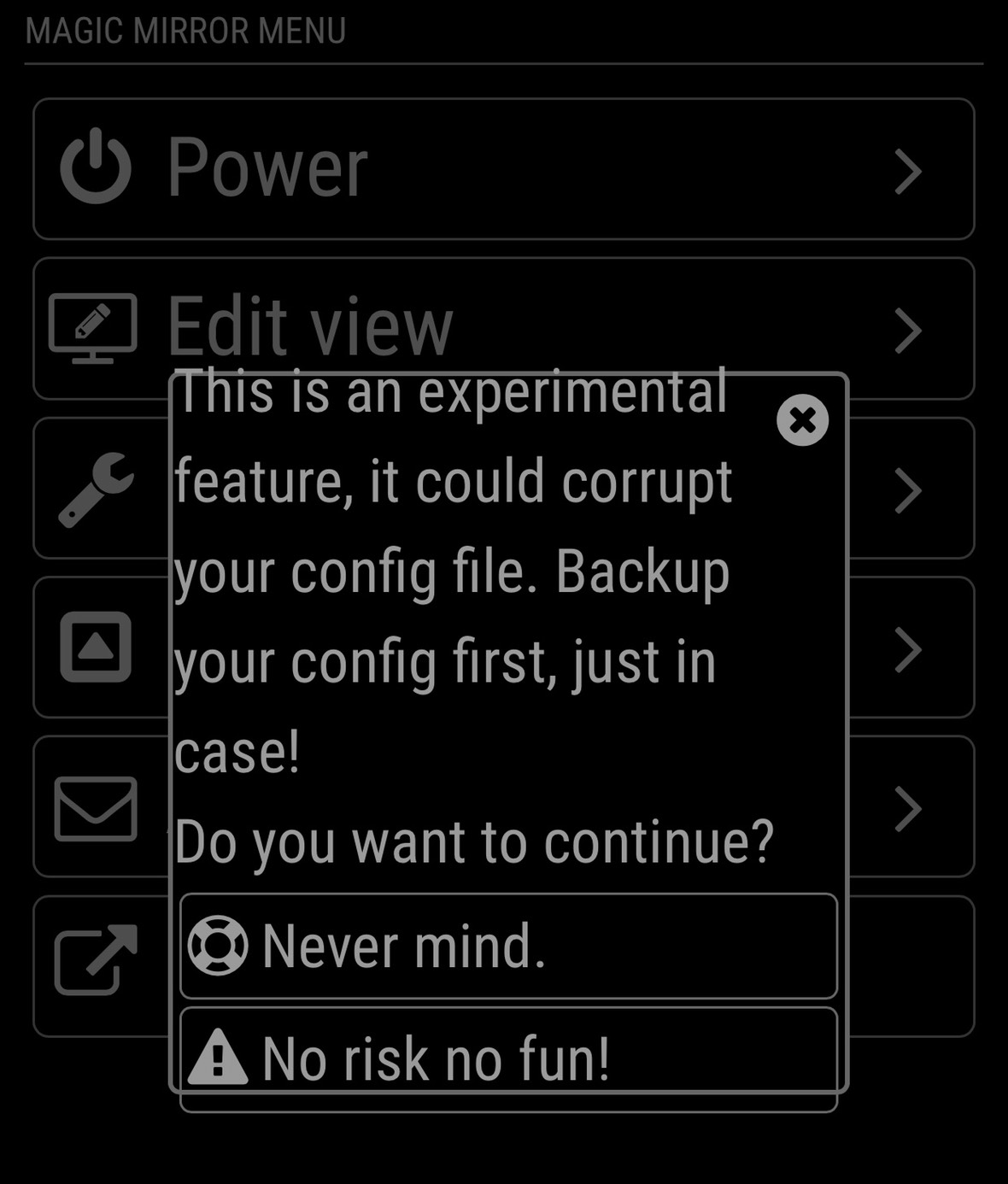
How to solve it,Thnaks so much -
@nobita It is not an error, just a warning. You can use it, but make sure to make a backup of your
config.jsfile first.Also new release with the long overdue french translation (which might need some improvements - I do not know, PRs are welcome if you spot anything):
[1.1.5] - 2018-05-14
Added
- French translation
Fixed
- Updated documentation to new MagicMirror version
- Fix error on updating MagicMirror
-
@jopyth Thank so much
-
very cool.
question… can you get this to work using touch screen?
like the buttons you show on the screen, control them using touch instead of mouse pointer or keyboard? -
@justjim1220 This is intended to be used from a different device (i.e. not your MagicMirror), for example, your smartphone or tablet. Maybe you could get it to work on your MagicMirror with something like the IFrame module and a touchscreen?
-
@jopyth I just want to thank you again for your work on this module! Your module rocks!
BTW - It doesn’t have to be a mobile/tablet, I wrote an AI skill for Mycroft that uses your MMM-Remote-Control module to pass verbal commands to the MagicMirror.
If you’d like, check out the 2 min. video here.
And here’s a link to the repo if anyone would like to check out the Python code that interacts with the MMM-Remote-Control module.
Thanks again!
Cheers! -
Hi snille,
Have you ever found a solution? I want to do something similar, but was also not able to get a module to be hidden/shown during certain times using MMM-ModuleScheduler
I tried
{notification: 'REMOTE_ACTION', schedule:  '*/2 * * * MON-FRI', payload: {action: "SHOW&module=module_15_MMM-Traffic"}},

{notification: 'REMOTE_ACTION', schedule:  '1-59/2 * * * MON-FRI', payload: {action: "HIDE&module=module_15_MMM-Traffic"}}
Does not make real sense, switching on a module every other minute, but would have been nice for testing…
If I use this as a GET request via HTTP,
http://My_MM_IP:8080/remote?action=HIDE&module=module_16_MMM-Trafficit works like charm…also curl works using another Raspi sending this command to the MM
Any idea?
Thanks, Peter
-
Dear MM-Builders,
does someone know how to solve attached problem?
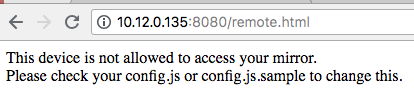
Thanks in advace :-)




Hello! It looks like you're interested in this conversation, but you don't have an account yet.
Getting fed up of having to scroll through the same posts each visit? When you register for an account, you'll always come back to exactly where you were before, and choose to be notified of new replies (either via email, or push notification). You'll also be able to save bookmarks and upvote posts to show your appreciation to other community members.
With your input, this post could be even better 💗
Register Login