@MarNog It might not be the filter breaking things - it could be CX2’s calendar engine. CX3Agenda does retrieval through the built in Calendar app and just displays - I’d highly recommend going to that, as it’s fully supported, unlike CX2.
A New Chapter for MagicMirror: The Community Takes the Lead
Read the statement by Michael Teeuw here.
Read the statement by Michael Teeuw here.
 B
Offline
B
Offline
Posts
-
RE: MMM-CalendarExt2 filter
-
RE: Is there a Difference between these ???
@sdetweil oh, I C&P’d that. :)
-
RE: Is there a Difference between these ???
@sdetweil (that wasn’t a copy. It was escaped. backslash ` )
-
RE: MMM-ValuesByNotification, CSS Advice...
@wishmaster270 Great start, now to adjust to fit… 🤣
Edit: here I am adjusting it and trying to figure out why it wouldn’t move up to the bar, then I realized, you had it in Top Center. 😞😞😞😞😖😖😖😖
-
RE: Is there a Difference between these ???
@plainbroke To expand on @wishmaster270 comment - To post code, please use the button
that looks like this:
that button puts this ``` into your text, allowing you to get code posted like this to make it readable:
{ ipAddress: “192.168.178.31”, name: “QNAP1”, icon: “database”, colorStateOnline: “green”, colorStateOffline: “red”, }, -
RE: MMM-ValuesByNotification, CSS Advice...
@wishmaster270 Getting closer, now just out of order, but much better organized.

It is also not sharing the top bar the way I like on the test screen, haven’t had time to go check the real display.
-
RE: MMM-MagicMover - transfer repo
@C-son It’s github - we can fork it if someone wants to adjust for breaking changes.
-
RE: MMM-ValuesByNotification, CSS Advice...

CSS in custom.css is exactly as you did, with the exception of having the overall display “inline-flex” with other modules to have the top bar fill horizontally rather than vertically.
Here’s my config as present.
{ module: "MMM-ValuesByNotification", // https://github.com/Tom-Hirschberger/MMM-ValuesByNotification position: "top_bar", config: { animationSpeed: 0, updateInterval: 15, groupPositions: "e", itemPositions: "e", reuseCount: 99, transformerFunctions: { degToCompass: (num) => { val = ((num/22.5)+.5) | 0; arr = ["N","NNE","NE","ENE","E","ESE", "SE", "SSE","S","SSW","SW","WSW","W","WNW","NW","NNW"]; res = arr[(val % 16)]; return res; }, }, groups: [ { items: [ { notification: "WeatherLink", classes: "col1", values: [ { valueTitle: "Temperature Outdoors", valueUnit: "°", jsonpath: "data.conditions[0].temp", valueFormat: "Number(${value}).toFixed(2)", }, ], }, { notification: "TempRoom", classes: "col1", values: [ { valueTitle: "My Office Temperature", valueUnit: "°", jsonpath: "temperature_f", valueFormat: "Number(${value}).toFixed(2)", }, ], }, { notification: "TempCase", classes: "col1", values: [ { valueTitle: "CPU Case Temperature", valueUnit: "°", jsonpath: "temperature_f", valueFormat: "Number(${value}).toFixed(2)", }, ], }, { notification: "WeatherLink", classes: "col1", values: [ { valueTitle: "Utility Room Temperature", valueUnit: "°", jsonpath: "data.conditions[1].temp_in", valueFormat: "Number(${value}).toFixed(2)", }, ], }, { notification: "WeatherLink", classes: "col2", values: [ { valueTitle: "Indoor Humidity", valueUnit: "%", jsonpath: "data.conditions[1].hum_in", }, { valueTitle: "Outdoor Humidity", valueUnit: "%", jsonpath: "data.conditions[0].hum", }, { valueTitle: "Wind Speed", valueUnit: "MPH", jsonpath: "data.conditions[0].wind_speed_last", unitSpace: true, }, { valueTitle: "Wind Direction", jsonpath: "data.conditions[0].wind_dir_last", valueTransformers: ["degToCompass"], }, ] }, ], }, ], }, }, -
MMM-ValuesByNotification, CSS Advice...
I can’t seem to figure this out.
I currently have the following display set up:
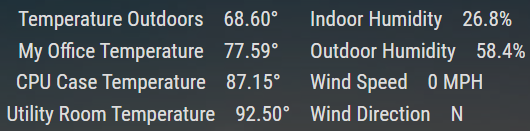
What I want is something more like this, ignoring the lines and font size (Excel)
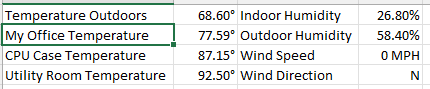
Can anyone help figure this out? ( @wishmaster270 tagged as author )
Existing CSS changes in custom.css:
/* ValuesByNotification */

.MMM-ValuesByNotification .vbn .groupWrapper {
    border-radius: 0px;
    border-style: none;
}

.MMM-ValuesByNotification .vbn .groupsWrapper, .MMM-ValuesByNotification .vbn .groupWrapper, .MMM-ValuesByNotification .vbn .itemsWrapper, .MMM-ValuesByNotification .vbn .valueWrapper{
    flex-direction: row;
    column-gap: 20px;
    flex-grow: 1;
}

.MMM-ValuesByNotification .vbn .groupsWrapper {
    column-gap: 10px;
}

.MMM-ValuesByNotification .vbn .groupsWrapper {
}


.MMM-ValuesByNotification .vbn .itemsWrapper {
	row-gap: 0px;
	column-gap: 0px;
	flex-direction: column;
}

.MMM-ValuesByNotification .vbn .itemTitle {
    text-decoration: none;
    margin: 0px;
}

.MMM-ValuesByNotification .vbn .valuesWrapper {
	flex-direction: column;
	gap: 0px;
	row-gap: 0px;
	column-gap: 0px;
}
Thanks!
-
RE: MMM-CalendarEXT2 mulitple time zones
@sdetweil You maintain the calendar module it’s reading from, no?
-
RE: MMM-CalendarEXT2 mulitple time zones
I don’t remember if there’s an option for that in the abandoned EXT2, I don’t believe so.
However, if you’d switch to EXT3 and/or EXT3Agenda as appropriate, you’d get full support from MMRize and sdetweil, who are the maintainers of the two modules used (EXT3/EXT3Agenda and calendar). Bonus, it’s a much easier config to do the same things.
-
RE: MMM-CalendarExt3
for #6, I’m sure it’s something like this, (I use CalendarExt3Agenda, which uses common code):
/* get rid of the icon */ .CX3 .event .headline .symbol { display: none; } -
RE: update the raspberry os needed?
@bdream No need, I’ve been running on old OSes for a while now - mostly because I want to keep using OMXPlayer.
-
RE: MMM-CX3A - Transform not working?
@MMRIZE Interesting. How would one install the Emoji fonts? I’d rather have the prettyness than all text.
-
RE: MMM-CX3A - Transform not working?
@MMRIZE That looks interesting… Most of my transforming is yanking out the emoji, though - because electron does partial display at best, and I so hate the boxed X showing up everywhere.
-
RE: Disable GPU? MESA-LOADER failure on fresh manual install
@sdetweil … so, are you gonna add this to the script? 😉
-
RE: MMM-CX3A - Transform not working?
@sdetweil it looks normal for me, too - however, a cut and paste into both fields from the original text does fix it, so, whatever.
-
RE: [INFO] Be careful to use iCal sample of config.js
@ankonaskiff17 … ahh, good point, forgot the fetch interval is not per item. Hey, @sdetweil - it’s your baby, you want to add a fetchInterval override variable per calendar, and default in the sample config.js to once a week or more for the holidays calendar? This would solve the issue CL is having with at least new installs…
As for the old ones, could we check to see if CL 's holiday calendar is being used, and inform or force an override for fetchInterval to solve for most?
(Just did a check and I’m not using CL’s holiday calendar, so whew)
-
RE: MMM-CX3A - Transform not working?
@MMRIZE good catch, that’s what it was… Cut and paste solved it. I really hate that my calendar merger application uses weird junk like that.