@AliAS said in Weatherunderground - currently - hourly - daily - configurable:
Sorry I don’t know how to post the code for you.
https://forum.magicmirror.builders/topic/4247/how-to-post-code-on-the-forum-for-absolute-beginners
 M
Offline
M
Offline
@AliAS said in Weatherunderground - currently - hourly - daily - configurable:
Sorry I don’t know how to post the code for you.
https://forum.magicmirror.builders/topic/4247/how-to-post-code-on-the-forum-for-absolute-beginners
Or a laptop with MagicMirror running on it for an even better idea of how it will work/look
Answer:
When he spams the message he’s trying to convey in a language that nobody understands.
I’m just saying.
@Fonfon said in Share your config.js right here....:
Great idea ! perhaps a photo code+photo ?
I’ve seen that there is some chatter lately about organizing, adding, combining, deleting some Categories and Sub-Categories on the forums by the administrators/moderators. I like the idea of having a place to post config.js files but it is my humble opinion (not that it matters) that the “Show Your Mirror” category isn’t the best place for that. As a once, and still current noob, I would never have considered looking in here for config help.
Take the category, CUSTOM CSS, for instance. That’s pretty obvious for the person looking for css help, if not Troubleshooting, in general. That’s just one example.
Again, in my humble opinion, it would be easier for people that are ready and willing to share their configs, and those people that are looking for examples of configs (with mirror picture showing the results) if there were a category similar to the CUSTOM CSS category. Perhaps, as @cowboysdude so aptly put it, a “Share Your Config” category.
I wish I would have seen such a category when I first joined the forum. It would have made a huge difference to have actually seen what a proper config looks like, and a picture of the outcome.
For what it’s worth, I’m going to make a request in the Discussion category.
Peace
Added a config option so that you could display the events from a specific time frame.
“All”, “Future”, “Past”, “Today”, “Last Week”, “This Week”, “Next week”,
and months by name, e.g. “January”, “February”, “March”, etc . . .
[card:mykle1/MMM-Events]
My $0.02:
There is absolutely no reason to buy a 4k display. A full HD, 32" display, is more than adequate.
@johnnyboy said in 1 old noob + 1 rPi = I can’t believe I did it! (revisited):
Hey bud… what post had your updated MM pictures that showed your finished WunderGround module… the one where you added colours? iirc there was a tip there too to change the colors?
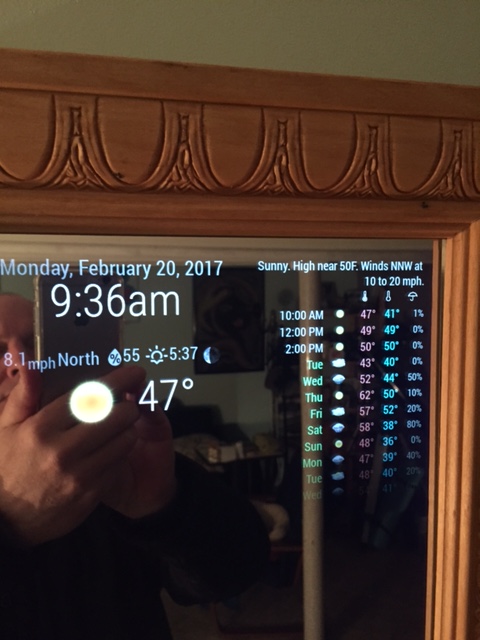
I don’t know where that post is so here’s what I think you are looking for. This goes in your custom.css file to change the colors for max-temp, min-temp and day. The colors you choose are up to you.
.MMM-WunderGround .max-temp {
  color: #f66;
}

.MMM-WunderGround .min-temp {
  color: #0ff;
}

.MMM-WunderGround .day {
  color: #6f6;
}
That gives you this.
I’m running out of ways to praise your efforts here. :^)
@cowboysdude was kind enough to show me one way of using different fonts in my module. My gratitude to him. Here’s a look. Simply click the image for an expanded, more pleasing view.

@johnnyboy said in 1 old noob + 1 rPi = I can’t believe I did it! (revisited):
The image on right of center
Evidently, I’m famous. Damn, I look good. :star2:
@Damian said in Npm intstall:
should i only use npm install when mentioned in readme or shold this be used everytime to install any module?
Only when mentioned in the readme.
npm install is used to install specific dependencies for a module. Not all modules make use of dependencies. Modules that make use of dependencies don’t all use the same dependencies.
I love that guy. I used to watch him with my father. Nice module and a cool idea.
@cowboysdude said in MMM-BMW-DS (A different kind of weather module):
I like it, then I unliked it…then I liked it again
Hahaha. Dude, thanks for your help.
I’ve cut acrylic a number of times and never had a problem but I’ve never used a saw of any kind. Remember, acrylic mirror will scratch easily. I wouldn’t drag a saw across it. If you are willing, try this:
Use a razor knife, sometimes called a utility knife or box cutter. A fresh blade works best. Don’t take the protective film off the mirror until you’re done cutting.
Lay a straight edge along your measurement line and secure it firmly. Now, run the knife along the straight edge several times, applying medium pressure and being careful to stay in the groove each time. Have you ever “snapped” sheetrock? This is exactly the same idea.
Once you’re done, lay the mirror on a table with the side you just cut facing up. bring the cut line to the straight edge of the table so that the edge of the table and the cut line are aligned on top of each other. Hold down firmly on the mirror that is over the table. Push down on the mirror that is not supported by the table. It’s going to need a good amount of pressure but the mirror will “snap” nicely, right along the cut line you made.
This is how I’ve done it, more than a few times
@lucallmon said in -=]!Show Your Module Setup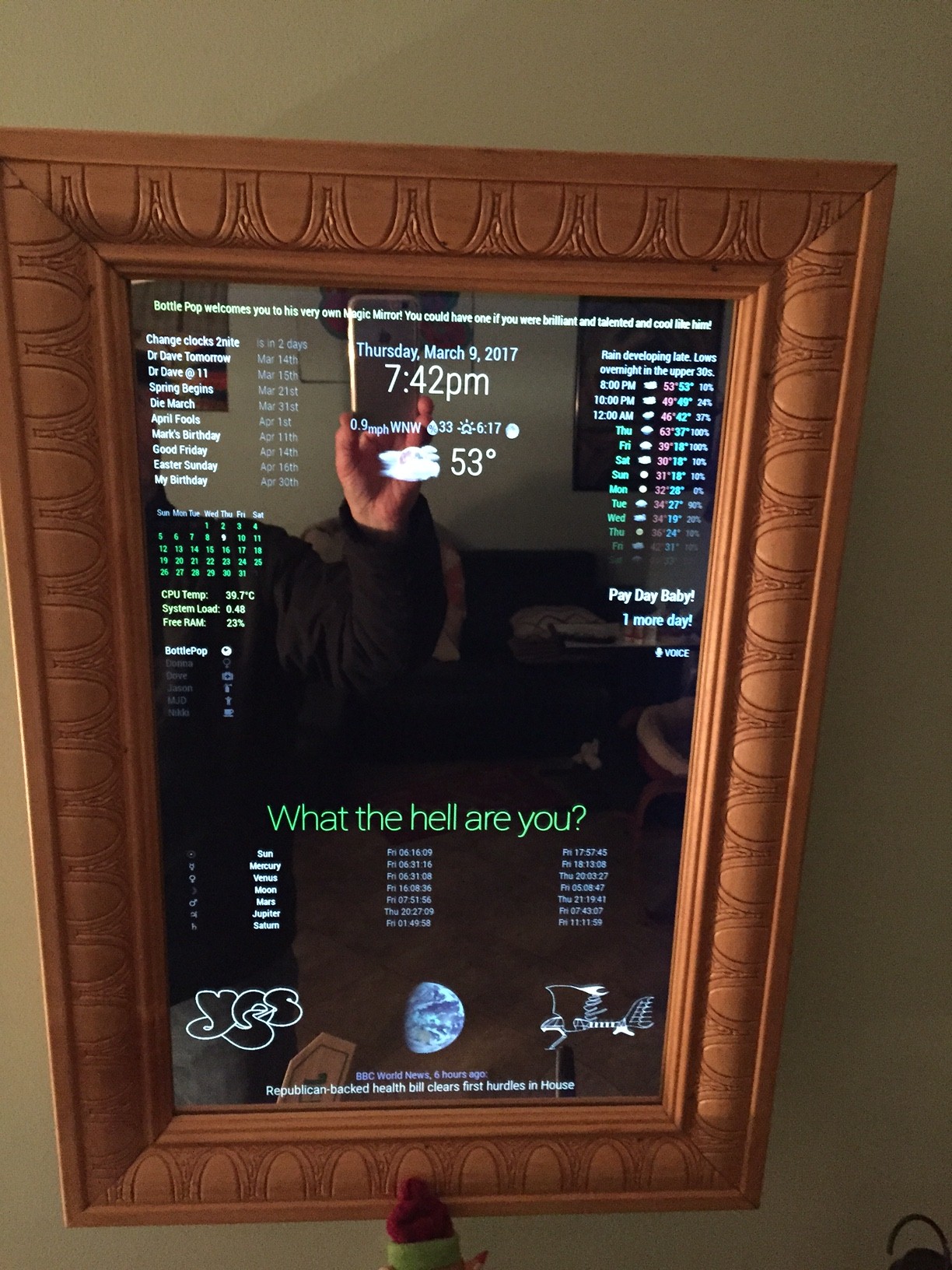
Then there is this.
https://forum.magicmirror.builders/topic/236/complete-setup-tutorial… Take your time. Follow the directions and ask specific questions along the way. You’ll be fine.
Why don’t you try the module listed above before you go changing the module files? At least see if it runs adequately on your setup first. :-)