@johnnyboy I just went and changed mine to incorrect spellings and I got the little green icon too. So . . .
A New Chapter for MagicMirror: The Community Takes the Lead
Read the statement by Michael Teeuw here.
Read the statement by Michael Teeuw here.
 M
Offline
M
Offline
Posts
-
RE: MMM-SimpleLogo
-
RE: MMM-SimpleLogo
@johnnyboy
The fact that the Logo.png showed properly on your first attempt means the module is working properly. Are you sure that your two pictures are spelled exactly as you are entering them in the config.js? I noticed that you spelled Logo.png with a capital L. Are your pictures named with capitals? -
RE: MMM-Astrology
As it turns out I did need another git pull, and with some adjustments to your css advice I was able to justify to the right. However, if I choose a width (250px) then the header becomes 2 lines and only the top line justified to the right. I still would like to not have a header at all, as I mentioned earlier.
The only other problem is the icon at the beginning of the horoscope. Even at 400px width yields the picture below
Let me not forget to thank you for your work here, so, thanks :thumbsup_tone1:
-
RE: MMM-Astrology
@cowboysdude said in MMM-Astrology:
Do a git pull and add this to your custom.css
Another one? I only ask because I did one earlier this afternoon. Ok, I’ll do another git pull and follow your suggestions. I’ll get back to you. Thanks for helping me out.
-
RE: MMM-Astrology
@cowboysdude said in MMM-Astrology:
I made a couple of changes so do a git pull when you get back
I told you I’d get back to you. :-)
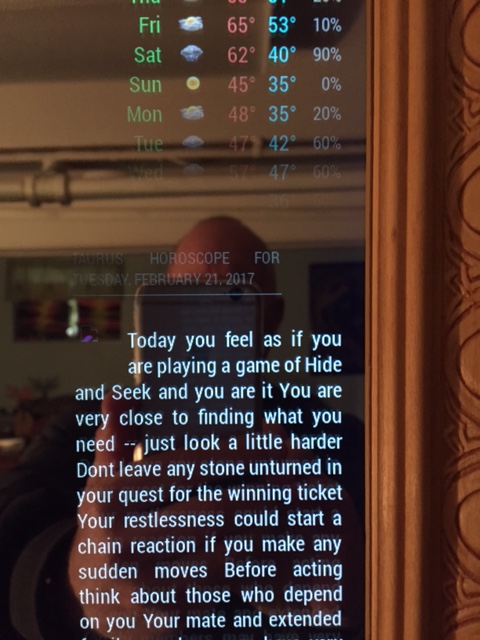
I successfully justified your module to the right using your css suggestion. However, the header css would not move the header permanently, meaning, as the module loads it appears as if it’s oriented correctly, but then it snaps back over to the left when the module does load. Now, I don’t know if you noticed from any of my pictures, but I don’t use headers at all, none. I would be more than pleased to be able to remove the header altogether. I noticed there is no header: in the config.js so how would I go about removing that.
Also, the logo? for Taurus seems to not load. There is a little symbol there. It’s not very clear at all in the picture. Broken link?
Otherwise, here it is.
-
RE: Problem With iOS Device and Forum Login
@Renfield said in Problem With iOS Device and Forum Login:
Any ideas what’s going on?
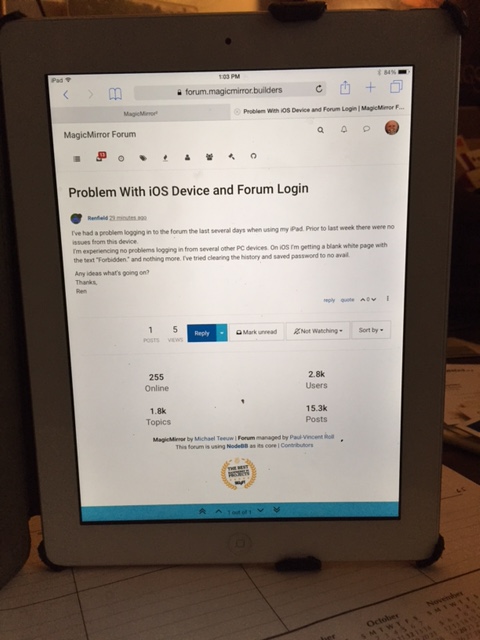
I read your post. I went to my iPad and logged in here. No problems. The picture shows this page on my iPad with your question.
-
RE: Weatherunderground - currently - hourly - daily - configurable
@bminer1 said in Weatherunderground - currently - hourly - daily - configurable:
And that worked! I swear, i have no clue what we noobs would do without you.
Yeah, he is the bomb!
-
RE: MMM-Astrology
@cowboysdude said in MMM-Astrology:
I made a couple of changes so do a git pull when you get back Now I’m off to dinner myself!
Short day at work today. I’ll pull the new version and fire her up in a few. I’ll get back to you
-
RE: Weatherunderground - currently - hourly - daily - configurable
@bminer1 said in Weatherunderground - currently - hourly - daily - configurable:
Can you share how you did this?
There you go. You got it from the source. (I was sleeping) Virtually every entry in my custom.css file is commented with
/* Thanks to Strawberry 3.141 */
-
RE: 1 old noob + 1 rPi = I can't believe I did it! (revisited)
@yawns said in 1 old noob + 1 rPi = I can’t believe I did it! (revisited):
And please let us know the reactions of your son. I can imagine I would be kind of irritated but proud of my dad building such a thing on his own, working his way through all these difficulties.
My son came home yesterday and stayed through this evening. It turns out my efforts were not in vain. He was utterly amazed that I took on, and completed, the MagicMirror project. He was excited and enthusiastic, wanting to see the code of the modules and css files. He already has ideas for what he would want to do with MM.
So, he went back to school with a camera full of pictures of my mirror to show his frat buddies, and he promised that he and I would do something like this together, when time allowed. I’m hoping he will want to create a MM module with me, although he would be doing all the work and I would just be along for the ride.
-
RE: 1 old noob + 1 rPi = I can't believe I did it! (revisited)
{
			module: 'calendar',
			position: 'top_left',
			config: {
			urgency: 0,
			getRelative: 1,
			fadePoint: 0.25, // Start on 1/4th of the list.
				calendars: [
					{
						symbol: 'calendar-check-o ',
						url: 'webcal://www.calendarlabs.com/templates/ical/US-Holidays.ics'
					},
					{
						url: 'https://calendar.google.com/calendar/ical/THIS COMES FROM GOOGLE CALENDAR/private-YOUR GOOGLE CALENDAR API GOES HERE/basic.ics'
					},
				],
			}
		},
Change your getRelative: 1 as above in your config.js file
Add your google calendar as above in your config.js file -
RE: 1 old noob + 1 rPi = I can't believe I did it! (revisited)
body {

}

.MMM-WunderGround .max-temp {
  color: #f66;
}

.MMM-WunderGround .min-temp {
  color: #0ff;
}

.MMM-WunderGround .day {
  color: #6f6;
}
That’s my custom.css entry for coloring
-
RE: Language Calendar Module
@broberg said in Language Calendar Module:
open fr.json in the folder languages, add
“DAYAFTERTOMORROW”: “Après-demain”,
under teh section that says calendarOh, I jumped all over this. Found my en.json file (I made a back up just in case) and edited it to read -
    /* CALENDAR */
"TODAY": " is today",
"TOMORROW": " is tomorrow",
"DAYAFTERTOMORROW": " in 2 days",
So, now my calendar reads,
President’s Day is today
Donna’s Birthday is tomorrow
Office Party in 2 daysNotice the space after the double quotes. With no space the i’s were capitalized. I’m just saying.
Thanks broberg. Good stuff!
-
RE: 1 old noob + 1 rPi = I can't believe I did it! (revisited)
@johnnyboy said in 1 old noob + 1 rPi = I can’t believe I did it! (revisited):
change out the calendar for something else or see if calender is editable?
Well, that’s the beauty of having modules. You can always change them to something more to your liking. I like the calendar because it allows me to link my Google calendar into it, so I see my events (birthdays, weddings, party dates, etc) as well as the US Holidays. You can also change the dates from relative (in 22 days) to absolute (Mar 14th) in the config’js file, which is nice. And there’s always the custom.css file for coloring, positioning, sizing, etc.
Initially, my biggest problem was wanting to put as many modules as I could fit on the screen, but I soon realized that it looked too busy, too cluttered. So, I decided less is more. I decided what modules were really important to me and where I wanted them. I’m happy with my design
-
RE: Taking The Leap! Need MM Family Help
@SoleLo said in Taking The Leap! Need MM Family Help:
Which mirror should I do it with?
Are they both 2-way mirrors?
-
RE: 1 old noob + 1 rPi = I can't believe I did it! (revisited)
@johnnyboy said in 1 old noob + 1 rPi = I can’t believe I did it! (revisited):
Your a mind reader from across the pond lol… I was thinking about changing the clock over to centre 5 mins ago…
I wasn’t suggesting that you move the clock. I was only inquiring if you had the clock installed because you thought that the sunset time was the clock, stuck at 17:20
-
RE: 1 old noob + 1 rPi = I can't believe I did it! (revisited)
@johnnyboy said in 1 old noob + 1 rPi = I can’t believe I did it! (revisited):
Also… whats with the time being wrong? Its been stuck on 17.20 ?
Is this not in your config.js file?
{ module: 'clock', position: 'top_center' }, -
RE: 1 old noob + 1 rPi = I can't believe I did it! (revisited)
@johnnyboy said in 1 old noob + 1 rPi = I can’t believe I did it! (revisited):
Also… whats with the time being wrong? Its been stuck on 17.20 ?
That’s your sunset/sunrise time, from the Wunderground module. is your clock module installed.enable?