MagicMirror Forum
    • Recent
    • Tags
    • Unsolved
    • Solved
    • MagicMirror² Repository
    • Documentation
    • 3rd-Party-Modules
    • Donate
    • Discord
    • Register
    • Login
    1. Home
    2. Mykle1
    3. Posts
    A New Chapter for MagicMirror: The Community Takes the Lead
    Read the statement by Michael Teeuw here.
    Mykle1M Offline
    • Profile
    • Following 5
    • Followers 73
    • Topics 101
    • Posts 4,397
    • Groups 2

    Posts

    Recent Best Controversial
    • RE: 1 old noob + 1 rPi = I can't believe I did it! (revisited)

      @johnnyboy said in 1 old noob + 1 rPi = I can’t believe I did it! (revisited):

      so maybe furum still buggy?
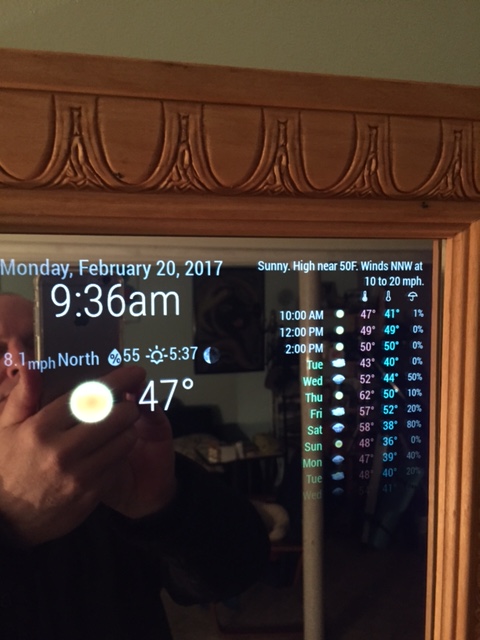
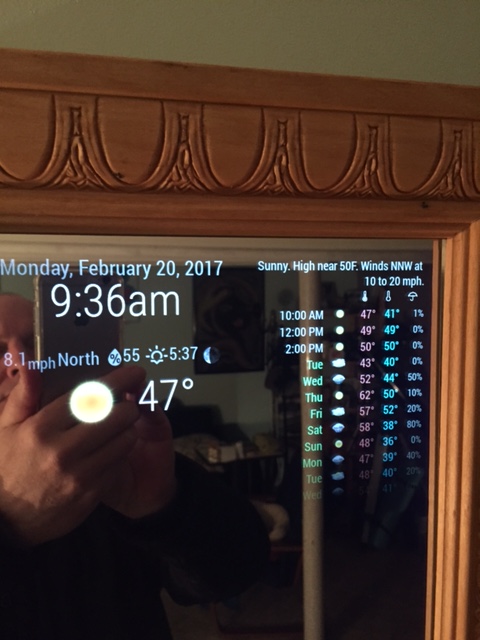
      My Weather icons look nothing like yours… so do I need to update WunderGround?

      Yes, I think there is an issue with pictures displaying but the moderators/administrators are aware of that and are looking into it. Make sure you have coloricon: true, set in your config.js file in the WunderGround array. If that doesn’t do it then maybe you do need to update WunderGround. In that case, in your terminal

      ~/MagicMirror/modules/MMM-WunderGround $ git pull

      That will update your WunderGround, if it needs it
      posted in Show your Mirror
      Mykle1M
      Mykle1
    • RE: Forum - uploaded images are not shown

      @yawns said in Forum - uploaded images are not shown:

      Update: @Mykle1 just uploaded a new picture and this is located in /assets/uploads/files/1487604272003-img_1761.jpeg

      Should I refrain from uploading pictures at this time? Just checking

      posted in General Discussion
      Mykle1M
      Mykle1
    • RE: MMM-Astrology

      @cowboysdude said in MMM-Astrology:

      I’m no css guru but try this in your custom css to push it over:

      I was going to try your css suggestion this morning but before I even entered that into the custom.css file the module isn’t loading. All I get is the “Forecasting…” and nothing else. I didn’t change anything and it was working yesterday. I reloaded MM quite a few times but it never completes loading the module. I’ll try again later

      posted in Entertainment
      Mykle1M
      Mykle1
    • RE: 1 old noob + 1 rPi = I can't believe I did it! (revisited)

      @yawns said in 1 old noob + 1 rPi = I can’t believe I did it! (revisited):

      The pictures are there, the forum is just not showing them currently.
      I fixed the image links in the opening post manually

      They seem to be working now. Thanks yawns. :thumbsup:

      posted in Show your Mirror
      Mykle1M
      Mykle1
    • RE: 1 old noob + 1 rPi = I can't believe I did it! (revisited)

      @johnnyboy said in 1 old noob + 1 rPi = I can’t believe I did it! (revisited):

      Hey bud… what post had your updated MM pictures that showed your finished WunderGround module… the one where you added colours? iirc there was a tip there too to change the colors?

      I don’t know where that post is so here’s what I think you are looking for. This goes in your custom.css file to change the colors for max-temp, min-temp and day. The colors you choose are up to you.

      .MMM-WunderGround .max-temp {
        color: #f66;
      }
      
      .MMM-WunderGround .min-temp {
        color: #0ff;
      }
      
      .MMM-WunderGround .day {
        color: #6f6;
      }
      

      That gives you this.
      0_1487604273042_IMG_1761.JPG

      posted in Show your Mirror
      Mykle1M
      Mykle1
    • RE: Weatherunderground - currently - hourly - daily - configurable

      @RedNax said in Weatherunderground - currently - hourly - daily - configurable:

      Mykle1: I have to run off to work right now but I will “give it a go” as soon as I get home. I’ll let you know. Thanks for this.

      I meant to get back to you, RedNax. It’s working nicely for me, and with the help of Strawberry, I’m running it twice. Once for just the current weather, under the clock, top center, and once for just the forecast, top right. Exactly the way I wanted it.
      0_1487603561689_IMG_1761.JPG

      posted in Utilities
      Mykle1M
      Mykle1
    • RE: Further module categories...

      @cowboysdude Dude, what forum do you run? :thumbsup_tone1:

      posted in General Discussion
      Mykle1M
      Mykle1
    • RE: MMM-Astrology

      @cowboysdude

      Ok, I have the Astrology up and running in my top_right, just under my weather. Real nice. I just need to push the whole thing to the right margin. I’ve tried some things in custom.css to accomplish this, based on entries that Strawberry made on other modules for me, but I can’t seem to get it to move! Are you screwing with me? ;-)

      Nice work, bro

      posted in Entertainment
      Mykle1M
      Mykle1
    • RE: MMM-Astrology

      @cowboysdude

      Yo bro, congrats on making your own module. I’m impressed. :thumbsup_tone1:

      I’m going to get it right now

      posted in Entertainment
      Mykle1M
      Mykle1
    • RE: Adding Modules

      @johnnyboy said in Adding Modules:

      Is this module US only?

      No, there’s weather all over the planet. :wink:

      posted in Troubleshooting
      Mykle1M
      Mykle1
    • RE: Adding Modules

      @johnnyboy said in Adding Modules:

      *** Note to self *** Must remember to check first whether a module requires a monthly fee to be paid before use.
      Must go and remove that module from my config now…

      You can get a free API key there. Put that module back in your config, and smile. :smile:

      posted in Troubleshooting
      Mykle1M
      Mykle1
    • RE: 1 old noob + 1 rPi = I can't believe I did it! (revisited)

      @Everyone

      1.1k views! That just made my day. Yeah, baby! :eyes:

      posted in Show your Mirror
      Mykle1M
      Mykle1
    • RE: Alignment with module "random_quotes"

      @qqqqqqqq said in Alignment with module “random_quotes”:

      @Mykle1 Nice! I actually like how you’ve put it. Thanks for the idea!

      Yes, my layout seems to be in high demand. :thumbsup:

      posted in Troubleshooting
      Mykle1M
      Mykle1
    • RE: Adding Modules

      @johnnyboy said in Adding Modules:

      First off, a massive shout out to Mykle1 for helping me to do in minutes, what took me many hours trying… Thanks a lot for that, much appreciated

      You’re welcome buddy. It wasn’t very long ago that I was in the very same place that you are in now. Some very fine people helped me get under way, and continue to help me. I repay them by helping others, where and when I can. I can see you’re in very good hands with Strawberry 3.141 assisting you. He was, and still is, instrumental in helping me perfect my MM. I’ll help you with the easy stuff. He’ll handle the genius side of things. :smile:

      posted in Troubleshooting
      Mykle1M
      Mykle1
    • RE: Alignment with module "random_quotes"

      @strawberry-3.141

      I took what you’ve been teaching qqqqqqqq and applied it to my own custom.css file, which I wanted justified to the left, instead of the right, in his case. I had also played with the .js file. I know this is wrong, and I know why now, but I am determined to do things the right way so I reverted back to the original .js file. It is a good feeling when things start to make sense.

      Taking what I learned from you, I applied it to my custom.css file below.

      .MMM-SystemStats {
        width: 175px;
      }
      
      .MMM-SystemStats td {
        text-align: left !important;
      }
      

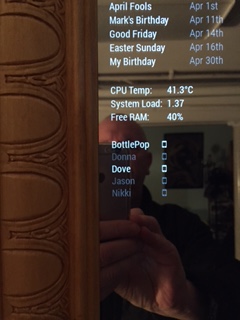
      And that produced this.
      0_1487515289121_nice.JPG

      Perfectly aligned and justified.

      Even when you’re helping someone else, you’re helping me. God, you’re freakin awesome!

      posted in Troubleshooting
      Mykle1M
      Mykle1
    • RE: Bad question

      @Fonfon - Nah, just trying to help you like people helped me.

      posted in General Discussion
      Mykle1M
      Mykle1
    • RE: Bad question

      @Fonfon – Double click your config.js file. It will open. Do your editing, then choose Save from the File menu

      posted in General Discussion
      Mykle1M
      Mykle1
    • RE: Bad question

      @Fonfon - No, you don’t have to rename your config.js file to edit it but you might want to back it up BEFORE you edit it. This way, if anything goes wrong you’re safe

      posted in General Discussion
      Mykle1M
      Mykle1
    • RE: More modules coming...soon.

      @cowboysdude - Oh, dude, you HAVE been busy. I congratulate you on your ability to create these wonderful things. I especially like the idea of the NFL weather module. This way, we’ll all know if Dak and Zeke are gonna get wet on game day. Nice work!

      posted in General Discussion
      Mykle1M
      Mykle1
    • RE: Bad question

      @cowboysdude said in Bad question:

      before you make changes to a working config.js make a copy of it

      Excellent advice, and I agree. We were just trying to get him a working config.js in the first place

      posted in General Discussion
      Mykle1M
      Mykle1
    • 1
    • 2
    • 211
    • 212
    • 213
    • 214
    • 215
    • 219
    • 220
    • 213 / 220