MagicMirror Forum
    • Recent
    • Tags
    • Unsolved
    • Solved
    • MagicMirror² Repository
    • Documentation
    • 3rd-Party-Modules
    • Donate
    • Discord
    • Register
    • Login
    1. Home
    2. Mykle1
    3. Posts
    A New Chapter for MagicMirror: The Community Takes the Lead
    Read the statement by Michael Teeuw here.
    Mykle1M Offline
    • Profile
    • Following 5
    • Followers 73
    • Topics 101
    • Posts 4,397
    • Groups 2

    Posts

    Recent Best Controversial
    • RE: Throwing down the gauntlet

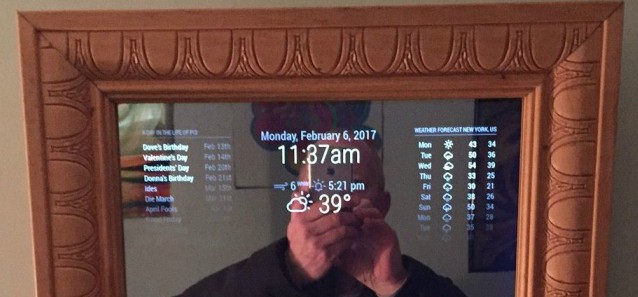
      Ok, ok, this might appear creepy, but it’s just my way of saying thank you. I believe in giving credit where credit is due.

      Strawberry 3.141 has come to my aid once again, and in the dead of night (at least for him). Honestly, he is simply amazing at his craft. My custom.css file is not really mine at all. It’s virtually all his doing. Every time I came up with something I wanted to change (and was impossible for me), and posted my request, this dude swoops in like Superman and saves the day. I posted the above request and within minutes he was working on it. And a few short minutes later he had done EXACTLY what I had hoped for. Who does that?

      I was happy (at first) with using the default modules and some 3rd party modules but reading the inspiring posts here made me think, “What if I could have it my way?”

      So, for your kindness and generosity, and for your amazing knowledge and talent, I thank you.

      The creepy part? See compliments.
      0_1487298276113_IMG_1753edit.jpg

      posted in Troubleshooting
      Mykle1M
      Mykle1
    • Throwing down the gauntlet

      My 1st mirror is nearly perfect thanks to some very talented and generous people here. If I mention Strawberry-3.141 again, people are going to start talking about “us”, but this dude is a miracle worker.

      So, here it is. What I thought was my final rendition of my layout, isn’t. As you can see, I was using the clock, currentweather and weatherforecast modules. I had currentweather under the clock and weatherforecast to the right. That was ok.
      0_1487289734839_Originaledit.jpg

      But then I discovered the WunderGround weather module. With it, I get my weather from a weather station less than a mile from my home, instead of a generic or centrally located local station. And, I find the color icons visually stunning. But there is a small(?) problem. The current weather and the weather forecast within this module are tied together (I think), so I can’t put the current weather under the clock, as in the picture above.

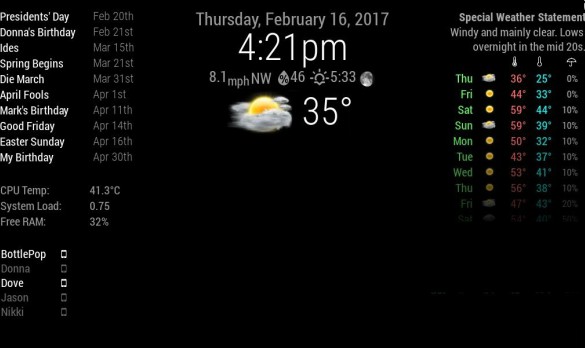
      Below is a picture of how I would like my mirror to look. The simple answer (I think) would be to have the nice color icon in the currentweather module (if that’s possible). Also, you might have noticed that I edited out (of the picture) the predicted rainfall column on the far right of the weather forecast and moved the “umbrella” icon over the percentage column, strictly for the sake of spacing.
      0_1487291285210_NewIdea2edit.jpg

      The current weather icon is what I mostly desire. I can certainly live without the removal of the predicted rainfall amount column.

      Any challengers? :thinking:

      Seriously, thanks for all the help and patience you have all shown to me. :thumbsup:

      posted in Troubleshooting
      Mykle1M
      Mykle1
    • RE: 1 old noob + 1 rPi = I can't believe I did it! (revisited)

      @johnnyboy said in 1 old noob + 1 rPi = I can’t believe I did it! (revisited):

      I have been lurking on here for a while now picking up hints and tips along the way

      You don’t have to lurk. Step into the light. No really, this place is just full of helpful, brilliant people. Any problems I encountered were immediately addressed when I posted my questions. I’m basically done with my (1st) mirror but I’m sticking around to try to repay those that helped, or continue to help me, by helping others, if I can.

      posted in Show your Mirror
      Mykle1M
      Mykle1
    • RE: Go East, young icon!

      @strawberry-3.141 said in Go East, young icon!:

      you can achieve this without modifying the code

      Strawberry-3.141 deserves an award. He went above and beyond in helping me customize the NetworkScanner module for me. Apparently, he is a genius, and willing to work well past midnight to help someone (me) with their MM. You have my highest praise.

      All credit for this custom.css goes to Strawberry-3.141
      }
      .MMM-NetworkScanner .fa-ul {
      margin-left: 2px; /* This aligned NetworkScanner to the left margin /
      width: 130px; /
      If you remove this line it will be the same width as the widest module in the region, this can lead to a big gap, thats why i limited it to 130px if you add devices with longer names you might want to increase this value */
      }

      .MMM-NetworkScanner .fa-li {
      position: relative; /* This put the icon on the right side */
      float: right;
      left: initial;
      }

      0_1487212483120_IMG_1749.JPG

      I dreamed it. He made it happen.

      posted in Troubleshooting
      Mykle1M
      Mykle1
    • RE: MM-orrery - Show the planets and their current relation to the Sun

      @hoyski said in MM-orrery - Show the planets and their current relation to the Sun:

      As far as showing the orbits, that’s a feature I’m hoping to have “real soon now”. I’ll let you know once I get it added o the module.

      Fantastic!

      P.S. It’s fun to see that Mercury has moved a couple of pixels since I first started developing this module. On the flip side, it’ll be about 80 years before Neptune moves from the lower right to the upper left of the display.

      That’s awesome!

      I’ve been sort of looking for a new scope. What I really want is a Meade LX90 10" or an LX200 but I’ll likely settle for an LX90 8" ACF or a LightSwitch 8". You know how expensive it can get.

      I’m going to play with your module some more. Thanks again. Good stuff!

      posted in Education
      Mykle1M
      Mykle1
    • RE: 1 old noob + 1 rPi = I can't believe I did it! (revisited)

      @johnnyboy said in 1 old noob + 1 rPi = I can’t believe I did it! (revisited):

      can you paste what you put in the MMM- simple-logo

                  {
      		module: 'MMM-SimpleLogo',
      		position: 'bottom_left',  	// This can be any of the regions.
      		fileUrl: "modules/MMM-SimpleLogo/public/yes.jpg",
      		config: {
                         width: "275px",
      		// The config property is optional.
      		// See 'Configuration options' for more information.
      		}
      	},
      	{
      		module: 'MMM-SimpleLogo',
      		position: 'bottom_right',	// This can be any of the regions.
      		config: {
                          width: "275px",
      		fileUrl: "modules/MMM-SimpleLogo/public/starship.jpg",
      		// The config property is optional.
      		// See 'Configuration options' for more information.
      		}
      	},
      

      I have 2 entries in my config.js file for MMM-SimpleLogo. One for each picture that I want to display. You can see each of their positions. You can see where I keep the picture files (fileUrl). I believe that if you change the width: then the height will automatically adjust, keeping the aspect ratio of the picture.

      One thing to keep in mind. Two entries using the same position. The earlier one in the config.js ( I call it HIGHER)
      will be above (higher) on your display. I hope this makes sense. I don’t know why the width: entries look indented. Mine are aligned with config: above

      posted in Show your Mirror
      Mykle1M
      Mykle1
    • RE: MM-orrery - Show the planets and their current relation to the Sun

      @broberg said in MM-orrery - Show the planets and their current relation to the Sun:

      we are men, we don’t rtfm unless we have to

      That’s effing hilarious. (Don’t know if I am allowed to curse here)

      posted in Education
      Mykle1M
      Mykle1
    • RE: 1 old noob + 1 rPi = I can't believe I did it! (revisited)

      @cowboysdude said in 1 old noob + 1 rPi = I can’t believe I did it! (revisited):

      It was quite humorous…

      Hell yeah. Tim Allen at his best. :thumbsup:

      posted in Show your Mirror
      Mykle1M
      Mykle1
    • RE: MM-orrery - Show the planets and their current relation to the Sun

      @broberg said in MM-orrery - Show the planets and their current relation to the Sun:

      https://github.com/hoyski/MM-orrery#config

      Thanks for pointing that out. I guess I should RTFM before I start asking for things

      posted in Education
      Mykle1M
      Mykle1
    • RE: MM-orrery - Show the planets and their current relation to the Sun

      @hoyski said in MM-orrery - Show the planets and their current relation to the Sun:

      This is my first module, and first foray into JavaScript for that matter, so any and all comments or suggestions on the module itself or the code behind it would be appreciated.

      I’m just and end user so I’m only stating what I would like to see in this module. I’m an amateur astronomer (in the loosest sense), with amateur Celestron and Meade telescopes, but I make great use of them, weather permitting. I have Planetrise on my mirror because of my enthusiasm for sky watching. I saw your module and immediately added it to my array.

      I’d like to see better coloring for the planets, or an option to colorize each.
      I’d like to see the orbits of the planets, or the option to see the orbits. If you are familiar with “Stellarium” then you know what I mean.
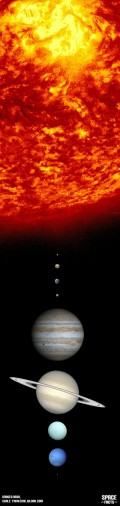
      I’d like to see a more realistic scaling, even if that means the sun will occupy a great amount of real estate, or an option for scaling the sun and/or the planets.

      Thank you for your module

      0_1487198200823_IMG_1172edit.jpg

      posted in Education
      Mykle1M
      Mykle1
    • RE: Go East, young icon!

      @tosti007 said in Go East, young icon!:

      Note: I am currently on mobile so have no way of testing it. If it doesn’t work then let me know and i will search another solution (and I will be confused since I am pretty sure this works)

      I tried this after going the custom.css route and it did not work.

      Thank you for your suggestion

      posted in Troubleshooting
      Mykle1M
      Mykle1
    • RE: Go East, young icon!

      @strawberry-3.141 said in Go East, young icon!:

      custom.css
      .MMM-NetworkScanner .fa-ul li .fa-li {
      float: right;
      }

      This did not work for me. The mobile icon remained on the left side of the device name. I should note that I already have an entry in custom.css for MMM-NetworkScanner. I tried your suggestion as a separate entry. Am I supposed to incorporate it into the existing entry?

      body {
      margin: 20px;
      height: calc(100% - 40px);
      width: calc(100% - 40px);
      }

      .MMM-NetworkScanner .fa-ul {
      margin-left: 2px;
      }

      .MMM-WunderGround .max-temp {
      color: #f66;
      }

      posted in Troubleshooting
      Mykle1M
      Mykle1
    • RE: Go East, young icon!

      @tosti007 said in Go East, young icon!:

      Note: I am currently on mobile so have no way of testing it. If it doesn’t work then let me know and i will search another solution (and I will be confused since I am pretty sure this works)

      It’s 7am here. I’m running off to work but I will try as soon as I get home. I will let you know. Many thanks.

      posted in Troubleshooting
      Mykle1M
      Mykle1
    • RE: Introduce yourself!

      @SoleLo said in Introduce yourself!:

      SO any pep talks please send my way.

      Just do it

      posted in General Discussion
      Mykle1M
      Mykle1
    • RE: Introduce yourself!

      Hi all,

      I guess I should have come here when I first joined the forum but I was so anxious for information that I didn’t even see this category, initially.

      I’m 58 years old. I am a retired New York City Police Officer. I now work for a local automobile titling and registration company. I have 3 children. My son, the youngest, is a Senior at Stevens Institute of Technology. You can thank (or blame) him for my being here. He introduced me to uBuntu and simply mentioned the Raspberry Pi to me before heading back to school. (See the full story in “Show your mirror”. The rest is history.

      I would just like to mention 3 names. They are/were instrumental in helping me get my mirror up and running and continuing to answer my questions relating to customization.

      PeppaPigKilla - The first person here to reply to my very first post for help
      yawns
      Strawberry 3.141

      So, thank you and all the other wonderful, helpful, creative people here.

      posted in General Discussion
      Mykle1M
      Mykle1
    • Go East, young icon!

      Hi all,

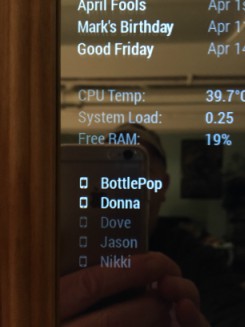
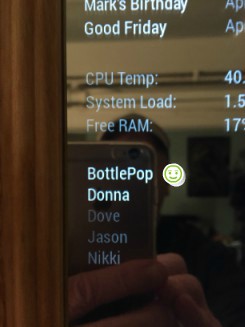
      I don’t even know if it’s possible, and it really isn’t necessary, but I’m trying to move the “mobile” icon in MMM-NetworkScanner from its place on the left of the device name to the right of the device name. I spent a good amount of time trying to achieve this, and I was trying where I probably shouldn’t ( the MMM-NetworkScanner.js file), and still no success.

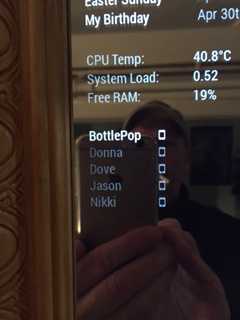
      This is where the mobile icon appears by default, to the left of the devices name. 0_1487111032913_IMG_1741edit.jpg

      I’d rather it be here, on the right of the device name, where the smiley face is.0_1487111179700_IMG_1743edit2.jpg

      If this is the developers jurisdiction then I humbly acquiesce.

      Peace :peace:

      posted in Troubleshooting
      Mykle1M
      Mykle1
    • RE: 1st mirror / photoframe / airplay / remote / led strips

      @bocapie said in 1st mirror / photoframe / airplay / remote / led strips:

      Which one are you using? I tried MMM-Traffic and cant seem to get my config.js to work.

      You’d be better off asking this question in the “Troubleshooting” area.

      https://forum.magicmirror.builders/category/10/troubleshooting

      This way people know you are looking for help. They might not see your question in here if they don’t come to look at the mirrors. In “Troubleshooting”, many brilliant, helpful people usually come to your aid in a timely manner.

      Good luck

      posted in Show your Mirror
      Mykle1M
      Mykle1
    • RE: MMM-SystemStats (cpu temp/load, fre ram ...)

      @strawberry-3.141 said in MMM-SystemStats (cpu temp/load, fre ram ...):

      put that in custom.css

      Oh, I’m so glad you got here first, before I tried to help him. :wink:

      posted in Utilities
      Mykle1M
      Mykle1
    • RE: Weatherunderground - currently - hourly - daily - configurable

      @RedNax

      This is a stunningly beautiful and informative module and the many config options must make it a favorite of anyone that uses it. I tip my hat to you.

      With that, may I make a humble request regarding fctext? I love this option but it can change from 3 lines to as many as 7 lines. Would it be possible to limit, or set, the amount of lines displayed. Or, could the text decrease in size as more information needs to be displayed, taking up the same amount of space?

      posted in Utilities
      Mykle1M
      Mykle1
    • 1
    • 2
    • 213
    • 214
    • 215
    • 216
    • 217
    • 218
    • 219
    • 220
    • 215 / 220