@dolanmiu That would be awesome! Hope you can fix it soon.
Kind regads!
P
Offline
A New Chapter for MagicMirror: The Community Takes the Lead
Read the statement by Michael Teeuw here.
Read the statement by Michael Teeuw here.
Posts
-
RE: MMM-awesome-alexa
-
RE: MMM-awesome-alexa
@dolanmiu I get it.
Now I’m stuck at the refreshtoken part, Ican’t move on -
RE: 27" custom framed magic mirror - fun to get done
Hi! Looks awesome! Congrats!
Do you have any photo from the sides and/or back? -
RE: Motion Detector
@danielis said in Motion Detector:
ur problem is that as soon as the mirror is off, your monito
Yes sir, that is my problem, the module seems to be working fine, but it is a bit annoying to see the alert when the mirror is off
-
RE: Motion Detector
@danielis
Sorry I can’t get your point as English is not my first language.
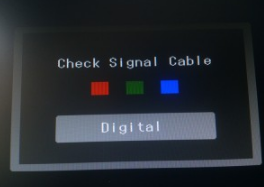
What I’m saying is that when the camera does not detect any movement, and the timeout setted is out, the monitor does not show the mirror, but after a few seconds appears something like this:
-
RE: Motion Detector
Hi @alexyak !
Thanks for the module, it looks awesome!
I was trying to use it, at some point I could make it run, I mean, I can set the timeout and the monitor “wakes up” when the pi camera detects any movement.
But when the timeout reachs the limit time, the monitor get off, but after a few seconds it appears a message that says “not signal, cable disconect”.
Is there any way to avoid that alert?Kind regards
-
PI Camera
Hi everyone!
I was looking the camera modules, but it seems they only works with an USB camera.
Is there any module that works with the pi camera?Kid regards
-
Which alexa module is better?
Hi everyone!
I would like to know which alexa module fits best for the magic mirror, and which features does it comes with.Kind regards
-
RE: MMM-awesome-alexa
So what can we do with this module? Sorry, I don’t get it
-
RE: My attempt at building the #smartmirror
@FreddyH That would be great!!
-
RE: My attempt at building the #smartmirror
@FreddyH Yes! now I can see it. Nice Job!
Do you have any other photo of the frame making process? -
RE: [Remote-Control] Shutdown, Configure and Update your MagicMirror
@strawberry-3.141 does the alias exist or it’s just an idea?
-
RE: [Remote-Control] Shutdown, Configure and Update your MagicMirror
@Jopyth Actually I have no idea haha
I’ve added a link in the module control section where I can change proffiles with the proffile switcher module, so I thought may be something similar could be done -
RE: [Remote-Control] Shutdown, Configure and Update your MagicMirror
@Jopyth Hi! Yes I could solve the part of remote connection, but still can’t find the way to change the name of moddules in the control, since I have for example 3 or 4 iFrames, all of them just says iFrame in the control, so I’m looking the way to customize them. Is it possible?
Kind regards
-
RE: MMM-ProfileSwitcher, A Profile/User/Layout Switching Module
@tosti007 Yes, I’ve got something like this:
<a id="link">Profile</a> document.getElementById("link").addEventListener("click", function(){ const ventana = window.open("localhost/remote?action=NOTIFICATION& notification=CURRENT_PROFILE&payload=%22default%22"); setTimeout(function(){ ventana.close(); }, 5000); /* 5 Segundos*/ }); -
RE: MMM-ProfileSwitcher, A Profile/User/Layout Switching Module
@Anhalter42 Ok, I’ll take a look at this. I’m not good at developing, so I don’t think I could get it, but I’ll try.
Thanks!
-
RE: MMM-ProfileSwitcher, A Profile/User/Layout Switching Module
@Anhalter42 because I’ve added this
CustomIn the mirror it goes to the Custom profile, but in the remote control it goes to “{“status”:“success”}”
-
RE: MMM-ProfileSwitcher, A Profile/User/Layout Switching Module
@Anhalter42 said in MMM-ProfileSwitcher, A Profile/User/Layout Switching Module:
?action=NOTIFICATION& notification=CURRENT_PROFILE&payload=%22default%22
Awesome!!
And is it possible to add a shortcut in the control menu so there is no need to acces via url?