A New Chapter for MagicMirror: The Community Takes the Lead
Read the statement by Michael Teeuw here.
  • This topic is deleted!

    Unsolved
    1
    1
    0 Votes
    1 Posts
    8 Views
  • Blank screen after update

    Unsolved
    3
    0 Votes
    3 Posts
    1k Views
    H
    I ‘fixed’ the problem by doing a fresh install of the magicmirror.
  • Conncting to MM from outside

    Solved
    11
    0 Votes
    11 Posts
    9k Views
    S
    i can connect to both my mirrors on the 2.4.1 version
  • MMM-NOAA3 not working since last update

    Solved
    6
    0 Votes
    6 Posts
    2k Views
    mumblebajM
    The issue was that I had to specify the lon and lat manually in the config.js.
  • MMM-RTSPStream issues

    13
    0 Votes
    13 Posts
    8k Views
    G
    Sorry for kicking this topic but did you resolve the problem? What was the issue and could you maybe post your working code?
  • stopping MM via pm2 does not close electron - at restart I get EADDRINUSE

    Unsolved
    3
    0 Votes
    3 Posts
    2k Views
    bheplerB
    It sounds like something on your Pi is attempting to start the Magic Mirror process twice. If you used a cron job to start MM as well as PM2, then this can happen. Likewise, if your script that PM2 calls to start the process has the command twice, this can happen. EADDRINUSE usually means that two processes are trying to serve up web pages on the same port. If that happens on reboot, then most likely two commands are trying to start MM. My recommendation is to remove PM2’s attempts to start MM, reboot and see if the mirror process starts. If so, find out how it’s being called and remove that, then reset pm2 to do it. If MM doesn’t start after the reboot, run your netstat -lptn again and find out what’s listening on that port.
  • Broken PI ...need help for saving config

    Solved
    5
    0 Votes
    5 Posts
    1k Views
    bheplerB
    To expand upon @eviltrooper’s suggestion: Pull the SD card out of your Raspberry Pi. Using an adapter, plug the card into another computer (most likely a Windows-based computer). Once the card is plugged in, the data on the drive will appear. You need to copy the config.js file from the SD card to your other computer. If you’re using a Windows PC, the computer will display two connected drives. One of them will demand that you format before you can use it. Don’t do that. The other drive will show you a file structure. On the drive with folders, navigate to Home -> pi -> Magic Mirror -> config. You’ll find the config.js file in there. Copy it to your PC, somewhere where you can find it again. At that point, you’ll want to restart the process to format the SD card and install the Raspberry Pi OS from the tutorial.
  • I wana 3 or 4 Modules side by side

    Unsolved side by side
    4
    1
    0 Votes
    4 Posts
    2k Views
    justjim1220J
    @robiv8 My question is how you got more than one to show side-by-side? Can this be done with 2 different modules?
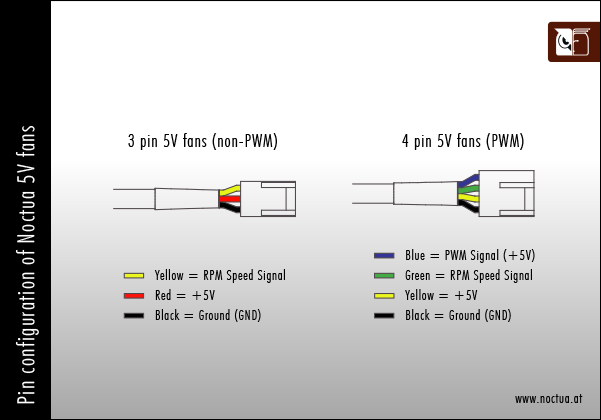
  • A fan script for a beginner

    Unsolved
    9
    1
    0 Votes
    9 Posts
    4k Views
    CyruS1337C
    Thanks, I want to try it
  • MM not starting automatically

    Unsolved
    4
    0 Votes
    4 Posts
    3k Views
    CyruS1337C
    it works now?
  • Needing help - MagicMirror sometimes working

    Unsolved
    2
    1
    0 Votes
    2 Posts
    826 Views
    B
    Anyone? Monitor is freezing or switching on/off all the time…
  • Calendar entries showing end time.

    Unsolved
    7
    0 Votes
    7 Posts
    3k Views
    AlvingerA
    I don’t really know. I just stumbled upon it browsing through the code in the development branch as I was thinking about implementing end times in my mirror. :slightly_smiling_face: It is not even documented in the README, you have to look in calendar.js to find out about the new options. When the code is moved to the master branch I am sure they will update the documentation (and also change some defaults to be non-reaking such as showEnd which should be false by default)
  • Somertimes no MagicMirror displayed after waiking up Screen by PIR Sensor

    8
    0 Votes
    8 Posts
    3k Views
    E
    Here is my working vcgencmd-Replacment: https://pastebin.com/5n8zqL5a Just copy&paste this into this file: /home/pi/MagicMirror/modules/MMM-PIR-Sensor/node_helper.js and replace the whole existing code there. After that the Problem was fixed for me.
  • This topic is deleted!

    Unsolved
    1
    0 Votes
    1 Posts
    81 Views
  • Starting up MM via SSH don't work

    Solved
    8
    0 Votes
    8 Posts
    2k Views
    Mykle1M
    @grimorth Life is good. Enjoy!
  • RPI3 - NPM Install - Failed to find Electron v1.7.0 for linux-arm64

    Unsolved
    1
    0 Votes
    1 Posts
    730 Views
    C
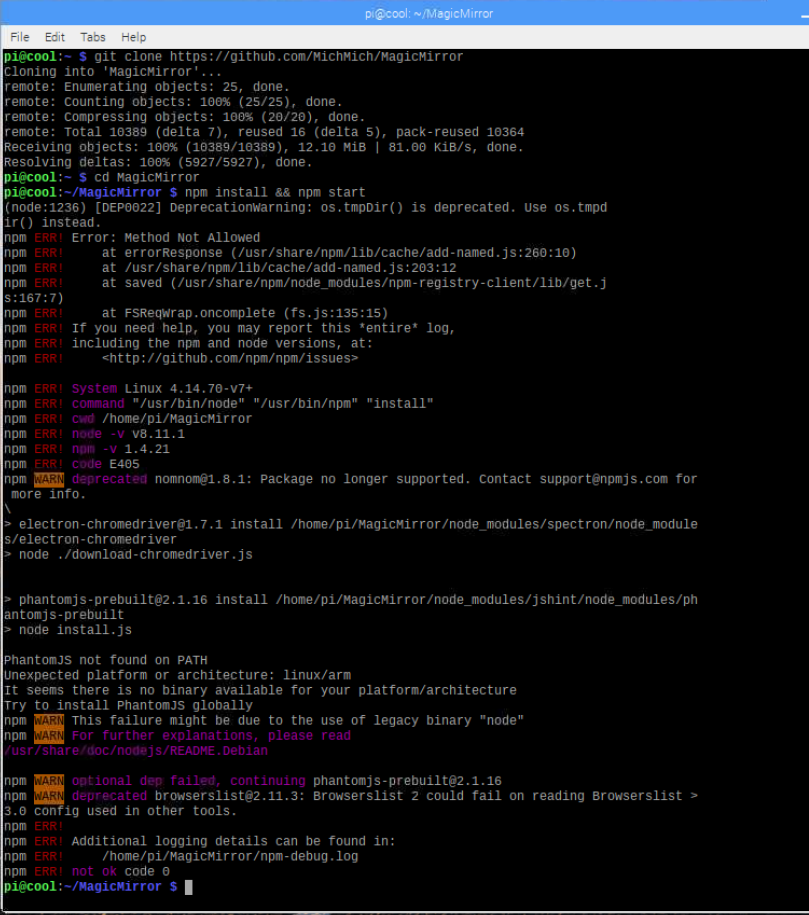
    I am trying to installing on a fresh build on a RPI3 and when i run npm install i get the following error. Error: Failed to find Electron v1.7.0 for linux-arm64 at https://github.com/electron/electron/releases/download/v1.7.0/chromedriver-v1.7.0-linux-arm64.zip OS/Kernel: 4.18.9-1-ARCH Node version: 10.11.0 NPM version: 6.4.1 Anyone run into this or know how to resolve this?
  • MM installation error by electron / arm64

    2
    0 Votes
    2 Posts
    2k Views
    C
    Did you ever fix this? I am running into the same issue.
  • How to disable auto update?

    Unsolved
    6
    0 Votes
    6 Posts
    3k Views
    Mykle1M
    @henrikra Exactly what it does, among other things
  • blank black screen every 23 hours

    Unsolved
    2
    0 Votes
    2 Posts
    973 Views
    O
    Exactly the same thing here…
  • Changing language on the mirror dynamically based on facial recognition

    Unsolved
    1
    0 Votes
    1 Posts
    545 Views
    A
    Hi there. So I am currently working on a magic mirror to have in my home. We are visited by my girlfriends parents every year who are Chinese. Since they only speak Chinese I would like to assist them with a mirror they can look in to see the weather, public transport etc. The only issue I am having is to change the language on the mirror on the fly. I want to set in facial recognition, so that when one of the parents stand in front of it it shows Chinese translation, but for the rest it is English. Is this possible to do smoothly without restarting the whole mirror?