MagicMirror Forum
    • Recent
    • Tags
    • Unsolved
    • Solved
    • MagicMirror² Repository
    • Documentation
    • 3rd-Party-Modules
    • Donate
    • Discord
    • Register
    • Login
    A New Chapter for MagicMirror: The Community Takes the Lead
    Read the statement by Michael Teeuw here.

    [MMM-PIR-Sensor] Install failing

    Scheduled Pinned Locked Moved Troubleshooting
    75 Posts 19 Posters 105.5k Views 18 Watching
    Loading More Posts
    • Oldest to Newest
    • Newest to Oldest
    • Most Votes
    Reply
    • Reply as topic
    Log in to reply
    This topic has been deleted. Only users with topic management privileges can see it.
    • J Offline
      Jopyth Moderator @Mar
      last edited by

      @Mar Please change your package.json file as displayed here and execute npm install again. @paviro has not yet responded to my PR, but hopefully this will get merged in sooner or later.

      Helpful sticky: How to troubleshoot

      M 3 Replies Last reply Reply Quote 1
      • M Offline
        Mar @Jopyth
        last edited by

        @Jopyth It finally worked!!! :lifter_tone2: thanks so much. Ive spent days on this :(

        Tried this last link you provided previously before posting but nothing was working, your support around getting node updated (and npm) was all that needed to happen first.

        Thanks again!

        1 Reply Last reply Reply Quote 1
        • M Offline
          Mar @Jopyth
          last edited by Mar

          @Jopyth Though looks like its failing on the config file now, Do you see any issues with the following?

                         {
                                  module: 'MMM-PIR-Sensor',
                                  config: {
                                          sensorPin: 17,
                                  }
                          },
          

          i seem to get an error and MM doesnt load when this is in the config file. I can even have disabled:true and it loads, otherwise I’ll get a blank webpage.

          1 Reply Last reply Reply Quote 0
          • M Offline
            Mar @Jopyth
            last edited by Mar

            @Jopyth

            using PM2 Im able to get the logs when starting, and even though it installed with your instructions i now get this error in the logs.

            0|mm       | Error: The module '/home/pi/MagicMirror/modules/MMM-PIR-Sensor/node_modules/epoll/build/Release/epoll.node'
            0|mm       | was compiled against a different Node.js version using
            0|mm       | NODE_MODULE_VERSION 50. This version of Node.js requires
            0|mm       | NODE_MODULE_VERSION 51. Please try re-compiling or re-installing
            0|mm       | the module (for instance, using `npm rebuild` or`npm install`).
            0|mm       |     at Object.Module._extensions..node (module.js:598:18)
            0|mm       |     at Module.load (module.js:488:32)
            0|mm       |     at tryModuleLoad (module.js:447:12)
            0|mm       |     at Function.Module._load (module.js:439:3)
            0|mm       |     at Module.require (module.js:498:17)
            0|mm       |     at require (internal/module.js:20:19)
            0|mm       |     at bindings (/home/pi/MagicMirror/modules/MMM-PIR-Sensor/node_modules/bindings/bindings.js:76:44)
            0|mm       |     at Object. (/home/pi/MagicMirror/modules/MMM-PIR-Sensor/node_modules/epoll/epoll.js:1:99)
            0|mm       |     at Module._compile (module.js:571:32)
            0|mm       |     at Object.Module._extensions..js (module.js:580:10)
            0|mm       | unclutter: someone created a sub-window to my sub-window! giving up
            
            
            M 1 Reply Last reply Reply Quote 0
            • M Offline
              Mar @Mar
              last edited by

              @Mar for anyone else who is getting this an npm rebuild fixes it. from here https://github.com/atom/apm/issues/635

              1 Reply Last reply Reply Quote 2
              • JayJ Offline
                Jay
                last edited by

                Hey, thanks for advising us how to install the modules, but I´m still struggling to find a solution for me even after updating nodejs and npm to the latest builts…
                Similar error with corrected package.json.

                Unable to find electron-prebuilt's version number, either install it or specify an explicit version
                

                I even tried the npm rebuild @Mar suggested. My last attempt to get this working was updating electron to its newest version but this didn´t help either.
                Is there anything I could further try to install this module correctly?

                M 1 Reply Last reply Reply Quote 0
                • M Offline
                  Mar @Jay
                  last edited by

                  @Jay I forgot what I did here to fix this issue. But to be honest after I got this working it still wasnt perfect. I ended going the route of a script on startup that controls the PIR sensor and its been perfect since and simple.

                  1 Reply Last reply Reply Quote 0
                  • foxF Offline
                    fox
                    last edited by

                    did you install the fix? or is this now obsolet?

                    Issues With MMM-WatchDog known?

                    https://forum.magicmirror.builders/post/29827

                    Useful for PIR-Sensor: https://forum.magicmirror.builders/post/21299

                    J 1 Reply Last reply Reply Quote 0
                    • J Offline
                      Jopyth Moderator @fox
                      last edited by Jopyth

                      @fox This PR should have fixed the issue (it is merged into the master).

                      Are you running MagicMirror 2.1.0? And is your PIR-Module up-to-date? Try updating both (see this and do it in both directories) to the newest version.

                      Helpful sticky: How to troubleshoot

                      foxF 1 Reply Last reply Reply Quote 1
                      • foxF Offline
                        fox @Jopyth
                        last edited by

                        @Jopyth said in [MMM-PIR-Sensor] Install failing:

                        @fox This PR should have fixed the issue (it is merged into the master).

                        Are you running MagicMirror 2.1.0? And is your PIR-Module up-to-date? Try updating both (see this and do it in both directories) to the newest version.

                        I deleted PIR Sensor completely. And made a new installation of this module and it installed without Problems. looks good from now

                        Issues With MMM-WatchDog known?

                        https://forum.magicmirror.builders/post/29827

                        Useful for PIR-Sensor: https://forum.magicmirror.builders/post/21299

                        1 Reply Last reply Reply Quote 1
                        • johnnyboyJ Offline
                          johnnyboy
                          last edited by johnnyboy

                          This post is deleted!
                          1 Reply Last reply Reply Quote 0
                          • S Offline
                            STEFF92
                            last edited by

                            Hi, i tried to install the module MMM-PIR-Sensor. I did it like its explained here:

                            https://github.com/paviro/MMM-PIR-Sensor

                            After installing the module i opened the config.js file an added:

                            {
                            			module: 'MMM-PIR-Sensor',
                            			config: {
                            				sensorPIN: 23,
                                                            powerSaving: true,
                                                            relayPIN: none,
                                                            relayOnState: 1,
                            			}
                            		},
                            

                            The way i connected the sensor is shown in the following picture:
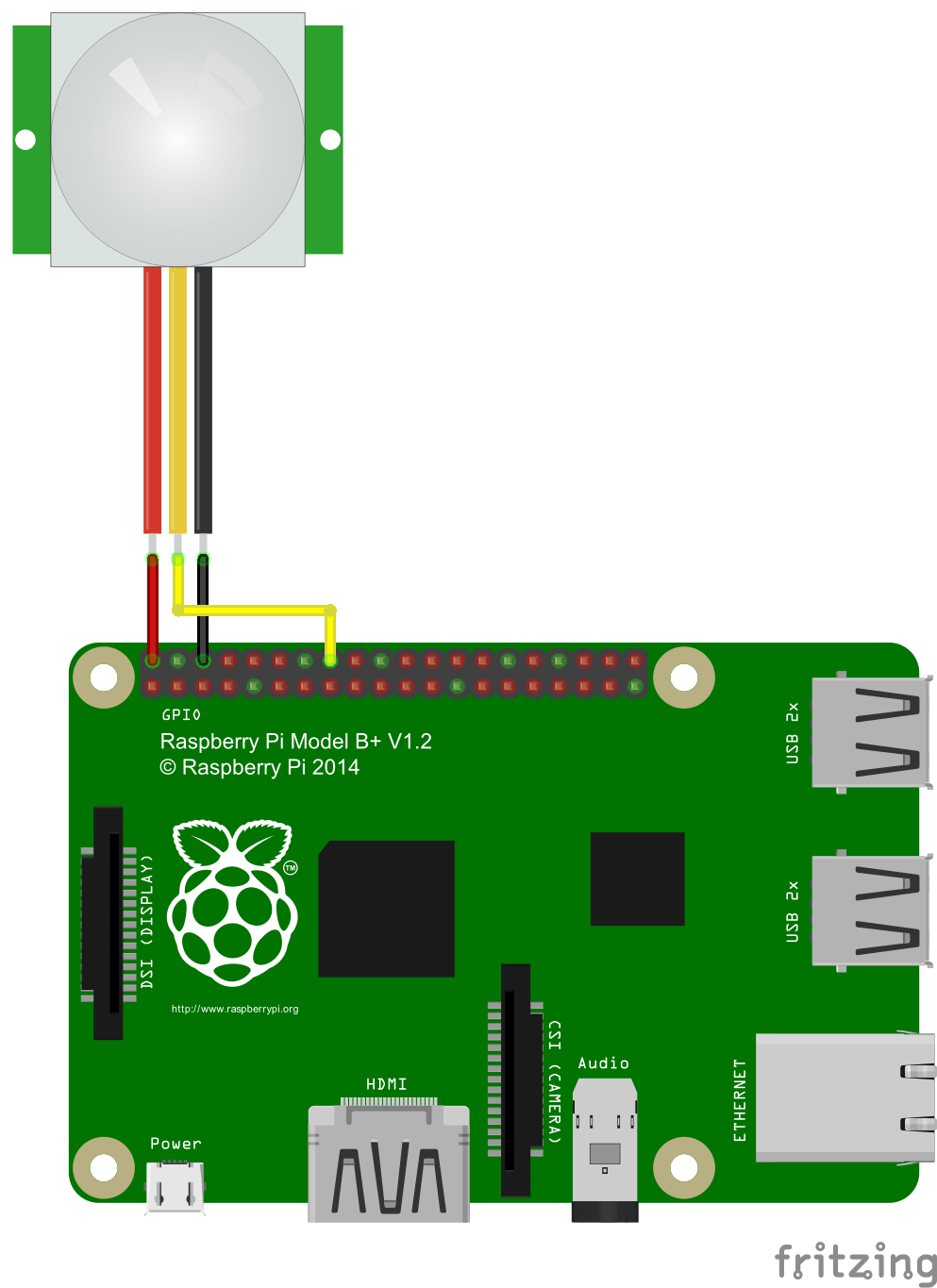
                            alt text

                            But when i want to start the magic mirror it says that i have to add a correct config.js file.
                            What did i wrong? Please help me guys ;)

                            JayJ johnnyboyJ 2 Replies Last reply Reply Quote 0
                            • JayJ Offline
                              Jay @STEFF92
                              last edited by

                              @STEFF92
                              Did you change the name of the config File from “config.js.sample” to “config.js”?

                              S 1 Reply Last reply Reply Quote 0
                              • S Offline
                                STEFF92 @Jay
                                last edited by

                                @Jay yes i did. The basic modules like clock or weather are running but when i add the module for the PIR sensor in the config.js file i cant start the magic mirror

                                1 Reply Last reply Reply Quote 0
                                • pjkoelemanP Offline
                                  pjkoeleman
                                  last edited by

                                  Delete the ‘,’ in te last line (relayOnState: 1)

                                  S 1 Reply Last reply Reply Quote 0
                                  • johnnyboyJ Offline
                                    johnnyboy @Jopyth
                                    last edited by johnnyboy

                                    This post is deleted!
                                    1 Reply Last reply Reply Quote 0
                                    • johnnyboyJ Offline
                                      johnnyboy @STEFF92
                                      last edited by johnnyboy

                                      This post is deleted!
                                      johnnyboyJ 1 Reply Last reply Reply Quote 0
                                      • johnnyboyJ Offline
                                        johnnyboy @johnnyboy
                                        last edited by johnnyboy

                                        This post is deleted!
                                        1 Reply Last reply Reply Quote 0
                                        • S Offline
                                          STEFF92 @pjkoeleman
                                          last edited by

                                          @pjkoeleman Doesnt work :(

                                          johnnyboyJ pjkoelemanP 2 Replies Last reply Reply Quote 0
                                          • johnnyboyJ Offline
                                            johnnyboy @STEFF92
                                            last edited by johnnyboy

                                            This post is deleted!
                                            S 1 Reply Last reply Reply Quote 0

                                            Hello! It looks like you're interested in this conversation, but you don't have an account yet.

                                            Getting fed up of having to scroll through the same posts each visit? When you register for an account, you'll always come back to exactly where you were before, and choose to be notified of new replies (either via email, or push notification). You'll also be able to save bookmarks and upvote posts to show your appreciation to other community members.

                                            With your input, this post could be even better 💗

                                            Register Login

                                            • 1
                                            • 2
                                            • 3
                                            • 4
                                            • 3 / 4
                                            • First post
                                              Last post
                                            Enjoying MagicMirror? Please consider a donation!
                                            MagicMirror created by Michael Teeuw.
                                            Forum managed by Sam, technical setup by Karsten.
                                            This forum is using NodeBB as its core | Contributors
                                            Contact | Privacy Policy