Read the statement by Michael Teeuw here.
[MMM-PIR-Sensor] Install failing
-
Hey, thanks for advising us how to install the modules, but I´m still struggling to find a solution for me even after updating nodejs and npm to the latest builts…
Similar error with corrected package.json.Unable to find electron-prebuilt's version number, either install it or specify an explicit versionI even tried the
npm rebuild@Mar suggested. My last attempt to get this working was updating electron to its newest version but this didn´t help either.
Is there anything I could further try to install this module correctly? -
@Jay I forgot what I did here to fix this issue. But to be honest after I got this working it still wasnt perfect. I ended going the route of a script on startup that controls the PIR sensor and its been perfect since and simple.
-
did you install the fix? or is this now obsolet?
-
@fox This PR should have fixed the issue (it is merged into the master).
Are you running MagicMirror
2.1.0? And is your PIR-Module up-to-date? Try updating both (see this and do it in both directories) to the newest version.Helpful sticky: How to troubleshoot
-
@Jopyth said in [MMM-PIR-Sensor] Install failing:
@fox This PR should have fixed the issue (it is merged into the master).
Are you running MagicMirror
2.1.0? And is your PIR-Module up-to-date? Try updating both (see this and do it in both directories) to the newest version.I deleted PIR Sensor completely. And made a new installation of this module and it installed without Problems. looks good from now
-
This post is deleted! -
Hi, i tried to install the module MMM-PIR-Sensor. I did it like its explained here:
https://github.com/paviro/MMM-PIR-Sensor
After installing the module i opened the config.js file an added:
{
			module: 'MMM-PIR-Sensor',
			config: {
				sensorPIN: 23,
                                powerSaving: true,
                                relayPIN: none,
                                relayOnState: 1,
			}
		},
The way i connected the sensor is shown in the following picture:
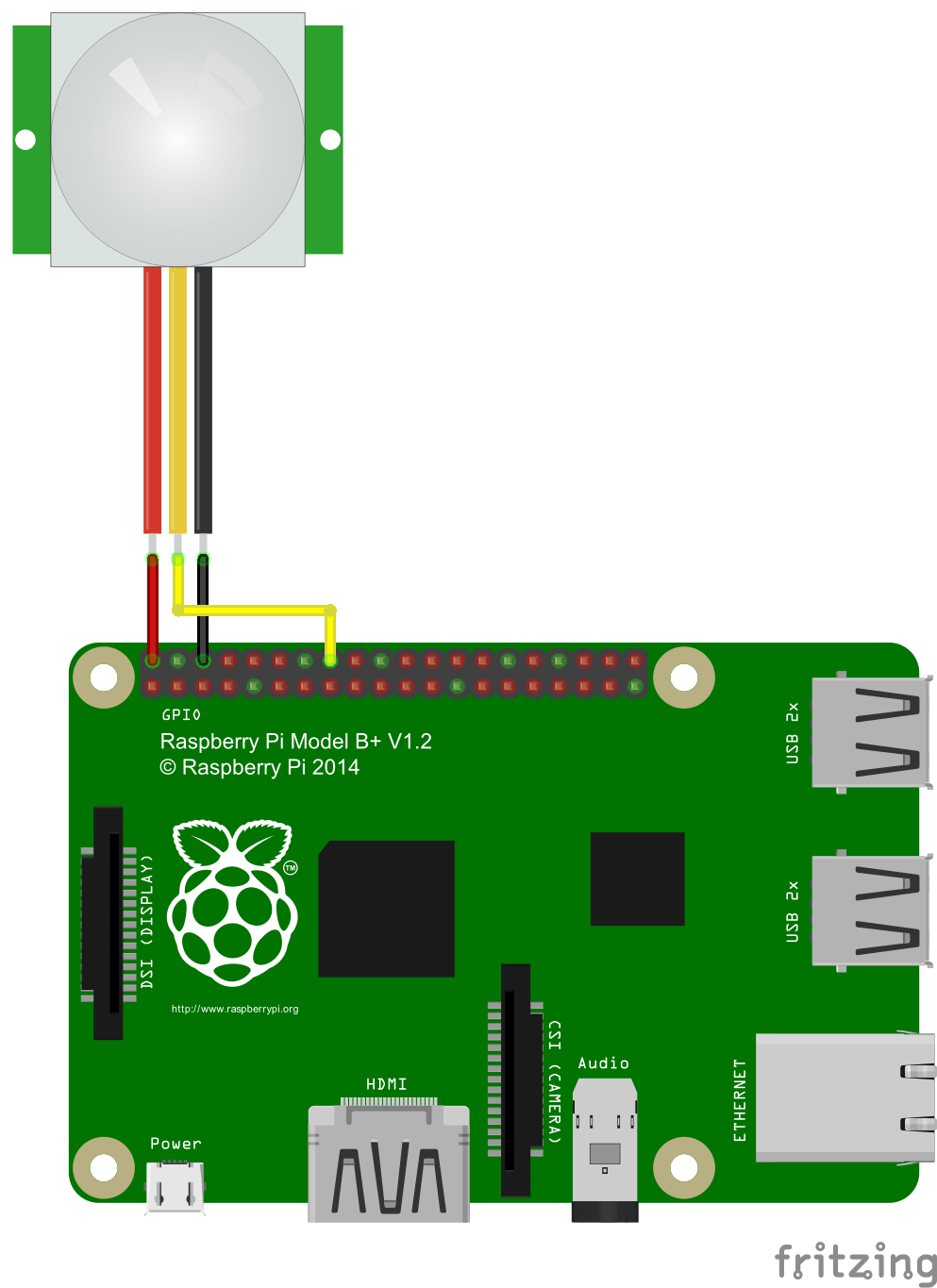
But when i want to start the magic mirror it says that i have to add a correct config.js file.
What did i wrong? Please help me guys ;) -
@STEFF92
Did you change the name of the config File from “config.js.sample” to “config.js”? -
@Jay yes i did. The basic modules like clock or weather are running but when i add the module for the PIR sensor in the config.js file i cant start the magic mirror
-
Delete the ‘,’ in te last line (relayOnState: 1)
-
This post is deleted! -
This post is deleted! -
This post is deleted! -
@pjkoeleman Doesnt work :(
-
This post is deleted! -
@STEFF92
What is not working;- Do you still have the problem with the config.sys, when post your config.sys here.
- Is the PIR not switching off you screen?
-
@johnnyboy But it doesnt matter as long as i use the gpio that belongs to this pin or am i wrong?
-
@pjkoeleman when i want to start the magic mirror it says that i should create a correct config.js file. But the only thing i added in my config.js file (which runs without the following lines) is:
{ module: 'MMM-PIR-Sensor', config: { sensorPIN: 23, powerSaving: true, relayPIN: none, relayOnState: 1, } }, -
This post is deleted! -
@johnnyboy yes i tried it like this :
               {
			module: 'MMM-PIR-Sensor',
			config: {
				sensorPIN: 23,
                                powerSaving: true,
                                relayPIN: none,
                                relayOnState: 1
			}
		},
But it dosent work. Same problem as before.





Hello! It looks like you're interested in this conversation, but you don't have an account yet.
Getting fed up of having to scroll through the same posts each visit? When you register for an account, you'll always come back to exactly where you were before, and choose to be notified of new replies (either via email, or push notification). You'll also be able to save bookmarks and upvote posts to show your appreciation to other community members.
With your input, this post could be even better 💗
Register Login