MagicMirror Forum
    • Recent
    • Tags
    • Unsolved
    • Solved
    • MagicMirror² Repository
    • Documentation
    • 3rd-Party-Modules
    • Donate
    • Discord
    • Register
    • Login
    A New Chapter for MagicMirror: The Community Takes the Lead
    Read the statement by Michael Teeuw here.

    MMM-Gas

    Scheduled Pinned Locked Moved Transport
    56 Posts 13 Posters 36.6k Views 12 Watching
    Loading More Posts
    • Oldest to Newest
    • Newest to Oldest
    • Most Votes
    Reply
    • Reply as topic
    Log in to reply
    This topic has been deleted. Only users with topic management privileges can see it.
    • justjim1220J Offline
      justjim1220 Module Developer
      last edited by

      NVM!!!

      When in doubt, Reboot it out!!!

      :smiling_face_with_sunglasses:

      "Life's Too Short To Dance With Ugly People"
      Jim Hallock - 1995

      1 Reply Last reply Reply Quote 0
      • R Offline
        rob73
        last edited by

        Is there any way to remove the Distance column? I live in a small town and dont really need the distances on the display. I hunted around the files a little bit and didnt see anything that I could maybe edit or delete that would remove it.

        Rob

        1 Reply Last reply Reply Quote 0
        • mochmanM Offline
          mochman Module Developer
          last edited by mochman

          @rob73 I haven’t tried this to see how it looks, but you may just be able to comment out a few of the lines in MMM-Gas.js
          Try commenting out the last 2 lines of this code in the getDom() function.

           var td5 = document.createElement("td");
           td5.innerHTML = dist;
           TDrow.appendChild(td5);
           weatherTable.appendChild(TDrow);
          

          It should look like this when you’re done.

          var td5 = document.createElement("td");
          td5.innerHTML = dist;
          //TDrow.appendChild(td5);
          //weatherTable.appendChild(TDrow);
          

          You should also comment out this part as well.

          var bjumpy = document.createElement("th");
          bjumpy.setAttribute("style", "text-align:center");
          bjumpy.classList.add("xsmall");
          bjumpy.innerHTML = "Distance";
          //xFCRow.appendChild(bjumpy);
          //weatherTable.appendChild(xFCRow);
          
          R 1 Reply Last reply Reply Quote 1
          • R Offline
            rob73 @mochman
            last edited by

            @mochman … Awesome… I followed your instructions and it worked! Thank you! I would have never figured that out on my own…

            Thanks again!

            Rob

            1 Reply Last reply Reply Quote 1
            • cowboysdudeC Offline
              cowboysdude Module Developer
              last edited by cowboysdude

              New config option to hide or show distance column.

              example config:

              {
                        disabled: false,
                        module: "MMM-Gas",
                        position: "top_left",
                        config: {
                           zip: "14904",
                           items: 10,
                           typeGas: "",	//premium, mid-grade, diesel, or blank for regular
                           sortBy: "price", 	//distance, price
                     distance: false //default is true, so using true just don't use distance in your config
                		}			   
                    },
              

              DO a git pull in the MagicMirror/modules/MMM-Gas dir to update!

              AND a HUGE Thanks to @mochman for all the help!!!

              Mykle1M 1 Reply Last reply Reply Quote 2
              • Mykle1M Offline
                Mykle1 Project Sponsor Module Developer @cowboysdude
                last edited by

                @cowboysdude

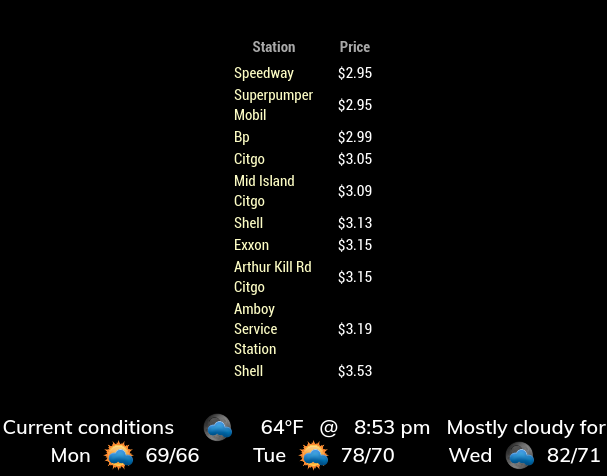
                Thanks. I really like this module alot. Very nice options and I love the mouse overs. Fantastic work! :thumbsup:
                0_1538787518808_gasas.png

                Create a working config
                How to add modules

                1 Reply Last reply Reply Quote 2
                • R Offline
                  rob73
                  last edited by

                  Awesome!

                  1 Reply Last reply Reply Quote 0
                  • richland007R Offline
                    richland007
                    last edited by

                    Is this still working?? It was working flawlessly for me before but i turned the MM off for like 3 months when i was doing some work around the house and when i turned it back on i do not see anything on my list of gas stations.

                    It just says updated at this time and date but nothing listed.
                    I did a git pull thinking that something might have been updated in those 3 months but nothing changed.

                    Anyone else experiencing difficulties ???

                    D

                    Mykle1M cowboysdudeC 2 Replies Last reply Reply Quote 0
                    • Mykle1M Offline
                      Mykle1 Project Sponsor Module Developer @richland007
                      last edited by Mykle1

                      @richland007 said in MMM-Gas:

                      Anyone else experiencing difficulties ???

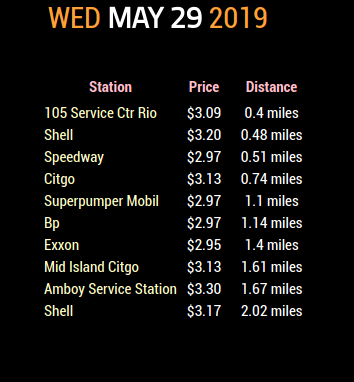
                      I just did a git pull on my current installation and everything seems to be working just fine.

                      Have you made any modifications? Are there any errors being reported in the terminal or dev console?
                      0_1559174344599_Screenshot from 2019-05-29 19-57-26.png

                      Create a working config
                      How to add modules

                      1 Reply Last reply Reply Quote 0
                      • cowboysdudeC Offline
                        cowboysdude Module Developer @richland007
                        last edited by

                        @richland007 Do a git pull as things did change and I updated it a month ago or so.

                        1 Reply Last reply Reply Quote 0
                        • richland007R Offline
                          richland007
                          last edited by

                          I did a git pull and than an npm install insde the module but still no luck only updated on today’s date and time.
                          No list of gas stations nothing just that.

                          Do we have to change anything in the module settings on the config.js file for the update??

                          Denis

                          Mykle1M 1 Reply Last reply Reply Quote 0
                          • Mykle1M Offline
                            Mykle1 Project Sponsor Module Developer @richland007
                            last edited by Mykle1

                            @richland007

                            This should be your config entry. Have you tried another zip code? See if this one works.

                            {
                                        disabled: false,
                                        module: "MMM-Gas",
                                        position: "top center",
                                        config: {
                                            zip: "10306"
                                        }
                                    },
                            

                            Create a working config
                            How to add modules

                            richland007R 1 Reply Last reply Reply Quote 1
                            • richland007R Offline
                              richland007 @Mykle1
                              last edited by

                              @Mykle1 Nothing solved it but a complete rm -rf and than a reinstall now it works fine
                              thank you
                              D

                              Mykle1M 1 Reply Last reply Reply Quote 0
                              • Mykle1M Offline
                                Mykle1 Project Sponsor Module Developer @richland007
                                last edited by

                                @richland007

                                :thumbsup:

                                Create a working config
                                How to add modules

                                1 Reply Last reply Reply Quote 0
                                • D Offline
                                  DDE12
                                  last edited by

                                  How do you change the size of the font in the module?

                                  S 1 Reply Last reply Reply Quote 0
                                  • S Offline
                                    sdetweil @DDE12
                                    last edited by

                                    @DDE12 custom.css, like always

                                    look to see if it has a css file which would tell u the class names used,

                                    then use custom.css to override those settings

                                    Sam

                                    How to add modules

                                    learning how to use browser developers window for css changes

                                    D 1 Reply Last reply Reply Quote 0
                                    • D Offline
                                      DDE12 @sdetweil
                                      last edited by

                                      @sdetweil There are two of them: MMM-Gas.css and MMM-Gas1.css. MMM-Gas did not seem to do anything and I was able to make some changes with MMM-Gas1 but not to the font size. Both css files have:

                                      .MMM-Gas .xxsmall{
                                      	font-size: 12px;
                                      

                                      Changing it has no effect.
                                      In dev mode, changing

                                      .xsmall {
                                          font-size: var(--font-size-xsmall);
                                      }
                                      

                                      from main.css does change the font size. I assume that this will affect any other module that uses the xsmall font.
                                      Is there a way through my css to set the font size for this module only?

                                      S 1 Reply Last reply Reply Quote 0
                                      • S Offline
                                        sdetweil @DDE12
                                        last edited by

                                        @DDE12 yes, prefix the class with the module name

                                        ..modulename .xsmall {
                                        ...
                                        }
                                        

                                        this is the documented way to use custom.css

                                        Sam

                                        How to add modules

                                        learning how to use browser developers window for css changes

                                        D 1 Reply Last reply Reply Quote 0
                                        • D Offline
                                          DDE12 @sdetweil
                                          last edited by

                                          @sdetweil That fixed it! Thank you! Looking back, I see that the module css has .xxsmall and the font size is determined by .xsmall. My brain glossed over that extra ‘x’. Maybe’s it’s a typo in the css because changing it does not seem to affect anything?

                                          S 1 Reply Last reply Reply Quote 0
                                          • S Offline
                                            sdetweil @DDE12
                                            last edited by

                                            @DDE12 sorry, don’t know the module…

                                            Sam

                                            How to add modules

                                            learning how to use browser developers window for css changes

                                            1 Reply Last reply Reply Quote 0

                                            Hello! It looks like you're interested in this conversation, but you don't have an account yet.

                                            Getting fed up of having to scroll through the same posts each visit? When you register for an account, you'll always come back to exactly where you were before, and choose to be notified of new replies (either via email, or push notification). You'll also be able to save bookmarks and upvote posts to show your appreciation to other community members.

                                            With your input, this post could be even better 💗

                                            Register Login

                                            • 1
                                            • 2
                                            • 3
                                            • 2 / 3
                                            • First post
                                              Last post
                                            Enjoying MagicMirror? Please consider a donation!
                                            MagicMirror created by Michael Teeuw.
                                            Forum managed by Sam, technical setup by Karsten.
                                            This forum is using NodeBB as its core | Contributors
                                            Contact | Privacy Policy