Read the statement by Michael Teeuw here.
MagicMirror does not work at startup
-
I also am having issues with auto start of the script.
New install on raspberry pi 3 B.
The manual start, stop and restart commands all work and when I run the pm2 save command, it does not error.
After a reboot the mm.sh does not autostart.
-
Also having this issue. pm2 start mm.sh works. MM2 boot up screen appears on start up. But loads to desktop.
-
I am having this problem too. This is the 4th time I’ve installed MM on a RPI 3 and I don’t know what’s changed recently, but it’s not loading at boot. I followed the AutoStart wiki to the T but it won’t autostart.
@MichMich @KirAsh4 @cowboysdude @ianperrin @yawns @Jopyth @morozgrafix - can any of you guys weigh in on this? This is kind of a big issue that it seems many folks are having.
-
I have the same issue, i did put java scrip on startup, i did look on the forum and #sebzx10r, suggest the same solution.
https://forum.magicmirror.builders/topic/1094/pm2-mm2-not-starting-on-start-up/15
In Raspian click Menu,Preferences,Main Menu Editor
Click Preferences and check Default applications for LXSession
Click OK and close main menu editor
Now click Menu and Under Preferences click on Default applications for LXSession
LXSession configuration opens
Click Autostart
Under Manual autostarted applications paste in your java command line
click add
close the LXSession configuration application and reboot your pi
your java app should run after reboot
Hope this help.
Cheers, -
@mpires did you get it working with this script?
-
I have the script working, but the only way to start mm on boot, was set
pm2 start mmon LXSession, but yes now once i boot my Pi, mm start without any problem.
-
@mpires so in the LXSession configuration menu under ‘autostart’, simply add the line ‘pm2 start mm’ and it’ll run at boot?
-
@mpires do I need an @ in front of it?
-
You have Pm2 install?
-
@mpires Yes.
-
@mpires That got it working. I had to add in the directory. Thanks for all your help.
-
no just put " pm2 start.sh "
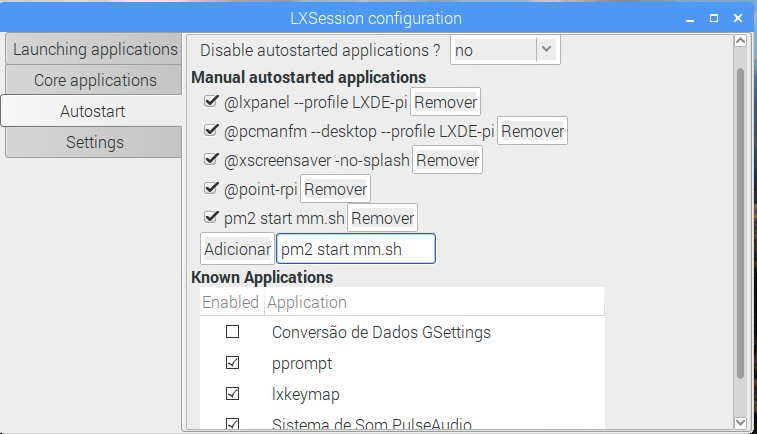
-
Another happy person :D
-
Thanks for the information. Using it I was able to figure out the steps for the command line.
cd ~/.config/lxsession/LXDE-pi
sudo nano autostartadd to the end
pm2 start mm.sh
Thanks again for helping.
-
@cassidycaid yup is the same, i just show visual way, because is more simple for some ppl to understand.
-
@cassidycaid Worked like a charm. Thanks a bunch.
-
When I boot the pi, I see the MagicMirror boot screen, the desktop, and then MagicMirror boots. Following the steps above did not solve the problem. Is the desktop supposed to show up before MagicMirror boots, or is it supposed to go straight into MagicMirror? After I see the boot screen and right before I see the desktop, it briefly becomes a black screen with an X in the upper left corner of the screen. Any ideas on what might be wrong? I have pm2 installed and it is functioning perfectly.
-
Yes that is correct, you will always see the desktop for few seconds, then should open MM.
I think will happen the same with any other option you find to auto boot MM.


Hello! It looks like you're interested in this conversation, but you don't have an account yet.
Getting fed up of having to scroll through the same posts each visit? When you register for an account, you'll always come back to exactly where you were before, and choose to be notified of new replies (either via email, or push notification). You'll also be able to save bookmarks and upvote posts to show your appreciation to other community members.
With your input, this post could be even better 💗
Register Login