@DazDavid Please post the relevant portion of your config.js file. That is a good place to start. Also please use the markdown commands to make your code easier for us to read.
B
Offline
A New Chapter for MagicMirror: The Community Takes the Lead
Read the statement by Michael Teeuw here.
Read the statement by Michael Teeuw here.
Posts
-
RE: The mirror that wasn't a mirror
-
RE: trouble with config file
Just a suggestion: Try replacing that location id of
locationID: '23'withlocationID: '2173741'. -
RE: Th old Magic Mirror project
The blog post that started it all: Xonay Labs
-
RE: Motion Detector
Thanks, @alexyak. Any idea about how to get around the issue with the new security surrounding webcams?
-
RE: Halloween mirror ghouls anyone?
@Mitchfarino Presumably you can inject some scripting to define an array of video files and then call a function to play the next file in the array. If you call that function from the onended() event in the VIDEO tag you should be able to get 90% of the way there.
-
RE: Twitter feed
Negative. I have, however, made some progress. Just FYI - If you attempt to position a module into a segment that doesn’t actually exist, you will receive an error of
cannot read property 'appendChild' of undefined. This actually means “The position ‘center_left’ doesn’t actually exist, jerk.”Having fixed this, I now see the title “Twitter Feed” on my mirror. It does not, however, actually display any tweets. Still… progress.
-
RE: Motion Detector
@paphko I just looked at my Pi 3 and I’m showing 40% usage with the motion detection module running (and failing). I suspect it’s the constant pic-compare-pic-compare loop that runs. It would be trivial to insert a wait in that loop to lower the CPU usage. Even a delay of 750 ms would probably help quite a bit.
-
RE: Alexa Goes Handsfree!
@d3r Wait, what? You can use Alexa’s voice service to activate on whatever phrase you like?
Oh, this is too awesome. My wife and were trying to get our echo to wake on “Hey Asshole” (it’s a literary reference, honest) and it wouldn’t let us. I’m going to get to work on a new mirror…
-
RE: Autostart & turning off powersave
@bhepler It seems to be working just fine. The mirror has been on all day so far.
-
RE: Screen auto turn-on when it has a power supply?
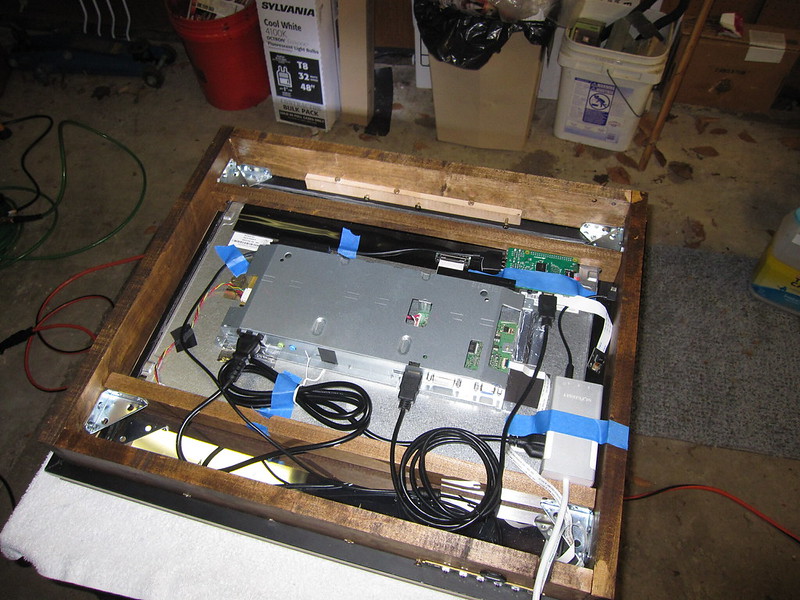
What I did with my monitor is that I removed the bezel from around the monitor and relocated the controls to the bottom of the mirror box. There was a fairly long (16" or so) and very thin ribbon cable that was stuck in place with a light adhesive. A gentle tug and it flopped around freely. I re-routed that cable out the bottom of the box and stuck it to the outside with an industrial booger. So now I just press the button if I need to turn the monitor on or adjust the settings.
-
RE: Autostart & turning off powersave
@deadherring Give me an hour and I’ll let you know. :-)
-
RE: Autostart & turning off powersave
@deadherring said in Autostart & turning off powersave:
What finally worked is this:
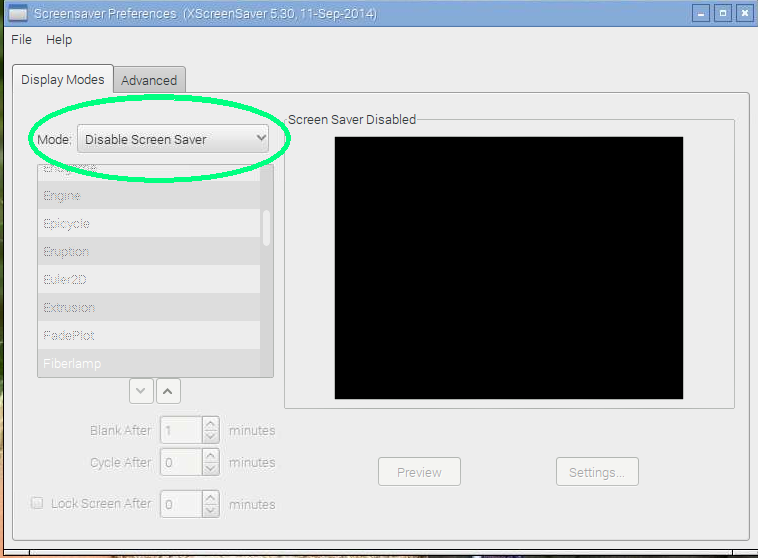
In the terminal window type: “sudo apt-get install xscreensaver” .It will install a screen saver that you can then access from the menu. Go in and disable the blank screen.
This is the only thing that worked for me and my screen has been on for an hour now.
@deadherring Heh. I tried that. But then the screensaver activated and I got a lovely fiber optic flower on top of my my mirror interface. I’ll look into it again.
Edited to add: Whoops. Never mind. I wasn’t looking in the right place. I tried setting “Blank After X minutes” and it wouldn’t let me set it to zero.
-
RE: Add a background image
@ostfilinchen Try this one:
background-Image: url("Images/logo.jpeg");Double-check your capitalization on your path and your file name. That’s burned me more than a couple of times.
-
RE: Autostart & turning off powersave
There is apparently something in the Jessie version of Raspian that is not allowing these settings to take. My research has indicated that the easiest way to keep your Pi displaying data is to install the xscreensaver and then configure it to never shut down the screen.
sudo apt-get update
sudo apt-get install xscreensaverNote: I haven’t tried this myself yet. Do let me know if this works for you.
-
RE: Halloween mirror ghouls anyone?
I experimented with this a bit yesterday. Thanks to @rvdgeer for the hint and @Jopyth for the initial code to start.
I ripped a YouTube video to disk and uploaded it to my Pi, putting it in the
vendorfolder. Adding this to my config.js was surprisingly effective (the rotate 90 is due to the video being designed to be projected on a window):{ module: "helloworld", position: "fullscreen_below", config: { text: "<video src='vendor/halloween.mp4' autoplay loop style='transform:rotate(90deg); position:absolute; top:50%;left:30%; height:50%'></video>" } }, -
RE: Front door mirror
@cowboysdude That gives me an idea. I wonder if the Alexa API will let you duplicate the Alexa mobile app in a mirror module? You could display what Alexa is playing & what she heard when you spoke to her.
Hmm…
-
RE: Motion Detector
Greetings! I’m slowly working my way through this thread and trying to figure out what’s going on here.
What works: configurable timeout for the motiondetector seems to work just fine. Turns the screen off. Interestingly, if I’m viewing the mirror via my desktop browser, refreshing the page will turn the monitor on.
What doesn’t work: turning the screen on. Even after entering
sudo modprobe bcm2835-vl2Additionally, I’m seeing this in the console with the developer tools enabled:
getUserMedia() no longer works on insecure origins. To use this feature, you should consider switching your application to a secure origin, such as HTTPS. See https://goo.gl/rStTGz for more details.
:8080/modules/motiondetector//webcamcapture.js:78 NavigatorUserMediaError -
RE: Can the usb port from a monitor power the rpi3?
@bibi said in Can the usb port from a monitor power the rpi3?:
If you want to share your Anker model - feel free
I’m using a NextGadget 20W desk charger. Plenty of power, but I just discovered that the cord is a bit short.
If you’re looking for 2.4 Amps per port, you might want to look at Skiva.
-
RE: First Mirror - Wedding Present
In case anyone was interested, I’m using the following:
NextGadget 20W Portable Desktop Charger - This powers the mirror and the USB powers the Pi.
Rippo Flush Mount USB cable - This gives me a USB port on the bottom of the box in case I need to hook up a keyboard.
ViewSonic 22" monitor - HDMI input was about all I really was looking for.
-
RE: First Mirror - Wedding Present
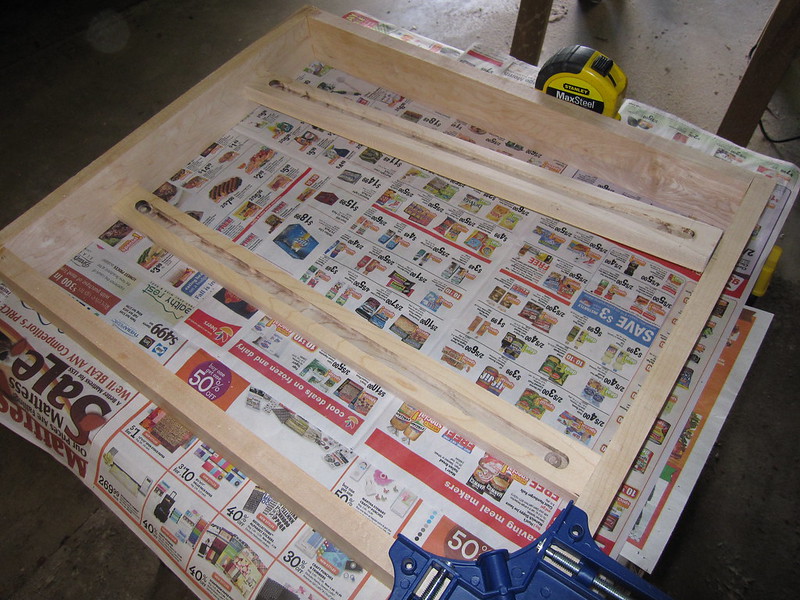
The construction is much like everyone else’s mirror. The only real challenge was that the computer monitor was smaller than the frame and the aspect ratios were just not going to match up (the frame is more square than your typical monitor). Building a box around the monitor wouldn’t touch the edges of the frame.
My solution was to build two internal runners to support the monitor in place. I think getting the two channels routed properly was like 50% of the construction process.
And everything in place: