Yeah I am not able to get the plain WiFi symbol to appear as well. The heading size responds to the new sizing of where a symbol should be, but no symbol appears.
 C
Offline
C
Offline
A New Chapter for MagicMirror: The Community Takes the Lead
Read the statement by Michael Teeuw here.
Read the statement by Michael Teeuw here.
Posts
-
RE: Internet Monitor
-
RE: Clean operating system?
@j.e.f.f Okay thats a possible solution, maybe i should have explained myself better. I currently have a couple people who want me to build them a magic mirror, so im just looking for a way to keep them from snooping around the system. Plus i’m a minimalist at heart.
-
Clean operating system?
Okay so i know i’m super picky here, but I really want some sort of clean system to run magic mirror. My goal is to only have the magic mirror application on the system and no other gui components. Does anyone know how i can achieve this?
-
RE: Downgrade Magic Mirror?
Well what do you know. It works now! My old code was this and it worked fine on older versions:
	"ipWhitelist": [
		"127.0.0.1",
		"::ffff:127.0.0.1",
		"::1",
		"192.168.11.1/24",
		"::ffff:192.168.11.1/24"
	]
But now that I put this it works fine, no need to downgrade now, much thanks:
"address": "0.0.0.0", "ipWhitelist": [ ] -
RE: Downgrade Magic Mirror?
@cruunnerr that is strange indeed. I’m not sure what’s going on with my setup then. I mainly made this post because I discovered this one researching before posting: https://forum.magicmirror.builders/topic/5025/can-t-access-magic-mirror-via-http
-
RE: Downgrade Magic Mirror?
@MichMich The only reason for me is I really love the ability to use the Remote Control module so I can easily remote access my mirrors. And I noticed in the new update that Http isn’t working, so I just want to go back to where I can remote access my mirrors.
-
RE: Downgrade Magic Mirror?
@cowboysdude Thank you so much, it worked like a charm. After successfully welding an enclosure together to put the dynamite and RPi, I set it off. And BOOM! Magic Mirror is now running like a charm ;)
-
Downgrade Magic Mirror?
What’s the best way to go about downgrading the magic mirror software but keeping all modules intact?
-
RE: Can't access magic mirror via http ?
So I have the same issues. I was wondering if there has been any developments on this subject over the past few months. Have any workarounds been discovered so I can finally remote access my Magic Mirror?
-
RE: [Remote-Control] Shutdown, Configure and Update your MagicMirror
I downloaded this module today and its been the best one so far. It has everything in it that I have been trying to accomplish for weeks. I wish I saw this one sooner. I have only one issue, when i click the restart MagicMirror button i get an error and my MagicMirror dose not restart.
-
RE: How do I go about making a decent sized mirror cheap?
Never mind about price, just what are different ways to achieve touchscreen capability with an acrylic sheet?
-
RE: How do I go about making a decent sized mirror cheap?
@bhepler That’s great and all, but I was mainly looking for ways to do touchscreen. I’m going to end up making a mirror for my grandma because she wants one but she would neither know how to use VNC or be able to, so I was hoping I could make it touchscreen so she could change whatever she wanted by just touching what she wants.
-
How do I go about making a decent sized mirror cheap?
I currently have a raspberry pi running the MagicMirror software, I have it fully customized to my liking. My new issue is going about building the actual mirror itself. I was wondering how I could get big screen real-estate, while also having it touch capable, while also keeping the costs down. Any suggestions??
-
RE: MMM-Modulebar - A module that adds touch buttons for showing/hiding other modules.
@Snille That was a brilliant idea! I got it to work just as I wanted.
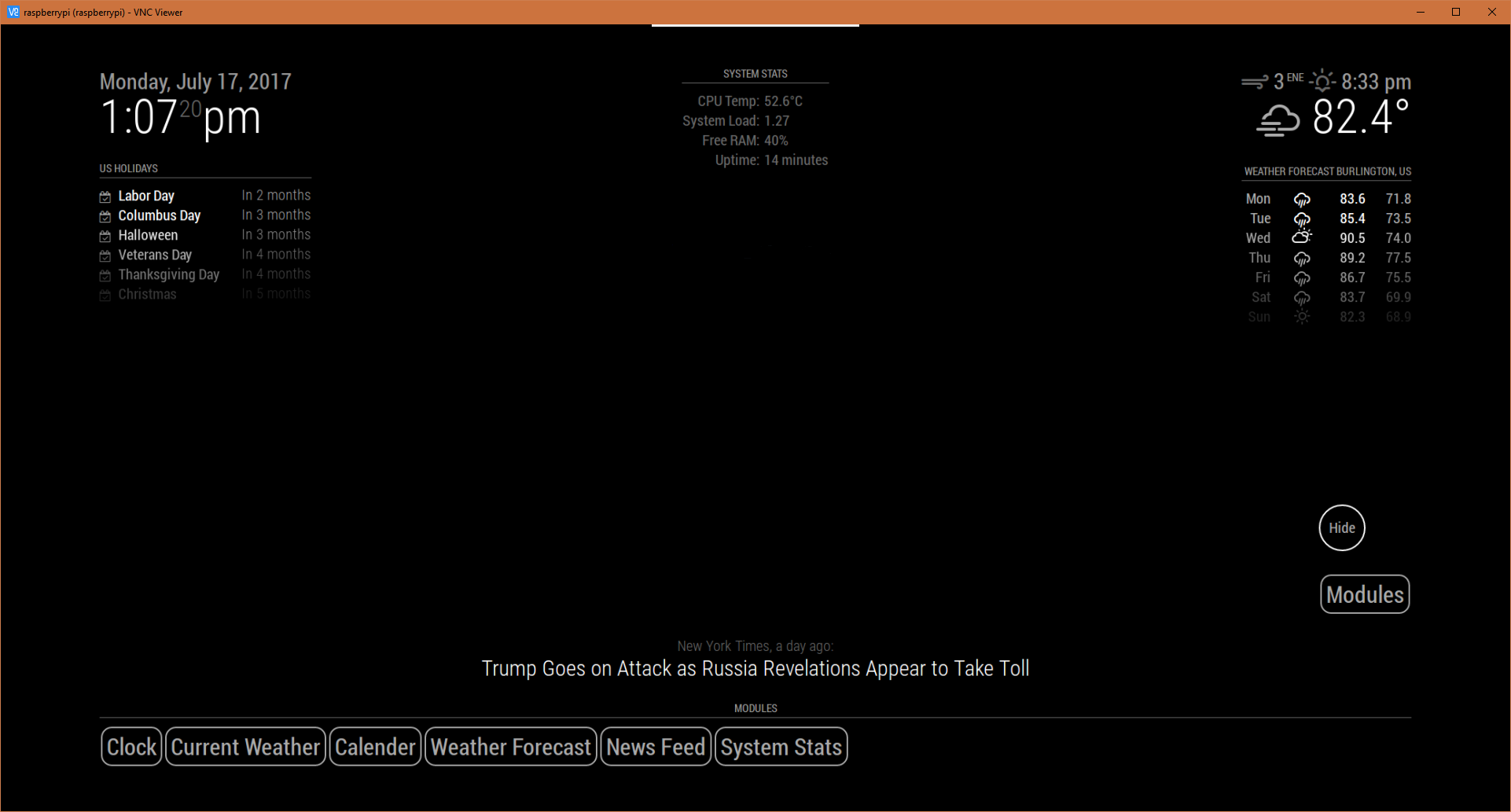
The Modules button is a separate module bar that I set up to toggle the one that I will fill with all my modules. I achieved this by going to my modules folder and duplicating the “MMM-Modulebar” folder and renaming it “MMM-ModulebarHide”. I then renamed everything referencing “MMM-Modulebar” to “MMM-ModulebarHide” for consistency.My config file is set up like this:
		{
        		module: "MMM-ModulebarHide",
       			position: "bottom_right",
			//header: "Modules",
        		classes: "default everyone",
        		config: {
        			buttons: {
   				 	"1": {
	  					module: "MMM-Modulebar",
      						text: "Modules",
    					},
       				}
       			}
    		},
		{
        		module: "MMM-Modulebar",
       			position: "bottom_bar", // This can be any of the regions.
			header: "Modules", // Optional
        		classes: "default everyone", // Optional
        		config: {
        			buttons: {
   				 	"1": {
	  					module: "clock",
      						text: "Clock",
    					},
   					"2": {
						module: "currentweather",
      						text: "Current Weather",
      					},
      					"3": {
      						module: "calendar",
      						text: "Calender",
      					},
      					"4": {
      						module: "weatherforecast",
      						text: "Weather Forecast",
      					},
      					"5": {
      						module: "newsfeed",
      						text: "News Feed",
      					},
      					"6": {
      						module: "MMM-SystemStats",
      						text: "System Stats",
      					},

      				}
           			// See 'Configuration options' for more information.
       			}
    		},
I can now toggle the module bar! Thanks so much!
-
RE: MMM-Modulebar - A module that adds touch buttons for showing/hiding other modules.
@Snille I have that module installed also, I was just wanting a quick way to hide certain modules like for example email. For whenever I don’t want any friends snooping, while i still get to show off the mirror. :)
-
RE: MMM-Modulebar - A module that adds touch buttons for showing/hiding other modules.
@Snille Haha, I tried that yes. only to realize my mistake.
-
RE: MMM-Modulebar - A module that adds touch buttons for showing/hiding other modules.
Is it possible to make the module bar itself toggle-able? It covers a large amount of screen real-estate; I was just wondering if its possible, how I could do that.
-
RE: I need help with editing configs (mainly the compliments)
@Mykle1 Works like a charm, thank you for the guidance!
-
I need help with editing configs (mainly the compliments)
I am very new to Linux and the raspberry pi. I was inspired to build a smart mirror so I got everything set up right, I installed Magic Mirror and then I hit a wall. I don’t quite understand on how to edit the configs, I am specifically trying to edit what the compliments say and get them to fade after 5 seconds. Can someone explain to me how I go about doing this?