MagicMirror Forum
    • Recent
    • Tags
    • Unsolved
    • Solved
    • MagicMirror² Repository
    • Documentation
    • 3rd-Party-Modules
    • Donate
    • Discord
    • Register
    • Login
    1. Home
    2. Mykle1
    3. Posts
    A New Chapter for MagicMirror: The Community Takes the Lead
    Read the statement by Michael Teeuw here.
    Mykle1M Offline
    • Profile
    • Following 5
    • Followers 73
    • Topics 101
    • Posts 4,397
    • Groups 2

    Posts

    Recent Best Controversial
    • RE: MMM-NFL

      @strawberry-3.141 said in MMM-NFL:

      never tried to install it on a non linux system

      Ok,then lets start off simply, if you don’t mind

      Are these part of the dependencies installed by the bash command?
      Packages: bison libasound2-dev autoconf automake libtool python-dev swig python-pip

      posted in Troubleshooting
      Mykle1M
      Mykle1
    • RE: MMM-doomsDay - The countdown module,

      @broberg

      Just glanced at the mirror and doomsDay is now reporting 1 more day. I don’t know at what time that occurred.

      posted in Utilities
      Mykle1M
      Mykle1
    • RE: MMM-NFL

      @strawberry-3.141

      This was in my terminal when I closed MM

      MMM-voice: Checking files.
      MMM-voice: Generating dictionairy and language model.
      MMM-voice: Saved words.json successfully.
      MMM-voice: Starting pocketsphinx.
      (node:1892) DeprecationWarning: Calling an asynchronous function without callbac
      k is deprecated.
      (node:1892) DeprecationWarning: Calling an asynchronous function without callbac
      k is deprecated.
      (node:1892) DeprecationWarning: Calling an asynchronous function without callbac
      k is deprecated.
      (node:1892) DeprecationWarning: Calling an asynchronous function without callbac
      k is deprecated.
      (node:1892) DeprecationWarning: Calling an asynchronous function without callbac
      k is deprecated.
      (node:1892) DeprecationWarning: Calling an asynchronous function without callbac
      k is deprecated.

      posted in Troubleshooting
      Mykle1M
      Mykle1
    • RE: MMM-NFL

      @strawberry-3.141

      MM shows a little white microphone in the bottom left of the screen with the word ERROR next to it

      run bash dependencies.sh in ~/MagicMirror/modules/MMM-voice/installers directory, to install all dependencies.

      This command would not work for me on the laptop so I manually installed these dependencies in the /MagicMirror/modules/MMM-voice/installers directory:
      SphinxBase :heavy_check_mark:
      PocketSphinx :heavy_check_mark:
      A microphone - I tested the microphone of the laptop and it is working. I recorded a test file. :heavy_check_mark:
      npm - already installed :heavy_check_mark:
      PocketSphinx-continuous :heavy_check_mark:
      lmtool :heavy_check_mark:

      Do I have to also install these? If so, how would I find them? Google search?

      Packages: bison libasound2-dev autoconf automake libtool python-dev swig python-pip

      microphone REQUIRED Id of microphone shown in the installer.

      I did not see and Id for the microphone.

      posted in Troubleshooting
      Mykle1M
      Mykle1
    • RE: MMM-doomsDay - The countdown module,

      @Mykle1

      {
          			module: 'MMM-doomsDay',
          			position: 'top_right', // This can be any of the regions, best results in center regions
          			config: {
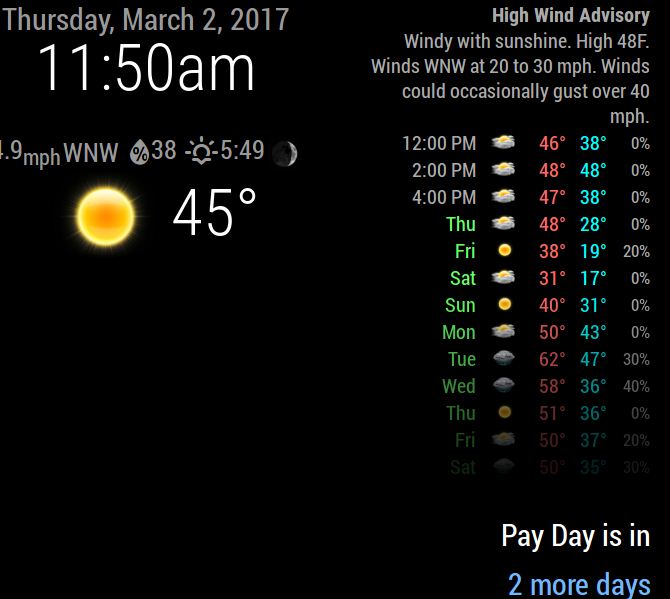
              			doomsDay: "2017-03-03 24:00:00", // the end day of the countdown, 
              			toWhat: 'Pay Day is in', // the title of your countdown event
      				present: 'Benjamin Pile!',
      				updateInterval: 1 * 3600000,
      				singular: 'more day!', // what it should say when it's only one day left, default is `Day Left`
      				plural: 'more days', // what it should say when it's more days left, default is `Days Left`
      				}
      		},
      

      0_1488473720195_Capture.JPG

      posted in Utilities
      Mykle1M
      Mykle1
    • RE: MMM-NFL

      @strawberry-3.141 said in MMM-NFL:

      without any modifications this is only possible with mmm-voice

      Ok, then I will give MMM-voice a try. Thanks

      posted in Troubleshooting
      Mykle1M
      Mykle1
    • RE: MMM-doomsDay - The countdown module,

      @broberg

      I hate to be the bearer of bad news, but as of this morning, the module is still not performing correctly. Yesterday, I set a simple test for tomorrow. It correctly reported 2 Days Left. This morning (7:09am) it still reports 2 Days Left. I’ve made only the changes that you have advised.

      sorry. no screenshot. I’m not at my normal computer

      posted in Utilities
      Mykle1M
      Mykle1
    • RE: 1 old noob + 1 rPi = I can't believe I did it! (revisited)

      @johnnyboy said in 1 old noob + 1 rPi = I can’t believe I did it! (revisited):

      LMFAO… I’m pinching that predator compliment… Brilliant!

      Of course you are… and thanks. :thumbsup_tone1:

      Had this been a video, and not a picture, you would have also seen, “What the hell are you?”

      posted in Show your Mirror
      Mykle1M
      Mykle1
    • MMM-NFL

      Hi,

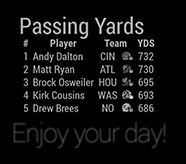
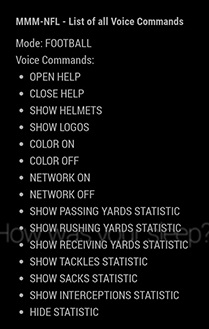
      I took and old laptop and installed MM on it today. It’s not going to be a mirror. It’s going to be a gift to my son-in-law who is an avid NFL football fan and he is totally into Fantasy Football as well. So, the only module running will be MMM-NFL (for now) and I have a question or two (for now). I already installed the module and it seems fine showing the last games of the post-season 2016 and the final of the SuperBowl.

      Do I have to install MMM-voice in order to show the windows below? Or is there a way to have multiple windows open without voice commands? For example, I’d like to have all the statistics windows open at the same time. If MMM-voice has to be installed then I hope the laptop microphone will work.
      0_1488423632327_example_statistic.jpg

      0_1488423648790_example_help.jpg

      Thank you for any help you can give me

      posted in Troubleshooting
      Mykle1M
      Mykle1
    • RE: 1 old noob + 1 rPi = I can't believe I did it! (revisited)

      @cyberphox said in 1 old noob + 1 rPi = I can’t believe I did it! (revisited):

      Just wondering what size monitor/mirror you are using?

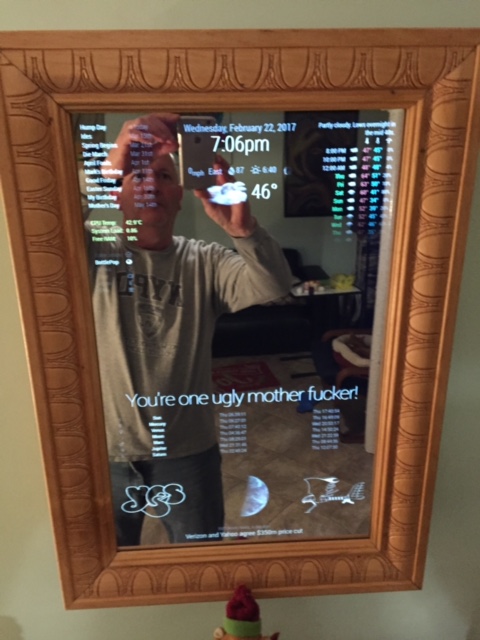
      22" diagonal monitor
      The mirror I bought was 24"x12". I only had to cut the length of the mirror by about 4 inches. The 12" width was perfect.
      0_1488413663769_IMG_2158.JPG

      posted in Show your Mirror
      Mykle1M
      Mykle1
    • RE: MMM-doomsDay - The countdown module,

      @broberg said in MMM-doomsDay - The countdown module,:

      And thank you for all the beta testing!

      My pleasure. Woke up to the module displaying the correct present: entry. Nice!

      posted in Utilities
      Mykle1M
      Mykle1
    • RE: Throwing down the gauntlet

      @jbeck615 said in Throwing down the gauntlet:

      yep on the same page now! ill stop messing with the js files in each modules folder. thanks

      You’re welcome. I did it too, at first

      posted in Troubleshooting
      Mykle1M
      Mykle1
    • RE: Throwing down the gauntlet

      @jbeck615 said in Throwing down the gauntlet:

      changes only go in the config.js file in the config folder

      Each module has a ReadMe that describes the config.js options. You’re not really changing the config.js file. You’re choosing options that the author has provided

      , dont touch the js files in each of hte modules

      Correct. Those are part of the module itself

      , and if needed, modify the css files in each module correct?

      You modify the custom.css file FOR each module, not IN the module folder

      posted in Troubleshooting
      Mykle1M
      Mykle1
    • RE: Throwing down the gauntlet

      @jbeck615 said in Throwing down the gauntlet:

      the main config file and never touch the config files of each modules folder?

      There are no config files in each module folder. Anything inside the actual module folder is part of the module and should not be altered. You set up each modules configuration in the config.js file inside your config folder. After that, any customizing of each module should be done in the custom.css file in your css folder.

      This is the WunderGround entry in my config.js file. The setup of the module.

      {
          			module: 'MMM-WunderGround', // Just for current weather
          			position: 'top_center',
          			config: {
              		apikey: 'YOUR API KEY', // private; don't share!
              		pws: 'pws:KNYNEWYO103', // Richmondtown Weather Station - Very Cool
      			currentweather: 1,
              		coloricon: true,
      			animationSpeed: 5000,
          			roundTmpDecs: 0,
          			UseCardinals: 1,
      			windunits: "mph", // bft or mph
      			}
      		},
      		{
          			module: 'MMM-WunderGround', // Just for forecast
          			position: 'top_right',
          			config: {
              		apikey: 'YOUR API KEY AGAIN', // private; don't share!
              		pws: 'pws:KNYNEWYO103', // Richmondtown Weather Station - Very Cool
      			currentweather: 0,
              		coloricon: true,
              		hourly: '1',
              		fctext: '1',
              		fcdaycount: "10",
              		fcdaystart: "1",
              		hourlyinterval: "2",
              		hourlycount: "1",
      			animationSpeed: 5000,
              		alerttime: 10000,
              		alerttruncatestring: "english:",
          			roundTmpDecs: 0,
          			UseCardinals: 1,
          			layout: "vertical",
      			windunits: "mph",
          			sysstat: "0"
      			}
      		},
      

      And this is the WunderGround entry in my custom.css file. To customize things like color, icons, position, size, etc…

      }
      
      .region.top.right .MMM-WunderGround table th {
        display: none; /* removes icons above max-temp, min-temp and % chance of rain */
      }
      
      .MMM-WunderGround .max-temp {
        color: #f66;
      }
      
      .MMM-WunderGround .min-temp {
        color: #0ff;
      }
      
      .MMM-WunderGround .weather-icon {
        color: #f93;
      }
      
      .MMM-WunderGround .day {
        color: #6f6;
      }
      
      .region.top.center .MMM-WunderGround table.small,   /* selector for ONLY current weather Thanks to Strawberry-3.141 */
      .region.top.right .MMM-WunderGround table:not(.small),   /* selector for ONLY weather forecast */
      .region.top.right .MMM-WunderGround table.small td:nth-child(6)  {
        display: none;    /* this line and line above selector for NO rain amount column */
      }
      

      I hope this clears things up for you

      posted in Troubleshooting
      Mykle1M
      Mykle1
    • RE: Throwing down the gauntlet

      @jbeck615 said in Throwing down the gauntlet:

      ive never touched any of the monthly calendar files until i added your lines above to the end of my mcal.css file

      Those should have been added to your custom.css file within your css folder

      and was curious if you had any thoughts as to why your numbers are aligned to the left (when facing monitor) of the abbreviated days and mine are aligned to the right?

      Are you talking about WunderGround still? If so, then mine are aligned to the right as well.

      posted in Troubleshooting
      Mykle1M
      Mykle1
    • RE: MMM-doomsDay - The countdown module,

      @broberg

      Done. I’ll keep you posted. Thanks for your time and effort. :thumbsup_tone1:

      posted in Utilities
      Mykle1M
      Mykle1
    • RE: MMM-voice

      @strawberry-3.141

      What do I need?
      Do I need a specific microphone?
      If I get a webcam with a built in microphone, will that work?
      If the webcam microphone will work, which webcam do you recommend?

      I just want to have everything I need before I try anything, thanks.

      posted in Utilities
      Mykle1M
      Mykle1
    • RE: MMM-doomsDay - The countdown module,

      @Mykle1

      Somewhere between now and when I posted my previous comment, the module updated to 1 Day left.

      posted in Utilities
      Mykle1M
      Mykle1
    • RE: What magic mirror module blew your mind?

      @cowboysdude said in What magic mirror module blew your mind?:

      As was I… referring to there’s not much config needed

      So, what’s it called? MMM-Voice? MMM-VoiceControl? Something else?

      posted in General Discussion
      Mykle1M
      Mykle1
    • RE: What magic mirror module blew your mind?

      @cowboysdude said in What magic mirror module blew your mind?:

      actually it works quite well out of the box…

      I was referring to my ability to config things, not the quality of his work, which as everyone here knows, is fantastic!

      posted in General Discussion
      Mykle1M
      Mykle1
    • 1
    • 2
    • 205
    • 206
    • 207
    • 208
    • 209
    • 219
    • 220
    • 207 / 220