A New Chapter for MagicMirror: The Community Takes the Lead
Read the statement by Michael Teeuw here.
  • This topic is deleted!

    Unsolved
    1
    0 Votes
    1 Posts
    1 Views
  • Problem with pm2 (package.json) after installing the first module

    Unsolved
    1
    0 Votes
    1 Posts
    1k Views
    K
    Hello, currently I am building a new MM and have at the beginning unusual problems. I installed the MM blank and take my old config.js from my old MM. After that the MM starts normally via pm2. As soon as I installed the first module, the MM does not start anymore via pm2. The pm2-Logs are pi@raspberrypi:~ $ pm2 logs MagicMirror [TAILING] Tailing last 15 lines for [MagicMirror] process (change the value with --lines option) /home/pi/.pm2/logs/MagicMirror-out.log last 15 lines: 0|MagicMir | All module helpers loaded. 0|MagicMir | Starting server on port 8080 ... 0|MagicMir | Server started ... 0|MagicMir | Connecting socket for: calendar 0|MagicMir | Starting node helper for: calendar 0|MagicMir | Connecting socket for: newsfeed 0|MagicMir | Starting module: newsfeed 0|MagicMir | Sockets connected & modules started ... 0|MagicMir | Launching application. 0|MagicMir | Create new calendar fetcher for url: https://calendar.google.com/…/…/private-xxxxxxxxxx/basic.ics - Interval: 300000 0|MagicMir | Create new calendar fetcher for url: https://calendar.google.com/…/…/private-xxxxxxxxxx/basic.ics - Interval: 300000 0|MagicMir | Create new news fetcher for url: http://www.tagesschau.de/xml/rss2 - Interval: 300000 0|MagicMir | Shutting down server... 0|MagicMir | Stopping module helper: calendar 0|MagicMir | Stopping module helper: newsfeed /home/pi/.pm2/logs/MagicMirror-error.log last 15 lines: 0|MagicMir | { Error: ENOENT: no such file or directory, open 'package.json' 0|MagicMir | at Object.fs.openSync (fs.js:660:18) 0|MagicMir | at Object.fs.readFileSync (fs.js:565:33) 0|MagicMir | at Object.<anonymous> (/home/pi/MagicMirror/js/app.js:15:32) 0|MagicMir | at Module._compile (internal/modules/cjs/loader.js:654:30) 0|MagicMir | at Object.Module._extensions..js (internal/modules/cjs/loader.js:665:10) 0|MagicMir | at Module.load (internal/modules/cjs/loader.js:566:32) 0|MagicMir | at tryModuleLoad (internal/modules/cjs/loader.js:506:12) 0|MagicMir | at Function.Module._load (internal/modules/cjs/loader.js:498:3) 0|MagicMir | at Module.require (internal/modules/cjs/loader.js:598:17) 0|MagicMir | at require (internal/modules/cjs/helpers.js:11:18) 0|MagicMir | errno: -2, 0|MagicMir | code: 'ENOENT', 0|MagicMir | syscall: 'open', 0|MagicMir | path: 'package.json' } When the MM start via pm2 the package.json file seems to be corrupt. When I start with DISPLAY =: 0 it works. I would be grateful if someone could help me. Thanks in advance.
  • PIR Sensor Install Problems

    Unsolved
    4
    0 Votes
    4 Posts
    1k Views
    S
    @anhanyoung move (mv) moves single instance around Copy(cp) make another instance in another location. Depends on what u want to do.
  • Noob need support for MM2 Update to 2.2.2

    Solved
    9
    0 Votes
    9 Posts
    2k Views
    Mykle1M
    @chris1971 said in Noob need support for MM2 Update to 2.2.2: How can I mark to solved? Sorry…? Click the three vertical dots to the right of your post
  • No sound when notification is arriving pushBulletNotification..

    Unsolved
    2
    0 Votes
    2 Posts
    1k Views
    B
    Hi sollekram, A little late reply, but maybe it still helps you out. You might want to take a look at this github issue: No sound while i got new notifications and maybe you will find a solution for your problem there. This module is only using the access token to communicate with the PushBullet API. This module and configuration is running on your Magic Mirror which is not publicly accessible. If your PushBullet access token is compromised someone can pull your notifications, if you think this is the case hit the button ‘Reset All Access Tokens’ on the PushBullet website (https://www.pushbullet.com/#settings) after login and create a new access token. Bas
  • MMM-EmbedYoutube autoplay problem

    Unsolved
    3
    0 Votes
    3 Posts
    1k Views
    A
    @yawns Already tried it with same results. I changed the video id and it works now but if I change autoplay to true it starts again while the module is hidden by MMM-Pages. I also have MMM-RadioDe installed with autoplay: true, it start only when I do to page I have added it. If it is hidden it doesn’t play.
  • How to prevent calendar from showing declined events

    Unsolved
    4
    0 Votes
    4 Posts
    1k Views
    S
    @mlcampbe I have responded
  • Current weather

    Unsolved
    2
    0 Votes
    2 Posts
    743 Views
    S
    Its back must of wanted me to have a coffee?!
  • Can't connect to MMM-Admin-Interface

    Unsolved
    2
    0 Votes
    2 Posts
    964 Views
    Mykle1M
    @HCoyle said in Can't connect to MMM-Admin-Interface: address: [“0.0.0.0”], Try address: "0.0.0.0", Note: Only one entry for address. It appears you have two.
  • After update to Mirror to 2.1.3 - no working Whitlist

    Solved
    33
    0 Votes
    33 Posts
    28k Views
    R
    Just came across this post while troubleshooting this issue. I got it working by converting the ip range to CIDR format by using this page as mentioned in older posts. I added these ip’s to the whitelist (without the ::ffff: !) and it worked. It’s also important to set the address value to “0.0.0.0”
  • Limiting width of the "Center" modules and retaining centering

    2
    0 Votes
    2 Posts
    1k Views
    M
    Did anyone every find an answer to this? I have search the forums up and down but no good answer for how to restrict the center regions to set a max width.
  • Flickering display in vertical mode MM2.5.0 (Pi3ModelB)

    Solved
    8
    1
    0 Votes
    8 Posts
    4k Views
    Z
    @NoEngN3rd said in Flickering display in vertical mode MM2.5.0 (Pi3ModelB): Hi Yes, I did found a solution. :thumbs_up: I consider it as a workaround but I’ll mark this thread as resolved. I setup a cron job (crontab -e) on the raspberry pi which is running the magic mirror: */30 6-22 * * * tvservice --preferred 35 22 * * * tvservice --off 55 5 * * * tvservice --preferred From 6 am til 10:30 pm it powers on the HDMI port with preferred settings. At 10:35 pm the HDMI display is switched off and switched on at 5:55 am. It avoids the issue described above but it is not the solution I had in mind at the beginning. I also ordered a banana pi M3 which is more powerfull (ARM cortex A7). Hopefully it will finally solve this issue. kind regards Hi, How is the result with your Banana Pi? Did you try it yet? I have the same problem with flicking after it reaches 65 degrees C. I’m also wondering if you have any cooling attached to you Pi?
  • Frustrated rookie

    6
    0 Votes
    6 Posts
    2k Views
    bheplerB
    @motdog - No worries. We’re here to help if you run into another problem. Here’s a quick rundown of the moving parts to a typical magic mirror: nodejs - This is what runs the Magic Mirror framework. It technically runs a dynamic webpage which is what you see on your monitor. npm - Node Package Manager. This is a tool that ships with nodejs that handles the downloading of required packages, compiling and running of nodejs applications - including the Magic Mirror framework. electron - This is like a web browser that runs on the Raspi desktop. It shows what nodejs is serving up, minus all the annoying bits of a web browser (menus, address bar, etc.) node_helper.js - This is an optional Javascript file in any module. It is responsible for passing data between the front end (display information) and the back end (calls to web services, authentication, etc.) pm2 - This is a process monitoring application. It’s responsible for running the Magic Mirror startup script and acts as sort of a cruise control. If the Magic Mirror crashes, pm2 will detect that the script has stopped and restart it. This is normally what starts your magic mirror when it boots. X-server - This is the desktop environment for your typical Raspberry Pi. This is what electron runs in, so it must be started in order for electron to work. I’m 90% positive that it’s also necessary for the included web browser Chromium to work. This is what your command startx is firing up. config.js - You’ve probably encountered this guy. This is the configuration file for the Magic Mirror web application. It helps to remember that this file is basically a Javascript data file. It controls how the web application loads and positions modules. It’s important to realize that the module itself may need to be installed/compiled before included in the config file. Including an uninstalled module isn’t going to help you much. I hope this helps.

  • Disabling sleep mode

    Unsolved
    3
    0 Votes
    3 Posts
    6k Views
    Mykle1M
    @jhwwhite said in Disabling sleep mode: I tried downloading a screensaver program but that doesn’t seem to be effective. Which screensaver? xscreensaver is king. Easy to install. Set it. Forget it. https://forum.magicmirror.builders/topic/9625/installation/19
  • Installed successfully, won't start, pi3 magicmirror@2.6.0 nodejs@6.16.0

    Unsolved
    2
    0 Votes
    2 Posts
    1k Views
    bheplerB
    Did you have any problems with the npm install command? Did that complete successfully? Just be sure, try this: cd ~/MagicMirror npm install npm start Let us know what you receive.
  • Push Notifications and incompatibility with RTSP window.

    Unsolved
    2
    1
    0 Votes
    2 Posts
    993 Views
    P
    did you ever find a solution?
  • MMM-nstreinen trouble

    Unsolved
    1
    1
    0 Votes
    1 Posts
    543 Views
    V
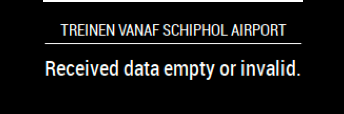
    Hey Guys, I have trouble with the MMM-nstreinen module from @qistoph When I had installed it everything worked, but when I launch the MagicMirror it gives the title of the module with underneath it: “Received data empty or invalid.” I have request multiple different API-keys but it never worked. Can someone help me?[image: 1551558910212-schermafbeelding-2019-03-02-om-21.34.31.png]
  • Magic Mirror on Windows 8.1 tablet?

    Unsolved windows 8.1 tablet touchscreen
    24
    0 Votes
    24 Posts
    15k Views
    R
    @justjim1220 i tried but got no success with gmail, however i was able to setup in another way… all my gmail synced to microsoft account so i tried to set up office account and its working. so now i am able to see my emails from gmail that get synced to outlook.office365 … thanks.
  • MMM-NASA

    7
    0 Votes
    7 Posts
    3k Views
    Mykle1M
    @motdog I just tried your config entry. The module can’t function with rotateInterval: 60,. That is only 60 milliseconds. Please try rotateInterval: 60 * 1000,. That’s 60 seconds. It will give the module time to display the image and the information that comes with each image.
  • ELECTRON window starts on top of MM window after clean install!

    Solved
    4
    1
    0 Votes
    4 Posts
    1k Views
    G
    @axled Ok, yes. I think this was the issue. So when I removed the autostart from pm2 it now only boots up the one MagicMirror. Now I’m just having problems to show the MMM-Globe module even though I have activated the OpenGL on the pi. After I removed the autostart from mm.sh my “pm2 ls” command now shows: ┌─────────────┬────┬───────┬────────┬─────────┬───────┬────────┬──────────┐ │ Name │ id │ mode │ status │ ↺ │ cpu │ memory │ ├─────────────┼────┼───────┼────────┼─────────┼───────┼────────┼──────────┤ │ MagicMirror │ 0 │ 2.6.0 │ fork │ online │ 1 │ 0% │ 2.5 MB │ │ mm │ 1 │ N/A │ fork │ stopped │ 34555 │ 0% │ 0 B │ └─────────────┴────┴───────┴────────┴─────────┴───────┴────────┴──────────┘ Use pm2 show <id|name> to get more details about an app