Read the statement by Michael Teeuw here.
MMM-voice
-
@justjim1220 said in MMM-voice:
@Mykle1, got any suggestions or pointers on how to get Alexa (or any voice assisted module) to work on Windows 10???
A while back, I halfheartedly tried to get MMM-voice to run under Windows 7. The problem is the dependencies that are required, finding them for your platform (Windows 7). It may be possible but it just wasn’t worth the effort to me when success was not guaranteed.
On the other hand, MM runs beautifully under ubuntu. In fact, I wouldn’t use (or recommend) anything else.
-
thanks @mykle1 for the assist to get it to show up!!
-
You’re welcome.
-
@strawberry-3.141 thanks so much for replying. i’ve been tackling it for a while, and yes i had read that documentation file several times but i’m such a noob that i didn’t even know what file to put that code into. you’re correct that what’s easy for some is difficult for me.
in any case, i’ve got your code implemented and after some trial and error, it’s somewhat functional. i’m able to successfully go back and forth between 2 modes that i’ve set, one of which is the “how do” mode. now, when i say “i look” it’s recognized by the mirror but it doesn’t seem to be executing any code. i’m taking this in baby steps as i learn how to make changes so i’m trying just to simply hide the compliments module. i have the following code which i think should hide the module but it doesn’t hide.
notificationReceived: function (notification, payload, sender) {
    // 1. register module
    if(notification === "ALL_MODULES_STARTED"){
        this.sendNotification("REGISTER_VOICE_MODULE", {
            mode: "HOW DO",
            sentences: [
                "I LOOK"
            ]
        });
    }

    // 2. react on command
    if(notification === "VOICE_HOW DO" && sender.name === "MMM-voice"){
        if(/(LOOK)/g.test(payload)){
            this.hide(1000);
            this.updateDom(300);
            // unhide the module,
            // set a 10 sec timeout
            // hide your module
        }
    }
}
i’m sorry for needing this spoon-fed to me, i have been trying, but i’m stuck on this.
-
@dogfeet try to set some logs, to see if you get the desired data or not,
notificationReceived: function (notification, payload, sender) {
    console.log(notification, payload)
then see if you get
notification === "VOICE_HOW DO"and the payload contains look -
@strawberry-3.141 thanks. i put the log command in like so…
notificationReceived: function (notification, payload, sender) {
    // 1. register module
    console.log(notification, payload);
    if(notification === "ALL_MODULES_STARTED"){
        this.sendNotification("REGISTER_VOICE_MODULE", {
            mode: "HOW DO",
            sentences: [
                "I LOOK"
            ]
        });
    }

    // 2. react on command
    if(notification === "VOICE_HOW DO" && sender.name === "MMM-voice"){
        if(/(LOOK)/g.test(payload)){
            this.hide(1000);
            this.updateDom(300);
            // unhide the module,
            // set a 10 sec timeout
            // hide your module
        }
    }
}
so i ran this with npm start dev and found this at the bottom of the console tab…
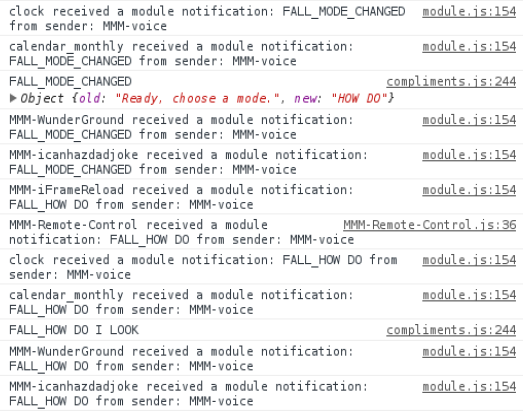
it looks like it’s recognizing the command belongs to the compliments module, but the text isn’t exactly as you described. is this correct? -
@Mykle1 youre awesome :*
-
@dogfeet i don’t know why it is
FALLinstead ofVOICEin your case?this is the code https://github.com/fewieden/MMM-voice/blob/master/MMM-voice.js#L203-L217
the important parts are
if (notification === 'VOICE')andthis.sendNotification(${notification}_${payload.mode}, payload.sentence);how can notification be voice and a few lines later it is fall? did you modify any files?
-
@strawberry-3.141 yes i did modify mmm-voice.js to suit my needs. to explain, i have a total of 5 commands. “fall” is the first mode and is native to the voice module, under which i have 2 commands, “asleep” and “wake up”. so i say “hey mirror” (my listen command), then “fall asleep” and it cuts out the monitor, then since it’s already in “fall” mode i just say “wake up” and it turns the display back on. the final commands are for the compliments module and they are “how do” (the mode) and “i look” which is where i’m having problems. fall asleep and wake up are working perfectly.
so yes, i modified the lines that you highlighted such that the 2 places where it used to say ‘VOICE’ it now says ‘FALL’.
should i not have done that? it seems to work. i had to make other minor changes of course to keep it working. -
@dogfeet if you changed that, then you also have to apply your renamin here
if(notification === "FALL_HOW DO" && sender.name === "MMM-voice"){ if(/(LOOK)/g.test(payload)){ this.hide(1000); this.updateDom(300); // unhide the module, // set a 10 sec timeout // hide your module } } -
@strawberry-3.141 i feel so stupid :facepalm:
-
So I must say the MMM-voice module (also with Mykle’s Hello-Lucy enhancements) works perfectly on my mirror… when I don’t have my Mycroft AI running at start as well. It’s an Error: resource busy/unavailable referring to the Microphone. When I stop Mycroft/restart mirror it works perfectly, but then Mycroft gets the same error. Any suggestions?
I am thinking about building a MagicMirror skill for Mycroft, but Mycroft is Python not Java, and not a module. Would it be possible to send the same commands as Hello-Lucy (i.e. ‘HIDE_CLOCK’ for example) only use Websocket-client for Mycroft and send commands to the MagicMirror via socket.io?
If so, what would handle the socketmessage? Would it be communicated to the right module/s. Would I also need to create a fork of the MMM-voice module with code to handle the socketmessages from Mycroft?
Any guidance would be much appreciated!
Sorry, I should have also said my mirror is running on a RPi 3b running Debian Jessie on a 16gb sd.
-
This post is deleted! -
@dmwilsonkc
Error: resource busy/unavailable referring to the Microphoneyour microphone cannot be used by multiple processes at a time.In your case I rather suggest to write an own module for mycroft instead of a fork, as you’re using a complete different stt engine.
If you’re interested in doing it via websockets you could have a look into mmm-mobile where i did something similar
-
@strawberry-3.141 So I guess I kind of understood what is happening with the MMM-Mobile module of yours. I am very new to all of this and have only been dabbling in writing simple code up to now. It is much easier to build off of existing code that I know already works. If I could figure out a way to continuing to use your MMM-voice module and Mycroft at the same time, I would probably just do that, but as you pointed out both processes can’t use the microphone at the same time. Since Mycroft skills seem pretty straight forward to create, I thought eh… Why not attempt it.
I can create a Mycoft skill that will send ‘HIDE_CLOCK’ for example to socket.io. What happens when the Websocket-client for Mycroft connects to socket.io and sends ‘HIDE_CLOCK’? How would MagicMirror handle that?
Keep in mind, I have already added Mykle’s modifications from Hello-Lucy.That’s part of what I can’t wrap my head around.
Thank you for responding and helping me!
-
@dmwilsonkc the module has a socket like https://github.com/MichMich/MagicMirror/blob/master/js/socketclient.js#L11, basically its a channel with the module name, if you then send messages, the module doesn#t differentiate if its from mycroft or node_helper, as it isnt aware of multiple entities.
-
@strawberry-3.141 Oh! Wow! That was awesome! You opened my eyes. I really am starting to understand better thanks to your incite. That makes perfect sense to treat Mycroft more like a remote-control than a voice-control because it handles the STT and can send socket messages to the MagicMirror. The MMM-Mycroft module would need to be very similar in function to your MMM-mobile module.
For example it could have a number of ways to control the MagicMirror:
        socket.on('SHOW_MODULES', () => {
            console.log(`${this.name}: Showing modules!`);
            this.sendSocketNotification('SHOW_MODULES');
        });

        socket.on('HIDE_MODULES', () => {
            console.log(`${this.name}: Hiding modules!`);
            this.sendSocketNotification('HIDE_MODULES');
        });
Just as an example to handle the messages sent to the socket.
If I’m reading your code right, you’re using a qr image to handle security. I hadn’t really thought about the need for security with something like this, but I guess that really should be a consideration. In your opinion, would requiring some kind of user password/key set in the config for both MMM-Mycroft module and the Mycroft MM skill be sufficient?
-
@dmwilsonkc I did MMM-Mobile for my bachelor thesis to connect to the MagicMirror via mobile and be able to control and change config of it, the qr code was meant for pairing the devices, so not everyone is able to hook into my socket channel and send commands. But you have to be aware of the differences between socket notifications and normal notifications. socket notifications describe only the communication between your module and his node_helper (or in my case the mobile app, because I extended the socket server), but this gives you no communication with other modules like the clock. Therefore you need normal notifications which describe the communication between modules and the core MM. Be aware of that those notifications can only be sent via the module not the node_helper.
My workflow was like this. Node_helper extends socket server. Mobile send command to node_helper, then the node_helper sends it to the module and the module broadcasts it to all other modules.
https://github.com/MichMich/MagicMirror/blob/master/modules/README.md#thissendnotificationnotification-payload
https://github.com/MichMich/MagicMirror/blob/master/modules/README.md#thissendsocketnotificationnotification-payload -
@strawberry-3.141 Thanks for the clarification. The code that I copied came from the node_helper as you are probably aware.
One more question for you concerning extending the socket with node_helper: The code you have for the MMM-mobile module is written like:appSocket() {
const namespace =
${this.name}/app;this.io.of(namespace).use((socket, next) => { const hash = crypto.createHash('sha256').update(socket.handshake.query.token).digest('base64'); if (this.mobile.user && this.mobile.user === hash) { console.log(`${this.name}: Access granted!`); next(); } else { console.log(`${this.name}: Authentication failed!`); next(new Error('Authentication failed!')); } }); this.io.of(namespace).on('connection', (socket) => { console.log(`${this.name}: App connected!`);Mycroft in my case is on the same RPi so I realize the code will be different and you have created this code in a way to “pair” with the mobile device. Again, I am very new to writing code like this, but can you point in the right direction as far as how to extend the socket with the MMM-mycroft module’s node_helper.js? I do not understand how to extend the socket. Why is the code appSocket() {
const namespace =
${this.name}/app;Would the same code work for MMM-mycroft module?
So my understanding, thanks to your help, to have a flow like this:
Node_helper extends socket server. Mycroft-core send command to node_helper, then the node_helper sends it to the MMM-mycroft module via this.send socketnotification and the MMM-mycroft module broadcasts it to all other modules via this.sendnotification.
I am just not sure how to code the Node_helper.js to extend the socket in my case.
You have been extremely helpful so far and I truly appreciate all of your help.
Also, since this is all done on the RPi, would the ipwhitelist even come into play here? My guess is no.
-
@dmwilsonkc if you run your mycroft core from the node helper as i do with pocketsphinx in voice then there is no need at all to mess with the socket server



Hello! It looks like you're interested in this conversation, but you don't have an account yet.
Getting fed up of having to scroll through the same posts each visit? When you register for an account, you'll always come back to exactly where you were before, and choose to be notified of new replies (either via email, or push notification). You'll also be able to save bookmarks and upvote posts to show your appreciation to other community members.
With your input, this post could be even better 💗
Register Login