Read the statement by Michael Teeuw here.
MMM-voice
-
@maxbachmann
Hi, the modules get signals to act and it realy doesnt matter in with language u use the voice.By the way i am also interested if u get it working in german
-
yeah but you still need to train it for the language
-
@strawberry-3.141 said in MMM-voice:
We could get Around the issue of @witschi87 but we dont know yet what the problem actually is. When he starts his mirror with DISPLAY=:0 nohup npm start & it works, with pm2 start mm not, but i have seen a couple using it with pm2 already
@iMAGiC sry I my Time is pretty Limited due to my Bachelor thesis, but i will have a look if i can adjust the Existent Music player to Voice commands easily
@strawberry-3.141 Any news here? I have the same problem. It works with
pm2 restart mmbut not after a reboot. Error 1. -
Guys,
If you want to try a multiple languages and self hosted module you can take a look here: https://forum.magicmirror.builders/topic/6615/kalliope-assistant-mmThis module allow you to bind MM to Kalliope assistant.
-
hi guys, i’m a little over my head here, really not familiar with coding very much but i’ve got voice working and been able to tweak a few things.
what i want to do is probably very easy but i just can’t get it to work. i want to have mmm-voice control the default compliments module such that compliments begins hidden by default and i can say “how do i look” and the mirror will show the compliments module for 10 seconds then hide it again.
i could change the compliments to have appropriate responses and then when the user says “how do i look” the mirror will appear to answer them.
i was thinking of setting “HOW DO” as the mode command to control the compliments module and then “I LOOK” could be the command within that mode to show a compliment for 10 seconds.
what do you think? is this a simple task?
-
@dogfeet cannot tell if it is an easy task for you, it depends on your knowledge about JS and MagicMirror
I assume you read the documentation here
- in your compliments module you need to register your commands
- then you need to check for your command
notificationReceived: function (notification, payload, sender) {
    // 1. register module
    if(notification === "ALL_MODULES_STARTED"){
        this.sendNotification("REGISTER_VOICE_MODULE", {
            mode: "HOW DO",
            sentences: [
                "I LOOK"
            ]
        });
    }

    // 2. react on command
    if(notification === "VOICE_HOW DO" && sender.name === "MMM-voice"){
        if(/(LOOK)/g.test(payload)){
            // unhide the module,
            // set a 10 sec timeout
            // hide your module
        }
    }
}
That’s all you need to connect your module to MMM-voice. Now you have to implement the comments
-
@strawberry-3.141 said in MMM-voice:
https:
Tried installing this today on a Dell Latitude E5500 running Ubuntu.
Seemed to install ok. Said my microphone was labelled 0
so entered that in config.jsNot getting any errors on running, but not getting a microphone icon anywhere on screen?
Full time Dad, DJ and entertainer and lover of technology.
-
@cyberphox never put it on an ubuntu machine @cowboysdude and @Mykle1 did, maybe they can assist you here.
If the error log is empty, you can also set
debug: truein the config and check the debug log file -
@cyberphox said in MMM-voice:
Tried installing this today on a Dell Latitude E5500 running Ubuntu.
Message me and I’ll try to help you out
-
@Mykle1 thanks man! helpful as always…it was Hello Lucy that inspired me to build another project with a little more power than my RP3…
-
No problem. See your chat messages so we don’t take up any room in this topic
-
@Mykle1, got any suggestions or pointers on how to get Alexa (or any voice assisted module) to work on Windows 10???
-
@justjim1220 said in MMM-voice:
@Mykle1, got any suggestions or pointers on how to get Alexa (or any voice assisted module) to work on Windows 10???
A while back, I halfheartedly tried to get MMM-voice to run under Windows 7. The problem is the dependencies that are required, finding them for your platform (Windows 7). It may be possible but it just wasn’t worth the effort to me when success was not guaranteed.
On the other hand, MM runs beautifully under ubuntu. In fact, I wouldn’t use (or recommend) anything else.
-
thanks @mykle1 for the assist to get it to show up!!
-
You’re welcome.
-
@strawberry-3.141 thanks so much for replying. i’ve been tackling it for a while, and yes i had read that documentation file several times but i’m such a noob that i didn’t even know what file to put that code into. you’re correct that what’s easy for some is difficult for me.
in any case, i’ve got your code implemented and after some trial and error, it’s somewhat functional. i’m able to successfully go back and forth between 2 modes that i’ve set, one of which is the “how do” mode. now, when i say “i look” it’s recognized by the mirror but it doesn’t seem to be executing any code. i’m taking this in baby steps as i learn how to make changes so i’m trying just to simply hide the compliments module. i have the following code which i think should hide the module but it doesn’t hide.
notificationReceived: function (notification, payload, sender) {
    // 1. register module
    if(notification === "ALL_MODULES_STARTED"){
        this.sendNotification("REGISTER_VOICE_MODULE", {
            mode: "HOW DO",
            sentences: [
                "I LOOK"
            ]
        });
    }

    // 2. react on command
    if(notification === "VOICE_HOW DO" && sender.name === "MMM-voice"){
        if(/(LOOK)/g.test(payload)){
            this.hide(1000);
            this.updateDom(300);
            // unhide the module,
            // set a 10 sec timeout
            // hide your module
        }
    }
}
i’m sorry for needing this spoon-fed to me, i have been trying, but i’m stuck on this.
-
@dogfeet try to set some logs, to see if you get the desired data or not,
notificationReceived: function (notification, payload, sender) {
    console.log(notification, payload)
then see if you get
notification === "VOICE_HOW DO"and the payload contains look -
@strawberry-3.141 thanks. i put the log command in like so…
notificationReceived: function (notification, payload, sender) {
    // 1. register module
    console.log(notification, payload);
    if(notification === "ALL_MODULES_STARTED"){
        this.sendNotification("REGISTER_VOICE_MODULE", {
            mode: "HOW DO",
            sentences: [
                "I LOOK"
            ]
        });
    }

    // 2. react on command
    if(notification === "VOICE_HOW DO" && sender.name === "MMM-voice"){
        if(/(LOOK)/g.test(payload)){
            this.hide(1000);
            this.updateDom(300);
            // unhide the module,
            // set a 10 sec timeout
            // hide your module
        }
    }
}
so i ran this with npm start dev and found this at the bottom of the console tab…
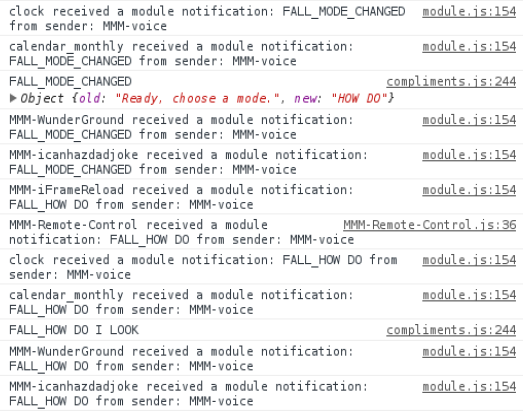
it looks like it’s recognizing the command belongs to the compliments module, but the text isn’t exactly as you described. is this correct? -
@Mykle1 youre awesome :*
-
@dogfeet i don’t know why it is
FALLinstead ofVOICEin your case?this is the code https://github.com/fewieden/MMM-voice/blob/master/MMM-voice.js#L203-L217
the important parts are
if (notification === 'VOICE')andthis.sendNotification(${notification}_${payload.mode}, payload.sentence);how can notification be voice and a few lines later it is fall? did you modify any files?




Hello! It looks like you're interested in this conversation, but you don't have an account yet.
Getting fed up of having to scroll through the same posts each visit? When you register for an account, you'll always come back to exactly where you were before, and choose to be notified of new replies (either via email, or push notification). You'll also be able to save bookmarks and upvote posts to show your appreciation to other community members.
With your input, this post could be even better 💗
Register Login