MagicMirror Forum
    • Recent
    • Tags
    • Unsolved
    • Solved
    • MagicMirror² Repository
    • Documentation
    • 3rd-Party-Modules
    • Donate
    • Discord
    • Register
    • Login
    A New Chapter for MagicMirror: The Community Takes the Lead
    Read the statement by Michael Teeuw here.

    Installing Magic mirror on windows 10

    Scheduled Pinned Locked Moved Troubleshooting
    38 Posts 9 Posters 21.8k Views 11 Watching
    Loading More Posts
    • Oldest to Newest
    • Newest to Oldest
    • Most Votes
    Reply
    • Reply as topic
    Log in to reply
    This topic has been deleted. Only users with topic management privileges can see it.
    • O Offline
      Omeliel
      last edited by

      Sorted. I post in few minutes solution.

      1 Reply Last reply Reply Quote 0
      • O Offline
        Omeliel
        last edited by

        So
        What worked for me was so far :
        Installation:
        I installed this: https://nodejs.org/en/download/
        In that tutorial, he said to install git bash. I didn’t I just used cmd from windows.
        From https://github.com/MichMich/MagicMirror I download the zip file, extracted in C: in windows (not as described in that tutorial).
        I renamed the extracted folder by just deleting master remain only MagicMirror as a folder.
        Open cmd in windows go in C:\MagicMirror and run npm install
        Then I went in C:\MagicMirror\config and delete sample extension ending to have just file named config.js
        After that, as @stedweil advised went and edit the package.json file and remove the display=${display… stuff from the start clause
        It should start with "node_modules, like this
        “start”: “node_modules/.bin/electron js/electron.js”,
        Now trying to start mm I got black screen only.
        I can’t remember where I saw but I think MichMich advice to go in C:\MagicMirror\vendor and run again npm install, I have done that and it worked.
        Now regarding editing the config.js, it need to be edited according to your area . There some tutorials for that too.

        S 1 Reply Last reply Reply Quote 0
        • O Offline
          Omeliel
          last edited by

          Tell me if is working for anyone who try it cuz i have 0 knowledge abot html, css, java :)) .
          Thank you @sdetweil @Michmich and @vintage89 and all others who spend their time share with us noobs :)) their knowlege.
          Kind regards

          1 Reply Last reply Reply Quote 0
          • S Offline
            sdetweil @Omeliel
            last edited by

            @Omeliel said in Installing Magic mirror on windows 10:

            Now trying to start mm I got black screen only.
            I can’t remember where I saw but I think MichMich advice to go in C:\MagicMirror\vendor and run again npm install, I have done that and it worked.
            Now regarding editing the config.js, it need to be edited according to your area . There some tutorials for that too.

            is it working or not? prior message says working, your new question seems it is not

            Sam

            How to add modules

            learning how to use browser developers window for css changes

            O 2 Replies Last reply Reply Quote 0
            • O Offline
              Omeliel @sdetweil
              last edited by Omeliel

              This post is deleted!
              1 Reply Last reply Reply Quote 0
              • O Offline
                Omeliel @sdetweil
                last edited by

                Is working for me . Need others to try. And let us knwo.

                1 Reply Last reply Reply Quote 0
                • S Offline
                  sdetweil
                  last edited by sdetweil

                  easy peasy

                  install nodejs  (google search)
                  (includes npm)
                  
                  install git (google search)
                  
                  open cmd.exe 
                  
                  git clone magicmirror repo
                  
                  cd MagicMirror\config
                  copy config.js.sample config.js
                  cd ..
                  npm install --only=prod
                  when finished
                  cd vendor
                  npm install
                  cd ..\fonts
                  npm install
                  cd ..
                  notepad package.json
                  change start line to 
                      "start": "node_modules/.bin/electron js/electron.js",
                  ctrl-s to save
                  alt key, file, exit to close ( or use mouse, file, exit)
                  npm start
                  

                  voila

                  Sam

                  How to add modules

                  learning how to use browser developers window for css changes

                  C S 2 Replies Last reply Reply Quote 0
                  • C Offline
                    Chrisflex @sdetweil
                    last edited by

                    @sdetweil I am having the exact same problem
                    I will followed the suggested remedies mentioned but still no luck.
                    Please assist if you can even via Teamviewer.

                    S 1 Reply Last reply Reply Quote 0
                    • S Offline
                      sdetweil @Chrisflex
                      last edited by

                      @Chrisflex said in Installing Magic mirror on windows 10:

                      I am having the exact same problem

                      what problem?

                      Sam

                      How to add modules

                      learning how to use browser developers window for css changes

                      1 Reply Last reply Reply Quote 0
                      • C Offline
                        Chrisflex
                        last edited by Chrisflex

                        The screen remains blank after start up.

                        Here is the log from the Console
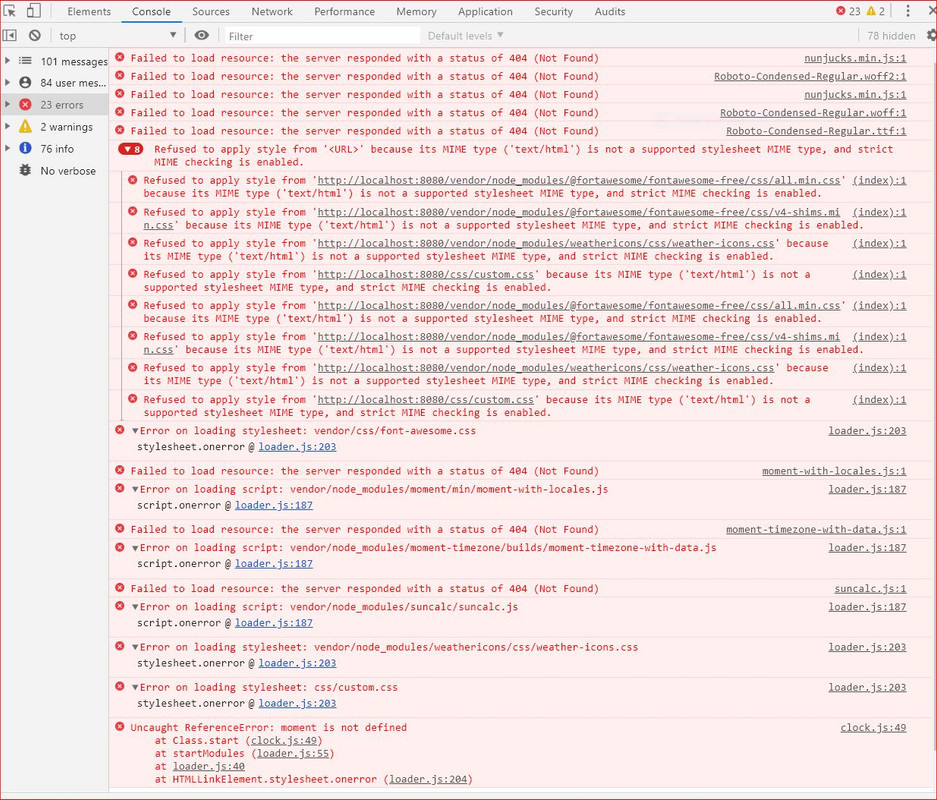
                        alt text

                        S 1 Reply Last reply Reply Quote 0
                        • S Offline
                          sdetweil @Chrisflex
                          last edited by

                          @Chrisflex looks like you missed these steps

                          cd ~/MagicMirror
                          cd vendor
                          npm install
                          cd ..\fonts
                          npm install
                          cd ..
                          

                          Sam

                          How to add modules

                          learning how to use browser developers window for css changes

                          1 Reply Last reply Reply Quote 1
                          • C Offline
                            Chrisflex
                            last edited by

                            Thank you very much I will try it.

                            C 1 Reply Last reply Reply Quote 0
                            • C Offline
                              Chrisflex @Chrisflex
                              last edited by

                              Thank you again it works!

                              I now have to figure out a way to change the news feed and get the local weather.

                              S 1 Reply Last reply Reply Quote 0
                              • S Offline
                                sdetweil @Chrisflex
                                last edited by

                                @Chrisflex read the readme for each module

                                Sam

                                How to add modules

                                learning how to use browser developers window for css changes

                                Mykle1M 1 Reply Last reply Reply Quote 2
                                • Mykle1M Offline
                                  Mykle1 Project Sponsor Module Developer @sdetweil
                                  last edited by

                                  @sdetweil said in Installing Magic mirror on windows 10:

                                  read the readme for each module

                                  I second this motion. :thumbs_up_light_skin_tone:

                                  Create a working config
                                  How to add modules

                                  C 1 Reply Last reply Reply Quote 0
                                  • C Offline
                                    Chrisflex @Mykle1
                                    last edited by

                                    @Mykle1 @sdetweil thanks I will do that

                                    1 Reply Last reply Reply Quote 0
                                    • S Offline
                                      sojourner @sdetweil
                                      last edited by

                                      @sdetweil This is solid gold :shooting_star: for the Windoz user in me! With these finishing steps, it works as expected. Thanks again!
                                      p.s. bonus points for suggesting notepad for editing the package.json along with the steps to quit nodepad… Too funny!

                                      1 Reply Last reply Reply Quote 0
                                      • V Offline
                                        vivian0239
                                        last edited by

                                        Hi, everyone!

                                        I have a task to install Magic Mirror on Windows. And I am very happy to find here. I tried the steps, but it still has error. My pc is Windows 10.
                                        I also changed package.json from:
                                        “start”: “DISPLAY="${DISPLAY:=:0}" ./node_modules/.bin/electron js/electron.js”,
                                        to
                                        “start”: “node_modules/.bin/electron js/electron.js”,
                                        I am new to JS, please tell me where I am wrong. Thank you!

                                        This is my log:
                                        ssdrive@home MINGW64 ~/MagicMirror
                                        $ npm install --only=prod

                                        magicmirror@2.12.0 install C:\Users\ssdrive\MagicMirror
                                        echo "Installing vendor files …
                                        " && cd vendor && npm install --loglevel=error

                                        "Installing vendor files …

                                        magicmirror@2.12.0 postinstall C:\Users\ssdrive\MagicMirror
                                        npm run install-fonts && echo "MagicMirror installation finished successfully!
                                        "

                                        magicmirror@2.12.0 install-fonts C:\Users\ssdrive\MagicMirror
                                        echo "Installing fonts …
                                        " && cd fonts && npm install --loglevel=error

                                        "Installing fonts …
                                        "MagicMirror installation finished successfully!
                                        audited 1050 packages in 16.723s

                                        75 packages are looking for funding
                                        run npm fund for details

                                        found 3 low severity vulnerabilities
                                        run npm audit fix to fix them, or npm audit for details

                                        ssdrive@home MINGW64 ~/MagicMirror
                                        $ cd vendor

                                        ssdrive@home MINGW64 ~/MagicMirror/vendor
                                        $ npm install
                                        npm WARN optional SKIPPING OPTIONAL DEPENDENCY: fsevents@1.2.4 (node_modules\fsevents):
                                        npm WARN notsup SKIPPING OPTIONAL DEPENDENCY: Unsupported platform for fsevents@1.2.4: wanted {“os”:“darwin”,“arch”:“any”} (current: {“os”:“win32”,“arch”:“x64”})

                                        added 82 packages from 57 contributors and audited 150 packages in 15.029s
                                        found 8 vulnerabilities (7 low, 1 high)
                                        run npm audit fix to fix them, or npm audit for details

                                        ssdrive@home MINGW64 ~/MagicMirror/vendor
                                        $ cd …\fonts
                                        bash: cd: …fonts: No such file or directory

                                        ssdrive@home MINGW64 ~/MagicMirror/vendor
                                        $ cd …

                                        ssdrive@home MINGW64 ~/MagicMirror
                                        $ cd fonts

                                        ssdrive@home MINGW64 ~/MagicMirror/fonts
                                        $ npm install
                                        added 1 package from 1 contributor and audited 1 package in 0.993s
                                        found 0 vulnerabilities

                                        ssdrive@home MINGW64 ~/MagicMirror/fonts
                                        $ cd …

                                        ssdrive@home MINGW64 ~/MagicMirror
                                        $ notepad package.json

                                        ssdrive@home MINGW64 ~/MagicMirror
                                        $ npm start
                                        npm ERR! code EJSONPARSE
                                        npm ERR! file C:\Users\ssdrive\MagicMirror\package.json
                                        npm ERR! JSON.parse Failed to parse json
                                        npm ERR! JSON.parse Unexpected token , in JSON at position 209 while parsing near ‘…tron js/electron.js",
                                        npm ERR! JSON.parse “server”: "node …’
                                        npm ERR! JSON.parse Failed to parse package.json data.
                                        npm ERR! JSON.parse package.json must be actual JSON, not just JavaScript.

                                        npm ERR! A complete log of this run can be found in:
                                        npm ERR! C:\Users\ssdrive\AppData\Roaming\npm-cache_logs\2020-08-09T20_33_43_328Z-debug.log

                                        ssdrive@home MINGW64 ~/MagicMirror
                                        $ npm start
                                        npm ERR! code EJSONPARSE
                                        npm ERR! file C:\Users\ssdrive\MagicMirror\package.json
                                        npm ERR! JSON.parse Failed to parse json
                                        npm ERR! JSON.parse Unexpected token , in JSON at position 209 while parsing near ‘…tron js/electron.js",
                                        npm ERR! JSON.parse “server”: "node …’
                                        npm ERR! JSON.parse Failed to parse package.json data.
                                        npm ERR! JSON.parse package.json must be actual JSON, not just JavaScript.

                                        npm ERR! A complete log of this run can be found in:
                                        npm ERR! C:\Users\ssdrive\AppData\Roaming\npm-cache_logs\2020-08-09T20_41_40_531Z-debug.log

                                        ssdrive@home MINGW64 ~/MagicMirror
                                        $

                                        S 1 Reply Last reply Reply Quote 0
                                        • S Offline
                                          sdetweil @vivian0239
                                          last edited by sdetweil

                                          @vivian0239 said in Installing Magic mirror on windows 10:

                                          ~/MagicMirror/vendor
                                          $ cd …\fonts
                                          bash: cd: …fonts: No such file or directory
                                          ssdrive@home MINGW64 ~/MagicMirror/vendor
                                          $ cd …
                                          ssdrive@home MINGW64 ~/MagicMirror
                                          $ cd fonts
                                          ssdrive@home MINGW64 ~/MagicMirror/fonts
                                          $ npm install
                                          added 1 package from 1 contributor and audited 1 package in 0.993s
                                          found 0 vulnerabilities

                                          there are 3 dots in the CD commands change it to 2 dots

                                          do NOT install under min.

                                          just open a command prompt (CMD.exe) and do npm install

                                          Sam

                                          How to add modules

                                          learning how to use browser developers window for css changes

                                          1 Reply Last reply Reply Quote 0
                                          • S Offline
                                            suqiqi
                                            last edited by

                                            ‘node_moudles’ is not recognized as an internal or external command,
                                            operable program or batch file.

                                            1 Reply Last reply Reply Quote 0

                                            Hello! It looks like you're interested in this conversation, but you don't have an account yet.

                                            Getting fed up of having to scroll through the same posts each visit? When you register for an account, you'll always come back to exactly where you were before, and choose to be notified of new replies (either via email, or push notification). You'll also be able to save bookmarks and upvote posts to show your appreciation to other community members.

                                            With your input, this post could be even better 💗

                                            Register Login

                                            • 1
                                            • 2
                                            • 2 / 2
                                            • First post
                                              Last post
                                            Enjoying MagicMirror? Please consider a donation!
                                            MagicMirror created by Michael Teeuw.
                                            Forum managed by Sam, technical setup by Karsten.
                                            This forum is using NodeBB as its core | Contributors
                                            Contact | Privacy Policy