@JMac For simple modules you should be able to clone it from github.
cd ~/MagicMirror/modules
git clone https://github.com/bwente/MMM-KitchenTimer.git
@JMac For simple modules you should be able to clone it from github.
cd ~/MagicMirror/modules
git clone https://github.com/bwente/MMM-KitchenTimer.git
Something like this for your MMM-MQTTbridge config on your mirror.
{
  module: "MMM-MQTTbridge",
  disabled: false,
  config: {
    mqttServer: "mqtt://USERNAME:PASSWORD@192.168.1.10:1883",
    stringifyPayload: true,

    mqttConfig: {
      // This example only sends MagicMirror events to MQTT.
      listenMqtt: false,
      interval: 300000,
    },

    notiConfig: {
      listenNoti: true,
      ignoreNotiId: ["CLOCK_MINUTE", "CLOCK_SECOND", "NEWS_FEED"],
      ignoreNotiSender: ["system"],
      qos: 0,
    },
  },
},
then edit
~/MagicMirror/modules/MMM-MQTTbridge/dict/notiDictionary.js
var notiHook = [
  {
    notiId: "KITCHEN_TIMER_STARTED",
    notiPayload: [
      {
        notiMqttCmd: ["Kitchen timer started"],
      },
    ],
  },
];

var notiMqttCommands = [
  {
    commandId: "Kitchen timer started",
    mqttTopic: "magicmirror/kitchen-timer/started",
    stringifyPayload: true,
    retain: false,
    qos: 0,
  },
];

module.exports = { notiHook, notiMqttCommands };
after restarting your mirror you should be able to listen for the topic: magicmirror/kitchen-timer/started in Home Assistant developer tools.
I did something similar with my Reolink doorbell, but used Home Assistant as the middleman.
When motion is detected, Home Assistant grabs a snapshot and sends it to MagicMirror. I use MMM-MessageCenter to display the notification and keep the snapshot in the message history, so I can still see who was at the door afterward.
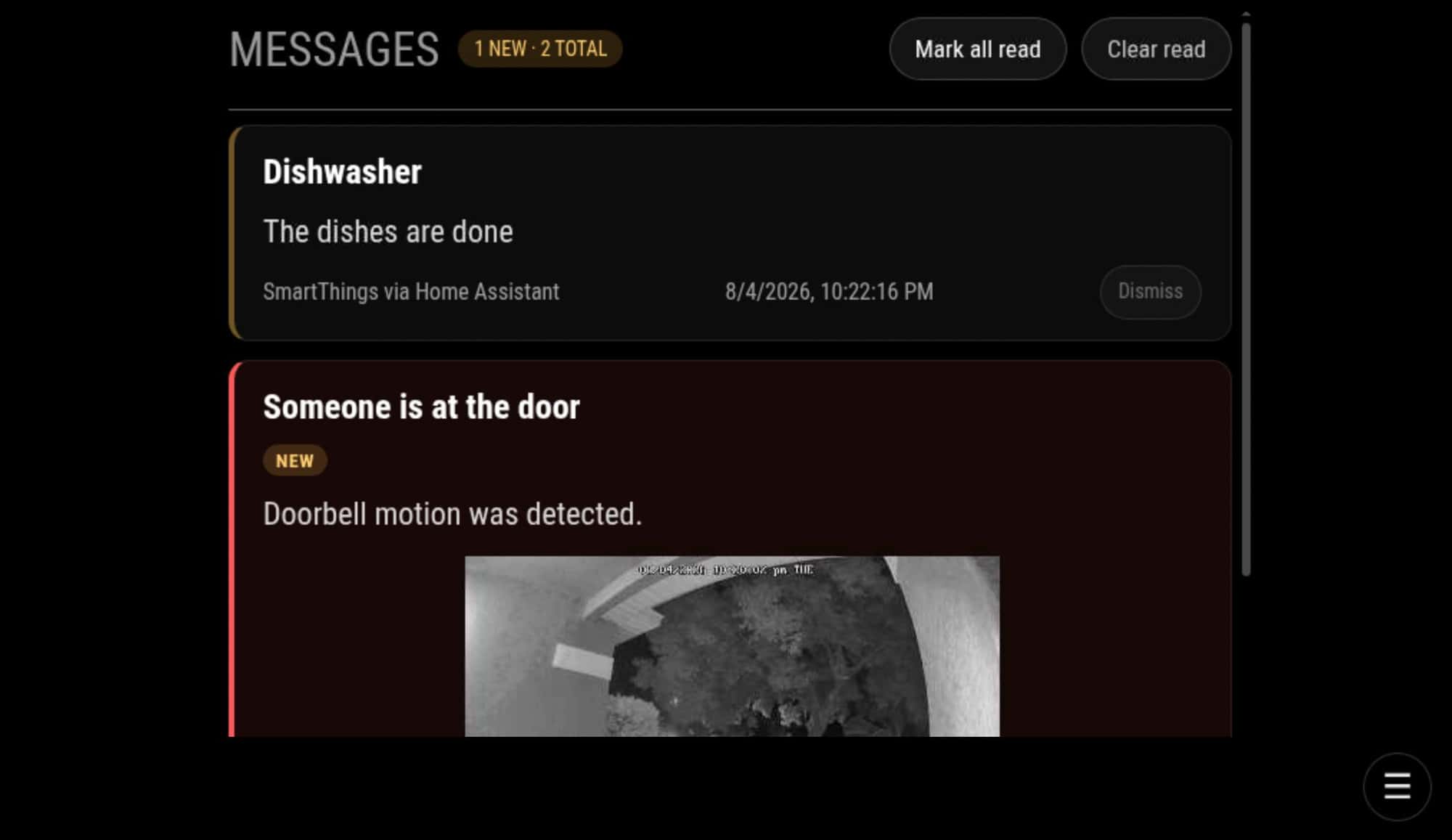
I went with snapshots rather than live video since it is lightweight and, for my use, I mostly just wanted to see who came to the door.
Thanks! Here is a look inside.
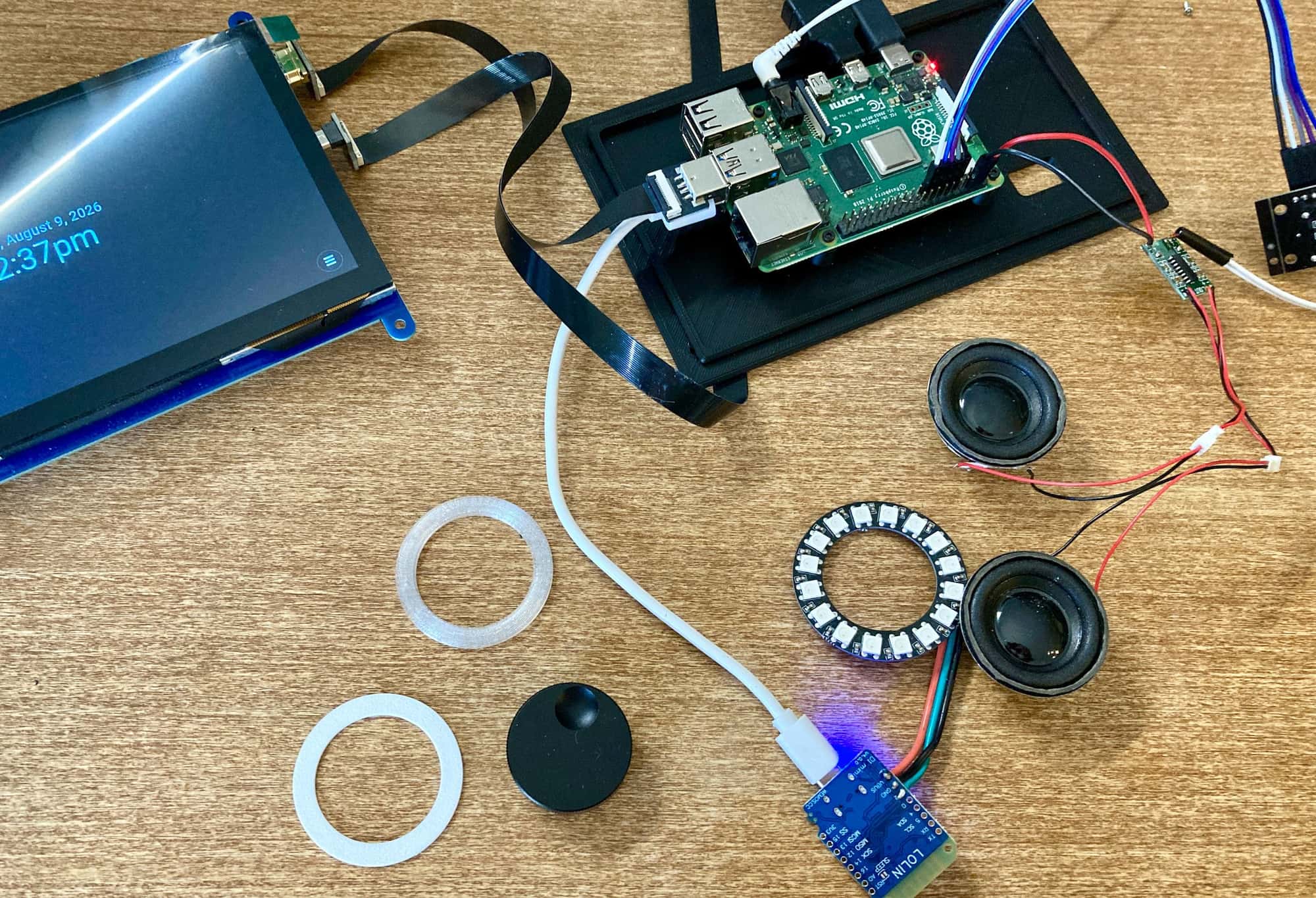
It is definitely a little packed in there. The Raspberry Pi runs MagicMirror, with the rotary encoder as the main physical control. There is also a small D1 mini running WLED for the illuminated ring, plus the internal speakers and amplifier.
A lot of the fun has been making all of those pieces work together. Turning and pressing the dial controls the channel selector, the LED ring can change based on status or notifications, and Home Assistant ties into it for messages and other events.
The enclosure is 3D printed and has gone through quite a few revisions to get everything to fit. Still needs a revision to fit my hands!
I am still cleaning up the code and documentation, but I am happy to share more of the hardware, wiring, software setup, or some of the failed prototypes if anyone is interested.
@Niggich On the HA side you would listen for the timer topic.
alias: Start Echo timer from MagicMirror
triggers:
  - trigger: mqtt
    topic: magicmirror/kitchen-timer/started

actions:
  - action: media_player.play_media
    target:
      entity_id: media_player.kitchen_echo
    data:
      media_content_type: custom
      media_content_id: >-
        set a timer for
        {{ trigger.payload_json.remainingSeconds | int }}
        seconds
A quick follow-up with some well-deserved acknowledgements.
Seymour may look like a standalone appliance, but it was made possible by the MagicMirror community and its wonderfully reusable ecosystem. Much of the project has been about connecting existing modules into a cohesive experience rather than reinventing everything from scratch.
Edward Shen for MMM-pages, which provides the underlying page and channel system.
Tom Hirschberger for MMM-GPIO-Notifications, which connects Seymour’s rotary encoder to MagicMirror.
Jopyth and contributors for MMM-Remote-Control, which makes remote administration and updates easier.
shbatm for projects including MMM-KeyBindings and MMM-RTSPStream.
MMRIZE for MMM-CalendarExt3 and MMM-CalendarExt3Agenda.
The MagicMirror team and every module author whose work helped turn this experiment into a functioning appliance.
Seymour also builds on WLED, Home Assistant, and Raspberry Pi—another reminder of how much becomes possible when open-source projects are designed to work together.
I have added a few pieces for the Audrey experience, including the timer, centralized messages, themes, channel navigation, and LED attention behavior. But Seymour’s foundation belongs to the broader community.
Thank you to everyone who created, maintained, documented, tested, or answered questions about these projects. Seymour would not exist without your work.
I’ve been working on a small ambient information appliance called Seymour.
The inspiration is the original 3Com Audrey internet appliance. Seymour is built around a Raspberry Pi, a 7-inch touchscreen, a rotary encoder, an illuminated WLED ring, an internal speaker, and a 3D-printed enclosure. I chose MagicMirror because its module ecosystem already provides most of the useful building blocks.
Instead of presenting everything as one dashboard, Seymour organizes modules into channels. Pressing the encoder opens the channel selector, rotating chooses a channel, and pressing again opens it. The touchscreen is also available.
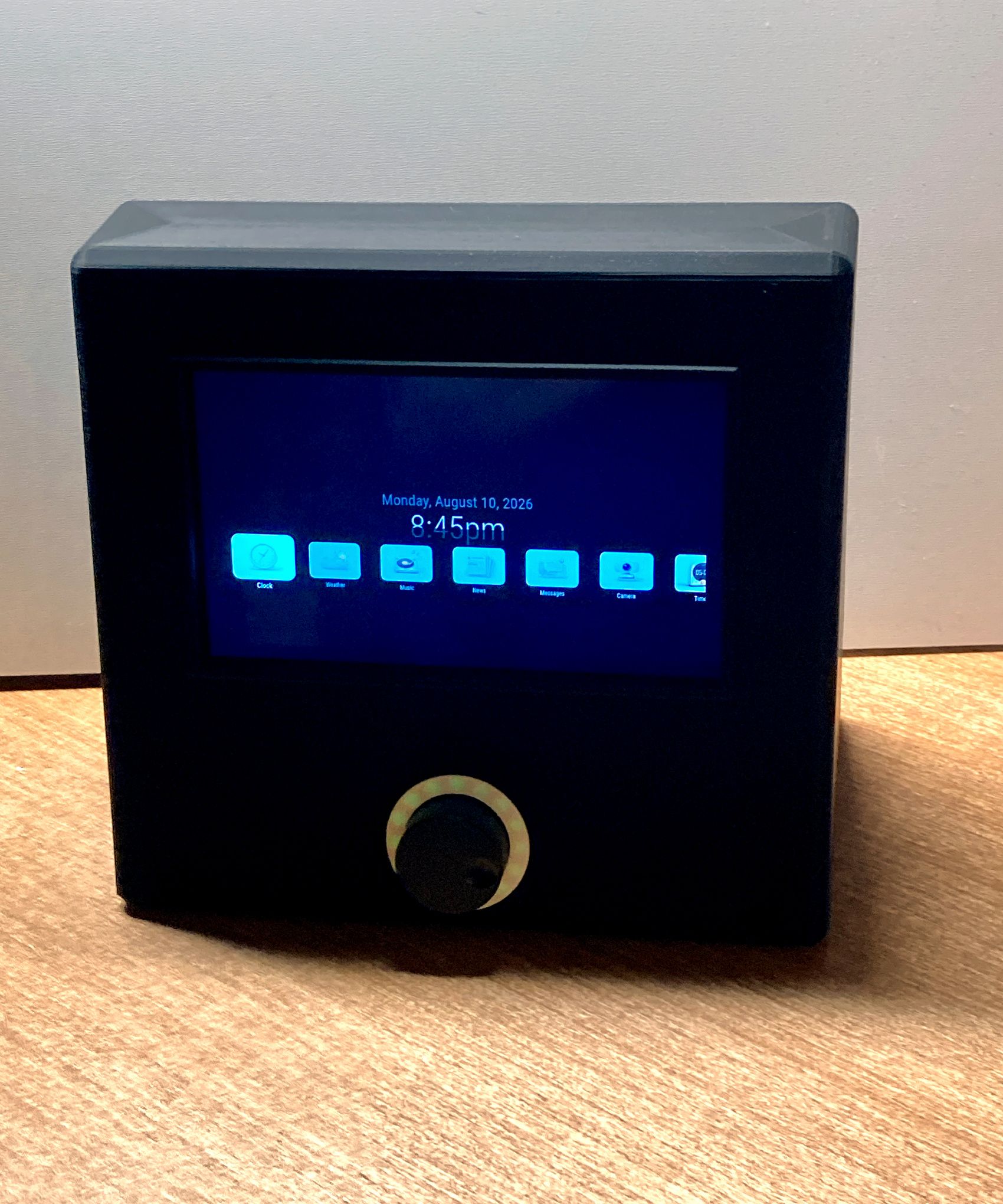
The current prototype includes clock, weather, news, calendar, messages, a kitchen timer, and local music playback through Music Assistant. The LED ring provides status and attention feedback, while the speaker handles music and timer sounds.
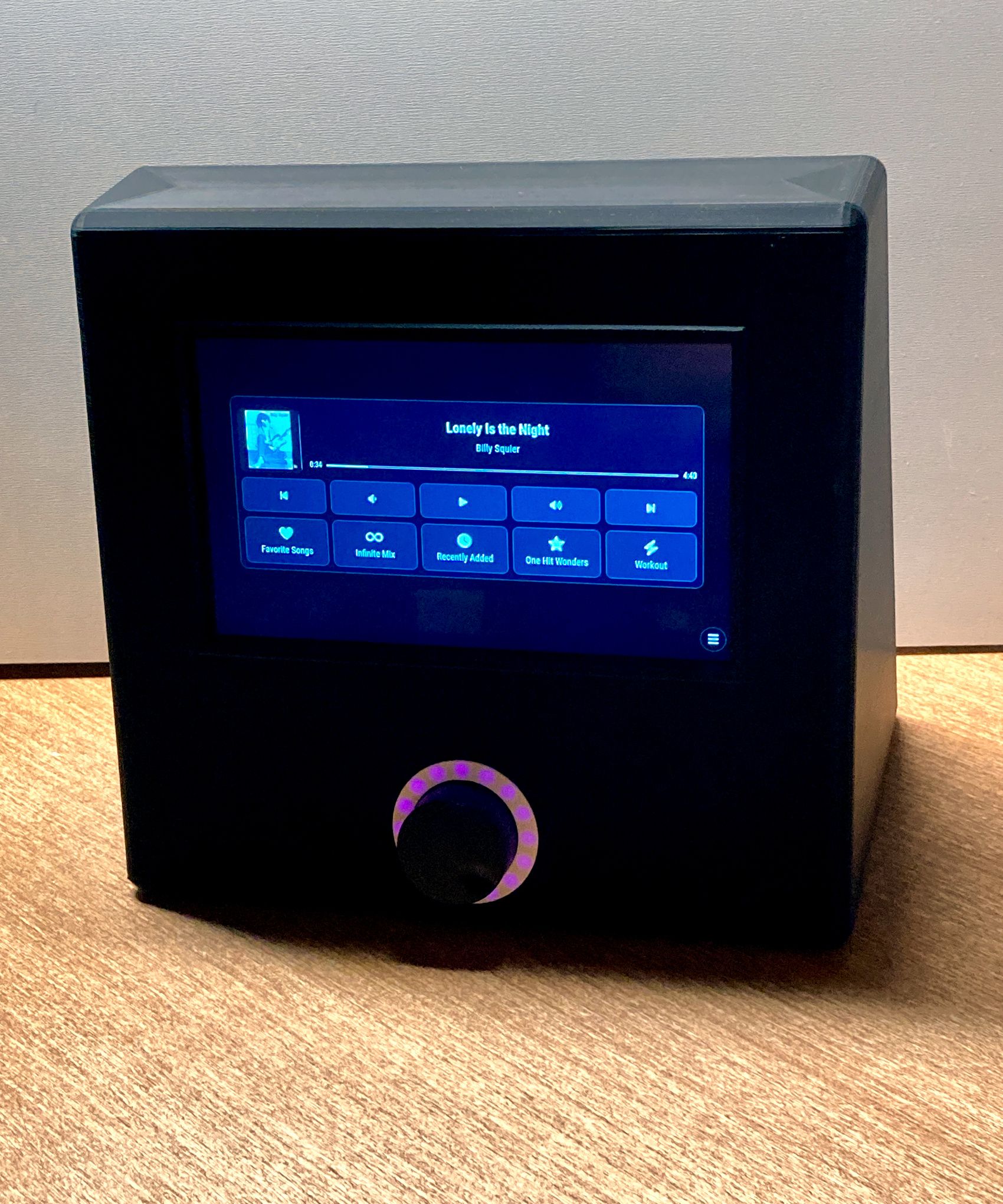
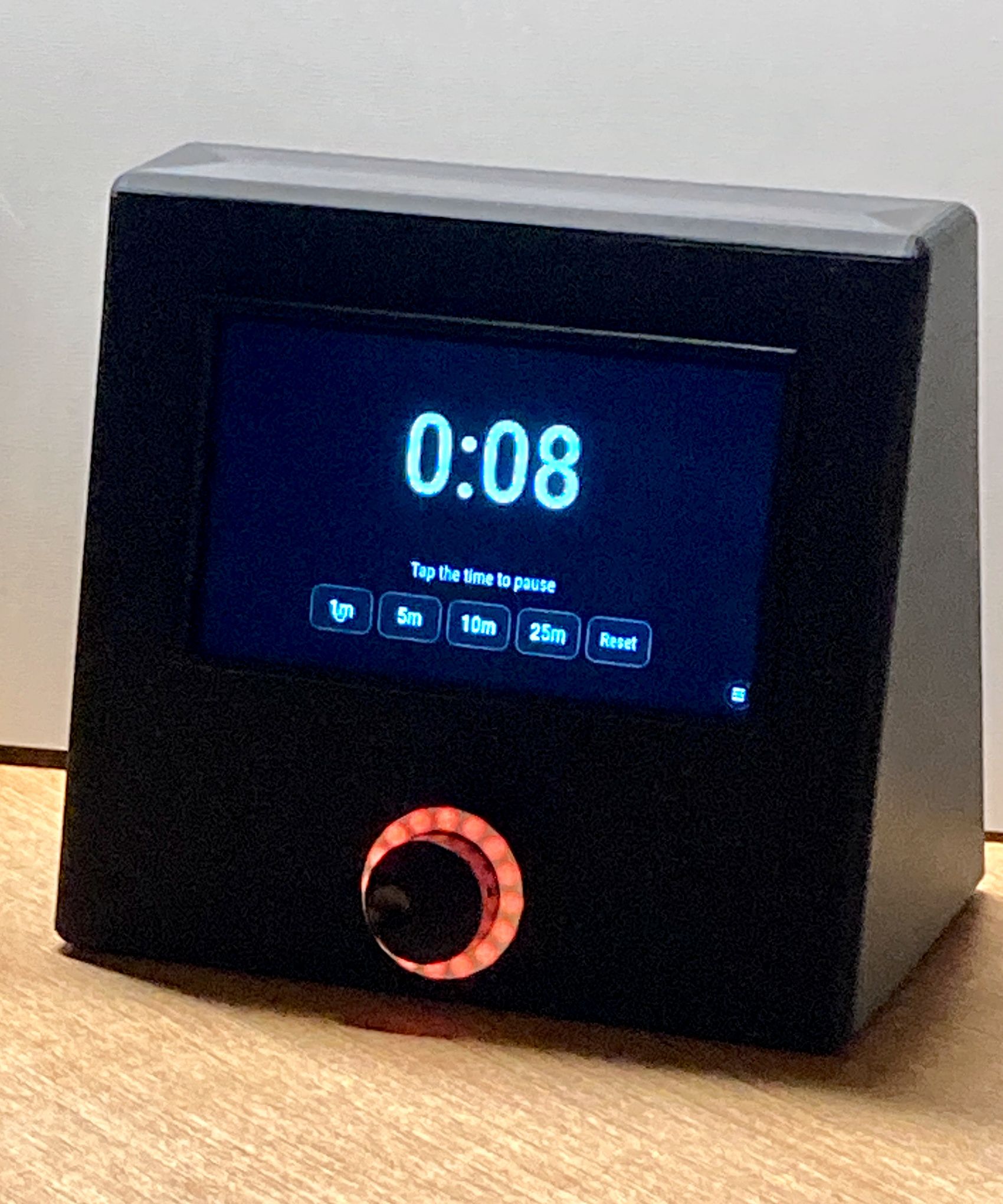
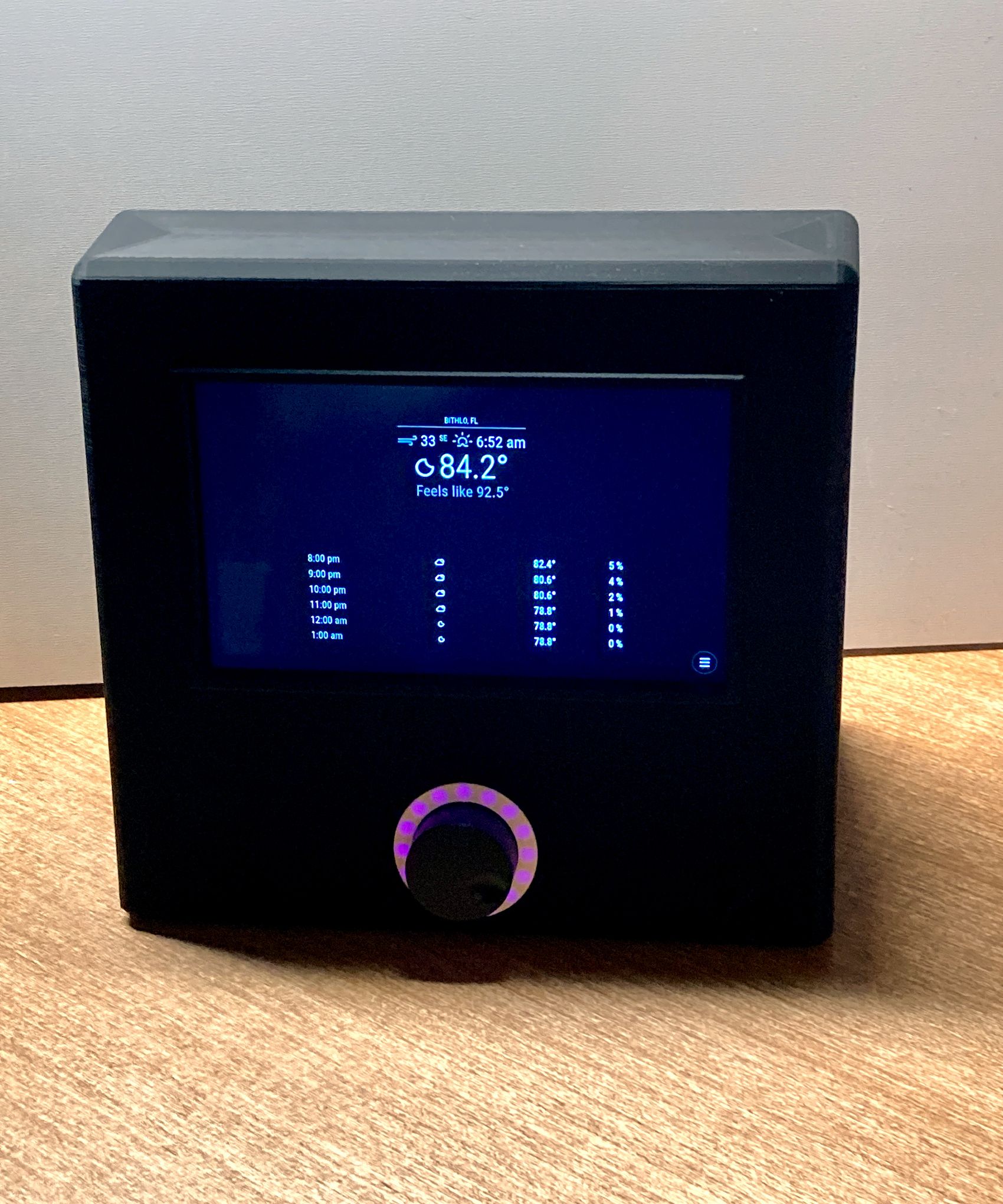
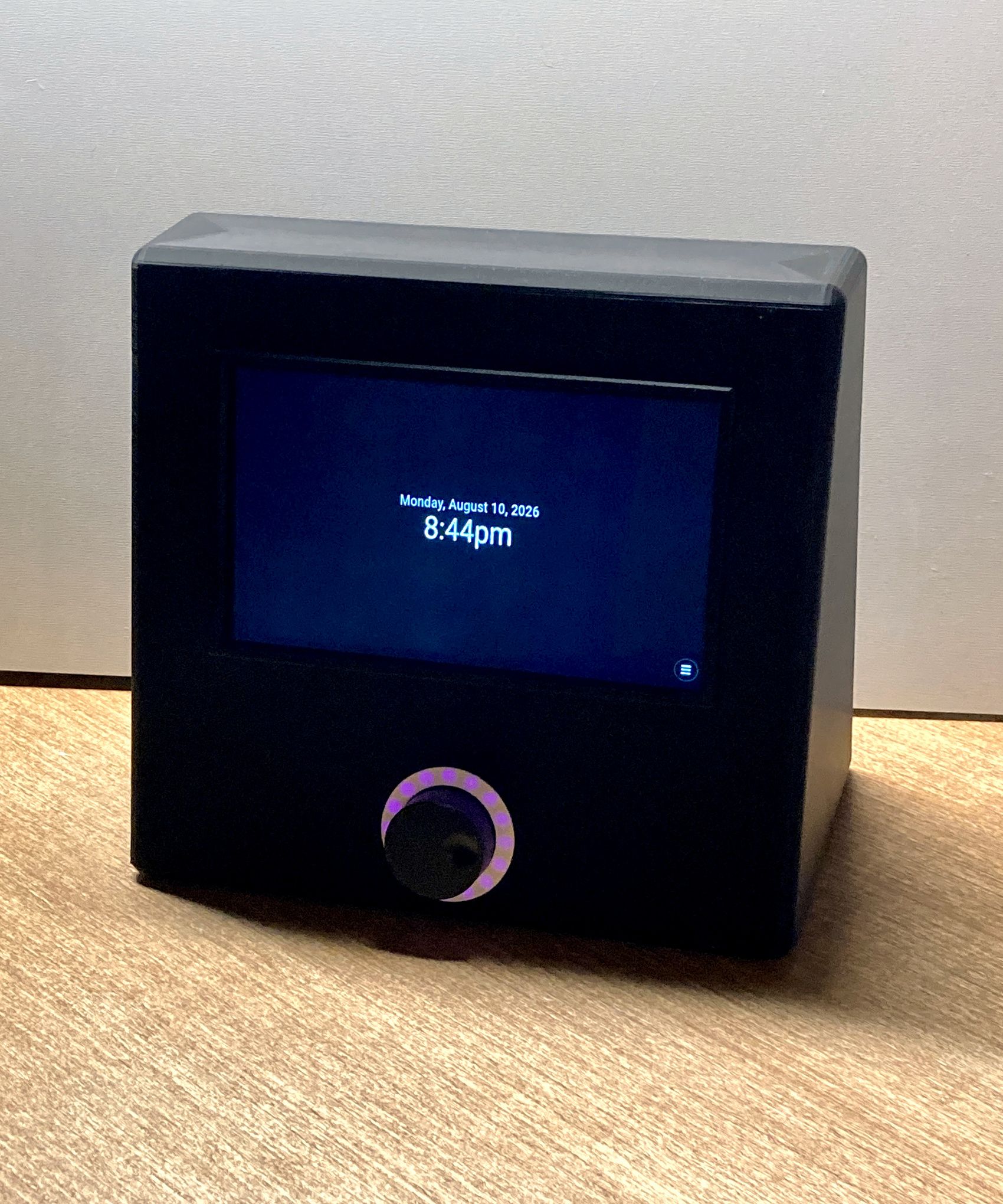
It is still a working prototype, although it may already be close to the finished personal appliance I wanted. I’m continuing to polish the documentation and software before making the repositories public.
Yes. Since you use Home Assistant, MagicMirror can publish an MQTT message when the timer starts, and HA can start a matching Alexa timer on the Echo paired with the Wall Clock.
The catch is they are separate timers, not truly synced. Starting and canceling can be synced, but pausing the MagicMirror timer will not pause Alexa.
@Niggich it’s a good idea, but unfortunately it can’t directly start a normal Alexa timer.
One option is to pair your Screen with the Echo over Bluetooth. That would give you the alarm sound through the Echo, but it wouldn’t activate the timer indicator on the Echo Wall Clock.
Another possibility may be installing alexa-remote on the Mirror or use HA. The module could notify it when a timer starts, and it could then ask the Echo to set the corresponding timer. That should also activate the Wall Clock. maybe?
A compact, touch-friendly Music Assistant controller.
It communicates directly with Music Assistant and does not require Home Assistant or embed the Music Assistant web application.
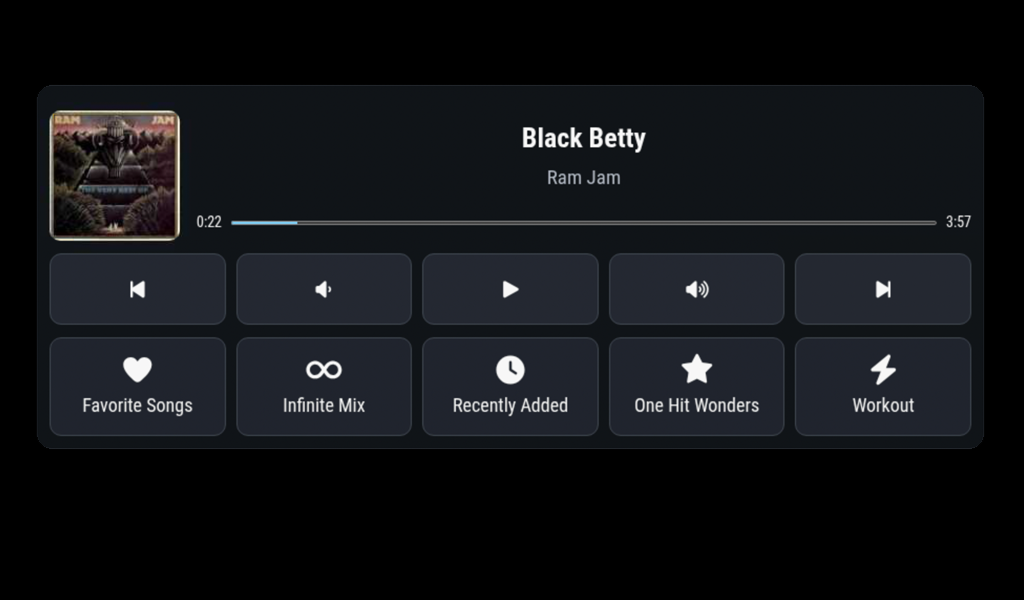
When playerId is omitted, the module presents the available Music Assistant
players for selection. A fixed player ID can be configured when the module
should always control one player.
Repository and documentation:
https://github.com/bwente/MMM-MusicAssistant-Controller
Latest stable release:
https://github.com/bwente/MMM-MusicAssistant-Controller/releases/tag/v1.3.0
@Niggich Update the module and it will use you language setting in your overall config.
@Niggich Thanks! For bottom_right, try enabling the module’s built-in compact layout:
{
  module: "MMM-KitchenTimer",
  position: "bottom_right",
  config: {
    compact: true,
  },
},
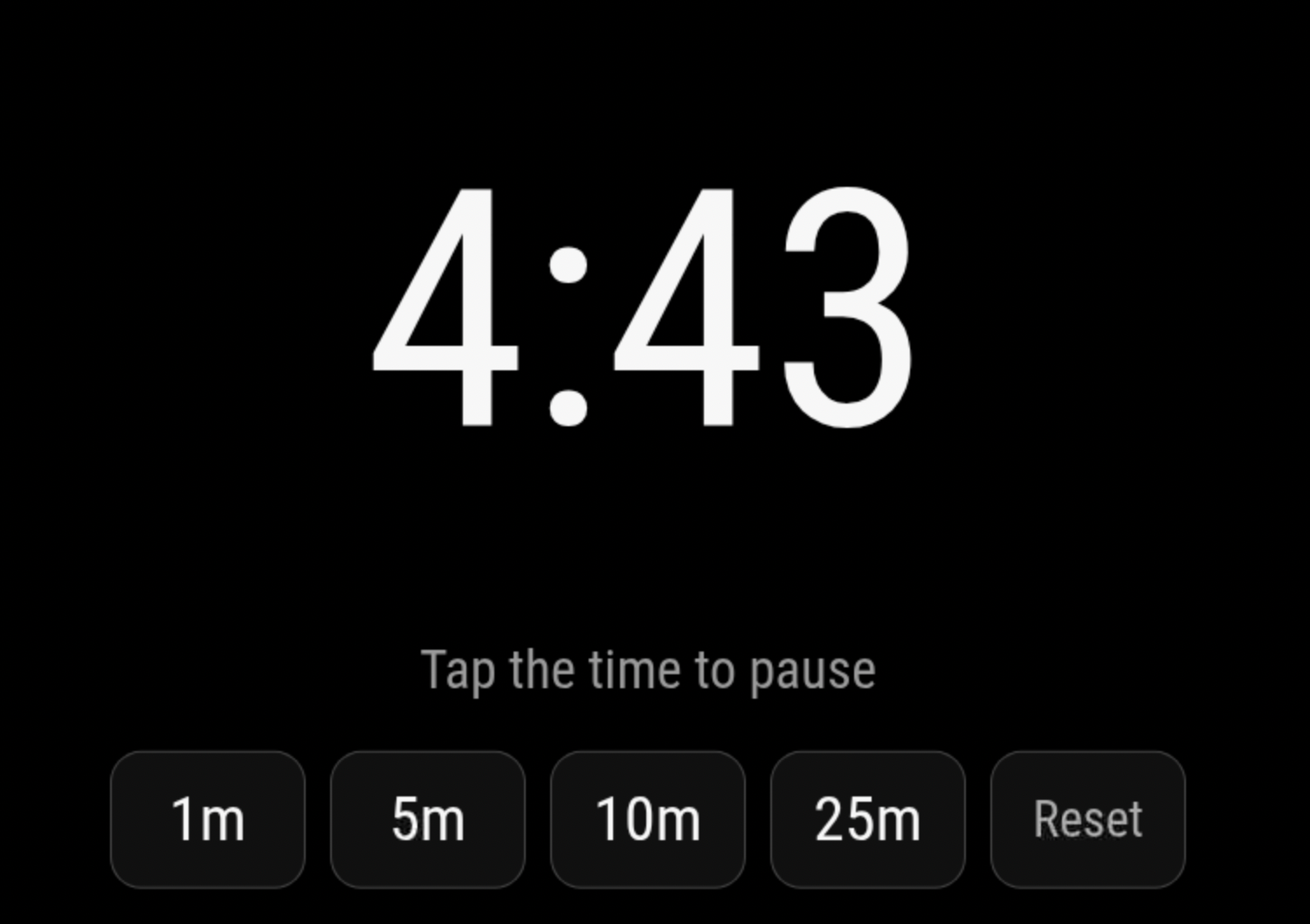
A newly refreshed fork of MMM-KitchenTimer, a responsive, touch-friendly countdown timer for MagicMirror².
It provides a large countdown display, configurable quick-duration presets, and accessible controls for touch, mouse, and keyboard. Tap the time display to pause or resume the countdown, and use the Reset or Dismiss control to cancel the timer or silence its alarm.
The module supports compact and full-screen layouts, optional alarm and button sounds, and reliable wall-clock timing. Active timers continue running and can finish while the module is hidden by page-management modules such as MMM-pages.
MMM-KitchenTimer also provides incoming and outgoing MagicMirror notifications. Other modules can start, add time to, pause, resume, reset, or dismiss the timer. Semantic state notifications make it possible to integrate voice assistants, smart lights, MQTT bridges, physical controls, notification centers, and other automations without embedding hardware-specific behavior in the timer.
This is a maintained fork of the module originally created by Tom Short, published with his permission. The original MIT attribution and existing configuration compatibility have been preserved.
https://github.com/bwente/MMM-KitchenTimer
cd ~/MagicMirror/modules
git clone https://github.com/bwente/MMM-KitchenTimer.git
I tried to do a simple update that did not work.
This fixed it. https://github.com/nodesource/distributions/blob/master/README.md
I also lost electron somehow, once that was installed everything is back. Thank you.
I tried to upgrade using an upgrade script.
evalmachine.<anonymous>:43
} = primordials;
    ^

ReferenceError: primordials is not defined
    at evalmachine.<anonymous>:43:5
    at Object.<anonymous> (/usr/lib/node_modules/npm/node_modules/graceful-fs/fs.js:11:8)
    at Module._compile (node:internal/modules/cjs/loader:1233:14)
    at Module._extensions..js (node:internal/modules/cjs/loader:1287:10)
    at Module.load (node:internal/modules/cjs/loader:1091:32)
    at Module._load (node:internal/modules/cjs/loader:938:12)
    at Module.require (node:internal/modules/cjs/loader:1115:19)
    at require (node:internal/modules/helpers:130:18)
    at Object.<anonymous> (/usr/lib/node_modules/npm/node_modules/graceful-fs/graceful-fs.js:3:27)
    at Module._compile (node:internal/modules/cjs/loader:1233:14)

Node.js v20.5.1
@joela85
Are you using MMM-PIR-Sensor?
https://github.com/paviro/MMM-PIR-Sensor/issues/49
I needed to delete the node_modules directory first. Then I ran npm install and the issue was gone.
Me too. I fixed by using this…
https://github.com/paviro/MMM-PIR-Sensor/issues/49
I needed to delete the node_modules directory first. Then I ran npm install and the issue was gone.
I have been trying out https://home-assistant.io/ I got it running on an old raspberry pi. Haven’t spent a lot of time on it, I hoping to back to once I get my mirror finished.
Google being very through with their JSON…
{
  "version": "1.0",
  "encoding": "UTF-8",
  "feed": {
    "xmlns": "http://www.w3.org/2005/Atom",
    "xmlns$openSearch": "http://a9.com/-/spec/opensearchrss/1.0/",
    "xmlns$gsx": "http://schemas.google.com/spreadsheets/2006/extended",
    "id": {
      "$t": "https://spreadsheets.google.com/feeds/list/YOUR_SECRET_SHEET_LINK_ID/od6/public/values"
    },
    "updated": {
      "$t": "2017-08-14T03:28:11.565Z"
    },
    "category": [
      {
        "scheme": "http://schemas.google.com/spreadsheets/2006",
        "term": "http://schemas.google.com/spreadsheets/2006#list"
      }
    ],
    "title": {
      "type": "text",
      "$t": "Sheet1"
    },
    "link": [
      {
        "rel": "alternate",
        "type": "application/atom+xml",
        "href": "https://docs.google.com/spreadsheets/d/YOUR_SECRET_SHEET_LINK_ID/pubhtml"
      },
      {
        "rel": "http://schemas.google.com/g/2005#feed",
        "type": "application/atom+xml",
        "href": "https://spreadsheets.google.com/feeds/list/YOUR_SECRET_SHEET_LINK_ID/od6/public/values"
      },
      {
        "rel": "http://schemas.google.com/g/2005#post",
        "type": "application/atom+xml",
        "href": "https://spreadsheets.google.com/feeds/list/YOUR_SECRET_SHEET_LINK_ID/od6/public/values"
      },
      {
        "rel": "self",
        "type": "application/atom+xml",
        "href": "https://spreadsheets.google.com/feeds/list/YOUR_SECRET_SHEET_LINK_ID/od6/public/values?alt=json"
      }
    ],
    "author": [
      {
        "name": {
          "$t": "bwente"
        },
        "email": {
          "$t": "bwente@email.com"
        }
      }
    ],
    "openSearch$totalResults": {
      "$t": "3"
    },
    "openSearch$startIndex": {
      "$t": "1"
    },
    "entry": [
      {
        "id": {
          "$t": "https://spreadsheets.google.com/feeds/list/YOUR_SECRET_SHEET_LINK_ID/od6/public/values/cokwr"
        },
        "updated": {
          "$t": "2017-08-14T03:28:11.565Z"
        },
        "category": [
          {
            "scheme": "http://schemas.google.com/spreadsheets/2006",
            "term": "http://schemas.google.com/spreadsheets/2006#list"
          }
        ],
        "title": {
          "type": "text",
          "$t": "How you doing?"
        },
        "content": {
          "type": "text",
          "$t": "morning: Good morning, sunshine!, afternoon: Hitting your stride!, evening: You made someone smile today, I know it."
        },
        "link": [
          {
            "rel": "self",
            "type": "application/atom+xml",
            "href": "https://spreadsheets.google.com/feeds/list/YOUR_SECRET_SHEET_LINK_ID/od6/public/values/cokwr"
          }
        ],
        "gsx$anytime": {
          "$t": "How you doing?"
        },
        "gsx$morning": {
          "$t": "Good morning, sunshine!"
        },
        "gsx$afternoon": {
          "$t": "Hitting your stride!"
        },
        "gsx$evening": {
          "$t": "You made someone smile today, I know it."
        }
      },
      {
        "id": {
          "$t": "https://spreadsheets.google.com/feeds/list/YOUR_SECRET_SHEET_LINK_ID/od6/public/values/cpzh4"
        },
        "updated": {
          "$t": "2017-08-14T03:28:11.565Z"
        },
        "category": [
          {
            "scheme": "http://schemas.google.com/spreadsheets/2006",
            "term": "http://schemas.google.com/spreadsheets/2006#list"
          }
        ],
        "title": {
          "type": "text",
          "$t": "Row: 3"
        },
        "content": {
          "type": "text",
          "$t": "morning: Who needs coffee when you have your smile?, afternoon: You are making a difference!, evening: You are making a difference."
        },
        "link": [
          {
            "rel": "self",
            "type": "application/atom+xml",
            "href": "https://spreadsheets.google.com/feeds/list/YOUR_SECRET_SHEET_LINK_ID/od6/public/values/cpzh4"
          }
        ],
        "gsx$anytime": {
          "$t": ""
        },
        "gsx$morning": {
          "$t": "Who needs coffee when you have your smile?"
        },
        "gsx$afternoon": {
          "$t": "You are making a difference!"
        },
        "gsx$evening": {
          "$t": "You are making a difference."
        }
      },
      {
        "id": {
          "$t": "https://spreadsheets.google.com/feeds/list/YOUR_SECRET_SHEET_LINK_ID/od6/public/values/cre1l"
        },
        "updated": {
          "$t": "2017-08-14T03:28:11.565Z"
        },
        "category": [
          {
            "scheme": "http://schemas.google.com/spreadsheets/2006",
            "term": "http://schemas.google.com/spreadsheets/2006#list"
          }
        ],
        "title": {
          "type": "text",
          "$t": "Row: 4"
        },
        "content": {
          "type": "text",
          "$t": "morning: Go get 'em, Tiger!, afternoon: You're more fun than bubble wrap!, evening: The day was better for your efforts."
        },
        "link": [
          {
            "rel": "self",
            "type": "application/atom+xml",
            "href": "https://spreadsheets.google.com/feeds/list/YOUR_SECRET_SHEET_LINK_ID/od6/public/values/cre1l"
          }
        ],
        "gsx$anytime": {
          "$t": ""
        },
        "gsx$morning": {
          "$t": "Go get 'em, Tiger!"
        },
        "gsx$afternoon": {
          "$t": "You're more fun than bubble wrap!"
        },
        "gsx$evening": {
          "$t": "The day was better for your efforts."
        }
      }
    ]
  }
}
I just discovered MagicMirror last week and got things setup this weekend. It has been a blast trying out new modules. A big thank you to everyone in the community that has given their time.
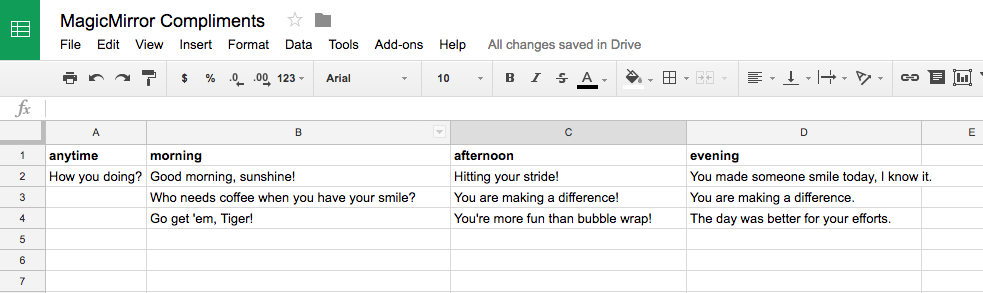
I am not a programmer and not much for command line. But I can follow instructions and copy and paste. I was looking for ways to update my mirror without having to touch terminal. I wanted an easy way to update my Compliments without making an JSON file by hand. I setup a new google sheets document.
Then published it.
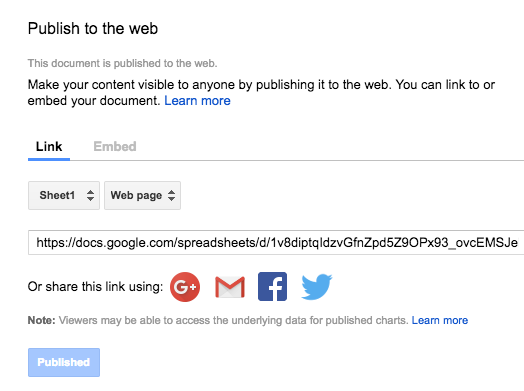
It turns out the JSON that google exports is not the JSON that Compliments needs. I tired my hand at jquery and html and got it to create the same format in the browser. But what is rendered in the browser window isn’t JSON either, it looks like it but it isn’t. I tried specifying the remotefile path as the html file that I made didn’t work.
I then tried writing to the file system and javascript can’t do that in the browser either. Then I discovered that node.js can write a file. I converted my jquery JSON looper into a node file.
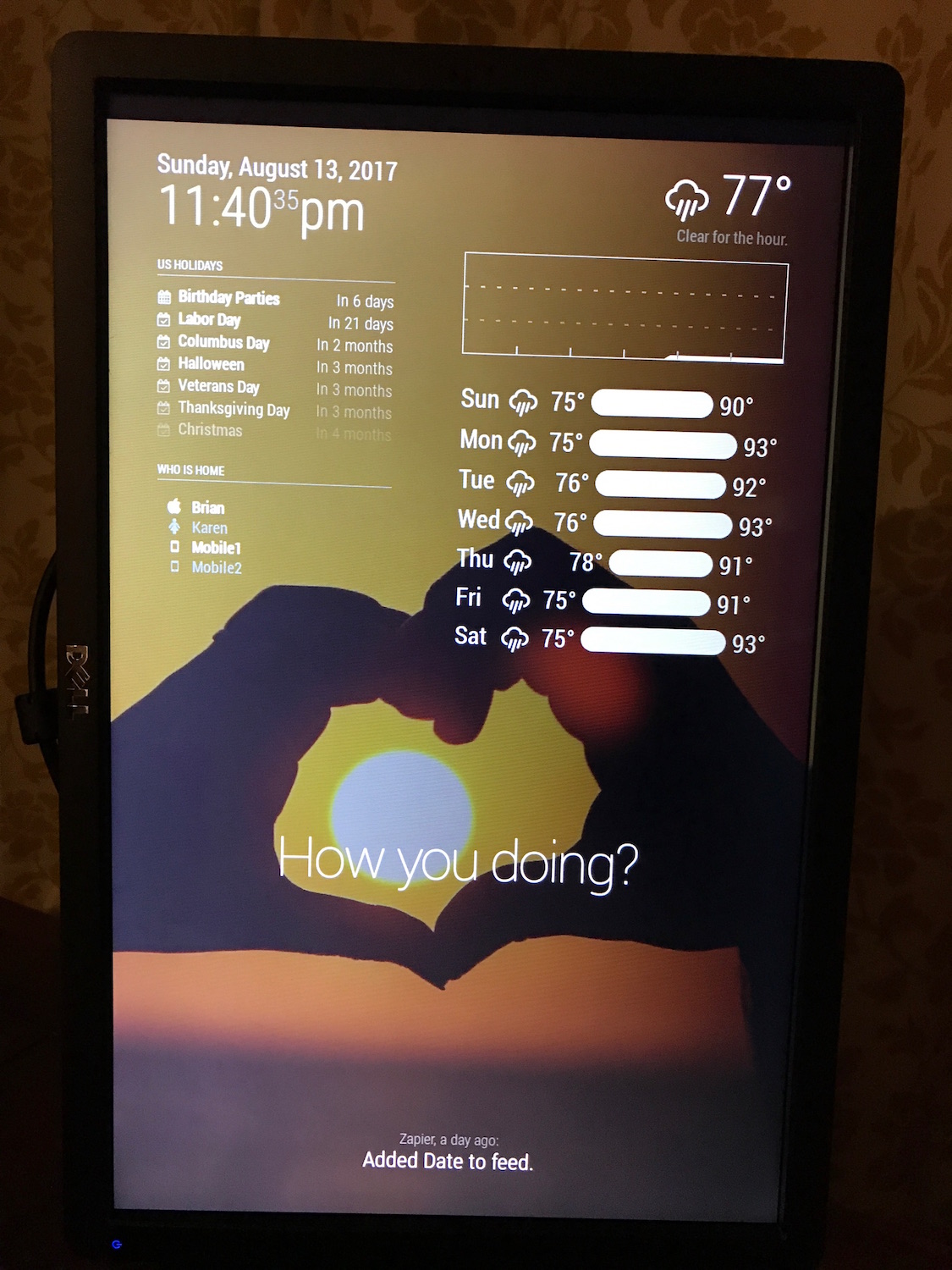
I started this morning with my first javascript, and this afternoon my first node.js, now tonight I am trying to figure out how to best make it work. I have to manually run
node remotefile.js
config.js
{
     module: 'compliments',
     position: 'lower_third',
     config: {
	 remoteFile: 'remotefile.json'
     }
}
And finally my noob code…
'use strict';
var request = require('request');

var url = 'https://spreadsheets.google.com/feeds/list/YOUR_SECRET_SHEET_LINK_ID/od6/public/values?alt=json';
var compliments = '';
var anytime = '';
var morning = '';
var afternoon = '';
var evening = '';

request.get({
    url: url,
    json: true,
    headers: { 'User-Agent': 'request' }
}, (err, res, data) => {
    if (err) {
        console.log('Error:', err);
    } else if (res.statusCode !== 200) {
        console.log('Status:', res.statusCode);
    } else {
        // data is already parsed as JSON:
        var entry = data.feed.entry;

        // anytime column
        anytime += '\t"anytime" : [\r\n';
        for (var i = 0; i < entry.length; i++) {
            if (entry[i]['gsx$anytime']['$t']) {
                anytime += '\t\t"' + entry[i]['gsx$anytime']['$t'] + '",\r\n';
            }
        }
        anytime = anytime.replace(/,\s*$/, "") + '\r\n';
        anytime += '\t],\r\n';

        // morning column
        morning += '\t"morning" : [\r\n';
        for (var i = 0; i < entry.length; i++) {
            if (entry[i]['gsx$morning']['$t']) {
                morning += '\t\t"' + entry[i]['gsx$morning']['$t'] + '",\r\n';
            }
        }
        morning = morning.replace(/,\s*$/, "") + '\r\n';
        morning += '\t],\r\n';

        // afternoon column
        afternoon += '\t"afternoon" : [\r\n';
        for (var i = 0; i < entry.length; i++) {
            if (entry[i]['gsx$afternoon']['$t']) {
                afternoon += '\t\t"' + entry[i]['gsx$afternoon']['$t'] + '",\r\n';
            }
        }
        afternoon = afternoon.replace(/,\s*$/, "") + '\r\n';
        afternoon += '\t],\r\n';

        // evening column
        evening += '\t"evening" : [\r\n';
        for (var i = 0; i < entry.length; i++) {
            if (entry[i]['gsx$evening']['$t']) {
                evening += '\t\t"' + entry[i]['gsx$evening']['$t'] + '",\r\n';
            }
        }
        evening = evening.replace(/,\s*$/, "") + '\r\n';
        evening += '\t]';


        compliments = '{\r\n' + anytime + morning + afternoon + evening + '\r\n}';

        var fs = require('fs');
        fs.writeFile("remotefile.json", compliments, function(err) {
            if (err) {
                return console.log(err);
            }

            console.log("The file was saved!");
        });

    }
});
I know the code could be a lot better. I also know I could use PHP to make it easier (just return JSON from the url). What would be the best MagicMirror way?