Hi,
I`ve seen that. Looks good.
Well, I could try if this works, too. I let you know.
Regards
Jose
J
Offline
A New Chapter for MagicMirror: The Community Takes the Lead
Read the statement by Michael Teeuw here.
Read the statement by Michael Teeuw here.
Posts
-
RE: Use local data from weatherstation
-
RE: MMM-Bluelinky module still working?
Hi,
I have a question and perhaps someone could help me.
I installed the module and get the “Loading …”, too.
I have a Hyundai PHEV with working Bluelink App. Doesn´t it works with PHEV or what am I´m doing wrong?
Regards
Jose
-
RE: MMM-FRITZ-Box-Callmonitor-py3 and MMM-Callmonitor-Current-Call
said in MMM-FRITZ-Box-Callmonitor-py3 and MMM-Callmonitor-Current-Call:
I’m not sure if this is correct: In your config a username is missing. As far as I’m aware of you have to use a username/password combination - therefore I remember that I had to create a separate user for using the module.Well, until now I didn’t need more. Everything is working fine except the arrows and colours. But I will see if sth. is needed.
That was the reason. Don`t know it shows the calls without a password but not the arrows.
Now everything is working fine.
Thanks a greets
Jose
-
RE: Use local data from weatherstation
Found a solution by the help of a member of another forum. Now everything works great and just the way I wanted it.
If you are interested in, have a look here. Unfortunately it is in German language.
Use data from local weatherstation
Kind regards
Jose
-
RE: MMM-FRITZ-Box-Callmonitor-py3 and MMM-Callmonitor-Current-Call
Hi,
sorry for the late response but I was ill and laying in bed.
I will have a look. Actually I have the following “proofed”.
@rkorell said in MMM-FRITZ-Box-Callmonitor-py3 and MMM-Callmonitor-Current-Call:
do you have the right (actual) fork? in my case this was https://github.com/xIExodusIx/MMM-FRITZ-Box-Callmonitor-py3.git
Yes, I’m using this one, too.
@rkorell said in MMM-FRITZ-Box-Callmonitor-py3 and MMM-Callmonitor-Current-Call:
I’m not sure if this is correct: In your config a username is missing. As far as I’m aware of you have to use a username/password combination - therefore I remember that I had to create a separate user for using the module.
Well, until now I didn’t need more. Everything is working fine except the arrows and colours. But I will see if sth. is needed.
@rkorell said in MMM-FRITZ-Box-Callmonitor-py3 and MMM-Callmonitor-Current-Call:
there were some requirements for the module - some python libraries as I remember correctly. - Do you have installed them in a proper version?
I think I have the right ones and up to date but I will have a look, too.
Thanks so far.
Kind regards
Jose
-
RE: MMM-FRITZ-Box-Callmonitor-py3 and MMM-Callmonitor-Current-Call
Hi,
I`m new to magicmirror and I like the CallMonitor a lot.
Everthing works fine for me except the arrows and colours. I installed MMM-FRITZ-Box-Callmonitor-py3 and MMM-Callmonitor-Current-Call. I put the necessary information in the conifg as ou can see:
{
		module: 'MMM-Callmonitor-Current-Call',
		position: 'top_right',	// This can be any of the regions. Best results in left or right regions.
		config: {
			showDirection: "true",
			colorEnabled: "true",
		}

	},


{
		module: 'MMM-FRITZ-Box-Callmonitor-py3',
		position: 'bottom_right',	// This can be any of the regions. Best results in left or right regions.
		header: "Letzte Anrufe", // This is optional
		config: {
			// See 'Configuration options' for more information.
			showContactsStatus: "true",
            	  fritzIP: "192.168.178.1",
            	  showContactsStatus: "true",
            	  maximumCallDistance: "240",
                        maximumCalls: "4",
                        reloadContactsInterval: "1",
			showOutgoing: "true",
			colorEnabled: "true",
                        password: "******",
		}
	},
An idea what am I doing wrong?
Regards
Jose
-
RE: Use local data from weatherstation
Thats`s a nice idea, too. But I like to have it much more simple like this one mentioned above. (mmm- WunderGround-PWS-Observations)
-
RE: REQUEST : SEMS PORTAL for Magic Mirror
@JerryP said in REQUEST : SEMS PORTAL for Magic Mirror:
A small step for men…
This is very nice. I like it a lot.
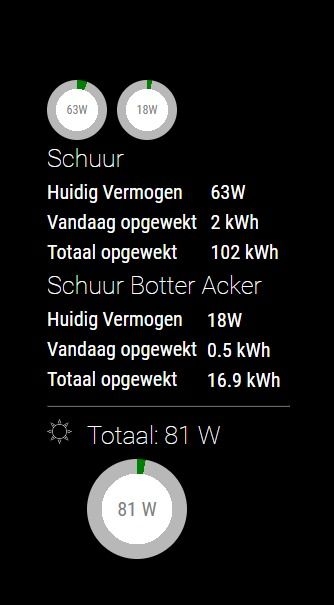
I use a very simple module to show the data. https://github.com/CuddlyCow/MMM-HoymilesPVMonitor
Unfortunately I use a hoymiles inverter.Any ideas to get it as nice as this module?
Jose
-
Use local data from weatherstation
Hi,
I`m searching for a module which shows my local data from my weatherstation (ecowitt clone), similar to this one, but directly from my local station and not by using any cloud service. mmm- WunderGround-PWS-Observations
This could be happen by using the FOSHK plugin or weewx.
I know that there is a module to show soil-moisture from ecowitt stations. That would be a possibility if you can expand it to use all of the other data like temperature, wind, …
Kind regards
Florian
-
RE: MMM-Hoymiles-Wifi
I spent a bit of time an got the following to work by using help of a friend.
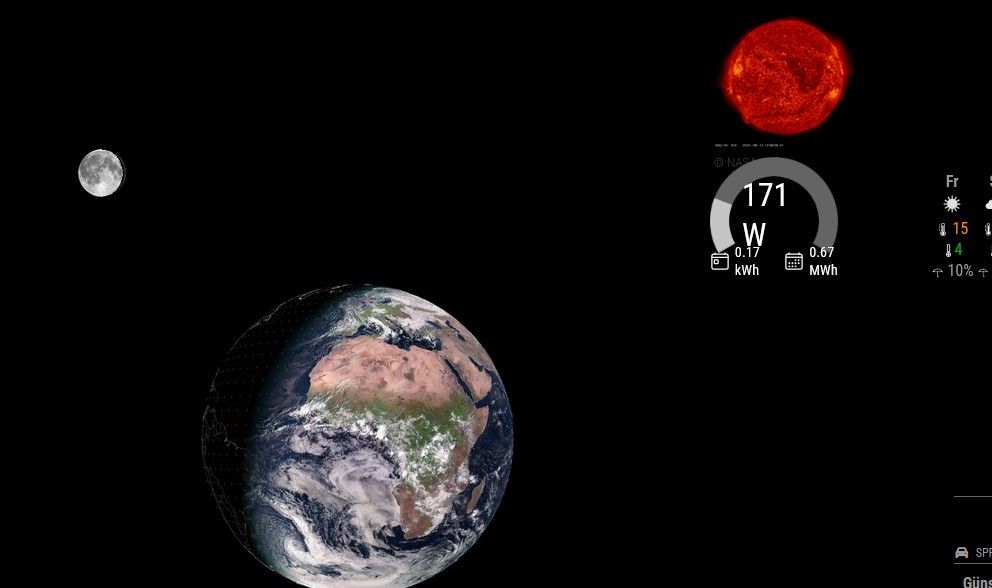
I wrote the following in the css:/* custom.css */ /* Passt die Gesamtbreite des gesamten Moduls an */ .MMM-HoymilesPVMonitor { /* Beispiel: Setzt die maximale Breite des gesamten Moduls auf 200 Pixel */ max-width: 200px; /* Stellt sicher, dass das Modul zentriert bleibt, falls es kleiner als die Spalte ist */ margin-left: auto; margin-right: auto; } /* Passt den inneren Container an, der das Canvas-Diagramm enthält. Dies überschreibt die 95% Breite, die im JS definiert wurde. */ .MMM-HoymilesPVMonitor div:first-child { /* Setzt die Breite des Containers auf 100% der oben definierten max-width (z.B. 200px). Sie können hier auch absolute Werte (z.B. 180px) verwenden, aber 100% ist am flexibelsten. */ width: 100% !important; }Now it is smaller, nevertheless I can’t get it much more smaller because the gauge will disappear then.
(It’s not displayed correctly in the screenshot, but it is on my mirror.)
-
RE: MMM-Hoymiles-Wifi
Great job! It could work for me. Unfortunately it’s dark outside but I can see the gauge on my mirror.
I don’t even dare to ask, but do you have a hint how about resizing it? I tried it with width and height but it won’t work.
 {
    module: "MMM-HoymilesPVMonitor",
    disabled: false,
    header: "PV Monitor",
    position: "top_left",
    width: "100px",
    height: "105px",
    config: {
      dtuIp: "192.168.178.150",        // IP address of your Hoymiles DTU
      maxPower: 800,                  // Maximum system power in watts
      updateInterval: 5 * 60 * 1000   // Update interval in milliseconds (default: 5 minutes)
    }
  },
Many thanks and kind regards
Florian
-
RE: MMM-Hoymiles-Wifi
Okay. But in the end I can’t get it to work. Don’t know whats wrong …
Does this has to do with that:
florian@raspberrypi:~ $ pm2 restart MagicMirror Use --update-env to update environment variables [PM2] Applying action restartProcessId on app [MagicMirror](ids: [ 0 ]) [PM2] [MagicMirror](0) ✓ ┌────┬─────────────────┬─────────────┬─────────┬─────────┬──────────┬────────┬──────┬───────────┬──────────┬──────────┬──────────┬──────────┐ │ id │ name │ namespace │ version │ mode │ pid │ uptime │ ↺ │ status │ cpu │ mem │ user │ watching │ ├────┼─────────────────┼─────────────┼─────────┼─────────┼──────────┼────────┼──────┼───────────┼──────────┼──────────┼──────────┼──────────┤ │ 1 │ HoymilesWifi │ default │ 2.33.0 │ fork │ 3691100 │ 0 │ 367… │ stopped │ 0% │ 0b │ florian │ disabled │ │ 0 │ MagicMirror │ default │ 2.33.0 │ fork │ 3691094 │ 0s │ 3 │ online │ 0% │ 3.0mb │ florian │ enabled │ └────┴─────────────────┴─────────────┴─────────┴─────────┴──────────┴────────┴──────┴───────────┴──────────┴──────────┴──────────┴──────────┘ florian@raspberrypi:~ $ -
RE: MMM-Hoymiles-Wifi
By unsing this, I get the following error:
python -m pip install -r requirements.txt --break-system-packages Defaulting to user installation because normal site-packages is not writeable ERROR: Could not open requirements file: [Errno 2] No such file or directory: 'requirements.txt' -
RE: MMM-Hoymiles-Wifi
Well I tried that but I’m to silly to install it.
florian@raspberrypi:~/MagicMirror/modules/MMM-Hoymiles-Wifi $ pip3 install hoymiles-wifi error: externally-managed-environment × This environment is externally managed ╰─> To install Python packages system-wide, try apt install python3-xyz, where xyz is the package you are trying to install. If you wish to install a non-Debian-packaged Python package, create a virtual environment using python3 -m venv path/to/venv. Then use path/to/venv/bin/python and path/to/venv/bin/pip. Make sure you have python3-full installed. For more information visit http://rptl.io/venv note: If you believe this is a mistake, please contact your Python installation or OS distribution provider. You can override this, at the risk of breaking your Python installation or OS, by passing --break-system-packages. hint: See PEP 668 for the detailed specification. florian@raspberrypi:~/MagicMirror/modules/MMM-Hoymiles-Wifi $ sudo apt install python3 hoymiles-wifi Error: Unable to locate package hoymiles-wifi florian@raspberrypi:~/MagicMirror/modules/MMM-Hoymiles-Wifi $ -
RE: MMM-Hoymiles-Wifi
* master
origin  https://github.com/schris88/MMM-Hoymiles-Wifi (fetch)
origin  https://github.com/schris88/MMM-Hoymiles-Wifi (push)
I used the ~ symbol.
-
RE: MMM-Hoymiles-Wifi
@evroom said in MMM-Hoymiles-Wifi:
$ hoymiles-wifi --host 192.168.178.50 identify-inverters
This works:
Identify-inverters Response:
{'1412a015f1e3': 'HMS-800W/1000W-2T'}
After that: ./HoymilesWifi.sh
* Serving Flask app 'hoymiles_data' * Debug mode: off Address already in use Port 5000 is in use by another program. Either identify and stop that program, or start the server with a different port. -
RE: MMM-Hoymiles-Wifi
@evroom said in MMM-Hoymiles-Wifi:
$ grep ‘dtu_ip_address’ HoymilesWifi.sh
Until that line everything is ok. After that it says:
grep: HoymilesWifi.sh: No such file or directory