MagicMirror Forum
    • Recent
    • Tags
    • Unsolved
    • Solved
    • MagicMirror² Repository
    • Documentation
    • 3rd-Party-Modules
    • Donate
    • Discord
    • Register
    • Login
    • Profile
    • Following 5
    • Followers 73
    • Topics 101
    • Posts 4,397
    • Groups 2
    Mykle1M Offline
    1. Home
    2. Mykle1
    3. Best
    A New Chapter for MagicMirror: The Community Takes the Lead
    Read the statement by Michael Teeuw here.

    Posts

    Recent Best Controversial
    • RE: MMM-NPR

      @twosquirrels

      It’s not my module, although I wish it were. A pretty swift piece of work. I thought this was a politics free zone, especially this topic which was published by the author for the purpose of announcing the module.

      You can always fork the repo and make any changes and modifications that you like. :-)

      posted in Education
      Mykle1M
      Mykle1
    • RE: I need help with editing configs (mainly the compliments)

      @chaseb1357 said in I need help with editing configs (mainly the compliments):

      Can someone explain to me how I go about doing this?

      The readme for the compliments module has all the information you need. I suggest you read it. With that, here is one way of adding compliments, in your config entry. However, this way can make your config cumbersome, but it does work. The readme explains how to use a remote file so you don’t fill up your config with compliments.
      https://github.com/MichMich/MagicMirror/tree/develop/modules/default/compliments

      And here is a config entry you can use. See how I added compliments to the file? Just follow that format and you’ll be fine.

      		{
      		module: "compliments",
      		position: "lower_third",
      			config: {
      				updateInterval: 5000,
      				fadeSpeed: 1000,
      				compliments: {
      		anytime: [
      			"Hey there sexy!",
      			"RTFM!",
      			"The readme will help!",
      			"Last one no comma"
      		],
      		morning: [
      			"Good morning, handsome!",
      			"Enjoy your day!",
      			"How was your sleep?",
      			"Last one no comma"
      		],
      		afternoon: [
      			"Hello, beauty!",
      			"You look sexy!",
      			"Looking good today!",
      			"Last one no comma"
      		],
      		evening: [
      			"Wow, you look hot!",
      			"You look nice!",
      			"Hi, sexy!",
      			"Add your own like this!",
      			"Watch your formatting!",
      			"Last one no comma"
      		]
      	}
      }
      },
      

      You can copy and paste it and edit it if you like.

      Then read the readme! ;-)

      posted in Troubleshooting
      Mykle1M
      Mykle1
    • RE: MMM-aviationwx (Aviation weather)

      A new spin on the display and does allow for international ICAO’s.
      https://github.com/mykle1/MMM-WISP

      {
              disabled: false,
      	module: "MMM-WISP",
      	position: "bottom_bar", // you could try top_bar and thirds
      	config: {
      	        ICAO: "KJFK,EGLL,UUDD,EDDT,RJAA,ZBAA,LFPG,LIRF", // Not limited to 8 International ICAO's
      		colorCode: "Alternative", // Standard or Alternative
      		useHeader: false,
      		header: "",
      		maxWidth: "100%",
      	}
      },
      
      posted in Transport
      Mykle1M
      Mykle1
    • RE: ***Noob Alert*** MagicMirror coding issues!!!

      @mythr33kidz said in ***Noob Alert*** MagicMirror coding issues!!!:

      the default weather app is not displaying on the screen at all (I’ve signed up for an API key via openweathermaps.org and also figured in my location ID) I’ve placed them both in the correct locations, but still no weather display.

      I will test your config entry if you post it here using this guide.
      https://forum.magicmirror.builders/topic/4247/how-to-post-code-on-the-forum-for-absolute-beginners

      there are several modules that I want to incorporate within the mirror but I’m not sure of how to install them either.

      https://forum.magicmirror.builders/topic/4231/how-to-add-modules-for-absolute-beginners

      last but not least, I would like to change the “NY Times” newsfeed to a more local feed, but really don’t know how to go about that either.

      Do a google search for rss newsfeeds to find the feed that you want. You need the rss url to the feed. With that url you can replace the NY Times url or add it to your newsfeed module.

      Again I appreciate all help that can be given! Thank you and I hope with your help, I’ll be able to present this present on time!

      We’ll get you sorted. No worries.

      posted in Troubleshooting
      Mykle1M
      Mykle1
    • RE: MMM-Gas

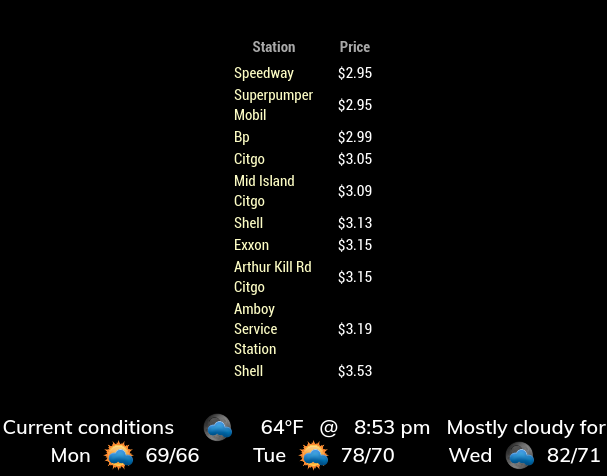
      @cowboysdude

      Thanks. I really like this module alot. Very nice options and I love the mouse overs. Fantastic work! :thumbsup:

      0_1538787518808_gasas.png

      posted in Transport
      Mykle1M
      Mykle1
    • RE: Calendar displays time in 12h format, was 24

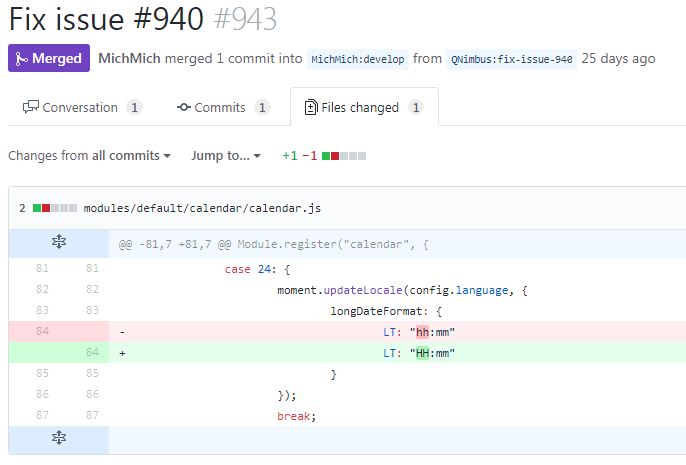
      @flobbr said in Calendar displays time in 12h format, was 24:

      Does anybody have a clue on this?

      Quick fix is to edit this in the module.
      0_1502211235676_fix.jpg

      Or move to the development branch

      posted in Troubleshooting
      Mykle1M
      Mykle1
    • RE: Calendar times in 24 hour format?

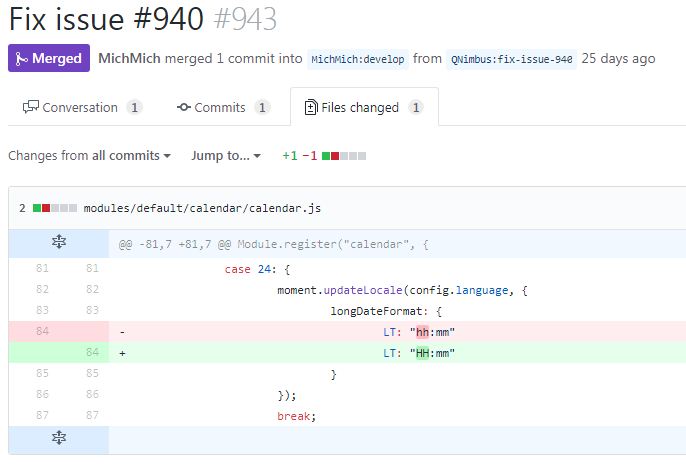
      @MarkusBe said in Calendar times in 24 hour format?:

      Any Ideas left, how to fix this?

      Quick fix is to edit this in the module:

      0_1501969529505_fix.JPG

      Or move to the developers branch of MM

      posted in Feature Requests
      Mykle1M
      Mykle1
    • RE: Weather

      @Gamble

      In the time it takes to read these, you could be up and running. Or, you could continue the way you have been.

      https://forum.magicmirror.builders/topic/4528/how-to-create-a-working-config-for-absolute-beginners

      https://forum.magicmirror.builders/topic/4231/how-to-add-modules-for-absolute-beginners

      posted in Troubleshooting
      Mykle1M
      Mykle1
    • RE: MLB Standings...

      @cowboysdude

      Uh, can you . . . ? ;-)

      posted in Sport
      Mykle1M
      Mykle1
    • RE: I have some problems about config file

      @cowboysdude

      Isn’t it crazy?

      posted in Troubleshooting
      Mykle1M
      Mykle1
    • RE: Adding background Image

      @matrixfox

      I’m not familiar with doing that through css but if you are interested, this module will do the trick without css manipulation.

      https://github.com/mykle1/MMM-EasyBack

      However, if I were to guess, I would try the url like this, without the home/pi. Forgive me if that is incorrect.

      MagicMirror/css/background.jpeg

      posted in Development
      Mykle1M
      Mykle1
    • RE: Viewing MM from a PC

      @Damian said in Viewing MM from a PC:

      in chrome browser

      Try the F11 key, and F11 again to go back.

      That should work.

      posted in Troubleshooting
      Mykle1M
      Mykle1
    • RE: Help for my fisrt MagicMirror

      @greda said in Help for my fisrt MagicMirror:

      I try this informaton next week.

      Yes, those tutorials are excellent!

      @yawns :thumbsup: :^)

      posted in Tutorials
      Mykle1M
      Mykle1
    • RE: Viewing MM from a PC

      @Damian said in Viewing MM from a PC:

      Every day is a school day ;-)

      Even at my age that is SO true. :^)

      posted in Troubleshooting
      Mykle1M
      Mykle1
    • RE: Adding Modules

      @johnnyboy said in Adding Modules:

      First off, a massive shout out to Mykle1 for helping me to do in minutes, what took me many hours trying… Thanks a lot for that, much appreciated

      You’re welcome buddy. It wasn’t very long ago that I was in the very same place that you are in now. Some very fine people helped me get under way, and continue to help me. I repay them by helping others, where and when I can. I can see you’re in very good hands with Strawberry 3.141 assisting you. He was, and still is, instrumental in helping me perfect my MM. I’ll help you with the easy stuff. He’ll handle the genius side of things. :smile:

      posted in Troubleshooting
      Mykle1M
      Mykle1
    • RE: Electron CPU usage

      Got a few spare SD cards so I installed a fresh new Jessie and MagicMirror-develop(which installed Electron 1.7.6). Well, I’m sad to report that Electron 1.7.6 gags on a default installation of MM. Using nmon for stats, Electron CPU usage soared over 225% every time there was a transition of both the Compliments module and the newsfeed module. When either made a transition by themselves, CPU usage was well over 140%. There was not much “at rest” time because newsfeed rotates pretty quickly by default. However, rare moments of “at rest” time showed near normal CPU usage of about 15%.

      I did this as a test, to satisfy my own curiosity, because my Pi3 doesn’t have the issues discussed here. Using the same Pi3 that hosts my mirror, running Jessie and MM 2.1.0 and Electron 1.4.15, it performs amazingly well, with no outrageous CPU usage or heat issues (fan installed).

      The same Pi3, with the newest develop installation of MM, which installs Electron 1.7.6, is hard pressed to handle the default of 4 modules adequately.

      Needless to say, I’m going back to my original SD card, with Jessie, MM 2.1.0 and Electron 1.4.15

      posted in Troubleshooting
      Mykle1M
      Mykle1
    • RE: Calendar overlapping problem

      @StrikeBack83 said in Calendar overlapping problem:

      Any idea?

      Ok, remove that entry from your custom.css file altogether. Revert any changes you made regarding " supressing the symbol config" and add this to your calendar config entry"
      displaySymbol: false,

      It’s right there in the ReadMe file of the calendar module. 3rd entry, configuration options.
      https://github.com/MichMich/MagicMirror/tree/develop/modules/default/calendar

      posted in Troubleshooting
      Mykle1M
      Mykle1
    • RE: PM2 - how to access terminal?

      @Richard238 said in PM2 - how to access terminal?:

      With PM2 installed, MM starts OK.
      Ctrl+Q to access desktop, but PM2 kicks in, so how do you get access to the terminal, and desktop with PM2 running?!
      Thank you.

      You can either minimize the MM window by pressing your ALT key and then choose Minimize from the Menu Bar at the top, or, Choose Exit from the File Menu in the Menu Bar. Pressing Ctrl+M will Minimize your MM window, as well.

      Now, with PM2 installed, it will relaunch the mirror. So, minimize the mirror first, and then type pm2 stop mm in your terminal so the mirror doesn’t relaunch. pm2 start mm to relaunch

      posted in Troubleshooting
      Mykle1M
      Mykle1
    • RE: after some days ical will not display anymore

      @fischi87 said in after some days ical will not display anymore:

      Nobody wants help me? :-(

      There is a date issue with calendar module that has been discussed on the forum in a few topics. I think this one will help you find the answer you are looking for

      https://forum.magicmirror.builders/topic/2208/calendar-shows-no-entries-after-mm-update

      posted in Troubleshooting
      Mykle1M
      Mykle1
    • RE: How to disable seconds in clock time?

      @alang said in How to disable seconds in clock time?:

      How can I get the seconds to not display on the default clock time module?

      From the clock module README file:

      displaySeconds: false,

      posted in Troubleshooting
      Mykle1M
      Mykle1
    • 1
    • 2
    • 9
    • 10
    • 11
    • 12
    • 13
    • 66
    • 67
    • 11 / 67