@hriereb said in Ip whitelist:
ipWhitelist: [“127.0.0.1”, “::ffff:127.0.0.1”, “::1”],
I just whitelist all of the devices on my network by changing to this at the beginning of my config.
ipWhitelist: [],
 M
Offline
M
Offline
@hriereb said in Ip whitelist:
ipWhitelist: [“127.0.0.1”, “::ffff:127.0.0.1”, “::1”],
I just whitelist all of the devices on my network by changing to this at the beginning of my config.
ipWhitelist: [],
Well, as long as you add one at a time you will always know which is causing the problem. Correct that problem before adding another
@cruunnerr said in Not sure what doing wrong :( adding modules:
Just a copy/paste failure from Mykle ;)
Nope, I missed that one. Nice catch! :-)
I think . . . you are a frickin genius!
I tip my hat to you, sir. That is some classy stuff!
It’s hard to know what’s going on there by your descriptions. However, when you were getting the error “the file is missing and i need to create one” your MM was working EXCEPT for the config.js needing to be created. In your config folder, there should be a file named config.js.sample. This file should not be edited. You have to copy this file and paste it in the same folder, renaming it to config.js. You now should have config.js.sample file and the config.js file in the same folder (the config folder of MagicMirror). Unless you’ve made some other changes this will allow the mirror to run.
Damn, why didn’t I think of this tutorial? :-)
Some other very useful key commands for MagicMirror
Yup, cowboydude is absolutely right. I went with the Automatic installer on my Raspberry Pi 3
Worked perfectly, and the directions are damn good
@Snille said in Input...What do you think?:
forecast is for Friday… Where is Thursday? :)
@cowboysdude said “Shows current conditions…rotates through the forecast.” above ^
Another question, can you switch between Celsius and Farsighted?..
Farsighted! That’s funny! :thumbsup:
Thanks again but the problem still exists. Let me explain what I’ve done so far.
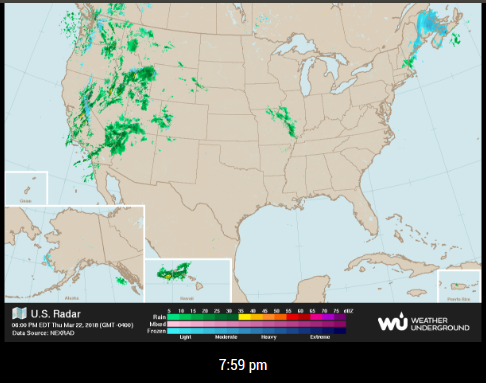
This url is not refreshing upon updateDom but the timestamp is.
https://icons.wxug.com/data/weather-maps/radar/united-states/united-states-current-radar-animation.gif
I’m lost. :-/
@Snille said in Input...What do you think?:
But I have to go to bed… REALLY now… :)
It’s early! And it’s Friday night!
(Yes, I know, it’s Saturday morning for you.)
12:46 AM
Friday, July 28, 2017 (GMT+2)
Time in Sweden
Like this, because I need the seed to change. Feel free to tell me what I’m doing wrong. Hehe :-)
var getTimeStamp = new Date().getTime();
img.src = "https://icons.wxug.com/data/weather-maps/radar/united-states/united-states-current-radar-animation.gif&seed=" + getTimeStamp;
pic.appendChild(img);
wrapper.appendChild(pic);
@cowboysdude said in 1 old noob + 1 rPi = I can’t believe I did it! (revisited):
HOLY COW THAT IS JUST PLAIN AWESOME!!! Great job!!! I LOVE IT!
That’s extremely nice of you to say so. I hope I get a similar reaction from my son when the time comes.
“250,000+ personal weather stations across the globe already send data to Weather Underground!”
Not a single one in Sweden, according to https://www.wunderground.com/weatherstation/ListStations.asp?selectedCountry=Sweden
@ninjabreadman said in GIF update from URL with MMM-EyeCandy:
Making your code the following:
That did the trick. The .gif file is refreshing to reflect the new data when it changes.
Thanks for the lesson. I do appreciate the help.
Peace!