A New Chapter for MagicMirror: The Community Takes the Lead
Read the statement by Michael Teeuw here.
  • broken css in forum

    5
    2
    0 Votes
    5 Posts
    2k Views
    schlachtkreuzer6S
    @yawns sure. Uncaught TypeError: Cannot set property ‘serializer’ of undefined at undefined.module.module.exports (serializer.js:159) at serializer.js:159
  • MMM-Networkscanner: 1 Divice and 2 macAddresses How

    1
    0 Votes
    1 Posts
    681 Views
    M
    Hi Guys, I have a Problem. My Telefon is one day in 2,4 GHz WLAN and next Day in 5Ghz WLAN. My Telefon has a other MacAddress. Is possible 2 MacAddresses for 1 Device? { macAddress: “mac.address.all.lower.case"or"macAddress.from.5Ghz.WLAN”, name: “DonnaiPhone”, icon: “mobile”}, thanks
  • Any MMM-Hive Users that can help, please?

    34
    0 Votes
    34 Posts
    20k Views
    D
    @mongo116 Ahhhh… thanks. I thought these referred to the inside temp? I will have another look at the config and see, but off hand I recall only 1 set? Those I thought were for inside… but will look more closely 2mor and play about. So yeah, very happy to have it actually working now, and that the link I gave you helped finding that BG changed things… and other MMM-Hive users on here will also appreciate the work you done to fix it. Thanks again…
  • Magic Mirror 2 - Please create a config file error

    8
    0 Votes
    8 Posts
    8k Views
    Mykle1M
    @Rpickp said in Magic Mirror 2 - Please create a config file error: It worked! Thank you so much! Excellent! :-)
  • MMM-netatmo integration

    2
    1
    0 Votes
    2 Posts
    2k Views
    CFennerC
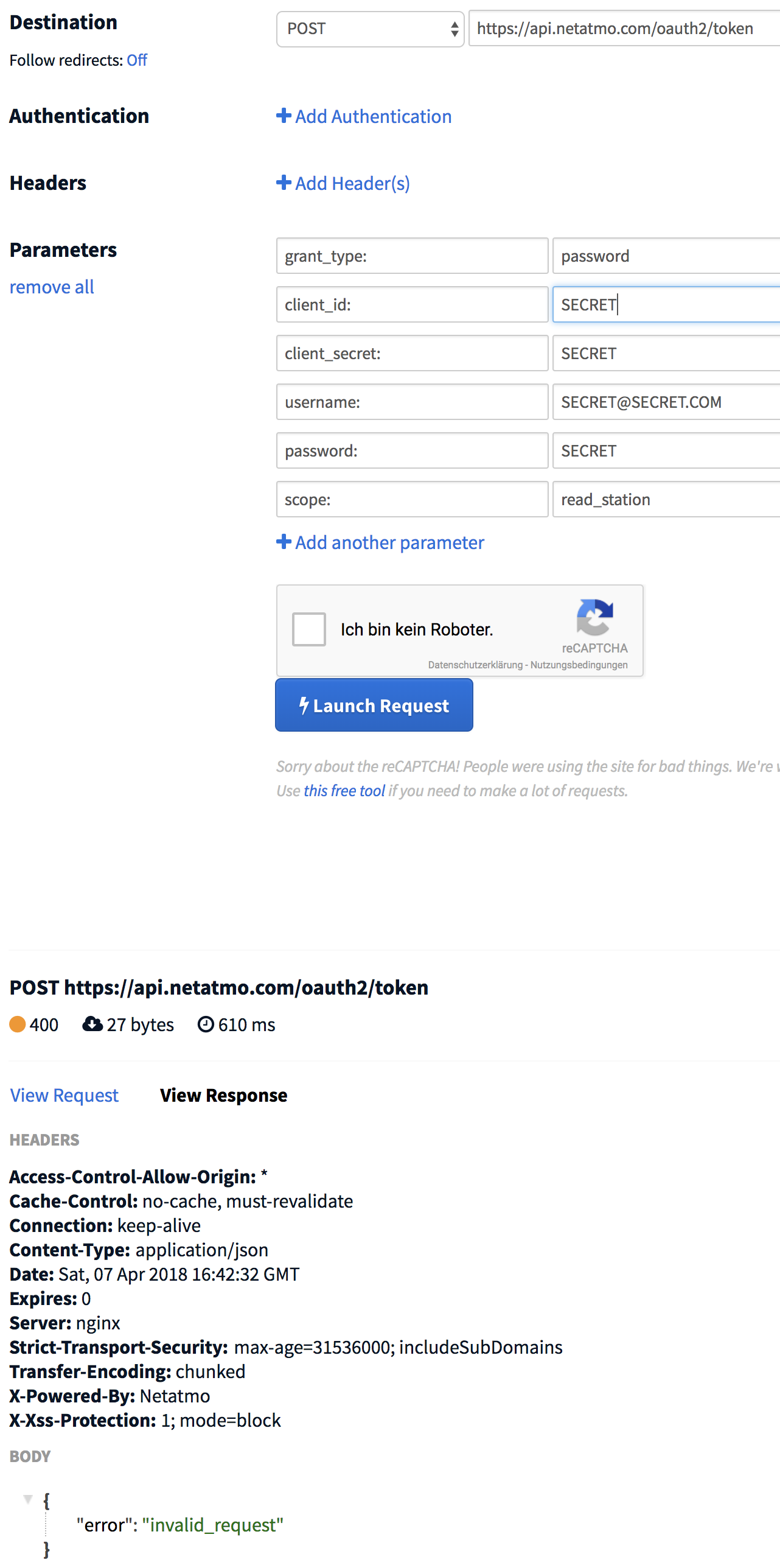
    @blebbens, please make sure that the “:” are not part of parameters! I just added a description how to do this with curl, this is a bit easier.
  • Current Weather module not working

    8
    0 Votes
    8 Posts
    6k Views
    S
    Odd… mine hasn’t… Is there a way to manually restart the module? Edit: Seems to be related to that metric to imperial thread. If I switch to metric, it loads fine, but imperial breaks It. What was the solution to that?
  • Black Screen issue using Autoinstaller

    2
    0 Votes
    2 Posts
    1k Views
    S
    I followed the update procedure for 2.3.1 including elctron beta and it’s now working with the default modules!
  • Calendar - dates but no times....

    1
    0 Votes
    1 Posts
    747 Views
    CrckrsC
    Hi All, Super new to this - so apologies upfront if this is a ‘stupid’ question! Have the default calendar setup, linked to a Google calendar, set to absolute date. For whatever reason I cannot get it to display event times, it only shows the dates. Am I missing something obvious here?! Thanks in advance - any suggestions welcome!
  • Touch inverted, can't get it right!! HELP

    Locked
    2
    0 Votes
    2 Posts
    979 Views
    yawnsY
    Please stop posting the same question multiple times. This is closed, please continue here: https://forum.magicmirror.builders/post/37832
  • No helper found for module:

    7
    0 Votes
    7 Posts
    9k Views
    Mykle1M
    @raymonvdm If you reinstall, I believe there is an option for autostarting where you simple have to choose yes. Otherwise, if you are setting up autostart manually, Pay particular attention to this line: PM2 will now show you a command you need to execute. Most people miss this step. You have to execute the command that appears. And lastly, you have to save the PM2 state
  • Sleep for updatenotification loop -- Help with JS needed

    1
    1 Votes
    1 Posts
    1k Views
    H
    Hi, I’m running MM on a PiZero, which has a comparable small amount of memory and to have a long lasting SD card, I put some tmp directories in memory and disabled swap. It works fine, however, once the update process of the default updatenotification module starts, I quickly run out of memory and the browser crashes. By changing the updateinterval, I verified that it is indeed due to the updatenotification module. I think this is because all modules are checked at the same time. I’ve 10 installed modules plus the default ones. All these parallel update processes consume quite some memory. I think I found the responsible loop “for (moduleName in modules)” in MagicMirror/modules/default/updatenotification/node_helper.js However I didn’t manage to put in some sleep command between each execution of the items in the loop. My knowledge of JS is very limited and I was not able to adapt the code examples found here https://stackoverflow.com/questions/3583724 to the MM code. I hope that somebody of you can help me with this issue. For me a hard coded sleep time would be totally fine, but of course an official change with a parameter that can be changed in the config file (or an option, that would make the different simpleGits run one after each other) would be even better. Already many thanks for your help!
  • New MagicMirror Version

    7
    0 Votes
    7 Posts
    3k Views
    O
    I don’t know what happens, but now there is no error
  • Changing moment.js behavior

    12
    0 Votes
    12 Posts
    11k Views
    C
    How do you actually use moment.js my clock is off and i dont know how to change it. then i got moment.js and still dont know
  • Help! Probem using PIR Sensor on raspberry pi zero to turn on/off screen

    15
    0 Votes
    15 Posts
    8k Views
    MikgaboM
    @NoNameRo Thanks SOO much!!! Got er working now. I really appreciate your help in the matter!!! Cheers, Mike
  • MM Pi Zero W - strange browser behaviour

    1
    0 Votes
    1 Posts
    771 Views
    W
    Following usual Pi Zero W MagicMirror tutorials this is what I got: Midori just doesn’t work, tried both console and desktop, result is either black screen, white screen or Connection Refused response, regardless what I put to config. Googling about Midori problem I found out that more people has/had that problem but without any solution. Connecting from remote Windows computer opens MM normally. Chromium is working, in some context - when I open it in Desktop, it starts everything (all modules) normally. When I start it in Console, it loads clock, currentweather, weatherforecast and calendar_monthly normally but doesn’t load Trello and Calendar (endless loading). When I open MM from another computer, Trello and Calendar load on both computer and raspberry! Also, GoogleMapsTraffic sometimes load white screen, and sometimes load normally. I am out of my mind already. I don’t know how to debug this anymore… I hope someone has any idea…
  • No Default Weather modules working on fresh install

    2
    0 Votes
    2 Posts
    832 Views
    Mykle1M
    @bassbahl Did you get your API key for the weather modules? Directions are in the readme of each
  • Blank black screen | Noob

    44
    0 Votes
    44 Posts
    59k Views
    A
    @axellejamous I just ran into this black screen issue too. I figured out that the local electron display will only work if the config.js contains: address: "localhost" I was running with the following and getting a black screen address: "::" Instead of using the built in display I am going to launch chromium myself in --kiosk mode. I need the MM to listen on all interfaces so I can see and debug from a separate machine.
  • Turning monitor on/off when not in use.

    7
    0 Votes
    7 Posts
    3k Views
    W
    Thanks for the input, @cruunnerr and @martinkooij. I ended up going with @cruunnerr’s approach as it required fewer changes to my existing setup. Here is what I did: Created a file that lists the devices and their IPs that we want to evaluate. Filename: “devices”. myphone,192.168.0.200 mywatch,192.168.0.201 wifephone,192.168.0.202 wifewatch,192.168.0.203 Created a perl script, “ping.pl”, that pings the devices listed in the file. If it gets a response it will write the results to a file named “ping_results”. #!/usr/bin/perl use Net::Ping; open(INFILE, "; close(INFILE); #open(OUTFILE, ">", "ping_results") or die("unable to write output: $!"); chomp(@ip_array); $p = Net::Ping->new(); foreach(@ip_array) { if($_ =~ /\d+.\d+.\d+.\d+/) { if($p->ping($&)) { open(OUTFILE, ">", "ping_results") or die("unable to write output: $!"); print OUTFILE ("$`is responding to ping.\n"); close(OUTFILE); } } } Added a crontab job to run the perl script at 04:55. # m h dom mon dow command # Execute Perl Script to check for devices 55 4 * * * perl /home/pi/ping.pl Created a shell script, “rpi-hdmi-on.sh” that will check to see if “ping_results” exists. If it does it will turn the monitor on and then delete the “ping_results” file. Added a crontab job to execute this script at 05:00. if [ -e ping_results ] then vcgencmd display_power 1 >/dev/null rm -f /home/pi/ping_results fi # m h dom mon dow command # Turn HDMI On (05:00/5:00am) 0 5 * * * /home/pi/rpi-hdmi-on.sh Created a shell script, “rpi-hdmi-off.sh” that will turn the monitor off. Added a crontab job to execute this script at 21:30. vcgencmd display_power 0 >/dev/null # m h dom mon dow command # Turn HDMI Off (21:30/9:30pm) 30 21 * * * /home/pi/rpi-hdmi-off.sh I’ve done some testing and it seems to be working well.

  • Website to write config file

    4
    0 Votes
    4 Posts
    2k Views
    F
    @triley5 Did you ever figure that out? I would also like to know how to be able to make a module change the config.js
  • What's casuing these SSH errors in the pm2 logs?

    1
    0 Votes
    1 Posts
    1k Views
    E
    I’m getting my logs spammed by the following SSH errors, in my PM2 logs: ssh_askpass: exec(/usr/bin/ssh-askpass): No such file or directory Permission denied (publickey). fatal: Could not read from remote repository. Please make sure you have the correct access rights and the repository exists. Any idea what module is causing this? I do have the notification module, constantly reminding me that one of my modules has X “commits behind master branch.” Are these related? How?