A New Chapter for MagicMirror: The Community Takes the Lead
Read the statement by Michael Teeuw here.
  • Having trouble with initial install

    2
    0 Votes
    2 Posts
    1k Views
    Mykle1M
    @sorenee Did you follow this? https://forum.magicmirror.builders/topic/236/complete-setup-tutorial
  • Trouble with git

    1
    0 Votes
    1 Posts
    674 Views
    E
    Hi, I’m building my first mirror, first time playing with a raspberry pi as well. I’ve used git and github before but I’m not super familiar with them. So far, I’m just working with my laptop on the raspberry pi remotely and I have modified the config.js file and installed a few modules. I am having the strangest problem with git though. I forked the main MagicMirror repo onto my account and was able to submit one commit locally and to my github remote repo. This commit modified the package-lock.json file only. However, git is telling me that my local repo and my remote repo are matching, even though my local repo has extra modules and config.js changes and my remote repo does not. How isn’t git seeing the differences?
  • Trouble with Wunderlist and/or Todoist - who can help?

    13
    0 Votes
    13 Posts
    7k Views
    M
    Hi pyrosmiley, thank you for the more detailed information. I’ll check that in the coming days. At the moment I’m busy with other things (including children’s birthday …). I get in touch with the results.
  • Can't view MM on LG TV WebOS browser - others fine

    14
    0 Votes
    14 Posts
    6k Views
    P
    Any additional thoughts here? I am around if there is something that I can test.
  • Motion Sense not working after adding HomeAssistant

    1
    0 Votes
    1 Posts
    908 Views
    M
    I have been successfully using MMM-Motion-Detection but it stopped working once I added HomeAssistant to the same RPi3. I didn’t think they would interact, but I guess they do. Has anyone experienced this or know what could cause it? RPi3, MagicMirror, and the module are all up to date.
  • MM modules not displaying or no longer refresh after restart

    7
    0 Votes
    7 Posts
    2k Views
    ?
    @bhepler Got it! I did wonder whether that might be it but the outages were so ridiculously coincidental with the changes I was making that I had to wonder whether I had broken something. Happy to report that everything is still working as expected at this time. Thanks all for the suggestions.
  • Updating MM (and/or disabling the update available message)

    4
    0 Votes
    4 Posts
    2k Views
    yawnsY
    As with every update, even from big companies like Microsoft, there is always a risk of breaking something
  • MMM-cryptocurrency

    4
    0 Votes
    4 Posts
    2k Views
    ?
    I had this problem too and spent way too long digging into it. The problem is in config/config.js. In the config for the MMM-cryptocurrency module, both “currency” and “significantDigits” SHOULD be arrays. If you’re trying to show more than one crypto, but don’t update “significant digits” then any index after 0 will show as NaN. Here’s my config as an example: { module: "MMM-cryptocurrency", position: "top_center", config: { currency: ['ethereum', 'bitcoin'], conversion: 'USD', showUSD: false, //headers: ['change24h', 'change1h', 'change7d'], displayType: 'logoWithChanges', showGraphs: false, significantDigits: [2,2], coloredLogos: true, } },
  • Current Weather do not display

    4
    0 Votes
    4 Posts
    2k Views
    yawnsY
    You only load module currentweather and not weatherforecast, so you won’t see any forecast. { module: "weatherforecast", position: "top_right", header: "Weather Forecast", config: { location: "New York", locationID: "5128581", //ID from http://www.openweathermap.org/help/city_list.txt appid: "YOUR_OPENWEATHER_API_KEY" } },
  • npm install not installing

    6
    0 Votes
    6 Posts
    3k Views
    D
    @Mykle1 yep, classic mistake…
  • MagicMirror wont start

    6
    0 Votes
    6 Posts
    3k Views
    bheplerB
    @kalleK Well, those errors didn’t seem to kill your mirror. I would comment out the 3rd-party modules in your config.js and restart your mirror process. Add them back one at a time until you get those warnings again and then talk to the module developer. Assuming those are module errors.
  • Serveronly Mode Not Running

    Unsolved
    4
    0 Votes
    4 Posts
    2k Views
    bheplerB
    @kiritowu Ah. Pi Zero. Okay, let’s skip the interface and concentrate on the server only stuff. Let’s try to get the application to install. Try this: cd ~/MagicMirror sudo npm install This may take a while before it completes. But hopefully it will install all of the necessary software. Give it a go.
  • Questions about adding MMM-Facial-Recognition to the config.js

    2
    0 Votes
    2 Posts
    1k Views
    D
    Found it! If you use MMM-system-stat togehter with MMM-Facial-Recognition, MagicMirror start will fail… this is because MMM-system-stats also uses classes: in the config.js i think…
  • Other options to hanging the mirror on a wall

    6
    0 Votes
    6 Posts
    4k Views
    bheplerB
    You could try mounting it flush with the back edge of a dresser. A couple of vertical supports that can be screwed into the back of the dresser can also be attached to the back of the mirror. You could probably get away with a couple of 1" x 1" x 12" wooden boards that are screwed into the mirror box and the back of your dresser. The whole thing can then be pushed up against a wall and you will have a mirror sitting on your dresser. Edited to add: Or spring for a couple of flat aluminum stock. 1" wide, 12" long, 1/8" thick or so. Drill holes, screw into dresser & frame. This would add less space to the depth of your setup.
  • News Feed full article won't display.

    1
    0 Votes
    1 Posts
    687 Views
    O
    I am trying to get a full news article from the default newsfeed to display when I press a button though it seems to display a blank iframe. I’m guessing it has something to do with the X-frame options not set correctly according to what I read on the newsfeed module git page. Is this x-frame option thing something I can set? Or how do I tell which news rss sites will allow embedding into an i-frame? Sorry I have basically no .js or xml experience so this is all pretty new to me. Running MM 2.3.1.btw with electron 1.4.15
  • This topic is deleted!

    1
    1
    0 Votes
    1 Posts
    11 Views
  • CSS - Naming header to change?

    4
    0 Votes
    4 Posts
    2k Views
    D
    @Mykle1 said in CSS - Naming header to change?: @Damian So, why don’t you tell others how you found your answer? It may help them in a similar situation. :-) Was in a rush so just posted the answer for others… Ok, I was directed to open Terminal, into $ MagicMirrror, and run my mirror with npm start dev Which will open up the Console window on the right of MM main screen. Then click the element tab at the top of the dev console window. On the left you will see the regions of your mirror. You have to click through them to find the module you are interested in, then click through that to find the header element. There you will find the class of the header. Take that to your custom.css file and apply. It’s case sensitive to the name of the module. This is what I did… as I have never been there before as never had cause to, so wanted to see it anyway. But, the real way I found the answer to my mistake, was seeing an example given by @Mykle1 of what I may find, and how to then format the .HEADER.CLASS.NAME into my CSS… .MMM-WWI .HEADER.CLASS.NAME { color: green; /* Header color. */ text-align: right; /* Algin header text. left, center, right */ } As soon as I saw .MMM-WWI I realised straight away that I was trying to copy the other examples of ,sonos that works by changing the other sonos module parts - Zone - Album art - Track name, and I should have used .MMM-Sonos for the header… My mistakes were obvious when I see them now… Not using a Dot at the start of MMM… then using .sonos and ,Sonos, when it should have been -Sonos… using .header when no Dot was rrequired. I now intend finding a list of MM CSS commands, and looking at them, and playing about with them so things like that (That I do not normaly play around with at all) will be understood more, and will prompt me more to playing around more in that part - customising.

  • Adding Google iCal in MMM

    2
    0 Votes
    2 Posts
    1k Views
    yawnsY
    @werdnllac cd ~/MagicMirror npm start You are in wrong directory :)
  • 0 Votes
    5 Posts
    3k Views
    PatexP
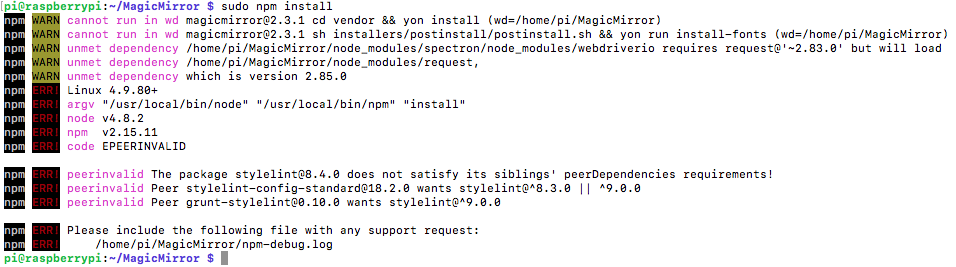
    @Mykle1 said in Error when running sudo npm install. magicmirror@2.3.1 cd vendor && yon install (wd=/home/pi/MagicMirror): I could be mistaken but I believe that using sudo npm install can cause problems. Installation of MM and its dependencies should be done as a normal user. For what it’s worth. Good point. I just saw his sudo npm install and followed along without thinking. You can try to uninstall stylelint again with npm uninstall stylelint(with or without sudo , whatever works) and install it again without the sudo command. If this does not yield any success in this issue someone fixed a similar warning (https://github.com/KraigM/homebridge-harmonyhub/issues/97). Never the less this shouldn’t all be necessary. Maybe it’s time to start over frech again and really be cautious about every step you do.
  • Update MagicMirror issue

    2
    0 Votes
    2 Posts
    2k Views
    PatexP
    @lloydrip said in Update MagicMirror issue: M. Pl It looks like git wants an e-mail address to perform the pull request. Just follow the instructions and you should be good to go. Run git config --global user.email "you@example.com" git config --global user.name “Your Name” As long as you don’t commit and push back to a repository it doesn’t really matter what you put in there.