A New Chapter for MagicMirror: The Community Takes the Lead
Read the statement by Michael Teeuw here.
  • Weather Module feels like is a little high

    Unsolved
    5
    1
    0 Votes
    5 Posts
    2k Views
    J
    Not sure what changed. I had the MM running overnight and when I checked it this morning the Feels like temp was correct. My guess is that there was an issue with the OpenWeather api. [image: 1527861107945-ebdbcc5d-c821-43e8-af09-b957f62102b0-image.png] Thanks,
  • Face Recognition. How many images are too many?

    Unsolved
    1
    0 Votes
    1 Posts
    666 Views
    N
    I’m running on an RPi 3b and have 4 users. Each user has just under 100 pictures that were used to train the mirror. Giving a total of about 350 images. I have my own module that if the user is recognized it plays a video. (Classic Disney “Mirror Mirror on the wall” type module) How many images are you using for your recognition file?
  • Temp suddenly showing 239 degrees

    19
    0 Votes
    19 Posts
    13k Views
    J
    @michmich Was this ever pushed? I believe I’m having the same issue. [image: 1527799119608-48b49553-2db1-4a20-a831-f429c4a72bc3-image.png]
  • Ubuntu 18.04 install issues

    10
    1
    0 Votes
    10 Posts
    4k Views
    J
    @hriereb Sorry I couldn’t help with those errors.
  • Making changes without stopping MM

    10
    0 Votes
    10 Posts
    3k Views
    idoodlerI
    @sharmstr Yep, thats true. Change *.css or Javascript file => Just reload the Webinterface (ctrl + r) Change config.json => Reload the Webinterface will do it 90%, else restart MagicMirror
  • Can’t install magic mirror on raspberry pi 1 model B

    Unsolved
    1
    0 Votes
    1 Posts
    984 Views
    J
    Hi, I’m new to this forum and new to magic mirror. I’m currently using a raspberry pi 1 model b to try and install magic mirror and I’m having a nightmare. I’ve tried two fresh copy’s of OS one been the latest Raspbian, and even tried Jessie. Every time i install MagicMirror I get errors listing dependencies, and other errors. I know that when your running it on a rp1 model b it has to be the server only version, can anyone please advise or point me to a good guide for my model pi and running server only? Thank you in advance. Jack
  • write access to git repository

    Solved
    3
    0 Votes
    3 Posts
    1k Views
    S
    Hi sdetweil, thank you for the clarification, since I have never contributed before I didn’t knew that. That really helped my a lot. Thanks, Carsten
  • Help with currentweather, remove these number

    Solved
    4
    1
    0 Votes
    4 Posts
    2k Views
    WayneRigleyW
    Hello, that number is Sunrise and Sunset. OK first off i also had an issue with that not being correct. regardless what i did. my fault was i DIDNT configure the Raspberry Pi main clock correct. timezone etc under preferences. start there first then this should come into play.
  • MMM-Assistant doesn't support korean?

    1
    0 Votes
    1 Posts
    568 Views
    W
    I use the MMM-Assistant,but i heard MMM-Assistant doesn’t support korean… is it true?
  • Local MagicMirror Not Displaying, Access via IP works fine

    Unsolved
    2
    0 Votes
    2 Posts
    1k Views
    idoodlerI
    @msheehan82689 Do you have some kind of screensaver enabled on your PC running the MagicMirror instance?
  • Odroid C1+ warnings at the end of the installation

    Unsolved
    3
    0 Votes
    3 Posts
    1k Views
    I
    It may be related with the fact that i’m root. I’ll try the following npm install --unsafe-perm to see if it works
  • This topic is deleted!

    Unsolved
    2
    2
    0 Votes
    2 Posts
    75 Views
  • Error Installing Dependencies Permission Denied

    Unsolved
    8
    0 Votes
    8 Posts
    4k Views
    bheplerB
    @buckgup It installed into desktop because that’s the folder you were in when you ran the git command. So: cd /home/pug git clone https://github.com/MichMich/MagicMirror.git cd MagicMirror npm install
  • Installing USB Soundcard using seperate USB Mic

    Unsolved
    12
    0 Votes
    12 Posts
    8k Views
    MrCoffeeM
    I reinstalled the whole system using another SD-card. Now I can use the seperate USB-Mic and the audio Out comes from the other USB-Soundcard. After that I installed all my modules like MMM-Podcast. I played the video and … sound comes from the audio jack again:-( However the usb mic and alexa are still working fine. It is just MMM-Podcast which uses the audio jack. How can that be? I installed the dependecies especially the omxplayer. But that can´t be the reason, or what do you think? lsusb Bus 001 Device 004: ID 0d8c:013c C-Media Electronics, Inc. CM108 Audio Controller Bus 001 Device 005: ID 0d8c:0014 C-Media Electronics, Inc. Bus 001 Device 003: ID 0424:ec00 Standard Microsystems Corp. SMSC9512/9514 Fast Ethernet Adapter Bus 001 Device 002: ID 0424:9514 Standard Microsystems Corp. SMC9514 Hub Bus 001 Device 001: ID 1d6b:0002 Linux Foundation 2.0 root hub aplay -l **** Liste der Hardware-Geräte (PLAYBACK) **** Karte 0: Device_1 [USB Audio Device], Gerät 0: USB Audio [USB Audio] Sub-Geräte: 1/1 Sub-Gerät #0: subdevice #0 sudo nano ~/.asoundrc pcm.!default { type asym playback.pcm "plughw:0" capture.pcm "plughw:1" } ctl.!default { type hw card 0 } Do you have an idea? Seems like I am almost there. Thanks.
  • MM2 on Synology NAS

    Unsolved nas synology
    1
    0 Votes
    1 Posts
    1k Views
    D
    Hi all, I’m trying to install MM on my synology. The steps I already performed: Install nodejs on synology Install MM in serveronly mode Copied config file and tried to whitelist IP address I now can access the page on xxx.xxx.x.x./MagicMirror/ but i get an error that the config file is missing although it is available. If I look at the console error I see that http://xxx.xxx.x.x./socket.io/socket.io.js is not loading. I already tried to change this to a CDN pointed location, with no luck. I’m kidda stuck here, can anybody help me on the way? Cheers,
  • MM not loading on startup or manually

    Unsolved
    4
    0 Votes
    4 Posts
    2k Views
    justjim1220J
    @awephuk I think you might be able to rebuild MM… cd MagicMirror npm rebuild it takes a few minutes, but that is one thing that has helped me in the past fix several different errors. Also, you can re-install the MM and your modules, especially the last one you added prior to getting this error… Start with the last module… cd modules/[last-module-name] >>> npm install Then run the npm install with MM. Or, the npm rebuild then restart MM Also, try rebooting the Pi by shutting it off, then turn it back on. (works better to help fix errors than using restart)
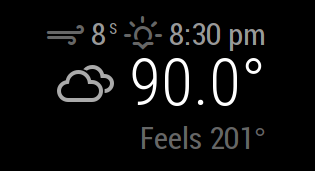
  • current weather feels 185F!!!

    Unsolved
    7
    0 Votes
    7 Posts
    3k Views
    Mykle1M
    @maxbachmann Ahh, I didn’t realize that the feels like temp was being calculated manually. I thought it was coming directly from the api. My bad. [image: 1526696346743-21.png]
  • Faster Reload after changing config.js

    Solved
    7
    0 Votes
    7 Posts
    8k Views
    Mykle1M
    @justjim1220 Allllllllllrighty then! :-)
  • Midori white screen (Raspberry Pi Zero W)

    Solved
    6
    0 Votes
    6 Posts
    4k Views
    strawberry 3.141S
    @meyraa from what i heard in the forum here, the users of the pi zero reported all that midori is the only browser on this pi that has no performance issues. The advantage of the chromium browser is that it is completely compatible, as electron internally uses the chromium project.
  • Blackscreen after changing custom.css

    Unsolved
    3
    0 Votes
    3 Posts
    1k Views
    J
    ty for the code. Sadly it didn’t help. It’s so weird, I set the whole css and config folder back to master-version and I still get a black screen. That are the only two folders I touched so far. I think the only way I can fix this is to reinstall everything.