A New Chapter for MagicMirror: The Community Takes the Lead
Read the statement by Michael Teeuw here.
  • Calender problems webcalc but no file only subsribe

    Unsolved
    6
    0 Votes
    6 Posts
    1k Views
    S
    @bb can u open the ics and see if there are any events in it?
  • Module not updating data, other modules work fine, how to debug?

    Solved
    2
    0 Votes
    2 Posts
    679 Views
    M
    So i ended up looking at pullrequests on the module and it looks like someone already made a fix for this. sorry for wasting forum space :) this should be a fix https://github.com/funsocietyirc/MMM-Wunderlist-Enhanced/pull/18/files
  • WiFi drops and reconnects regularly...

    Solved
    9
    0 Votes
    9 Posts
    4k Views
    M
    @barnosch I am also having the same issue. I tried this method, But still i am facing this issue. Any other solutions.
  • Blank screen after some time with only cursor. OS is still responsive

    Unsolved
    5
    0 Votes
    5 Posts
    970 Views
    O
    @sdetweil Well that could explain it. I’ll try disabling itand letting it run over night to see if i wake up to a crashed mirror.
  • Transportation module doesn't work

    Unsolved magic mirror smart mirror
    1
    0 Votes
    1 Posts
    634 Views
    A
    Hi, I’m a total beginner to this and have only installed 3 modules previous to this one. When I try to add this new one (MMM-SL-PublicTransport) the magicmirror displays the message ‘Please create a config file.’ If anyone could help me out I would be very grateful ! Here’s the code including the module above it (MMM-Screencast, which works fine): { module: 'MMM-Screencast', position: 'bottom_right', // This position is for a hidden <div /> and not the screencast window config: { position: 'bottomCenter', height: 600, width: 750, } }, { module: 'MMM-SL-PublicTransport', position: 'top_right', header: 'Busses', config: { apikey: 'Ipostedmyapihere', // REQUIRED. stations: [ // REQUIRED at least one entry. // Definition of the stations that you would like to see { stationId: 'Ipostedmystationidhere', // REQUIRED. An id of a station. You need to run the utility // findStation to get the id(s) of the station(s) you want. stationName: 'stationnamehere',// Optional. This is the name of the station. // It's shown in the header if you have set a header on the module // excludeTransportTypes: [], // Optional. This is an array of types of transport that you DONT // want to see. If not present then all transport types are shown. // The types are: 'Bus', 'Train', 'Metro', 'Tram' and 'Ship'. lines: [ // Optional. An array of lines that you want to see departing from // this station. { line: line-id, // The id of the line direction: dir, // Optional. If present only show departures in this direction // for this line. swapDir: false // Optional. If true, change dir 1 to 2 and vice versa. // Shall be used with the "In to town" feature. Note that // if direction is defined, that shall be direction swapped to. } ] }, ], maxDestinationLength: 999, // Optional, will truncate the destination string to the set length. displaycount: 10, // Optional, show this number of departures for each direction. omitDeparturesLeft: false, // Optional, if set to true departures that have left the station // is not shown. showdisturbances: false, // Not implemented yet fade: true, // Optional. Shall the table of departures be faded or not fadePoint: 0.2, // Optional. Fraction from end where to start fading delayThreshhold: 60, // Optional. If a departure is delayed or in advance only // show this // if the delay/advance is greater than this number in // seconds. updateInterval: 5*60*1000, // Optional. Number of milliseconds between calls to // Trafiklab's API. This value shall preferably be larger then 1 min // There are limitations on number of calls per minute and month highUpdateInterval: {}, // Optional if you dont need it don't define it. // If defined use higher frequences for updates, see // "Set what times to update more frequently" below uiUpdateInterval: 1000, // Optional. Number of milliseconds between updates of the // departure list. This value shall preferably be less then 10 sec SSL: false, // Optional. Use https to access the TrafikLab services, // defaults to false since I have experienced problems // accessing this service over https. Have an ongoing // discussion with TrafikLab debug: false, // Optional. Enable some extra output when debugging ignoreSanityCheck: false, // Optional. If set to true config sanity checks are not done. useDisplayTime: false, // Optional. If true use the actual displaytime that is // received via the API instead of the ExpectedDateTime and // TimeTabledDateTime. See the DisplayTime section below. cleanHeader: false, // If set to true the last update time is not shown // in the header showIcon: true // Optional. If true show an icon of the type of transport } }, ] }; The parts I have changed are apikey, stationId and stationName Thanks in advance

  • Weather module shows past data

    Unsolved
    2
    0 Votes
    2 Posts
    716 Views
    S
    @n21brown you should open an issue on github for this, so it can be tracked and if anyone wants to contribute a solution for it
  • Magic Mirror wont start

    Solved
    4
    0 Votes
    4 Posts
    947 Views
    S
    @everybodyfloats cool… can u mark this issue closed (3 dots to the right of the message that solves if)
  • calenderExt2 scroll the notifactions?

    Unsolved
    2
    0 Votes
    2 Posts
    591 Views
    ?
    @citizendevpi No. I tried overflowed events scrolling on my other module MMM-CalendarExt but, RPI3 couldn’t handle it with its performance. Maybe RPI4 would have better power, but many users are still using RPI3.
  • Just started looking into MMM-AssistantMk2 - step 3

    Unsolved
    3
    0 Votes
    3 Posts
    768 Views
    F
    @Sean Ok, it seems to have compiled without problems, so far so good. Now to configuration and hotword :-)
  • Mm on raspberry pi4

    Unsolved
    4
    0 Votes
    4 Posts
    953 Views
    S
    @florian the link here takes u to the topic (where u can read about WHY the updated installer) , which has the command to execute the installer…
  • National Flag in Calendar Entry (Germany)

    Unsolved
    1
    1
    0 Votes
    1 Posts
    349 Views
    B
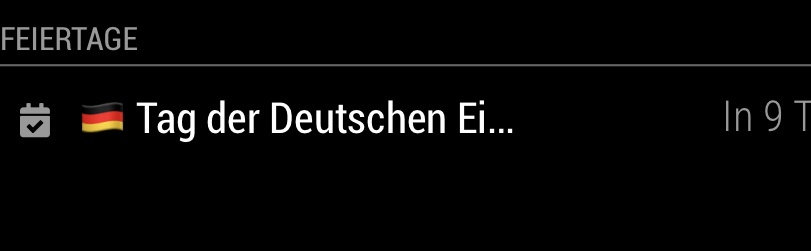
    I have subscribed to the Google Calendar of public holidays (Germany). Our national public holiday is approaching, Oct 3. The standard calendar module does show this entry, but without the German national flag symbol. Instead, there are only two empty boxes in front of the entry. This is just a minor problem and I ignored it until today, when I discovered that when using the MMM-Remote-Control module on my iPad and mirroring the screen to my iPad the flag is there. So I assume that the Raspberry browser is not able to display this symbol. Any idea? Screenshot attached is from my iPad. I have Raspian and MM2, freshly installed. Thanks a lot! Bertram ::: [image: 1569338123330-9050e5be-598e-414c-a6a2-a96dc7a3504b.jpeg] :::
  • Adding HTTP stream

    Unsolved
    5
    0 Votes
    5 Posts
    2k Views
    G
    I use Smartwebdisplay and the height and width settings are for the frame, not the content within. Not sure if you can do the same but to get mine to display correctly, I set my DVR to quad camera view. I then moved the camera I wanted into position 1 and resized the frame to the height and width of that first camera, even though it is still receiving the stream for all 4. It still has to be slightly larger than I wanted but does the trick as the Iframe is sizing from the top left. I don’t know of an Iframe viewer for MM that allows you to resize the contents but if anyone comes across one let me know please!
  • How to add to MMM-Remote-Control module

    Unsolved
    1
    0 Votes
    1 Posts
    531 Views
    F
    Hi, I am not too versed in customizing my mirror but I am very interested to find out if I can add the MMM-Memo module to the Remote-Control module list… Sorry if I’m being clear, but I don’t want to have to always physically type out http://IP:port/addMemo?memoTitle=&item=&value= everytime I want to add a memo… Im not sure if I need to open another topic, but my MMM-Remote-Control module will not restart my MM, despite every other button works… Does anybody know how I can remedy either issue? Thanks
  • How to delete one MagicMirror window

    Solved
    6
    1
    0 Votes
    6 Posts
    1k Views
    S
    @Stoffbeuteluwe please mark your issue solved… thanks
  • This topic is deleted!

    Unsolved
    1
    0 Votes
    1 Posts
    22 Views
  • Mirror starts not correct

    Unsolved
    18
    0 Votes
    18 Posts
    8k Views
    T
    The mirror starts every day automatically with pm2 throw a smart plug and the raspberry shuts down throw corn every day. At the first start, he wont run with the log above, when i reboot the pi he is working without any problems till he shuts down at the end of the day. All updates were made by me, none automatically.
  • MMM-SoccerLiveScore after Module update .....not working

    Unsolved
    9
    0 Votes
    9 Posts
    2k Views
    S
    @Stoffbeuteluwe i would guess the api has changed, and the module needs to be updated
  • Can't install on fresh RPi 4

    Unsolved
    2
    0 Votes
    2 Posts
    603 Views
    S
    @hap-scrapper said in Can't install on fresh RPi 4: '/root/MagicMirror/n looks like you did sudo (as folder is /root, instead of /home/pi) sudo to install magicmirror… please don’t… rename the magicmirror folder out of the way, and try my new installer script see here https://forum.magicmirror.builders/topic/10171/anyone-want-to-try-updated-installer/2
  • screen rotation - display cropped

    Solved
    4
    0 Votes
    4 Posts
    1k Views
    Corben DallasC
    Yes I have. This dtoverlay entry for fake kms is like default on Raspbian Buster (on Rasperry Pi 4). But now that you mention it, I most probably was pretty confused by this guide over here: Configuring-the-Raspberry-Pi Following it I thought it would be good enough for fake kms to put the display_rotate=3 in config.txt (as stated in my first post), but after disabling it (this is crucial!) and putting your suggestion about the xrandr option in autostart it finally worked in the end. “In the end”, as I would really like it to be always rotated (including boot), but hey… this is something to work with. Cheers! -Corben
  • Update MM 2 not sucessfull

    Solved
    2
    0 Votes
    2 Posts
    729 Views
    N
    You can take a look at this post which may help you in your problem. https://www.cs.swarthmore.edu/~adanner/help/git/git-merge.php Let me know if it helped you. Also fix sim not provisioned error.