A New Chapter for MagicMirror: The Community Takes the Lead
Read the statement by Michael Teeuw here.
  • Adding HTTP stream

    Unsolved
    5
    0 Votes
    5 Posts
    2k Views
    G
    I use Smartwebdisplay and the height and width settings are for the frame, not the content within. Not sure if you can do the same but to get mine to display correctly, I set my DVR to quad camera view. I then moved the camera I wanted into position 1 and resized the frame to the height and width of that first camera, even though it is still receiving the stream for all 4. It still has to be slightly larger than I wanted but does the trick as the Iframe is sizing from the top left. I don’t know of an Iframe viewer for MM that allows you to resize the contents but if anyone comes across one let me know please!
  • How to add to MMM-Remote-Control module

    Unsolved
    1
    0 Votes
    1 Posts
    531 Views
    F
    Hi, I am not too versed in customizing my mirror but I am very interested to find out if I can add the MMM-Memo module to the Remote-Control module list… Sorry if I’m being clear, but I don’t want to have to always physically type out http://IP:port/addMemo?memoTitle=&item=&value= everytime I want to add a memo… Im not sure if I need to open another topic, but my MMM-Remote-Control module will not restart my MM, despite every other button works… Does anybody know how I can remedy either issue? Thanks
  • How to delete one MagicMirror window

    Solved
    6
    1
    0 Votes
    6 Posts
    1k Views
    S
    @Stoffbeuteluwe please mark your issue solved… thanks
  • This topic is deleted!

    Unsolved
    1
    0 Votes
    1 Posts
    22 Views
  • Mirror starts not correct

    Unsolved
    18
    0 Votes
    18 Posts
    8k Views
    T
    The mirror starts every day automatically with pm2 throw a smart plug and the raspberry shuts down throw corn every day. At the first start, he wont run with the log above, when i reboot the pi he is working without any problems till he shuts down at the end of the day. All updates were made by me, none automatically.
  • MMM-SoccerLiveScore after Module update .....not working

    Unsolved
    9
    0 Votes
    9 Posts
    2k Views
    S
    @Stoffbeuteluwe i would guess the api has changed, and the module needs to be updated
  • Can't install on fresh RPi 4

    Unsolved
    2
    0 Votes
    2 Posts
    603 Views
    S
    @hap-scrapper said in Can't install on fresh RPi 4: '/root/MagicMirror/n looks like you did sudo (as folder is /root, instead of /home/pi) sudo to install magicmirror… please don’t… rename the magicmirror folder out of the way, and try my new installer script see here https://forum.magicmirror.builders/topic/10171/anyone-want-to-try-updated-installer/2
  • screen rotation - display cropped

    Solved
    4
    0 Votes
    4 Posts
    1k Views
    Corben DallasC
    Yes I have. This dtoverlay entry for fake kms is like default on Raspbian Buster (on Rasperry Pi 4). But now that you mention it, I most probably was pretty confused by this guide over here: Configuring-the-Raspberry-Pi Following it I thought it would be good enough for fake kms to put the display_rotate=3 in config.txt (as stated in my first post), but after disabling it (this is crucial!) and putting your suggestion about the xrandr option in autostart it finally worked in the end. “In the end”, as I would really like it to be always rotated (including boot), but hey… this is something to work with. Cheers! -Corben
  • Update MM 2 not sucessfull

    Solved
    2
    0 Votes
    2 Posts
    729 Views
    N
    You can take a look at this post which may help you in your problem. https://www.cs.swarthmore.edu/~adanner/help/git/git-merge.php Let me know if it helped you. Also fix sim not provisioned error.
  • New Chromium Window asking for login information

    Solved google assistant aiy projects voice kit
    5
    0 Votes
    5 Posts
    1k Views
    S
    @WillBuden thats for the feedback!.. glad u found what it was
  • Stuck at Create new news Fetcher

    Solved
    7
    0 Votes
    7 Posts
    1k Views
    S
    @BenediktB while your there, before supplying the key, lets teach one more valuable thing… with the mirror running, using a keyboard, hit ctrl-shift-i, a new window (the developers window) will open. select the tab at the top labeled ‘console’ and then scroll up to see any errors, usually in red… you can also get messages from JUST ONE module, by putting part of its name in the filter box, on the console tab, ‘weath’, hit enter u can close that window with the same keystrokes, or using a mouse hit the x in the top right corner u can start the dev window at start time too with npm start dev

  • Cannot Get Magic Mirror To Start On Second Screen

    Solved
    11
    0 Votes
    11 Posts
    5k Views
    D
    oops, marked the wrong post, but I made it solved, the solution is from “sdetweil” 2 posts above the solved marked message. Thank you very much!
  • electron:837): Gtk-WARNING **: cannot open display: 0:

    Unsolved
    7
    0 Votes
    7 Posts
    3k Views
    Corben DallasC
    I saw this just yesterday (followed by a few other warnings). Solution was to follow pretty much this ancient but still working how-to for jessie: jessie-lite-installation-guide (especially points describing “Install Xserver, LXDE-gui and lightdm” and missing packages)
  • updateDom, getTemplateData, getDom, start etc: What function is called when?

    Unsolved
    5
    0 Votes
    5 Posts
    2k Views
    S
    @lavolp3 I also do not see any modules called twice.
  • MMM-RTSPstream USER_PRESENCE issue

    Solved
    1
    0 Votes
    1 Posts
    516 Views
    buzzkcB
    Just a heads up for anyone that uses the MMM-RTSPstream module, and in my case, with MMM-Remote-control. I’m also using the develop branch of the module. When I put my screen to sleep the omx_stream1 pm2 task wasn’t restarting. Turns out there was a typo in one of the variable names which fixed the issue. See the bug report here: https://github.com/shbatm/MMM-RTSPStream/issues/52
  • Restore desktop access after auto-start commands

    Unsolved autostart
    5
    0 Votes
    5 Posts
    2k Views
    K
    @sdetweil Neither do I. Last I check I was running the base raspbian desktop and I don’t know how to get back to that
  • Problem with the Module "email"

    Unsolved
    57
    0 Votes
    57 Posts
    32k Views
    mumblebajM
    @CyruS1337 Please remember, for the emails to display you need to set fade: false.
  • new script for screensaver disable

    Unsolved
    13
    1 Votes
    13 Posts
    5k Views
    S
    @mieserwicht yeh, had to escape the - on -dpms… try again adding again, yes, it got an empty result due to the error
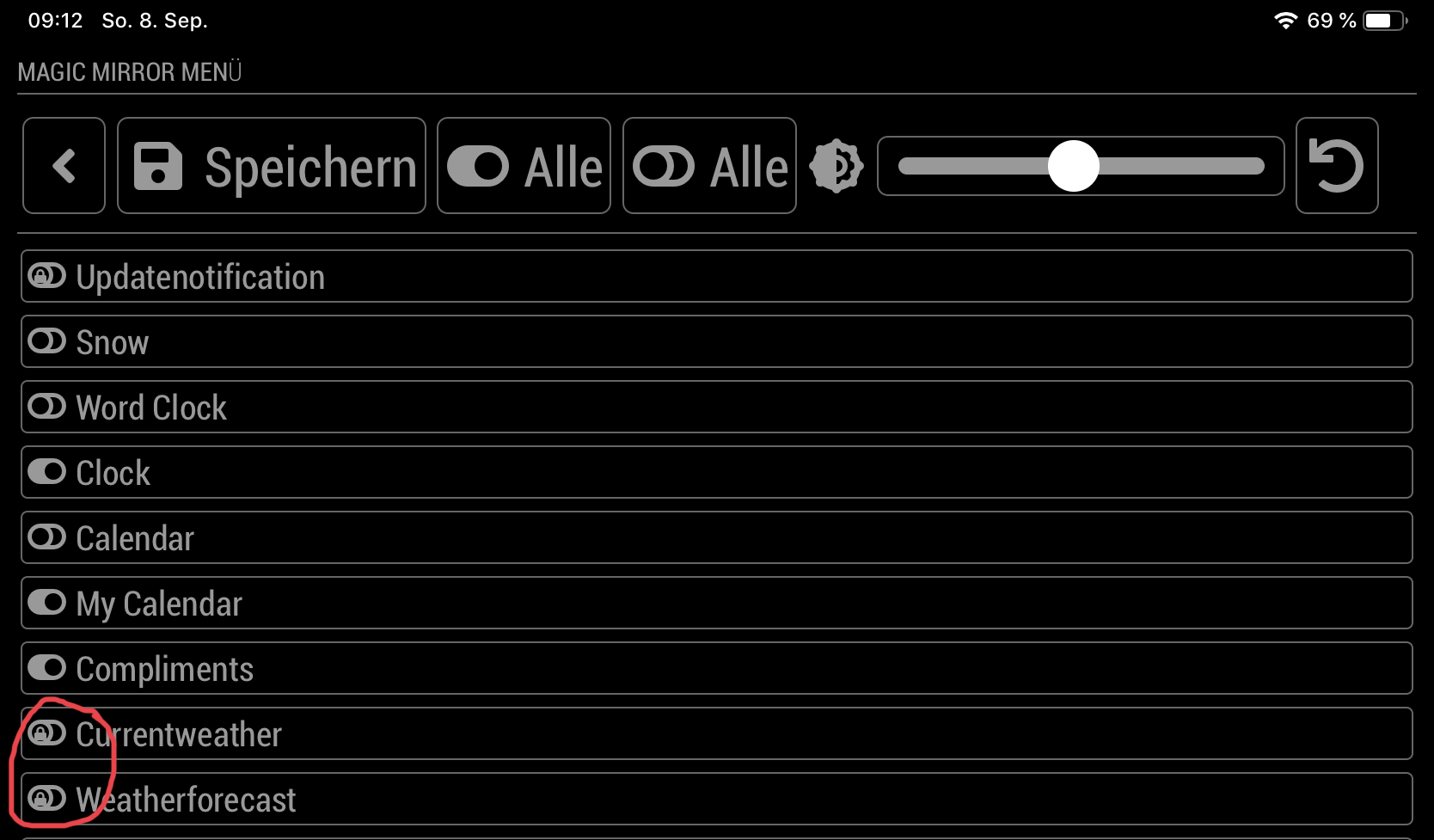
  • Weather module locked after starting MagicMirror ?

    Unsolved
    3
    1
    0 Votes
    3 Posts
    829 Views
    StoffbeuteluweS
    @sdetweil I see this on my ipad or iPhone This is the module MMM-Remote-Control
  • MMM-network-signal module ALWAYS displays message text

    Solved
    5
    0 Votes
    5 Posts
    1k Views
    S
    no worries! happy to help :D