MagicMirror Forum
    • Recent
    • Tags
    • Unsolved
    • Solved
    • MagicMirror² Repository
    • Documentation
    • 3rd-Party-Modules
    • Donate
    • Discord
    • Register
    • Login
    A New Chapter for MagicMirror: The Community Takes the Lead
    Read the statement by Michael Teeuw here.

    MMM-Gas

    Scheduled Pinned Locked Moved Transport
    56 Posts 13 Posters 44.5k Views 12 Watching
    Loading More Posts
    • Oldest to Newest
    • Newest to Oldest
    • Most Votes
    Reply
    • Reply as topic
    Log in to reply
    This topic has been deleted. Only users with topic management privileges can see it.
    • 3
      3d @cowboysdude
      last edited by

      @cowboysdude and @mochman … WOW, nice work!

      The only thing I had to fix was put the ITEMS in quotes…the proper syntax for me was:

      items: "10",
      
      M 1 Reply Last reply
      Reply Quote 1
      • M
        mochman Module Developer @3d
        last edited by mochman

        @3d Hmm, the code is supposed to use that variable as an integer. What kind of error were you getting when you had items: 10,?

        Edit: Guess it doesn’t matter. Math.min() still works using a string.

        3 1 Reply Last reply
        Reply Quote 1
        • 3
          3d @mochman
          last edited by

          @mochman It wasn’t loading the config.js. So I just stepped through line by line until if failed. Once if failed I put the 10 in quotations and it loaded.

          1 Reply Last reply
          Reply Quote 0
          • justjim1220J
            justjim1220 Module Developer
            last edited by

            Ok, so I deleted my current GAS module. and reinstalled it.

            I went to the website to check my zip code, which is good.

            I tried it with & without the quotes around the 10.

            Still not working for me… :slightly_frowning_face:

            “Life’s Too Short To Dance With Ugly People”
            Jim Hallock - 1995

            1 Reply Last reply
            Reply Quote 0
            • justjim1220J
              justjim1220 Module Developer
              last edited by

              NVM!!!

              When in doubt, Reboot it out!!!

              :smiling_face_with_sunglasses:

              “Life’s Too Short To Dance With Ugly People”
              Jim Hallock - 1995

              1 Reply Last reply
              Reply Quote 0
              • R
                rob73
                last edited by

                Is there any way to remove the Distance column? I live in a small town and dont really need the distances on the display. I hunted around the files a little bit and didnt see anything that I could maybe edit or delete that would remove it.

                Rob

                1 Reply Last reply
                Reply Quote 0
                • M
                  mochman Module Developer
                  last edited by mochman

                  @rob73 I haven’t tried this to see how it looks, but you may just be able to comment out a few of the lines in MMM-Gas.js
                  Try commenting out the last 2 lines of this code in the getDom() function.

                   var td5 = document.createElement("td");
                   td5.innerHTML = dist;
                   TDrow.appendChild(td5);
                   weatherTable.appendChild(TDrow);
                  

                  It should look like this when you’re done.

                  var td5 = document.createElement("td");
                  td5.innerHTML = dist;
                  //TDrow.appendChild(td5);
                  //weatherTable.appendChild(TDrow);
                  

                  You should also comment out this part as well.

                  var bjumpy = document.createElement("th");
                  bjumpy.setAttribute("style", "text-align:center");
                  bjumpy.classList.add("xsmall");
                  bjumpy.innerHTML = "Distance";
                  //xFCRow.appendChild(bjumpy);
                  //weatherTable.appendChild(xFCRow);
                  
                  R 1 Reply Last reply
                  Reply Quote 1
                  • R
                    rob73 @mochman
                    last edited by

                    @mochman … Awesome… I followed your instructions and it worked! Thank you! I would have never figured that out on my own…

                    Thanks again!

                    Rob

                    1 Reply Last reply
                    Reply Quote 1
                    • cowboysdudeC
                      cowboysdude Module Developer
                      last edited by cowboysdude

                      New config option to hide or show distance column.

                      example config:

                      {
                                disabled: false,
                                module: "MMM-Gas",
                                position: "top_left",
                                config: {
                                   zip: "14904",
                                   items: 10,
                                   typeGas: "",	//premium, mid-grade, diesel, or blank for regular
                                   sortBy: "price", 	//distance, price
                             distance: false //default is true, so using true just don't use distance in your config
                        		}			   
                            },
                      

                      DO a git pull in the MagicMirror/modules/MMM-Gas dir to update!

                      AND a HUGE Thanks to @mochman for all the help!!!

                      Mykle1M 1 Reply Last reply
                      Reply Quote 2
                      • Mykle1M
                        Mykle1 Project Sponsor Module Developer @cowboysdude
                        last edited by

                        @cowboysdude

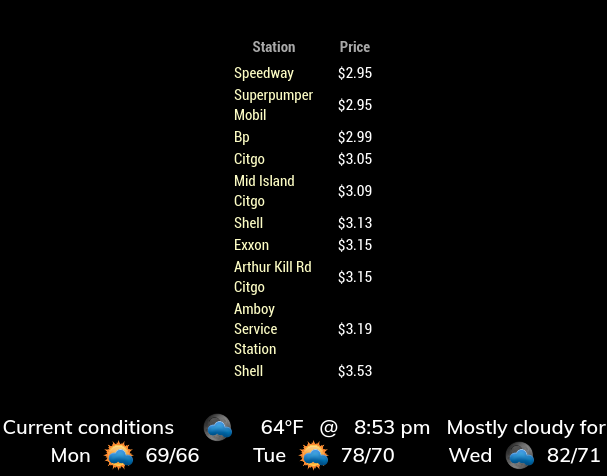
                        Thanks. I really like this module alot. Very nice options and I love the mouse overs. Fantastic work! :thumbsup:
                        0_1538787518808_gasas.png

                        Create a working config
                        How to add modules

                        1 Reply Last reply
                        Reply Quote 2
                        • R
                          rob73
                          last edited by

                          Awesome!

                          1 Reply Last reply
                          Reply Quote 0
                          • richland007R
                            richland007
                            last edited by

                            Is this still working?? It was working flawlessly for me before but i turned the MM off for like 3 months when i was doing some work around the house and when i turned it back on i do not see anything on my list of gas stations.

                            It just says updated at this time and date but nothing listed.
                            I did a git pull thinking that something might have been updated in those 3 months but nothing changed.

                            Anyone else experiencing difficulties ???

                            D

                            Mykle1M cowboysdudeC 2 Replies Last reply
                            Reply Quote 0
                            • Mykle1M
                              Mykle1 Project Sponsor Module Developer @richland007
                              last edited by Mykle1

                              @richland007 said in MMM-Gas:

                              Anyone else experiencing difficulties ???

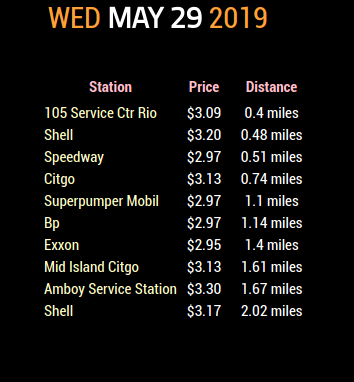
                              I just did a git pull on my current installation and everything seems to be working just fine.

                              Have you made any modifications? Are there any errors being reported in the terminal or dev console?
                              0_1559174344599_Screenshot from 2019-05-29 19-57-26.png

                              Create a working config
                              How to add modules

                              1 Reply Last reply
                              Reply Quote 0
                              • cowboysdudeC
                                cowboysdude Module Developer @richland007
                                last edited by

                                @richland007 Do a git pull as things did change and I updated it a month ago or so.

                                1 Reply Last reply
                                Reply Quote 0
                                • richland007R
                                  richland007
                                  last edited by

                                  I did a git pull and than an npm install insde the module but still no luck only updated on today’s date and time.
                                  No list of gas stations nothing just that.

                                  Do we have to change anything in the module settings on the config.js file for the update??

                                  Denis

                                  Mykle1M 1 Reply Last reply
                                  Reply Quote 0
                                  • Mykle1M
                                    Mykle1 Project Sponsor Module Developer @richland007
                                    last edited by Mykle1

                                    @richland007

                                    This should be your config entry. Have you tried another zip code? See if this one works.

                                    {
                                                disabled: false,
                                                module: "MMM-Gas",
                                                position: "top center",
                                                config: {
                                                    zip: "10306"
                                                }
                                            },
                                    

                                    Create a working config
                                    How to add modules

                                    richland007R 1 Reply Last reply
                                    Reply Quote 1
                                    • richland007R
                                      richland007 @Mykle1
                                      last edited by

                                      @Mykle1 Nothing solved it but a complete rm -rf and than a reinstall now it works fine
                                      thank you
                                      D

                                      Mykle1M 1 Reply Last reply
                                      Reply Quote 0
                                      • Mykle1M
                                        Mykle1 Project Sponsor Module Developer @richland007
                                        last edited by

                                        @richland007

                                        :thumbsup:

                                        Create a working config
                                        How to add modules

                                        1 Reply Last reply
                                        Reply Quote 0
                                        • D
                                          DDE12
                                          last edited by

                                          How do you change the size of the font in the module?

                                          S 1 Reply Last reply
                                          Reply Quote 0
                                          • S
                                            sdetweil @DDE12
                                            last edited by

                                            @DDE12 custom.css, like always

                                            look to see if it has a css file which would tell u the class names used,

                                            then use custom.css to override those settings

                                            Sam

                                            How to add modules

                                            learning how to use browser developers window for css changes

                                            D 1 Reply Last reply
                                            Reply Quote 0

                                            Hello! It looks like you're interested in this conversation, but you don't have an account yet.

                                            Getting fed up of having to scroll through the same posts each visit? When you register for an account, you'll always come back to exactly where you were before, and choose to be notified of new replies (either via email, or push notification). You'll also be able to save bookmarks and upvote posts to show your appreciation to other community members.

                                            With your input, this post could be even better 💗

                                            Register Login

                                            • 1
                                            • 2
                                            • 3
                                            • 2 / 3
                                            • First post
                                              Last post
                                            Enjoying MagicMirror? Please consider a donation!
                                            MagicMirror created by Michael Teeuw.
                                            Forum managed by Sam, technical setup by Karsten.
                                            This forum is using NodeBB as its core | Contributors
                                            Contact | Privacy Policy