Just updated MM (wew what a battle to update node on pi4…)
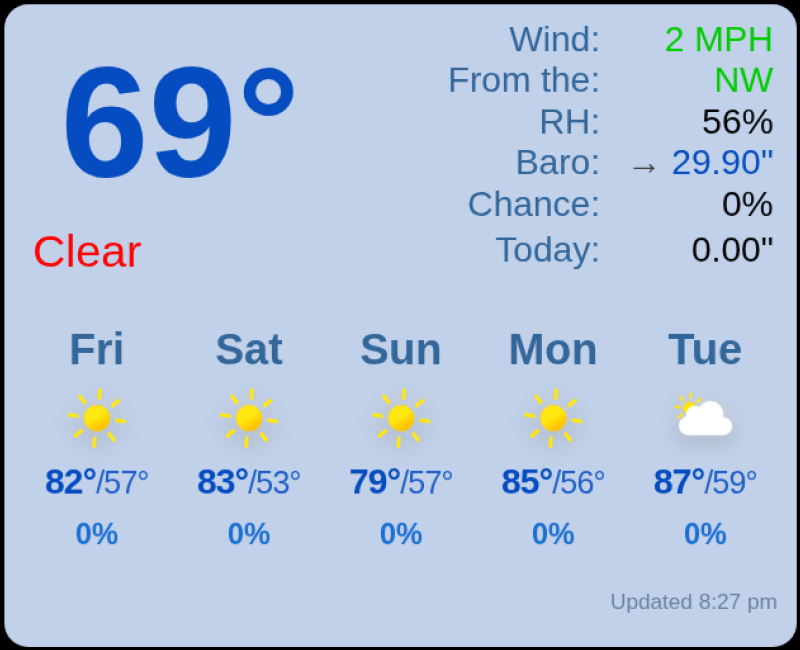
I have the weather module called 3 times, one for current weather, and 2 for weekly forecast for 2 locations.
Both of the weekly forecasts that use “weathergov” are still loading fine, but the section that uses “openweathermap” and type “current” no longer loads properly after the update.
The module title is “undefined” and the rest is like “Invalid date” and “NaN” for the temperature.
Have I missed something?
Re: MMM-CountEvents (2.0.0 - Revamped)
I have been working on integrating this module in order to show a daily countdown for when my kids need to leave the house. It should show the module only between 730am to 8am on weekdays, with 745 being the targetTime.
I initially was trying to set up a function to dynamically change the targetTime to support weekdays only, but I couldn’t get it to update the value for the module except when it was loaded. I seemed to be able to get around that by scheduling a browser refresh every morning using MMM-ModuleScheduler along with MMM-Remote-Control.
The challenge I am having is that the module doesn’t seem to be clearly responding dynamically to the ignoreBefore and ignoreAfter config parameters. I have them set to “15601000”. When 730 rolls around nothing happens. Then I refreshed after a couple minutes and the count events module showed up. Around 16 minutes after 8am the event was still showing, but when I refreshed the browser it went away.
I have the refresh time set to 1000 and show showSeconds is true.
Is this expected behavior? I had anticipated that the event would appear at 730 and disappear at 8 automatically without having to refresh. Am I configuring it wrong somehow (probably). Thank you!
Recently updated MagicMirror and noticed the News Feed Title and Publish date are now running together – there is a space missing after the comma after the Title, so it looks like this:
New York Times,2 hours ago:
when it should look like this (space after the comma):
New York Times, 2 hours ago:
I haven’t noticed this in the older version I was running; Was showPublishDate used to be handled differently (via CSS and/or a div/span) instead of being inline with the showSourceTitle?
Can anyone help with getting the missing space back into this News Feed module output?
How do i use more of the bottom bar ?
Currently i have
moon LARGE SPACE calendar LARGE SPACE current weather (Stacked on) weather forecast
I want to use that space to the right of calendar so i can arrange the screen better. I do not want to stack.
let config = {
address: "0.0.0.0",
port: 8080,
basePath: "/",
ipWhitelist: [],
useHttps: false,
httpsPrivateKey: "",
httpsCertificate: "",
language: "en",
locale: "en-US",
timeFormat: 12,
units: "imperial",
modules: [
// Clock
{
module: "clock",
position: "top_right",
config: {
timeFormat: 12,
timezone: "America/New_York",
displayType: "digital",
displaySeconds: false,
showWeek: false,
showSunTimes: true,
showMoonTimes: true,
lat: ,
lon:
}
},
// Ecobee indoor conditions
{
module: "MMM-Ecobee",
position: "top_left",
header: "Indoor Conditions",
config: {
updateInterval: 300000,
showIndoorHumidity: true,
showOutdoorWeather: false
}
},
// Dynamic Weather (OpenWeather visual background)
{
module: "MMM-DynamicWeather",
position: "fullscreen_above",
config: {
api_key: "", // required
lat: ,
lon: ,
units: "imperial",
weatherInterval: 600000,
updateInterval: 600000,
animationSpeed: 2000,
effectDuration: 60000,
effectDelay: 30000,
fadeDuration: 3000,
realisticClouds: true,
sequential: "weather"
// sunImage: "sun_center"
}
},
// Calendar
{
module: "calendar",
position: "bottom_center",
header: "Holidays",
config: {
maximumNumberOfDays: 90,
wrapEvents: false,
fade: false,
maximumEntries: 5,
calendars: [
{
symbol: "calendar",
url: "https://calendar.google.com/calendar/ical/en.usa%23holiday%40group.v.calendar.google.com/public/basic.ics"
}
]
}
},
// Moon Phase
{
module: "MMM-MoonPhase",
position: "bottom_left",
config: {
hemisphere: "N",
resolution: "detailed",
updateInterval: 12 * 60 * 60 * 1000
}
},
// Current outdoor conditions (WeatherFlow)
{
module: "weather",
position: "bottom_right",
header: "Outdoor Conditions -",
config: {
weatherProvider: "weatherflow",
apiBase: "",
token: "",
stationid: "",
type: "current",
units: "imperial",
tempUnits: "imperial",
windUnits: "mph",
degreeLabel: true,
showPrecipitationProbability: true,
showUVIndex: true,
showWindDirection: true,
showWindDirectionAsArrow: true,
showHumidity: true,
showSun: false,
showLightning: true,
showFeelsLike: true,
showCloudCover: true,
showPrecipitationAmount: true,
updateInterval: 10 * 60 * 1000
}
},
// Forecast (WeatherFlow)
{
module: "weather",
position: "bottom_right",
config: {
weatherProvider: "weatherflow",
apiBase: "",
token: "",
stationid: "",
type: "forecast",
units: "imperial",
tableClass: "medium",
colored: true,
fade: false
}
}
]
};
if (typeof module !== "undefined") {
module.exports = config;
}
start little ‘advertising’ … (this is what you get when you ask AI to promote your project…)
Stop juggling terminals and fighting file permissions. With MMM-DevContainer you can develop MagicMirror in VS Code using either Docker Compose or Dev Containers — your choice.
Why it’s better:
One workspace for everything: modules, config and css all in one place. No more multiple windows or scattered folders.
Works with Docker Compose and/or VS Code Dev Containers: pick the workflow that fits your setup.
No file-rights hassle: edit and save directly from VS Code without sudo/chmod pain (unlike editing inside a running MM Docker container - if you’ve ever tried that).
Reproducible, clean environment: consistent installs, easy onboarding, and less “it works on my machine.”
Great DX: built-in terminals, IntelliSense, debugging, and Git — all inside the container.
npm install runs automatically on first start, so you can get coding faster.
Get started: https://github.com/HeikoGr/MMM-DevContainer
Quick start
Clone the repo:
git clone --depth=1 https://github.com/HeikoGr/MMM-DevContainer.git
cd MMM-DevContainer
Add your module:
Create your module inside modules/YourModule (or add it as a Git submodule).
Keep MagicMirror core, your modules, and config together in this single workspace.
Choose your workflow from below:
Option A — Docker Compose
docker compose up --build
Open the app in your browser (e.g., http://localhost:8080)
Stop when done: docker compose down
Option B — VS Code Dev Container
Install VS Code + the “Dev Containers” extension.
Open the MMM-DevContainer folder in VS Code.
Reopen in Container when prompted (or use Command Palette: “Dev Containers: Reopen in Container”).
Notes:
At the moment it’s only testet on linux (or windows with ssh on linux…)
Dependencies: npm install runs automatically on first start (via the devcontainer/compose setup). If your module needs extra dependencies, you can still run npm install inside the container terminal.
All source folders are mounted into the container; edits happen from VS Code without permission issues.
Suggestions and feedback welcome!
Have ideas to improve the setup? Issues and PRs are very welcome.
Tell me what works well for you and what could be smoother.
Hi,
I#m not very used with programming so i can’t solve the problem in my config.js
{
module: "MMM-Hoymiles-Wifi",
position: "top_left",
config: {
width: "300px",
height: "320px",
updateInterval: 60000, // in milli seconds
frames : [
{ src: 'http://192.168.178.150:5000'},
]
},
},
};
/*************** DO NOT EDIT THE LINE BELOW ***************/
if (typeof module !== "undefined") { module.exports = config; }
I always get errors like this;
npm run config:check
magicmirror@2.33.0 config:check
node js/check_config.js
[2025-11-01 15:16:44.895] [INFO] Checking config file /home/florian/MagicMirror/config/config.js …
[2025-11-01 15:16:44.994] [ERROR] Your configuration file contains syntax errors :(
Line 232 column 1: Parsing error: Unexpected token }
Thanks a lot if everybody could help me.
Kinds regards
Florian
Re : MMM-MultimonthHello everyone
I just discovered the MMM-Multimonth module.
Great module!
I do have a question, though:
If I select a single month (monthCount: 1), how can I reduce its size since it takes up the entire width of the screen?
And more generally, regardless of the number of months, how can I reduce the size of the months so that they don’t all fill the screen, and have space between each month?
Thanks in advance.
Hey again folks
So I set the dimming to 1.0 ( even tried a higher number ) but thr screen is still pretty bright in the hallway. The dimming function works in general but like said, its not completely black like mentioned in the doc.
I also reduced brightness of my screen just to double check, but that wasnt it.
Any ideas or is it just not possible to darken the screen to the “off” level?
I installed MMM-Jast v2.9.5 on a fresh Install of MagicMirror2 on my Raspberry Pi 5.
All I was getting was the word “Loading”. The problem was fixed when I downgraded yahoo-finance2 from 2.14.0 to 2.11.3 as in the Jast package.json.
cd ~/MagicMirror/modules/MMM-Jast
rm -rf node_modules package-lock.json
npm install yahoo-finance2@2.11.3 --save-exact
Hi,
I loaded up the MMM-AirQuality module, and it’s now working fine.
I get the general Air Quality index.
If you hit the aqucn.org site, it will also show PM2.5, CO2, R.H (Relative Humidity), Press (Barometric Pressure) and Temp.
Is it possible for the module to also display at lease the PM2.5 and CO2?
Thanks.
Michael
I took the plunge. My five year old MagicMirror ground to a halt as far as Display resolution, Rotation and DIsplay control are concerned. Everything was working great on my Raspberry Pi 3B+. An unfortunate rpi-update broke everything. I struggled to restore Bullseye, and it was a shock to realise it is not easy to find the right official image.
I then tried Bookworm, the three issues continued to remain unsolved.
I then decided to install Trixie. Most of the transition of MM was smooth, ofcourse with a few hicks, but getting the display resolution and rotation was the most frustrating part.
I got it working finally. I have restored the Display resolution and the rotation succesfully.
I will shortly upload the entire process which was not only exhausting but of great learning value.
I need to recover the GPIO Notification Module which isnt working and resulting Motion control of monitor using RCWL0516.
I researched about the best Bathroom Mirrors with built-in lighting for the past few days because I’m planning to upgrade my bathroom setup and want something that’s modern, durable, and possibly compatible with smart or DIY lighting features. I read reviews on The New York Times (Wirecutter), The Spruce, and Popular Mechanics, and they’re marking these two as some of the best options:
USHOWER 2-Pack Black Bathroom Mirrors
[https://www.amazon.com/USHOWER-Mirror-Bathroom-Rectangle-Mounted/dp/B0B3XPZX8B]
LOAAO 40X32 LED Bathroom Mirror with Lights
https://www.amazon.com/LOAAO-Bathroom-Anti-Fog-Dimmable-Waterproof/dp/B09TP75Y82
However, I’m having trouble deciding which one would best suit my needs and would appreciate some expert advice. I’d prefer something that’s bright, anti-fog, and easy to integrate with a smart switch or LED controller if possible.
Has anyone here tried building or modifying one of these mirrors for smart home integration or MagicMirror setups?
Would love to hear your experiences, wiring tips, or hardware suggestions before I decide.
Thanks in advance!
Running MM V2.33.0 on Docker. I installed MMM-ISS-Live but it only shows this error message: “Error 153
Video player configuration error”
I have done some research and found that I need to add " referrerpolicy=“strict-origin-when-cross-origin” " to the IFrame. I looked at the MMM-ISS-Live.js file, found a section dealing with IFrame and inserted the policy statement following the format of the other Iframe statements. That change alone did not fix the problem, same error message after restarting MM.
I noticed several references to electron and now I’m wondering if this module will even run under Docker.
Any suggestions/thoughts greatly appreciated.
RonR
To resolve major issues with Display and rotation and also screen On Off control I am forced to flash the older Bullseye version. I searched high and low, but the " Official Bullseye OS 32 Bit for Raspberry Pi 3B" is almost impossible to find. It has been removed from the Raspberry Pi website, even the archives do not seem to have the correct file. Some shady mirror site do list it but i am aprehensive. I dont know what i am missing. Any help in locating the verified OS from a reliable source.
Thanks
Just changed from MMM-RTSPStream to MMM-Mplayer because of issues. That solved the issue with the processor being continuously maxed out. However, video from my ip cam is still delayed and stutters losing a lot of frames. I can play it outside of MagicMirror on another computer using the cameras web interface or with VLC using the same url as MM and both show in real time. Tried a bunch of settings, no luck.
Curious for those that have this working properly, real time, what kind of camera are you using. What is your connection type. . . rtsp, http, resolutions, etc …
A New Chapter for MagicMirror: The Community Takes the Lead
Read the statement by Michael Teeuw here.
Categories
-
Announcements
Announcements regarding the MagicMirror software and forum.
-
Core System
Discuss the MagicMirror² core framework.
-
-
-
-
-
-