A New Chapter for MagicMirror: The Community Takes the Lead
Read the statement by Michael Teeuw here.
  • MMM-NHL displays 'Loading'

    Unsolved
    3
    0 Votes
    3 Posts
    581 Views
    strawberry 3.141S
    @Cliff365 I released a new version, please update the module again.
  • Unable to run MMM-pihole-stats

    Solved
    4
    0 Votes
    4 Posts
    750 Views
    S
    @BatterseaBridge said in Unable to run MMM-pihole-stats: Why was that ‘different lib for node-fetch’ well a couple of things the author used the mm copy without knowing we stopped providing it in this release, as we moved over to the built in fetch (aka supported) in node 18 and up without a number, you get the latest, but we aren’t an es6 library based runtime. (import vs require) most developers here are not professionals so we ( I didn’t 5 yrs ago) didn’t understand all this dependency stuff
  • Think I messed up one of my moduless

    Solved
    3
    0 Votes
    3 Posts
    639 Views
    B
    @sdetweil said in Think I messed up one of my moduless: git checkout package-lock.json Solved! Thank you so much. I hope you have a great Holiday break!
  • MMM-GooglePhotos does not display all photos

    Unsolved
    6
    0 Votes
    6 Posts
    616 Views
    R
    @sdetweil I have been trying to dig out some hints from the logs, but I’m not seeing any error messages. Here’s what’s in the logs: 0|MagicMir | [21.12.2023 13:14.05.391] [LOG] [GPHOTOS] [node_helper] Image loaded: 50 + 3 AIYQHLPTFIXlceHy6i07TEu1BJPJ0fBZ6qaGUhfyQ3hXDd99MfZ2vcIewb6ewe8RhI-JMW4e6-F6k8W4cDrk_snFwxM0YXMXBA 0|MagicMir | [21.12.2023 13:15.05.344] [LOG] [GPHOTOS] [node_helper] Image loaded: 50 + 4 AIYQHLNbObH7UIznnrX-PVuqX-oDZD1OgqGSAoVjnI1j72GKL1isBZCMRjKJfa5zjecIQXFMCQgg9L8dt98SygI45xz5EtTB3Q 0|MagicMir | [21.12.2023 13:16.05.777] [LOG] [GPHOTOS] [node_helper] Start Album scanning 0|MagicMir | [21.12.2023 13:16.05.781] [LOG] [GPHOTOS] [node_helper] Prepare to get photo list from ‘Big 24 inch photoframe’ 0|MagicMir | [21.12.2023 13:16.05.785] [LOG] [GPHOTOS:AUTH] Token is alive. 0|MagicMir | [21.12.2023 13:16.05.789] [LOG] [GPHOTOS:CORE] Indexing photos now. total: 0 0|MagicMir | [21.12.2023 13:16.06.328] [LOG] [GPHOTOS] [node_helper] Image loaded: 50 + 5 AIYQHLM1xI3NPHpR-5wRp8bURv2pS9dCkNgwhEoUNnacXR5J6pmYNiV30c8KHmyppAWWpfnvKkZgJj3garnogyq-bhDNgvoweg 0|MagicMir | [21.12.2023 13:16.07.807] [LOG] [GPHOTOS:CORE] Indexing photos now. total: 50 0|MagicMir | [21.12.2023 13:16.09.711] [LOG] [GPHOTOS:CORE] Indexing photos now. total: 100 0|MagicMir | [21.12.2023 13:16.11.643] [LOG] [GPHOTOS:CORE] Indexing photos now. total: 150 0|MagicMir | [21.12.2023 13:16.13.458] [LOG] [GPHOTOS:CORE] Indexing photos now. total: 200 0|MagicMir | [21.12.2023 13:16.15.311] [LOG] [GPHOTOS:CORE] Indexing photos now. total: 250 0|MagicMir | [21.12.2023 13:16.16.616] [LOG] [GPHOTOS] [node_helper] Got 289 photo(s) from ‘Big 24 inch photoframe’ 0|MagicMir | [21.12.2023 13:16.16.689] [LOG] [GPHOTOS] [node_helper] Total indexed photos: 289 0|MagicMir | [21.12.2023 13:16.16.689] [LOG] [GPHOTOS] [node_helper] num to ref: 50 , DesChunk: 50 , totalLength: 289 , Pntr: 0 0|MagicMir | [21.12.2023 13:16.16.706] [LOG] [GPHOTOS:AUTH] Token is alive. 0|MagicMir | [21.12.2023 13:16.16.706] [LOG] [GPHOTOS:CORE] received: 50 to refresh 0|MagicMir | [21.12.2023 13:16.16.716] [LOG] [GPHOTOS] [node_helper] Photo list cache saved 0|MagicMir | [21.12.2023 13:16.17.914] [LOG] [GPHOTOS] [node_helper] refreshed: 50 , totalLength: 289 , Pntr: 50 0|MagicMir | [21.12.2023 13:16.17.915] [LOG] [GPHOTOS] [node_helper] just sent 50 more pics 0|MagicMir | [21.12.2023 13:17.05.340] [LOG] [GPHOTOS] [node_helper] Image loaded: 0 + 1 AIYQHLOLdy89lagXSQrdX1dGgo9YyR3nMSqVOFkgr1Te2AxWVBY0JsMJ_6mKsNhTuU5InTotF_U1R5b4iOpL0Dap2ShmxhJ9aA 0|MagicMir | [21.12.2023 13:18.05.401] [LOG] [GPHOTOS] [node_helper] Image loaded: 0 + 2 AIYQHLNu5PDUUAcLidvQEWXkNXN1g4pCE5i9mERxGvdhKdBdPnOKaAo2bp4FgNn27ZQntTXCtw2eSAl6xnWBSSBg1qNfw2uFSQ 0|MagicMir | [21.12.2023 13:19.05.332] [LOG] [GPHOTOS] [node_helper] Image loaded: 0 + 3 AIYQHLPJQNm95HPif_f-P5pZemNGJZA6ZbOZITWswfi5ISxKsexK3dsnn78W1KwzDaGnG4I5nY0FK7fhMLwx_uyy_AfS4FwD6Q It runs fine for about one hour (55 images displayed), then reindexes and starts over with the first image. (0+1). At this point I’m going to attempt to step through the code and see if I can find out what’s happening.
  • 0 Votes
    10 Posts
    2k Views
    S
    @ZiggidyZ I saw, thank you!!
  • MMM-GooglePhotos stuck on "Loading..."

    Unsolved
    4
    0 Votes
    4 Posts
    711 Views
    M
    @TipsyNurse What backend log says? Scanning doesn’t happen?
  • Multiple instances of ImagesPhotos module

    Solved
    20
    0 Votes
    20 Posts
    14k Views
    N
    @sdetweil This is amazing! Thank you for all of your hard work. Works perfectly
  • Incorrect Clock module time after update to latest MM

    Solved
    7
    0 Votes
    7 Posts
    2k Views
    bheplerB
    @nschertz No worries. Little errors like that happen to all of us.
  • Weather sunset time shows UTC instead of local time zone

    Unsolved
    1
    1
    0 Votes
    1 Posts
    257 Views
    C
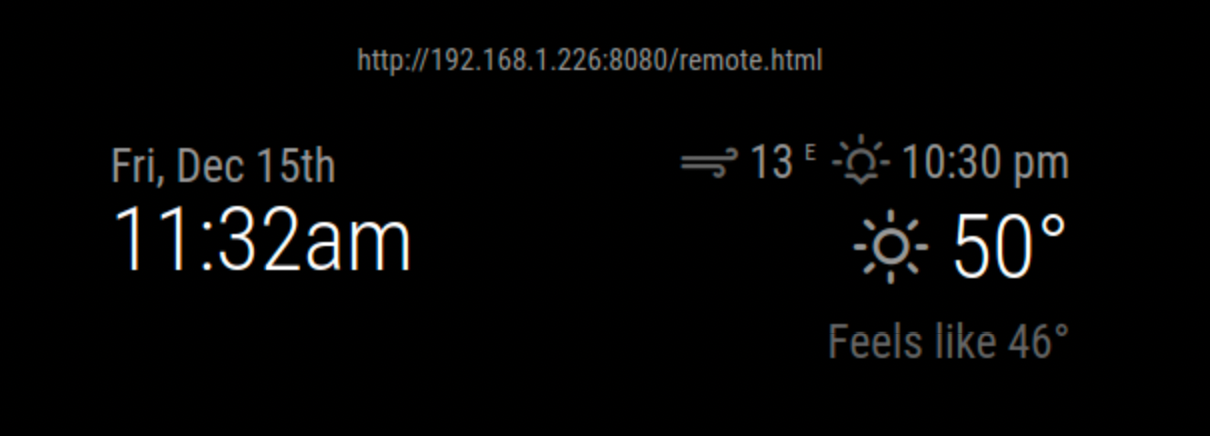
    After the recent update I noticed that the wether module (using Wether Underground server) shows the sunset time in UTC. I am in Atlanta which is 5 hours behind GMT and sunset today is 5:30pm Local time or 10:30pm GMT. The wether module is displaying 10:30. This appears to have just started happening with the latest MM update. My config.JS has the following: { module: 'weather', position: 'top_right', disabled: false, config: { location: 'Atlanta, US', lat: 33.749, lon: -84.388, roundTemp: true, apiKey: '6d6d.........xxxxxx..........8be4b7f' } }, I added the Lat/Lon information while trying to debug but it made no difference. I do not see anywhere to add timezone information. My clock module is showing the current timezone and using “date” in a terminal shows that the system clock is working as expected and us using my local timezone (EST). [image: 1702657986393-screenshot-2023-12-15-at-11.32.47-am.png]
  • MMM-GroveGestures / Python script is terminated

    Solved
    25
    0 Votes
    25 Posts
    8k Views
    E
    Can someone help me? Many thanks
  • Need help building two modules that communicate with each other

    Solved
    9
    0 Votes
    9 Posts
    1k Views
    S
    @DarkwingBuilds both showing (checked needs to be looked at) [image: 1702487314682-screenshot-at-2023-12-13-11-07-43-resized.png]
  • Calendar default

    Unsolved
    4
    0 Votes
    4 Posts
    695 Views
    S
    @chris47803 ok, can you do two things look at the messages where mm starts, npm start if you use pm2, then pm2 logs --lines=50 download the ics data and look at the events curl -sL calendar_url >somefile.txt edit somefile.txt and look for event that should be in the future BEGIN:VEVENT . DTSTART:… . END:VEVENT
  • Monitor not responding to MMM-Remote-Control or MMM-AlexaControl

    Unsolved
    3
    0 Votes
    3 Posts
    593 Views
    G
    @sdetweil sorry for the late reply. for lsb_release -a: No LSB modules are available Release 11 for uname -a Linux raspberrypi 6.1.21-v7+ #1642 Not sure if the other info given was relevant. Got a codename with the lsb and a date with the uname
  • MMM-CalendarExt3Agenda questions.

    Unsolved
    9
    0 Votes
    9 Posts
    2k Views
    K
    @MMRIZE thanks for the info. I don’t even know how modules get updated or how I know when a module needs to be updated. Do I need to subscribe to the GitHub page or can I turn on auto updates or anything like that?
  • Module isn't staying in its position area

    Solved
    3
    0 Votes
    3 Posts
    524 Views
    K
    @BKeyport Thanks. I’m using the “mywordoftheday” module. I put in a max-width 400px and it seemed to do the trick. Thanks.
  • MMM_CalendarWeek - First few events listed are from years ago

    Unsolved
    4
    1
    0 Votes
    4 Posts
    740 Views
    K
    Oh, I found a note on the page about removing the Position flag so I’ll try that. I’ll start a new thread for my questions about the Ext3Agenda module. Thanks.
  • MMM-CalendarExt2 initial setup

    Unsolved
    4
    0 Votes
    4 Posts
    790 Views
    BKeyportB
    @csongor-varga-0 Course, my answer would be to delete CX2 and go with CX3.
  • MMM-CalendarExt3 Formatting questions follow-up

    Solved
    8
    0 Votes
    8 Posts
    1k Views
    M
    @UncleRoger You can use this; .CX3 .event.fullday.multiday .headline .time { display:none; } (I’ll add this to the next update to be the default.)
  • MMM-Remote-Control

    Solved
    9
    0 Votes
    9 Posts
    2k Views
    J
    @Dennis-010 Thanks for figuring all of this out. I also reverted back to the X11 window driver. For completeness, just add --rotate right to the command: customCommand: { // Optional, See "Using Custom Commands" below monitorOnCommand: 'xrandr -d :0 --output HDMI-1 --auto --rotate right', monitorOffCommand: 'xrandr -d :0 --output HDMI-1 --off' },
  • MMM-ImagesPhotos Help Resizing photos

    Solved
    6
    0 Votes
    6 Posts
    1k Views
    S
    @bebetter14 awesome the error you saw was unexpected token whatever that is the first clue to look for a missing comma on the line before