Hi,
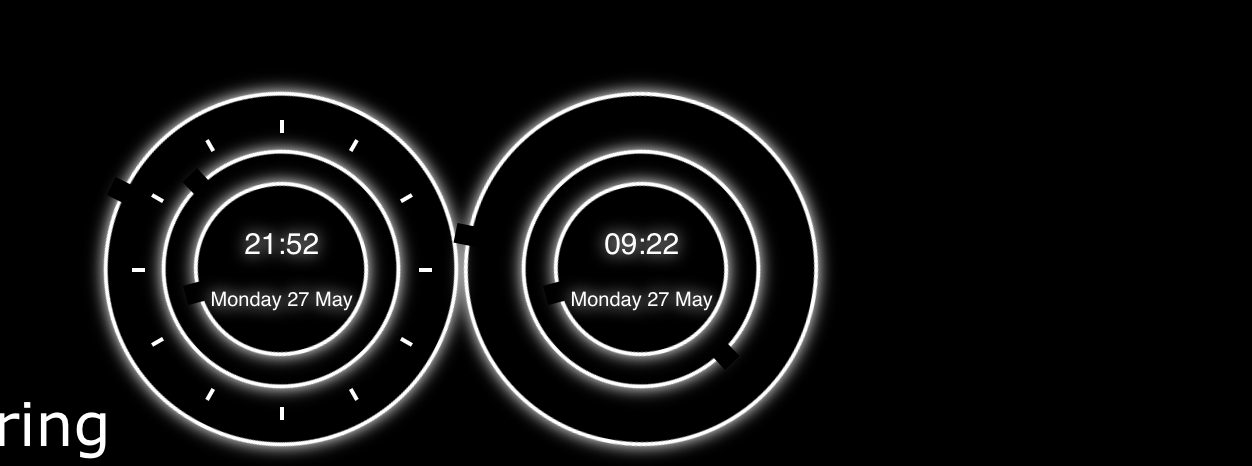
I’m using the MMM-iClock module to display clock. Initially this was working fine, but here as per my requirement, I am trying to display 2 clocks side by side in top_right section. Here I’ve 2 questions.
Here the functionality is working fine, but the UI(of the 2nd clock) seems messed up(the number bars doesn’t show up).
As soon as the mirror starts, the clocks goes to the right corner and then automatically comes to place.
Here is my code.
var iClock;
Module.register("MMM-iClock", {
defaults: {
seconds: true,
size: "350px",
color: "#FFFFFF",
digital: 2, // 0 (no display), 1 (permanent display) or 2 (show for 5 seconds on every miniute)
analogue: true, // false (no display), true (permanent display)
glow: true, // false (no display), true (permanent display)
},
getStyles: function () {
return ["MMM-iClock.css"];
},
days: ["Sunday", "Monday", "Tuesday", "Wednesday", "Thursday", "Friday", "Saturday"],
months: ["January", "February", "March", "April", "May", "June", "July",
"August", "September", "October", "November", "December"],
start: function () {
iClock = this;
Log.info("Starting module: " + iClock.name);
var style = document.querySelector('html');
style.style.setProperty('--fore', iClock.config.color);
style.style.setProperty('--size', iClock.config.size);
if (!iClock.config.glow)
style.style.setProperty('--glow', "none");
setTimeout(iClock.updateClock, 1000)
},
getDom: function () {
var wrapper = document.createElement("div");
wrapper.className = "iClock";
if (iClock.config.analogue === true) {
var x = document.createElement("div");
x.className = "x";
var y = document.createElement("div");
y.className = "y";
var z = document.createElement("div");
z.className = "z";
overlay = document.createElement("div");
overlay.className = "overlay";
var hour = document.createElement("div");
hour.className = "hour";
hour.id = "sHour";
overlay.appendChild(hour);
var minute = document.createElement("div");
minute.className = "minute";
minute.id = "sMinute";
overlay.appendChild(minute);
if (iClock.config.seconds === true) {
var second = document.createElement("div");
second.className = "second";
second.id = "sSecond";
overlay.appendChild(second);
}
//SFO
sfoTimeoverlay = document.createElement("div");
sfoTimeoverlay.className = "sfoTimeoverlay";
var sfoTimehour = document.createElement("div");
sfoTimehour.className = "hour";
sfoTimehour.id = "sfoTimesHour";
sfoTimeoverlay.appendChild(sfoTimehour);
var sfoTimeminute = document.createElement("div");
sfoTimeminute.className = "minute";
sfoTimeminute.id = "sfoTimesMinute";
sfoTimeoverlay.appendChild(sfoTimeminute);
if (iClock.config.seconds === true) {
var sfoTimesecond = document.createElement("div");
sfoTimesecond.className = "second";
sfoTimesecond.id = "sfoTimesSecond";
sfoTimeoverlay.appendChild(sfoTimesecond);
}
z.appendChild(overlay);
z.appendChild(sfoTimeoverlay);
y.appendChild(z);
x.appendChild(y);
wrapper.append(x);
}
if (iClock.config.digital !== 0) {
var time = document.createElement("div");
time.className = "time";
time.id = "sTime";
if (iClock.config.digital === 2)
time.style.opacity = 0;
if (iClock.config.analogue === true)
overlay.appendChild(time);
else wrapper.appendChild(time);
}
if (iClock.config.digital !== 0) {
console.log('##########' + iClock.config.digital);
var sfoTimetime = document.createElement("div");
sfoTimetime.className = "time";
sfoTimetime.id = "sfoTimesTime";
if (iClock.config.digital === 2)
sfoTimetime.style.opacity = 0;
if (iClock.config.analogue === true)
sfoTimeoverlay.appendChild(sfoTimetime);
else
wrapper.appendChild(sfoTimetime);
}
return wrapper;
},
updateClock: function () {
var wait = 60;
now = new Date();
console.log(now);
wait -= now.getSeconds();
var sec = now.getSeconds() + (60 * now.getMinutes()) + (60 * 60 * now.getHours());
if (iClock.config.seconds === true) {
wait = 1;
sec += 1
}
s = (360 / 60) * sec;
m = s / 60;
h = m / 12
sHour = hour = now.getHours();
sMinute = minute = now.getMinutes();
if (sHour < 10) sHour = "0" + sHour;
if (sMinute < 10) sMinute = "0" + sMinute;
var sDate = document.createElement("div");
sDate.className = "date";
sDate.innerHTML = iClock.days[now.getDay()] + " " + now.getDate() + " " + iClock.months[now.getMonth()];
document.getElementById('sTime').innerHTML = sHour + ":" + sMinute;
document.getElementById('sTime').appendChild(sDate);
if (iClock.config.digital == 2) {
if ((iClock.config.seconds === true && (sec + 2) % 60 == 0) || iClock.config.seconds === false)
document.getElementById('sTime').style.opacity = 1;
setTimeout(function () {
document.getElementById('sTime').style.opacity = 0;
}, 5000);
}
if (iClock.config.analogue === true) {
if (iClock.config.seconds === true)
document.getElementById('sSecond').style.transform = "translate(-50%, -50%) rotate(" + s + "deg)";
document.getElementById('sMinute').style.transform = "translate(-50%, -50%) rotate(" + m + "deg)";
document.getElementById('sHour').style.transform = "translate(-50%, -50%) rotate(" + h + "deg)";
}
var estTime = new Date();
estTime.setHours(now.getHours() - 12);
estTime.setMinutes(now.getMinutes() - 30);
console.log(estTime);
sfoTime = estTime;
wait = 60;
wait -= sfoTime.getSeconds();
var sfoTimesec = sfoTime.getSeconds() + (60 * sfoTime.getMinutes()) + (60 * 60 * sfoTime.getHours());
if (iClock.config.seconds === true) {
wait = 1;
sfoTimesec += 1
}
sfoTimes = (360 / 60) * sfoTimesec;
sfoTimem = sfoTimes / 60;
sfoTimeh = sfoTimem / 12
sfoTimesHour = sfoTimehour = sfoTime.getHours();
sfoTimesMinute = sfoTimeminute = sfoTime.getMinutes();
if (sfoTimesHour < 10) sfoTimesHour = "0" + sfoTimesHour;
if (sfoTimesMinute < 10) sfoTimesMinute = "0" + sfoTimesMinute;
var sfoTimesDate = document.createElement("div");
sfoTimesDate.className = "date";
sfoTimesDate.innerHTML = iClock.days[sfoTime.getDay()] + " " + sfoTime.getDate() + " " + iClock.months[sfoTime.getMonth()];
console.log(document.getElementById('sfoTimesTime'));
document.getElementById('sfoTimesTime').innerHTML = sfoTimesHour + ":" + sfoTimesMinute;
document.getElementById('sfoTimesTime').appendChild(sfoTimesDate);
if (iClock.config.digital == 2) {
if ((iClock.config.seconds === true && (sfoTimesec + 2) % 60 == 0) || iClock.config.seconds === false)
document.getElementById('sfoTimesTime').style.opacity = 1;
setTimeout(function () {
document.getElementById('sfoTimesTime').style.opacity = 0;
}, 5000);
}
if (iClock.config.analogue === true) {
if (iClock.config.seconds === true)
document.getElementById('sfoTimesSecond').style.transform = "translate(-50%, -50%) rotate(" + sfoTimes + "deg)";
document.getElementById('sfoTimesMinute').style.transform = "translate(-50%, -50%) rotate(" + sfoTimem + "deg)";
document.getElementById('sfoTimesHour').style.transform = "translate(-50%, -50%) rotate(" + sfoTimeh + "deg)";
}
setTimeout(iClock.updateClock, wait * 1000);
}
});
and here is the CSS.
:root {
--back: #000;
--fore: #00D6FF;
--size: 350px;
--glow: 0 0 8px var(--fore);
}
.iClock {
position: relative;
display: block;
width: var(--size);
height: var(--size);
border-radius: 350px;
}
.iClock .x:after, .iClock .x:before, .iClock .x .y:after, .iClock .x .y:before, .iClock .x .y .z:after, .iClock .x .y .z:before {
content: "";
position: absolute;
top: 50%;
left: 50%;
transform: translate(-50%, -50%);
width: 2px;
height: 100%;
background: var(--fore);
}
.iClock:after {
transform: translate(-50%, -50%) rotate(90deg);
z-index: 1;
}
.iClock .x:before {
transform: translate(-50%, -50%) rotate(30deg);
}
.iClock .x:after {
transform: translate(-50%, -50%) rotate(60deg);
}
.iClock .x .y:before {
transform: translate(-50%, -50%) rotate(120deg);
}
.iClock .x .y:after {
transform: translate(-50%, -50%) rotate(150deg);
}
.iClock .x .y .z:before {
transform: translate(-50%, -50%) rotate(0deg);
}
.iClock .x .y .z:after {
transform: translate(-50%, -50%) rotate(90deg);
}
.overlay {
float: left;
}
.sfoTimeoverlay {
float: right;
margin-left: 120%
}
.iClock .x .y .overlay, .iClock .x .y .sfoTimeoverlay {
position: absolute;
width: 91%;
height: 91%;
top: 50%;
left: 50%;
transform: translate(-50%, -50%);
background: var(--back);
border-radius: 300px;
z-index: 2;
}
.iClock .x .y .overlay .hour, .iClock .x .y .overlay .minute, .iClock .x .y .overlay .second,
.iClock .x .y .sfoTimeoverlay .hour, .iClock .x .y .sfoTimeoverlay .minute, .iClock .x .y .sfoTimeoverlay .second {
position: absolute;
top: 50%;
left: 50%;
width: calc(100% + 40px);
height: calc(100% + 40px);
border-radius: 350px;
transform: translate(-50%, -50%);
border: 2px solid var(--fore);
box-shadow: var(--glow);
}
.iClock .x .y .overlay .hour:after, .iClock .x .y .overlay .minute:after, .iClock .x .y .overlay .second:after, .iClock .x .y .sfoTimeoverlay .hour:after, .iClock .x .y .sfoTimeoverlay .minute:after, .iClock .x .y .sfoTimeoverlay .second:after {
content: "";
position: absolute;
width: 10px;
height: 15px;
top: -8px;
left: 50%;
transform: translate(-50%);
background: var(--back);
}
.iClock .x .y .overlay .minute, .iClock .x .y .sfoTimeoverlay .minute {
width: calc(100% - 18px);
height: calc(100% - 18px);
}
.iClock .x .y .overlay .second, .iClock .x .y .sfoTimeoverlay .second {
width: calc(100% - 50px);
height: calc(100% - 50px);
}
.iClock .time {
position: absolute;
top: 50%;
left: 50%;
transform: translate(-50%, -50%);
text-align: center;
font-family: 'Titillium Web', sans-serif;
text-align: center;
font-size: 15px;
white-space: nowrap;
font-weight: 500;
line-height: 30px;
text-shadow: var(--glow);
color: var(--fore);
}
.iClock .x .y .overlay .hour, .iClock .x .y .overlay .minute, .iClock .x .y .overlay .second, .iClock .time, .iClock .x .y .sfoTimeoverlay .hour, .iClock .x .y .sfoTimeoverlay .minute, .iClock .x .y .sfoTimeoverlay .second, .iClock .time {
transition: 1s cubic-bezier(.4, 0, .2, 1);
-o-transition: 1s cubic-bezier(.4, 0, .2, 1);
-ms-transition: 1s cubic-bezier(.4, 0, .2, 1);
-moz-transition: 1s cubic-bezier(.4, 0, .2, 1);
-webkit-transition: 1s cubic-bezier(.4, 0, .2, 1);
}
.iClock .time .date {
font-size: 10px;
line-height: 25px;
text-align: center;
}
I didn’t do much of coding here, I copy pasted the existing clock and did modifications on top of it.
Here is how it looks while I start my mirror.
[image: 1558974210801-screen-shot-2019-05-27-at-9.52.37-pm.png]
And here it is after 2-3 seconds.
[image: 1558974237730-screen-shot-2019-05-27-at-9.52.43-pm.png]
please let me know on where am I going wrong and how can I fix this.
Thanks,
Sunny