@strawberry-3-141 cheers! 👍🏼
 C
Offline
C
Offline
A New Chapter for MagicMirror: The Community Takes the Lead
Read the statement by Michael Teeuw here.
Read the statement by Michael Teeuw here.
Posts
-
RE: 55" LED TV Cr4z33 Mirror
@michmich no thanks to you instead!
if it wasn’t for you all this would NEVER have happened. :heart:
-
RE: 55" LED TV Cr4z33 Mirror
@vinp grazie. 😁
It’s 6 cm deep.
The TV wasn’t that thick, but I wanted to leave 3-4 cm more for room to fit all the stuff behind. -
RE: 55" LED TV Cr4z33 Mirror
@dæmoneyes I got the TV for free from Samsung because of a promotion.
Everything else is almost all stuff I was already having apart from the hangers and other minor things.Let’s say that if I had to buy everything from scratch it would have costed about 600-700 EUR?
Side view is where the LED strip is.
Tell me if you want to see it anyway. 😉 -
RE: Two way mirror film
@dæmoneyes yes correct, but if you aren’t going to do a mirror bigger than let’s say a A4 paper then you can ask Pilkington to send you a free sample.
I did and they sent it without any hassle. 😉
-
RE: [MMM-RTSPStream] - Video Streaming from Live Feeds & Security Cameras
@goprojojo I guess he just scheduled the reboot command into cron (Google for it). ;)
-
RE: MagicMirror screen goes black
@davyc yes please fix it as I am getting the same issue (actually since today only although I got it running perfectly for weeks… :thinking_face: )
-
55" LED TV Cr4z33 Mirror
So after 14 days I was FINALLY able to find a volunteer strong enough to help me hanging this 30 kg 55" smart mirror to the bathroom wall! :face_with_tears_of_joy:
I took inspiration from @spitzlbergerj wonderfull smart mirror and I have to thank him for giving me the Sketchup file and all the informations needed! :thumbs_up_medium_skin_tone:
The frame is made by beechwood (all the cutting and moulding was made by a carpenter) with specific measures to perfectly contain the LED TV.
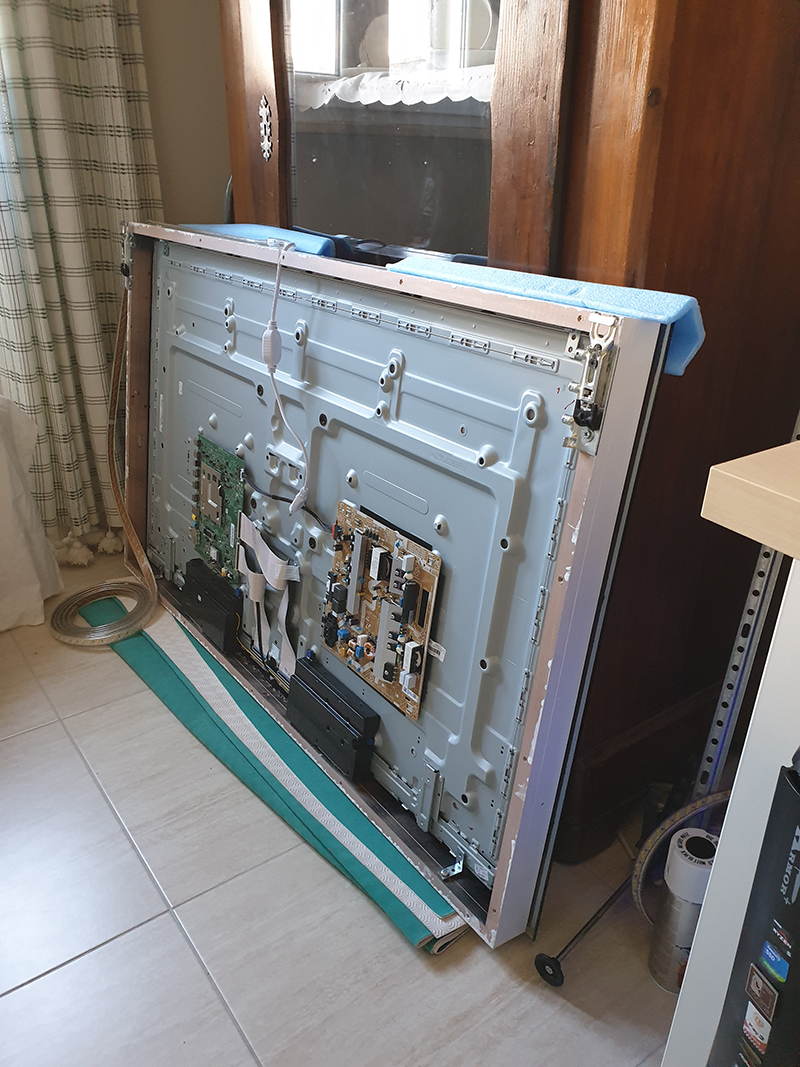
The glass has been glued to the frame by using a very special glue called Soudal Fix All High Tack.
Keep it in mind if you want to make a borderless smart mirror as it is very effective.List of parts:
- Raspberry Pi 3 B+
- 55" Samsung LED TV UE55NU7170
- Beech strips
- Pilkington MirroView glass
- 15W SEBSON Mirror Light LED
- Poly Pool pp2522.2 Spaziozero Socket Rack
- BTicino S3610D/F Connector Adaptor for P 30 and Pin 10 Amp with Lightning Protection
- USB microphone Andoer (I made a hole at the bottom in the center of the frame to fit it)
- 2 x GedoTec Cabinet hanger Cabinet suspension invisible Upper cabinet Buoyancy 130 kg Steel zinc plated for Press-in operation (find in the link also the leftside hanger)
- A bunch of very good & handy WAGO 221-413 ELECTRICAL WIRE BLOCK CONNECTOR STRIP
- A generic 4000K LED strip all around the frame to improve room light
List of 3rd-party modules:
- MMM-AssistantMk2
- MMM-DarkSkyForecast
- MMM-Hotword
- MMM-NowPlayingOnSpotify
- MMM-PushBulletNotifications
- MMM-Remote-Control
- MMM-RTSPStream
Some other pics of my mirror:
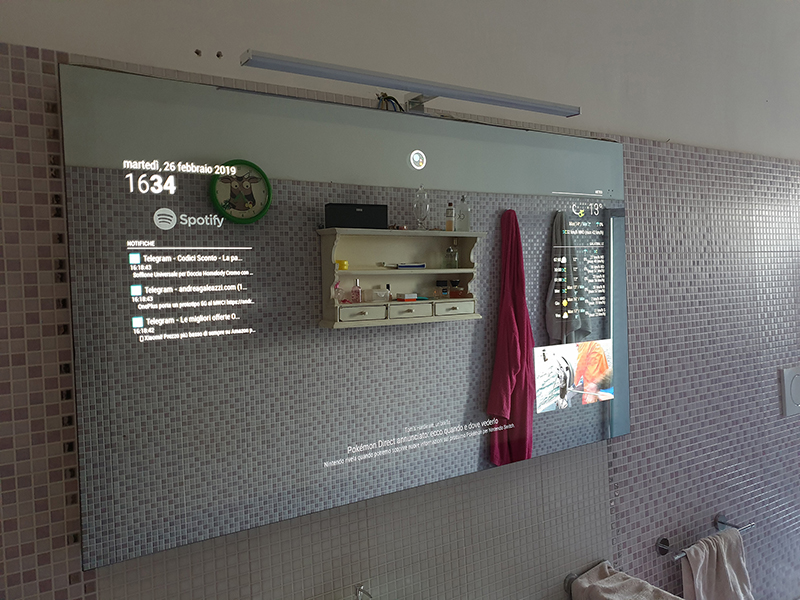
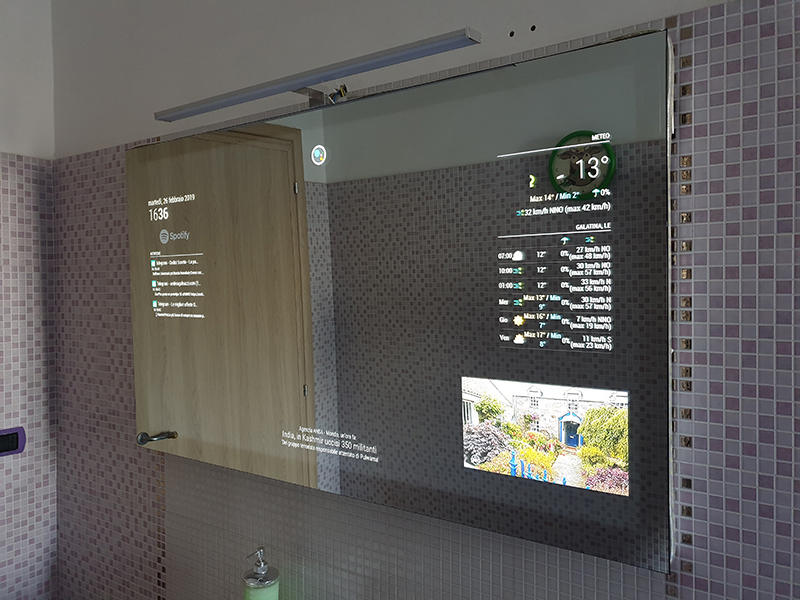
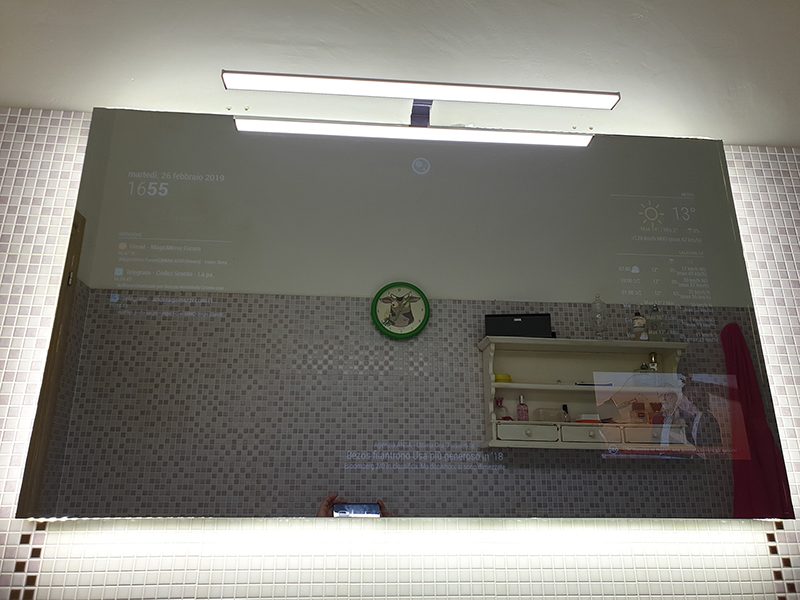
Special thanks go to (again) @spitzlbergerj , @Sean (especially for custom voice command needs and for initial modules setup), @shbatm for struggling at trying to help me fixing bugs and (my bad) mistakes done by myself (:smiling_face_with_open_mouth_cold_sweat:), @evroom and whoever else I forgot to mention (sorry!).
Feel free to ask here, but give me time to answer because I have a quite busy life. :face_with_stuck-out_tongue_winking_eye:
SketchUp file for the frame:
https://www.dropbox.com/s/rr23bbfu0i34ksa/Cr4z33 Mirror.skp?dl=0 -
RE: Two way mirror film
@fermamitiprego imho I literally HATE acrylic films. :persevering_face:
It starts showing scratches at first glance and the surface is so imperfect and full of bubbles …
I don’t know the size of the LCD monitor you are going to use, but consider into using a REAL glass like ie. a Pilkington MirroView!
-
RE: [MMM-Remote-Control](v2-dev) Extensible REST API, Dynamic Menus, and Socket Communications, plus other updates
@shbatm said in [MMM-Remote-Control](v2-dev) Extensible REST API, Dynamic Menus, and Socket Communications, plus other updates:
@cr4z33 try adding them using the customCommands config setting (see the develop branch README.
I set the dev branch module like the following:
		{
			module: 'MMM-Remote-Control',
			disabled: false,
			customCommand: {
					monitorOnCommand: 'echo on 0 | cec-client -s -d 1',
					monitorOffCommand: 'echo standby 0 | cec-client -s -d 1',
					monitorStatusCommand: 'echo pow 0 | cec-client -s -d 1'
					}
		},
None of the commands are working. :confused_face:
I get the ‘Done’ message, but then nothing happens…The syntax is 100% correct and working if used in the terminal.
-
RE: [MMM-RTSPStream] - Video Streaming from Live Feeds & Security Cameras
@website19880927 said in [MMM-RTSPStream] - Video Streaming from Live Feeds & Security Cameras:
localPlayer: ‘omxplayer’
Try using VLC instead.
Replace
localPlayer: ‘omxplayer’
with
localPlayer: ‘vlc’However you will have to use the developer branch of this module.
See here for instructions on how to install it:
https://github.com/shbatm/MMM-RTSPStream/tree/developI didn’t test 4K streaming, but it should be OK up to 1080p.
-
RE: [MMM-Remote-Control](v2-dev) Extensible REST API, Dynamic Menus, and Socket Communications, plus other updates
@shbatm OK thanks I will try that tomorrow.
-
RE: [MMM-Remote-Control](v2-dev) Extensible REST API, Dynamic Menus, and Socket Communications, plus other updates
@cr4z33 said in [MMM-Remote-Control](v2-dev) Extensible REST API, Dynamic Menus, and Socket Communications, plus other updates:
@shbatm I need to replace the monitor ON / OFF commands with these TV ones from the package ‘cec-client’.
Where do I have to look at?
TV ON:
echo on 0 | cec-client -s -d 1TV OFF:
echo standby 0 | cec-client -s -d 1TV Status:
echo pow 0 | cec-client -s -d 1@shbatm so I found out by myself the lines to edit in node_helper.js.
I can succesfully turn off the TV by using the remote module, but for some unknown reason I can’t turn it on… :thinking_face:
Running the command from the terminal works perfectly. -
RE: [Remote-Control] Shutdown, Configure and Update your MagicMirror
@jopyth I would love to give it a try, but I need first to replace the monitor on/off commands with more suitable CEC commands (I use the cec-utils package) as I have a TV instead. :)
Please tell me what do I have to edit to use the following commands?
Turn tv on:
echo on 0 | cec-client -s -d 1Turn tv off:
echo standby 0 | cec-client -s -d 1Tv status:
echo pow 0 | cec-client -s -d 1 -
RE: Mouse arrow doesn't hide after MagicMirror is loaded
@ejay-ibm it helps A LOT thanks! 👍🏼
-
Mouse arrow doesn't hide after MagicMirror is loaded
I am testing my final MM build on the TV when I just noticed that the mouse arrow doesn’t hide.
Any reason why it is showing and how can I automatically hide it after MM loading?
-
RE: what monitor screen to buy? LCD, IPS?
@thijsmathijs honestly I can’t see the point if having a brand label or not until we are talking about smart mirrors… :confused_face:
Usually you just take away the enclosure and therefore there’s no more brand label showing there.
-
RE: [MMM-RTSPStream] - Video Streaming from Live Feeds & Security Cameras
So I am having finally some spare time to explain better how to to switch stream by voice control (think at ie. IP cameras, Internet TV/Radio channels, etc.).
We are going to use OMXplayer here (can’t say how it will be the result with VLC honestly…) and the good voice command module MMM-AssistantMk2.
So set it up properly and once you have it up and running come back and go on reading, otherwise contact @Sean (the author of that module) asking for help. :)Open config.js with a text editor and go to the MMM-AssistantMk2 module section.
Replaceconfig: {with
			config: {
					onActivate: {
							timer: 0,
							command: "RTSP_DEACTIVATE"
							},
					transcriptionHook: {
								"CHANNEL_1": {
										pattern: "TV 1",
										command: "CHANGE_CHANNEL_1"
										},
								"CHANNEL_2": {
										pattern: "TV 2",
										command: "CHANGE_CHANNEL_2"
										},
								"CHANNEL_3": {
										pattern: "TV 3",
										command: "CHANGE_CHANNEL_3"
										},
								"CHANNEL_4": {
										pattern: "TV 4",
										command: "CHANGE_CHANNEL_4"
										},
								"CHANNEL_5": {
										pattern: "Radio 1",
										command: "CHANGE_CHANNEL_5"
										},
								"CHANNEL_6": {
										pattern: "Radio 2",
										command: "CHANGE_CHANNEL_6"
										},
								"CHANNEL_7": {
										pattern: "Radio 3",
										command: "CHANGE_CHANNEL_7"
										}
								},
					command: {
							"CHANGE_CHANNEL_1": {
										notificationExec: {
													notification: "RTSP-PLAY",
													payload: "stream1"
													}
									},
							"CHANGE_CHANNEL_2": {
										notificationExec: {
													notification: "RTSP-PLAY",
													payload: "stream2"
													}
									},
							"CHANGE_CHANNEL_3": {
										notificationExec: {
													notification: "RTSP-PLAY",
													payload: "stream3"
													}
									},
							"CHANGE_CHANNEL_4": {
										notificationExec: {
													notification: "RTSP-PLAY",
													payload: "stream4"
													}
									},
							"CHANGE_CHANNEL_5": {
										notificationExec: {
													notification: "RTSP-PLAY",
													payload: "stream5"
													}
									},
							"CHANGE_CHANNEL_6": {
										notificationExec: {
													notification: "RTSP-PLAY",
													payload: "stream6"
													}
									},
							"CHANGE_CHANNEL_7": {
										notificationExec: {
													notification: "RTSP-PLAY",
													payload: "stream7"
													}
									},
							"RTSP_DEACTIVATE": {
										notificationExec: {
													notification: "RTSP-STOP",
													payload: "all"
													}
									},
					},
Please note that the aforementioned stream names (ie. “TV 1”) used after
pattern:HAVE TO BE the same that we will use below in the MMM-RTSPStream module or it won’t work!
Of course they are all examples so fit them to your needs, but remember to use then the same naming.So let’s go to enter MMM-RTSPStream like the following:
		{
			module: "MMM-RTSPStream",
			position: "bottom_right",
			disabled: false,
			config: {
				autoStart: false, // Streams will start by voice commands only
				rotateStreams: true,
				rotateStreamTimeout: 0,
				shutdownDelay: 0,
				moduleWidth: 420, // Adjust it to your needs
				moduleHeight: 236, // Adjust it to your needs
				localPlayer: 'omxplayer',
				remotePlayer: 'none',
				showSnapWhenPaused: false,
				remoteSnaps: false,
				stream1: {
						name: 'TV 1',
						url: 'IPofstream1',
						protocol: "tcp",
						frameRate: 'undefined',
						width: 420, // Adjust it to your needs
						height: 236 // Adjust it to your needs
		            		},
				stream2: {
						name: 'TV 2',
						url: 'IPofstream2',
						protocol: "tcp",
						frameRate: 'undefined',
						width: 420, // Adjust it to your needs
						height: 236 // Adjust it to your needs
		            		},
				stream3: {
						name: 'TV 3',
						url: 'IPofstream',
						protocol: "tcp",
						frameRate: 'undefined',
						width: 420, // Adjust it to your needs
						height: 236 // Adjust it to your needs
		            		},
				stream4: {
						name: 'TV 4',
						url: 'IPofstream',
						protocol: "tcp",
						frameRate: 'undefined',
						width: 440, // Adjust it to your needs
						height: 247 // Adjust it to your needs
		            		},
				stream5: {
						name: 'Radio 1',
						url: 'IPofstream',
						protocol: "tcp",
						frameRate: 'undefined',
						width: 420, // Adjust it to your needs
						height: 236 // Adjust it to your needs
		            		},
				stream6: {
						name: 'Radio 2',
						url: 'IPofstream6',
						protocol: "tcp",
						frameRate: 'undefined',
						width: 440, // Adjust it to your needs
						height: 247 // Adjust it to your needs
		            		},
				stream7: {
						name: 'Radio 3',
						url: 'IPofstream7',
						protocol: "tcp",
						frameRate: 'undefined',
						width: 420, // Adjust it to your needs
						height: 236 // Adjust it to your needs
		            		}
This should be all.
You can add as many streams as you want (I don’t see the problem if you run them one by one). ;)