A New Chapter for MagicMirror: The Community Takes the Lead
Read the statement by Michael Teeuw here.
  • Raspbian Stretch: Screen is always blanked

    Solved displaying blank black screen raspbian
    2
    1 Votes
    2 Posts
    1k Views
    Mykle1M
    @a-i-ks Raspbian still seems to turn off the display. Personally, I would install xscreensaver and use that to disable the screensaver. In your terminal sudo apt-get install xscreensaver THEN sudo reboot Run xscreensaver. Choose Disable Screensaver. Done.
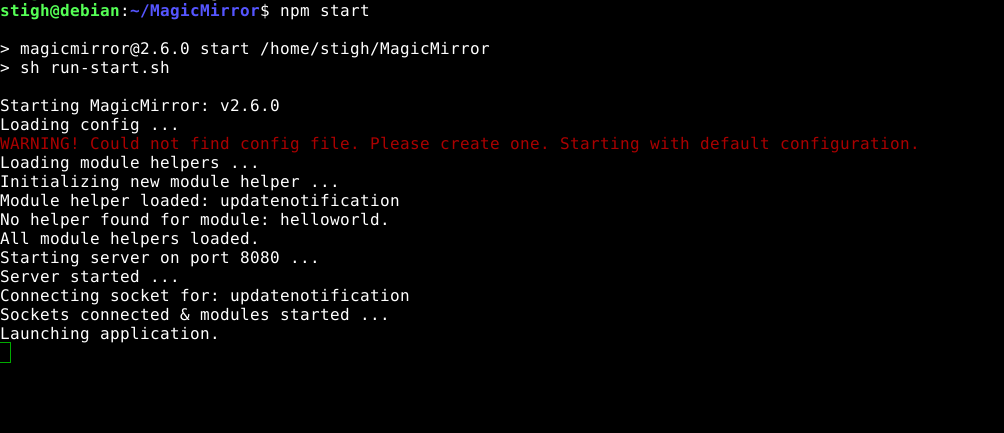
  • Debian 9 as VM, running npm start makes it all "freeze" but...

    Unsolved
    11
    1
    0 Votes
    11 Posts
    4k Views
    ?
    @thestigh I’m not sure this is exact solution. However, Some system (like ATB) has an issue to execute Electron of MM (after 2.x - new GPU acceleration). You can run MM as serveronly mode to use your existing Chrome Browser instead Electron. You can make a script to execute MM serveronly mode and Chrome to display it. Or you can try this to disable GPU. npm start -- --disable-gpu
  • Office365 Calendar load error

    Solved
    4
    0 Votes
    4 Posts
    2k Views
    N
    Glad to help, have a nice day
  • first installation on RPi3 failed

    Solved
    6
    0 Votes
    6 Posts
    2k Views
    L
    looking okay after reboot, thanks
  • MagicMirror doesn't start with 'npm start' electron not found

    2
    0 Votes
    2 Posts
    1k Views
    S
    @Stevo Please provide a little more info about your installation: Are you on a Raspberry Pi or something different How did you install the MM? Have you run npm install? Are you trying to start it from SSH or on the computer directly?
  • All modules auto hide, except currentweather

    Solved
    3
    0 Votes
    3 Posts
    1k Views
    J
    @sean thanks! So it is a feature! I can see what we could do with it, and now that I know where to look, I’ll put it to good use. I’ll dive into the currentweather code and try to find out why it behaves different.
  • ipwhitelist - a lot of issues... can't connect remotely ..

    Unsolved
    4
    0 Votes
    4 Posts
    2k Views
    B
    @plati got it … thank you… but the ipwhitelist Parameter are not very handsome so i did a ipwhitelist: [], and that works… further i will look for the correct Syntax to grant Access for Special addresses outside my LAN…
  • syntax errors

    Unsolved
    11
    0 Votes
    11 Posts
    4k Views
    G
    @egnos As @sdetweil already stated the comma’s are for showing the code that there is more to run after the line. It is no problem to have a extra comma at the end. But if you don’t put a comma the code doesn’t run further and gives you a syntax error. The {} are for making a object in JS, if you don’t close the object with a } you will also get a syntax error.
  • MMM-awesome-alexa snowboy issue

    Unsolved
    9
    0 Votes
    9 Posts
    2k Views
    bheplerB
    Please use the Markdown features of the board when posting code.
  • Error on npm install

    Solved
    14
    0 Votes
    14 Posts
    9k Views
    R
    Seems my reply to this got lost… Got this working! Removed the .nvm directory, removed the symlinks, shutdown pm2 and re-ran the installation script and it all went in fine! sudo rm -rf ~/.nvm sudo rm -f /usr/local/bin/node sudo rm -f /usr/local/bin/nvm pm2 stop mm sudo rm -rf ~/MagicMirror bash -c "$(curl -sL https://raw.githubusercontent.com/MichMich/MagicMirror/master/installers/raspberry.sh)" I got an error on npm not being the right version, so upgraded that: sudo npm i -g npm (Note sudo is working now, which it wasn’t before) And now my node and npm versions look good and pm2 is running MagicMirror again! pi@raspberrypi:/ $ node -v v9.11.2 pi@raspberrypi:/ $ npm -v 6.5.0 Thanks everyone for the help!

  • NPM install is giving Error.

    Unsolved
    18
    0 Votes
    18 Posts
    29k Views
    R
    Aha-got it! sudo rm -rf ~/.nvm sudo rm /usr/local/bin/node sudo rm /usr/local/bin/nvm pm2 stop mm (not sure if I missed this earlier) bash -c "$(curl -sL https://raw.githubusercontent.com/MichMich/MagicMirror/master/installers/raspberry.sh)" This installed fine, but gave me an error of an out-of-date npm version, so I ran: sudo npm i -g npm Then moved all my old modules and config file over to the new install and checked my node/npm versions: pi@raspberrypi:~/MagicMirrorBackup/modules $ node -v v9.11.2 pi@raspberrypi:~/MagicMirrorBackup/modules $ npm -v 6.5.0 So they’re not as up-to-date as my previous ones, but MagicMirror is working fine! Thanks everyone for the input, turns out just a bit of manual removal and persistence sorted me out!
  • MMM-Buttons

    1
    0 Votes
    1 Posts
    585 Views
    X
    Hi is it possible to send multiple notifications at once with a press of the button? I would like to increment a page and hide modules at the same time. Is it possible?
  • MMM-NOAA3 - No icon

    Solved
    11
    1
    0 Votes
    11 Posts
    10k Views
    richland007R
    @cowboysdude I still haven’t been able to resolve my above problem that my NOAA3 module comes up not formatted right. Here is the error that is logging [image: 1546757008860-noaa3error.png] “length” is undefined etc Oh and i am using OpenWeather looking like this [image: 1546757107049-20181118_181527.jpg] Thank you for your help always appreciated and for this fantastic work D
  • MM Starts before network is up

    Unsolved
    2
    0 Votes
    2 Posts
    960 Views
    S
    I am using pm2 and it’s startup scripts to start MM on boot on my pi 3. I tried several different ordering techniques including: [Unit] Description=PM2 process manager Documentation=https://pm2.keymetrics.io/ Wants=network-online.target After=network.target network-online.target .... [Install] WantedBy=multi-user.target network-online.target For some reason nothing works and I keep getting auth errors on my modules and a constant Loading text in my calendar. I resorted to writing this in my MM startup script to wait for a ping: ((count = 100)) while [[ $count -ne 0 ]] ; do ping -c 1 8.8.8.8 rc=$? if [[ $rc -eq 0 ]] ; then ((count = 1)) fi ((count = count - 1)) done if [[ $rc -eq 0 ]] ; then cd ~/MagicMirror DISPLAY=:0 npm start fi Anyone else have any ideas?
  • MM v.2.6.0 doesn't update

    Unsolved
    2
    0 Votes
    2 Posts
    820 Views
    Mykle1M
    @maltavius I believe you’ll find your answer here, mate. Good luck. https://forum.magicmirror.builders/topic/9378/updating-6db61b4-de57daa/2 Score one for the forum search feature! :-)
  • Error in config file

    Unsolved
    5
    0 Votes
    5 Posts
    1k Views
    cowboysdudeC
    Ok so before you add ANY new modules make a backup of your config so you will always have a working copy :)
  • Troubles updating to 2.6.0

    Solved
    5
    0 Votes
    5 Posts
    2k Views
    A
    @bhepler npm install electron@latest
  • Syncing Multiple Calendars

    Unsolved
    4
    0 Votes
    4 Posts
    2k Views
    bheplerB
    @cstein6486 said in Syncing Multiple Calendars: Lastly, I don’t understand the significance of “symbol” for the calendars. The symbol will be added to the beginning of every event for that configured calendar. For example, I have a calendar of movie release dates merged in with my social calendar. I keep the “calendar-check-o” for the social calendar, but I use “video-camera” for the movie release calendar. The end result is that every entry that is a movie release shows a video camera icon and my social calendar shows a calendar with a check icon.
  • Updated to MM v2.6.0 now all I get is only a black Electron screen...

    Solved
    7
    0 Votes
    7 Posts
    2k Views
    S
    or kill all node related ps -ef | grep node | awk '{print $2}' | xargs kill -9
  • Auto Start on Pi Zero

    Unsolved pizero magic mirror autostart
    2
    0 Votes
    2 Posts
    1k Views
    A
    @aidandon I commented on the other post; not sure if you have solved already. Did you install using my github repo? If so, the problem is that my pm2_MagicMirror.json file is looking for a file called startMagicMirror.sh and not mmstart.sh, so it won’t know to run your mmstart.sh file. Edit: if you have this working now, can you mark the post as solved.