A New Chapter for MagicMirror: The Community Takes the Lead
Read the statement by Michael Teeuw here.
  • No video screen with omxplayer for MMM-Podcast2

    Unsolved
    4
    0 Votes
    4 Posts
    904 Views
    D
    I have a bigger problem on a other place. But i couldn’t found it atm.
  • Microphone/MMM-voice Help

    31
    0 Votes
    31 Posts
    14k Views
    T
    @Mykle1 Yes :)
  • MMM-BackgroundSlideshow

    Solved
    30
    0 Votes
    30 Posts
    11k Views
    H
    @sdetweil thank you very much. I got I working with MMM-ImagesPhotos (took your config + enhanced swap size). My pictures are displayed now :). Is there a chance to auto-rotate to landscape if picture orientation is portrait? Or should I use another module to do this (which one)? Best regards hootzter
  • a new problem with fhem

    Unsolved
    17
    0 Votes
    17 Posts
    6k Views
    kusselinK
    @DerRheingold said in a new problem with fhem: Hi, I got FHEM up and running on my installation. Works as intended. However the configuration depends on your (hardware) setup. Some questions that come to my mind are: Is FHEM is running on the same device? Have you defined the Mirror as an allowed FHEMWEB device? Here’s my config, maybe it helps: Hi, thanks fpr your post. No…fhem is running on another raspi… i try it… thanks

  • A problem about MMM-BMW-DS

    Unsolved
    25
    0 Votes
    25 Posts
    11k Views
    Mykle1M
    @TheGeekfather said in A problem about MMM-BMW-DS: USB sound card same as yours. Uhh, I’m not using a USB sound card. Do you think it could be a dependency that wasn’t installed? I think, rather than trying to troubleshoot this, it would be best that you delete your current installation of Hello Lucy. You didn’t exactly follow the directions. You can save your config entry. Read the arecordHelp.md file inside the docs folder of the repo. The microphone should be working before the installation of Hello Lucy. Then follow the installation instructions in the readMe.md file. if you deviate from the instructions then I won’t be able to help you.
  • MM2.10 & Pi3b - run-start.sh issue? (Exit status 7, errno 7, error code ELIFECYCLE)

    Solved
    12
    0 Votes
    12 Posts
    3k Views
    X
    Yup, this is when I ran into the troubles. Many thanks for the lift, sam. Will close the issue as it is related to a ‘simple’ module install challenge … XR
  • 2.9 to 2.10 update error using lubuntu 18.04

    Solved
    4
    0 Votes
    4 Posts
    959 Views
    S
    @fatrgr in general there is a planned new release every 90 days
  • MagicMirror stopped working after screensaver installed

    Solved
    16
    0 Votes
    16 Posts
    5k Views
    D
    Ok thank you again for helping.
  • No upcoming events

    Solved
    28
    0 Votes
    28 Posts
    16k Views
    B
    @Buncie said in No upcoming events: https://calendar.google.com/calendar/ical/ioniaisd.org_44nlnatni9hl965bmbs894hvko%40group.calendar.google.com/public/basic.ics Thanks. Although the calendar I used was the wrong one. But everything seems to be okay.
  • 24" monitor shows trough glass

    Unsolved
    4
    0 Votes
    4 Posts
    999 Views
    A
    Wow, did not expect reply that quick. Thanks, will defenetly try the recommendations!
  • dont get fullscreen on the rpi

    Unsolved
    2
    0 Votes
    2 Posts
    516 Views
    lavolp3L
    @berne YOur question is difficult to understand. A bit more explanation would have helped. If the whole raspbian desktop is not fullscreen, you might take a look at this: https://forum.magicmirror.builders/topic/601/not-realy-fullscreen/3
  • Cant update from 2.9.0 > 2.10.0 using update script

    Solved
    3
    0 Votes
    3 Posts
    737 Views
    H
    It works whatever you did thanks!
  • Black screen

    Solved
    18
    0 Votes
    18 Posts
    5k Views
    V
    Ok Thanks Everythings works fine now
  • MM electron command not found after update

    Solved
    3
    0 Votes
    3 Posts
    833 Views
    H
    @sdetweil Just booted the MM and it is working again. Do no know why it now runs ok and yesterday not (didn’t do anything new). So I guess this topic is solved.
  • Multiple PIR Sensors

    Unsolved
    2
    0 Votes
    2 Posts
    536 Views
    S
    @KumarTRD hardware wise, sure, just need to use another pin for the signal of the second pi. software wise, I don’t know if u can run the python detector scripts twice… it currently only watches for changes on 1 pin
  • config.js file Calendar part, don't show the 4th ICS and mess up the date format

    Unsolved
    5
    0 Votes
    5 Posts
    1k Views
    S
    @siraero its probably the downlevel ical library in the calendar/vendor folderr
  • Install hangs at "Updating packages"

    Solved installation stall hangs
    3
    0 Votes
    3 Posts
    2k Views
    G
    That worked, thanks!
  • Default Calendar adjustment

    5
    1
    0 Votes
    5 Posts
    3k Views
    S
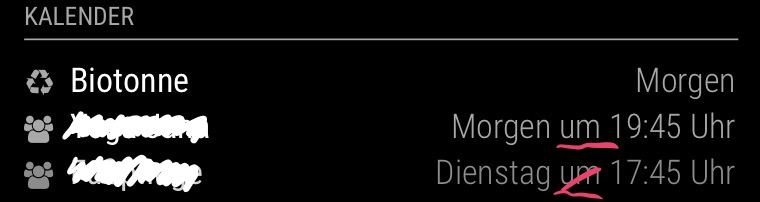
    Two years later… :) After updating to MM 2.10, I noticed again that the “um” or “at” still bothers me and makes the calendar entries unnecessarily wide. Does anybody have another idea or a tip, what exactly should be changed in the calendar.js to remove it?
  • Update troubles. Again.

    Unsolved
    10
    0 Votes
    10 Posts
    2k Views
    evroomE
    @uatuba No need to apologize, but you were asked to supply the exact steps taken. A git pull followed by npm install in the MM homedir will most likely solve your electron error message. If not, the upgrade script from Sam will solve it or at least will provide with some info to check for.
  • How do I now Rotate display ?

    Solved
    10
    0 Votes
    10 Posts
    9k Views
    T
    Just tried this. It seems the fkms + display_rotate no longer works. There are some comments about in the rpi forums too, like this one: https://www.raspberrypi.org/forums/viewtopic.php?t=246146 Using the kms driver plus the edits to the autostart file worked for me. Is there a way to get an official update to the documentation?